Pure Data: reading the source tree behind a real-time music system
Pure Data - a free real-time computer music system
At a glance
- What is it?
- Pd is a free real-time computer music system whose C source tree vendors its own audio, MIDI and Windows I/O layers and builds through autotools. The files a reader is pointed at explain how to obtain a binary and stop there, so the tree layout carries most of the engineering evidence.
- Who is it for?
- Pd suits audio engineers, educators and researchers who want a free real-time system and will compile from source when a package manager offers nothing. It is a poor fit for teams that need a documented data flow, a pinned dependency list or a stated publication channel, since none of those exist in the tree.
- Can I use it commercially?
- Check first. The repository uses a licence we do not classify automatically, so read its LICENSE file before any commercial use.
- Is it still maintained?
- Yes. The repository last received commits 6 days ago.
- What is it written in?
- Mainly C, according to GitHub's language statistics.
Answers come from the project's GitHub data, last synced on November 7, 2026, and from our analysis. They are not legal advice.
Star history
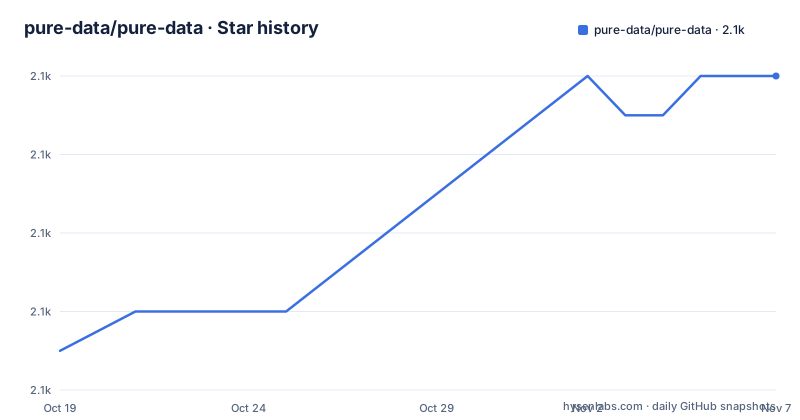
- pure-data/pure-data2,120 ★ · +7
| Repository | 2026-10-19 | 2026-11-07 |
|---|---|---|
| pure-data/pure-data | 2.1k | 2.1k |
7 Stars in the last 19 days, measured from the daily GitHub snapshot. Compare with other projects
Editorial analysis
Pd's source is C, and the root listing is the real documentation
Pure Data introduces itself in a single line: a free real-time computer music system, written in C. Everything a reader needs beyond that sentence is split across two kinds of file, and the repository root shows the split immediately. Scaffolding sits at the top level: configure.ac, Makefile.am, the m4 macro directory, autogen.sh and pd.pc.in, plus INSTALL.txt, INSTALL.htm, README.txt and README.translators.md. Platform and library layers live in directories: mac, linux and msw name the three operating systems Pd ships for, while src, tcl, gtk, libpd, doc, man, md, font, po and extra name everything else. No directory carries a description, so the listing proves what exists and not what each part does. That gap shapes any evaluation: the object model Pd is used for is documented in the manual, not in the repository files a newcomer opens first.
Audio, MIDI and Windows I/O are vendored rather than delegated
Three root directories decide how Pd talks to hardware: portaudio, portmidi and asio. Nothing in the files listed here says where those sources came from, what revision they track, or which build flags enable them, so a reviewer cannot tell from the root alone whether a system without PortAudio development packages builds at all. The naming carries a hint about platform reach. PortAudio and PortMidi are cross-platform by name, and asio has no platform prefix, although it sits next to msw and portmidi rather than inside any operating system directory. Vendoring has a practical upside: a fixed copy of each backend removes one class of version drift between a Pd build and the audio stack underneath it. The cost is that patch management moves into the repository, and no file here gives a procedure for updating a vendored backend.
Three operating systems, three different ways to get Pd
Binaries for Linux, macOS and Microsoft Windows come from one of two addresses:
http://msp.ucsd.edu/software.htmlor from the community site at https://puredata.info. On Linux or FreeBSD, package names exist for the two large distributions:
apt-get install puredata
dnf install puredata
The README hedges that availability, saying that in some installations you can install Pd this way and otherwise you compile from source as INSTALL.txt describes. macOS gets a tar.gz archive that a double click extracts into a runnable Mac app you can drag into Applications. Windows gets a self-extracting executable or a zip. Whichever route you take, the manual comes with the archive: an unpacked copy keeps it locally in the file doc/1.manual/index.htm, matching the doc directory at the root. One asymmetry stands out. Linux has named packages, while macOS and Windows rely on the archive you fetch yourself, so a repeatable automated install exists on only one of the three platforms.
Autotools inputs and a Travis file beside a GitHub directory
The build system is plain GNU Autotools. configure.ac holds the configure script source, the m4 directory holds the macros such a setup needs, autogen.sh regenerates the script, and Makefile.am drives the recursion. The file pd.pc.in follows the pkg-config template convention, so a successful install can expose package metadata that other build systems query, which matters when Pd is a dependency rather than the thing being run. Continuous integration is less clear. The root carries a .travis.yml file, and it also carries a .github directory, but the listing shows no workflow files inside that directory, so which service currently runs the build cannot be confirmed from what is visible here. Nobody reading the tree can tell you whether a change is compiled on all three platforms or on one.
Extensions arrive through a menu command, not a manifest
The dependency story changes once you leave the core. Extensions for video and 3D graphics exist, and the README calls the Find externals command in Pd's Help menu the easiest way to get them. That is a runtime lookup rather than a file you can inspect, pin or diff: the extension set lives wherever that command points, and no directory in the root listing corresponds to it. Reproducing a colleague's patch on another machine therefore means matching extension versions by hand, and nothing here documents a lock file, a version constraint or an offline install path for them. For news about new Pd builds, the project points at a mailing list at https://lists.puredata.info/listinfo, where you can browse or subscribe.
libpd sits at the root with no mention in any file pointer
The libpd directory is the one entry in the listing that would change how Pd is embedded rather than how it is used, and no file named in the README refers to it. Not INSTALL.txt as the README names it, and not the manual at doc/1.manual/index.htm. A reader who wants to drive Pd from a host program's C code has a directory to look at and no in-repository instruction for compiling it, linking it or calling it. The same silence covers the patch execution model itself: nothing in the pointer set explains scheduling, timing or the object set, so claims about Pd's runtime behaviour have to be sourced from the manual rather than from the code you just cloned. Nothing here contradicts the system being worked on, but it does mean the repository is not self-describing.
The copyright line ends in 2024 while commits run into 2026
Ownership and terms are specific enough to check. Except where noted otherwise, files in the distribution read Copyright (c) 1997-2024 Miller Puckette and others, with usage, redistribution and a disclaimer of warranties spelled out in LICENSE.txt. That header still reads 1997-2024 even though the last push landed on 2026-10-06, and the repository carries no GitHub releases, which leaves the mailing list and the two download sites as the only publication channels any file names. Tcl/Tk, expr and some other files are copyrighted separately, so a redistribution has to account for components Pd does not own. Support credits name Intel, Keith McMillen Instruments, ZKM, IEM and UCSD, and the contributor acknowledgement runs past thirty names, which says more about sustained contribution than about how changes reach users. Read the terms file before shipping anything built from this tree; the year range in the header is the only ownership signal a reader sees without opening it.
Editorial conclusion
Pd suits audio engineers, educators and researchers who want a free real-time system and will compile from source when a package manager offers nothing. It is a poor fit for teams that need a documented data flow, a pinned dependency list or a stated publication channel, since none of those exist in the tree. Before adopting, build once from the source archive, confirm the three vendored port subdirectories compile on your platform, and settle the redistribution terms in the file the README points you to.
Frequently asked questions
How do I install Pure Data on Linux?
Where the distribution ships a package, install it with apt-get install puredata or dnf install puredata. On installations without that package, download the source and compile it following INSTALL.txt.
Does Pure Data offer prebuilt binaries for macOS and Windows?
Yes. macOS binaries arrive as a tar.gz archive that extracts into a Mac app, and Windows binaries come as a self-extracting executable or a zip file, both fetched from http://msp.ucsd.edu/software.html or https://puredata.info.
How do I add video and 3D graphics extensions to Pd?
Use the Find externals command in Pd's Help menu, which the README names as the easiest route to extensions such as video and 3D graphics. No manifest or version file for those extensions is described in the repository.
Where can I find the Pure Data manual offline?
An unpacked Pd distribution keeps the manual locally in the file doc/1.manual/index.htm. Online, the README points to the Pd Manual hosted at msp.ucsd.edu.
What licence applies to Pure Data files?
Except where noted otherwise, files carry Copyright (c) 1997-2024 Miller Puckette and others, with usage and redistribution terms in LICENSE.txt. Tcl/Tk, expr and some other files are copyrighted separately.
Official sources
Add this badge to your README
If you maintain this project, the badge below links readers to this analysis and shows its maintenance status from the daily GitHub snapshot. Paste the markdown into your README; add ?metric=license or ?metric=stars to the image URL for a different field.

[](https://hysenlabs.com/projects/pure-data-pure-data)Star history chart for your README
[](https://hysenlabs.com/projects/pure-data-pure-data)Was this useful?