autoflake: rewriting Python files that pyflakes calls unused
Removes unused imports and unused variables as reported by pyflakes
At a glance
- What is it?
- autoflake takes the unused import and unused variable reports from pyflakes and applies them to your source files, with a conservative default that only touches standard library imports. It is a small, single file tool, and its safety depends as much on the flags you pass as on the tool itself.
- Who is it for?
- Adopt autoflake as a pre-commit step for a codebase where dead imports accumulate, and run it with the default settings first, because the standard library only default is the option that keeps it safe on projects with import side effects. Do not adopt it on a codebase that relies on star imports, on `__all__` heavy modules, or on side effect imports without a `# noqa` marker, since those are the cases the documentation warns about.
- Can I use it commercially?
- Yes. MIT is a permissive licence: you can use, modify and sell software built on it, as long as you keep its copyright and licence notices.
- Is it still maintained?
- Yes. The repository last received commits 3 days ago.
- What is it written in?
- Mainly Python, according to GitHub's language statistics.
Answers come from the project's GitHub data, last synced on November 7, 2026, and from our analysis. They are not legal advice.
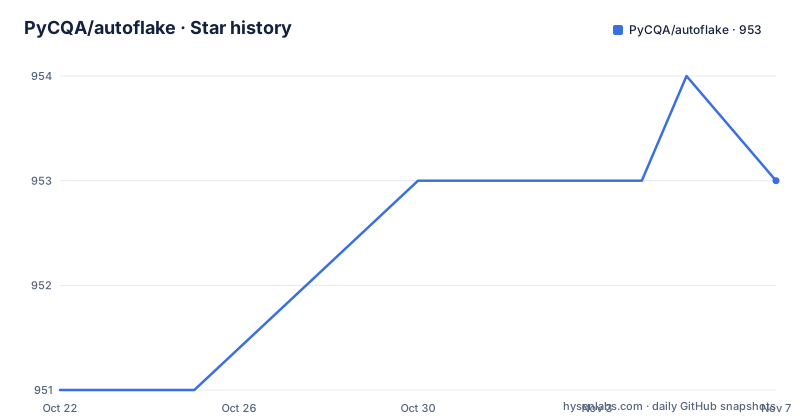
Star history
- PyCQA/autoflake953 ★ · +2
| Repository | 2026-10-22 | 2026-11-07 |
|---|---|---|
| PyCQA/autoflake | 951 | 953 |
2 Stars in the last 16 days, measured from the daily GitHub snapshot. Compare with other projects
Editorial analysis
A rewriter built on top of a reporter
autoflake removes unused imports and unused variables from Python code, and it does it by making use of pyflakes. That relationship defines the whole tool.
pyflakes is a reporter. It parses a module, works out which names are never used, and prints a list of complaints. It never edits anything, which is the right default for a linter but leaves the actual work of deleting the lines to a human. autoflake is the editor that pyflakes does not want to be. It takes the same analysis and rewrites the file.
The project description says it removes unused imports and unused variables as reported by pyflakes, and the word as reported is the important qualifier. autoflake does not have its own import analysis, so it inherits pyflakes' understanding of what counts as unused, including its blind spots. The pyproject.toml pins the dependency at pyflakes 3.0.0 or later, and there is no separate resolver to reason about.
Who it is for is a Python developer who is tired of deleting imports by hand after a refactor, or a team that wants dead imports removed automatically on every commit. It is a maintenance tool, not a correctness tool. It will not find a bug, and the fact that it can rewrite a file on a schedule is exactly why its defaults are conservative.
Why only standard library imports are removed by default
The default behaviour is the single most consequential design decision in this tool, and the documentation explains it in one sentence: other modules may have side effects that make them unsafe to remove automatically.
That is the whole reason. An import statement is not always just a name binding. Importing a module can register a plugin, populate a registry, configure logging, or run code that a framework depends on. pyflakes sees a name that is never referenced and calls it unused. autoflake, by default, refuses to act on that judgement for anything outside the standard library, where side effects are rare and well understood.
The same reasoning extends to the second default. Removal of unused variables is disabled by default, and the `--remove-rhs-for-unused-variables` option is labelled unsafe in the options list, because removing the right hand side of an assignment can remove a call whose result is never bound but whose execution matters.
When you want the aggressive behaviour, there are two routes. The `--imports` option takes a comma-separated list of additional module or package names that may be removed, and the configuration examples in the documentation use django, requests and urllib3. The `--remove-all-unused-imports` option removes all unused imports, standard library or not. Both move the responsibility for side effects onto you.
Installing and running it for the first time
The install command is short.
pip install --upgrade autoflakeThe package declares a console script named autoflake, and the project is built with hatchling from a single module, autoflake.py, with the version read out of that file. It requires Python 3.10 or later.
A first run should be a diff, not an edit. The options list gives you `--check`, which returns an error code if changes are needed, and `--check-diff`, which does that and also displays the file diffs. The documented example in the README runs the tool in place on a file with variable removal switched on:
autoflake --in-place --remove-unused-variables example.pyFor a first look at a real project, the safer command is the diff one, over a single file, so you can see exactly what it would delete before it touches anything. The tool also has a `--stdout` mode, which prints the changed text rather than editing, and a `--quiet` flag that suppresses output when there are no issues.
Two flags matter for large trees. `-r` drills down directories recursively, and `-j n` sets the number of parallel jobs, matching the CPU count when the value is 0. The `--exclude` option takes comma-separated globs to skip file and directory names, which is how you keep it out of virtualenvs, migrations and vendored trees.
The pre-commit hook and the args that matter
The repository ships a `.pre-commit-hooks.yaml` at the top level, and the documentation shows the hook definition to copy into your own `.pre-commit-config.yaml`.
-   repo: https://github.com/PyCQA/autoflake
    rev: v2.4.0
    hooks:
    -   id: autoflake
That is the minimal form, and it works because the hook definition carries sensible defaults. If you customise the arguments, the documentation warns to include `--in-place` in the list.
-   repo: https://github.com/PyCQA/autoflake
    rev: v2.4.0
    hooks:
    -   id: autoflake
        args: [--remove-all-unused-imports, --in-place]
The reason is mechanical. Without `--in-place`, autoflake prints diffs and does not write the file, so the hook would report a change and leave the working tree untouched, which turns every commit into a no-op with a confusing message. This is the single most common way to misconfigure the hook.
The `rev` value in the example pins the hook to a tagged release rather than to the default branch, which is the right pattern for a pre-commit configuration because it makes the behaviour of the hook reproducible across every machine and every clone of the repository.
Configuration in pyproject.toml or setup.cfg
autoflake can be configured through a file, and the documentation gives two formats that cover most Python projects. The first is a `pyproject.toml` section.
[tool.autoflake]
check = true
imports = ["django", "requests", "urllib3"]
The second is a `setup.cfg` section for projects that have not moved to the newer file.
[autoflake]
check=true
imports=django,requests,urllib3
The mapping between the two is direct, and the documentation spells out the rule: the name of each configuration parameter matches the flag, with the leading dashes removed, so the parameter `expand-star-imports` corresponds to the flag `--expand-star-imports`.
Configuration is discovered based on the location of the file being processed, and there is an override for that. The `--config` option sets the configuration file explicitly instead of auto determining it based on file location, which is what you need in a monorepo where several projects have different rules, or in a CI job where the working directory is not the project root.
The `check = true` setting in the example is worth understanding. It is the configuration equivalent of the `--check` flag, and it makes the tool report rather than rewrite. In a pre-commit setup that would be the wrong choice, since you want the rewrite to happen. In a CI check it is exactly right.
Where autoflake gets it wrong, and how the project admits it
There are five documented failure modes, and each has a specific escape hatch.
The first is side effect imports. The documentation gives the Flask example, where a module is imported for the side effect of registering routes rather than for the names it binds.
from .endpoints import role, token, user, utilsUnder `--remove-all-unused-imports` those imports would go. The fix is a `# noqa` comment at the end of the line, which instructs autoflake to leave that line as is.
from .endpoints import role, token, user, utils # noqaThe second escape hatch is a file level skip, placed as a comment at the top of the file.
# autoflake: skip_file
import os
The third is star imports. The `--expand-star-imports` option expands wildcard star imports with undefined names, but the documentation is precise about its conditions: it only triggers if there is only one star import in the file, and it is skipped if there are any uses of `__all__` or `del` in the file. A file with two star imports, or a module that defines `__all__`, gets no expansion at all.
The fourth is `__init__.py`. The `--ignore-init-module-imports` option excludes those files, and the reason to reach for it is that package initialisers often import submodules precisely to make them importable.
The fifth is the fuzz test, which is the best evidence in the repository about how the tool behaves. It runs pyflakes on a file before and after the transformation and fails if the pyflakes results get worse. The comparison is done in memory and the actual files are left untouched, which means you can point it at a large body of real code and get a pass or fail answer on whether autoflake made the code worse.
A single file tool with a modern Python floor
The repository layout says something about the project's shape. The top level holds autoflake.py, a py.typed marker, the two test scripts, pyproject.toml, a uv.lock file, an AUTHORS.rst, a .pre-commit-hooks.yaml and a .pre-commit-config.yaml. There is no package directory, because there is only one module, and the hatch build configuration includes exactly that file in the wheel.
The `py.typed` marker means the tool ships type information, which matters if you wrap it in your own tooling.
On the Python floor, pyproject.toml requires Python 3.10 or later. That is a genuine constraint for anyone still on 3.8 or 3.9, and it is worth checking before you add the tool to an older environment. The one conditional dependency is tomli, pulled in only on Python versions below 3.11, so the project reads the newer TOML format on every supported version.
The licence field on the repository says MIT, and the project metadata records the same licence along with a licence file entry. The tool is a build time utility that rewrites source files you own, and it is distributed as a normal pip package with a homepage pointing at its own project page on PyPI.
On upkeep, three releases appear in the recent history: v2.3.2 on 2026-02-18, v2.3.3 on 2026-02-20 and v2.4.0 on 2026-08-22. The repository is not archived and the last push was on 2026-10-12. The dependency floor of pyflakes 3.0.0 is the part to watch on upgrade, since a new pyflakes release can change what gets reported as unused, and with it what autoflake deletes.
Editorial conclusion
Adopt autoflake as a pre-commit step for a codebase where dead imports accumulate, and run it with the default settings first, because the standard library only default is the option that keeps it safe on projects with import side effects. Do not adopt it on a codebase that relies on star imports, on `__all__` heavy modules, or on side effect imports without a `# noqa` marker, since those are the cases the documentation warns about. Before wiring it into a hook, run `autoflake --check-diff` over the tree and read every hunk, then add the configuration to pyproject.toml rather than to the hook arguments.
Frequently asked questions
How do I install autoflake and remove unused imports from a file?
Install it with `pip install --upgrade autoflake`, then run `autoflake --check-diff` to preview the changes or `autoflake --in-place` to apply them. By default only unused standard library imports and useless pass statements are removed.
Why is autoflake not removing my unused third party imports?
Because only unused standard library imports are removed by default, since other modules may have side effects that make them unsafe to remove automatically. Use the `--imports` option to name specific packages, or `--remove-all-unused-imports` to remove all of them.
How do I stop autoflake from deleting an import that is only there for its side effects?
Add a `# noqa` comment at the end of that line, and autoflake will leave it as is. To skip an entire file, add a `# autoflake: skip_file` comment at the top of it.
What should I put in .pre-commit-config.yaml for autoflake?
Use the hook definition from the documentation with a `rev` pinned to a release such as v2.4.0. If you add arguments, the documentation says to include `--in-place`, otherwise the hook prints diffs and leaves the files unchanged.
Can autoflake be configured in pyproject.toml?
Yes. A `[tool.autoflake]` section holds the settings, and the same parameters work in a `[autoflake]` section of setup.cfg. The parameter names match the command line flags without the leading dashes, and `--config` overrides the automatic location based discovery.
Official sources
Add this badge to your README
If you maintain this project, the badge below links readers to this analysis and shows its maintenance status from the daily GitHub snapshot. Paste the markdown into your README; add ?metric=license or ?metric=stars to the image URL for a different field.

[](https://hysenlabs.com/projects/pycqa-autoflake)Star history chart for your README
[](https://hysenlabs.com/projects/pycqa-autoflake)Was this useful?