Pyflakes for Fast Python Error Checks Without Style Rules
A simple program which checks Python source files for errors
At a glance
- What is it?
- Pyflakes is a passive Python checker that parses source files instead of importing them. It fits developers who want fast, low-noise diagnostics without committing to style enforcement.
- Who is it for?
- Adopt Pyflakes when a lightweight, single-file error checker is the goal, and choose Flake8 if style rules or per-project configuration are required. Before adoption, verify the interpreter requirement because the README says Python 3.9 or later while setup.py currently sets `python_requires='>=3.11'`.
- Can I use it commercially?
- Yes. MIT is a permissive licence: you can use, modify and sell software built on it, as long as you keep its copyright and licence notices.
- Is it still maintained?
- Yes. The repository last received commits 10 days ago.
- What is it written in?
- Mainly Python, according to GitHub's language statistics.
Answers come from the project's GitHub data, last synced on November 6, 2026, and from our analysis. They are not legal advice.
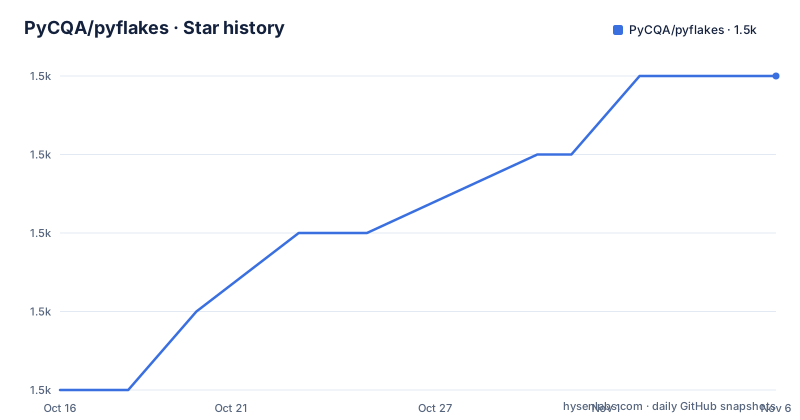
Star history
- PyCQA/pyflakes1,465 ★ · +4
| Repository | 2026-10-16 | 2026-11-06 |
|---|---|---|
| PyCQA/pyflakes | 1.5k | 1.5k |
4 Stars in the last 21 days, measured from the daily GitHub snapshot. Compare with other projects
Editorial analysis
Why Pyflakes Targets False-Positive-Free Python Checks
Pyflakes addresses a narrow part of static analysis: finding errors in Python source without importing the program. Its intended audience includes developers who want a quick check for suspicious or incorrect constructs, but who do not want a linter to enforce formatting conventions. The README describes the tool as checking Python source files for errors and states that it never complains about style.
That boundary matters because style rules and correctness rules have different consequences. A style report can require formatting changes without identifying a program defect. Pyflakes instead focuses on diagnostics derived from Python syntax trees. This makes it more suitable for editors, commit checks, or lightweight command-line use when the desired signal is limited to correctness-related findings.
The project also sets an explicit expectation about false positives: its design principles say Pyflakes tries "very, very hard" to avoid emitting them. That is a design commitment, not a guarantee. The repository still exposes individual-file analysis, so checks that require a broader view of a codebase can remain outside its scope.
How Pyflakes Parses Files Without Executing Them
Pyflakes analyzes a source file by parsing it rather than importing it. It examines the resulting syntax tree for each file. This avoids executing module-level code and makes it suitable for checking modules with import-time side effects.
The distinction between parsing and importing is the central technical choice. An importer may execute application code, initialize resources, connect to services, or trigger other actions defined by a module. Pyflakes does not need that process for its documented checks. It reads source and works from syntax, which also explains the README's claim that it is faster than Pylint.
That speed claim has a specific boundary. The README attributes it largely to examining the syntax tree of each file individually. The same design restricts checks that need program-wide facts. Pyflakes is therefore a focused checker, not a substitute for every form of static analysis. Its best-fit workflows value fast local feedback and limited scope more than broad semantic analysis.
Installing Pyflakes and Running a First Directory Check
The README identifies PyPI as the installation source and gives `pip` as the installation command. The documentation says the package supports all active Python versions from 3.9 onward, but the current `setup.py` declares `python_requires='>=3.11'`. Confirm that metadata against the interpreter used by the target environment before installation.
Install or upgrade Pyflakes into the active environment with:
pip install --upgrade pyflakesThe README also recommends selecting the Python interpreter explicitly when compatibility matters:
python3.15 -m pip install pyflakesThat example demonstrates the documented interpreter-specific installation pattern rather than requiring Python 3.15. The matching invocation checks the current directory tree with Pyflakes:
python3.15 -m pyflakes .The repository's `setup.py` defines a `pyflakes` console entry point through `pyflakes.api:main`. A normal package installation therefore also exposes the `pyflakes` command. The README does not provide sample diagnostic output, so the exact findings depend on the Python files and the installed version.
What the setup.py Entry Point Reveals About Distribution
The packaging metadata defines Pyflakes as a console application. Under setuptools, `setup.py` registers `pyflakes = pyflakes.api:main` as a console script. It also packages `pyflakes`, `pyflakes.scripts`, and `pyflakes.test`, and includes a fallback script path for environments without setuptools.
This entry-point arrangement gives Pyflakes two documented paths: the installed `pyflakes` command and execution through `python -m pyflakes`. The README specifically presents the module form when the check must run under a particular Python version. That is useful in projects with multiple interpreters, since the command and the analyzed environment can be aligned more clearly.
The metadata states that the package is intended for Python 3 only and lists both CPython and PyPy implementations. It also identifies Pyflakes as a mature development-status package. Those are packaging declarations rather than evidence that a particular check will satisfy a codebase's standards.
There is a packaging fallback that selects `bin/pyflakes` when setuptools is unavailable. In modern installation paths, however, the documented `pip` command is the relevant entry point. The README does not describe manual installation from the repository or a standalone binary distribution.
Pyflakes and Flake8 Choose Different Check Boundaries
Flake8 is the most direct alternative identified by the README. It combines Pyflakes with style checks against PEP 8 and adds per-project configuration. This makes it the closer fit when a team wants both error-oriented analysis and explicit formatting or style policy.
Pyflakes itself does not complain about style. That restriction makes its output easier to interpret when the objective is to identify questionable code rather than settle an entire formatting standard. Flake8 broadens the scope, but the README frames that broader set as optional functionality rather than as a requirement for every workflow.
Pylint is another comparison point in the documentation. The README calls it faster than Pylint, largely because Pyflakes inspects each file's syntax tree individually. This is not a claim that Pyflakes detects every problem Pylint can detect. In fact, the same file-by-file design means Pyflakes is more limited in the kinds of things it can check.
The practical choice is therefore not merely which tool has more checks. A project that rejects style findings may prefer Pyflakes. A project that also wants PEP 8 enforcement and configuration should inspect Flake8. A project requiring deeper analysis may need to accept broader tooling than either of these choices provides.
Limitations Include File Scope, Configuration, and Python Version Ambiguity
The clearest limitation is analytical scope. Pyflakes examines files individually, so checks that depend on relationships across the entire codebase are less appropriate. The README directly acknowledges that this approach is more limited than broader tools.
The second limitation is policy coverage. Pyflakes deliberately excludes style checks. A team that expects line-length decisions, formatting normalization, or PEP 8 enforcement from one command will not receive that behavior from this package. Flake8 is the documented route for adding those checks, along with per-project configuration.
A third issue is documentation and metadata disagreement. The README states support for Python 3.9+, while `setup.py` requires Python 3.11 or later. The README and setup.py give different minimum-version statements. Developers should treat the package metadata as an installation boundary and verify their target interpreter before relying on the README's broader statement.
Pyflakes is also the wrong tool when importing modules is the intended behavior. Its source parsing avoids module side effects, which is a benefit for analysis, but means it is not an execution monitor. Finally, no GitHub releases are listed. The repository contains `NEWS.rst` for changelog information, but the release history available here does not establish a regular publishing schedule.
Pyflakes Maintenance, Licensing, and Upgrade Work
The repository is not archived, and its last push was on 2026-10-14. Those facts establish recent repository activity, but they do not by themselves describe the release cadence because the repository has no GitHub releases. `NEWS.rst` is the documented place to inspect changes, and contributors are asked to include tests and pass Flake8.
The package is distributed under the MIT license. The repository declares that identifier in `setup.py`, and the project metadata labels the package as OSI Approved under the MIT License. This permits use and modification under the license's conditions, but deployment teams still need to review the actual `LICENSE` file and retain required notices. This is a packaging and compliance consideration, not a claim that the license removes all legal responsibility.
Upgrades can affect both interpreter compatibility and diagnostic behavior because Pyflakes parses source and checks syntax-tree information. The README provides the PyPI installation command and points to `NEWS.rst`, but it does not document a formal upgrade procedure or a compatibility policy for individual releases. Pinning and reviewing `NEWS.rst` are therefore more defensible operational practices than assuming that every upgrade is behavior-neutral.
Editorial conclusion
Adopt Pyflakes when a lightweight, single-file error checker is the goal, and choose Flake8 if style rules or per-project configuration are required. Before adoption, verify the interpreter requirement because the README says Python 3.9 or later while setup.py currently sets `python_requires='>=3.11'`. Also check whether isolated file analysis meets the checks expected by your project.
Frequently asked questions
How do I install Pyflakes for a specific Python version?
The README gives the pattern `python#.# -m pip install pyflakes` and gives `python3.15 -m pip install pyflakes` as an example. It also documents `python#.# -m pyflakes .` for running a check with that interpreter.
Does Pyflakes check Python code by importing it?
No. The README states that Pyflakes works by parsing the source file instead of importing it. This avoids import-time side effects and allows it to inspect modules without executing their code.
What is the difference between Pyflakes and Flake8?
Pyflakes checks Python source for errors without enforcing style. The README says Flake8 combines Pyflakes with PEP 8 style checks and adds per-project configuration ability.
Can Pyflakes find every kind of problem in a Python project?
No. The README says Pyflakes examines each file's syntax tree individually, which makes it faster but more limited in the types of checks it can perform.
Official sources
Add this badge to your README
If you maintain this project, the badge below links readers to this analysis and shows its maintenance status from the daily GitHub snapshot. Paste the markdown into your README; add ?metric=license or ?metric=stars to the image URL for a different field.

[](https://hysenlabs.com/projects/pycqa-pyflakes)Star history chart for your README
[](https://hysenlabs.com/projects/pycqa-pyflakes)Was this useful?