What PyInstaller Actually Puts In Your Executable, And Where It Stops Working
Freeze (package) Python programs into stand-alone executables
At a glance
- What is it?
- PyInstaller reads one script, works out what it needs, and copies everything, including the running interpreter, into a folder or one executable. That single design choice explains its platform limits, its Linux tool list, and the places it will refuse to help you.
- Who is it for?
- PyInstaller fits anyone shipping a Python app to users who have no interpreter, as long as the build runs on the target OS. Teams that need one host to emit several platforms, or a build pinned to Python 3.10.0, should look elsewhere.
- Can I use it commercially?
- Check first. The repository uses a licence we do not classify automatically, so read its LICENSE file before any commercial use.
- Is it still maintained?
- Yes. The repository last received commits 6 days ago.
- What is it written in?
- Mainly Python, according to GitHub's language statistics.
Answers come from the project's GitHub data, last synced on November 14, 2026, and from our analysis. They are not legal advice.
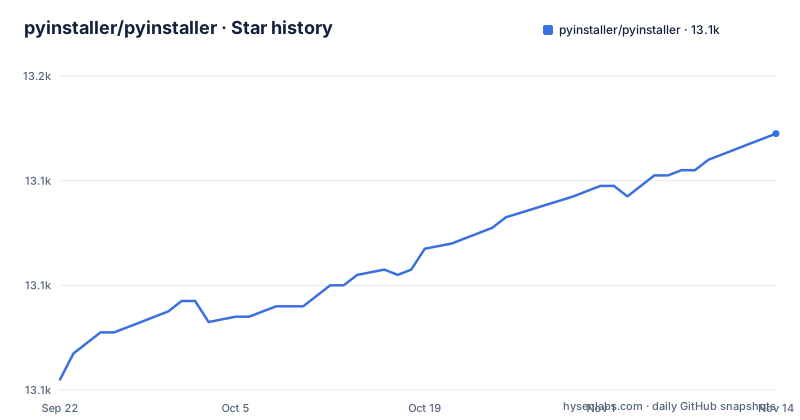
Star history
- pyinstaller/pyinstaller13,149 ★ · +47
| Repository | 2026-09-22 | 2026-11-14 |
|---|---|---|
| pyinstaller/pyinstaller | 13.1k | 13.1k |
47 Stars in the last 53 days, measured from the daily GitHub snapshot. Compare with other projects
Editorial analysis
The package carries whichever interpreter happened to run the build
PyInstaller reads the script you wrote, analyzes it to discover every other module and library needed to execute, then collects copies of all those files along with the active Python interpreter and puts them with your script in a single folder, or optionally in a single executable file. That last detail drives everything else. The Python version that ends up inside the package is the one present on the machine that ran the freeze, and there is no config value that overrides it. Two build machines with different interpreters produce two different packages from the same command, and the person holding the binary may have no way to see which Python it carries. The default branch is develop, and releases v6.22.3, v6.22.2, and v6.22.1 landed on 2026-09-12, 2026-08-17, and 2026-08-15, so pinning a build to a known release is a choice you have to make on purpose. If your pipeline has no control over the Python on the build image, you get whatever that image happens to ship, bundled into the artifact.
Not a cross compiler, so every target OS needs its own build host
PyInstaller is tested against Windows, macOS, and GNU/Linux, and the project's own statement about the limit is direct: it is not a cross compiler. To make a Windows app you run PyInstaller in Windows, and to make a GNU/Linux app you run it in GNU/Linux. That rules out a single Linux runner that emits Windows installers, or a Mac build host producing a Linux tarball. AIX, Solaris, FreeBSD, and OpenBSD count as used successfully, but none of them run in the continuous integration tests, so a failure there carries no signal about whether upstream would consider it a defect. The consequence for a reader is a concrete cost: a release pipeline targeting two platforms needs two build environments, two sets of dependency pins, and two chances to produce differently shaped artifacts. The command itself is a single line, and it only does what the machine you are standing on can do.
pyinstaller /path/to/yourscript.pyPython 3.10.0 and the 3.16 betas are excluded by name
PyInstaller works out of the box with any Python version from 3.8 through 3.15, and the project metadata sets requires-python to >=3.8, <3.16. Two exclusions are named outright instead of being left for you to discover. Python 3.10.0 contains a bug that makes it unsupportable by PyInstaller, so that exact patch release is a dead end even though the rest of the 3.10 series sits inside the supported range. Beta releases of Python 3.16 will not work either, and the 3.15 ceiling means a base image that moves to 3.16 first will break your freeze step before any of your own code is involved. For a reader building inside containers, the consequence is that the exact patch level of the base image turns into a build dependency, and a pinned 3.10.0 image has to be replaced rather than patched.
The Linux checklist is ldd, objdump, objcopy, and which libc you picked
On Linux the requirements are listed per libc and architecture, and the list is short enough to check by hand. GNU libc based distributions are covered on x86_64, aarch64, i686, ppc64le, and s390x. musl libc based distributions are covered for x86_64 and aarch64 only. Alongside that sit three console tools: ldd, which prints the shared libraries required by each program or shared library and lives in the glibc or libc-bin distribution package; objdump, which displays information from object files and lives in binutils; and objcopy, which copies and translates object files and also lives in binutils. A musl build on i686, ppc64le, or s390x falls under the untested, contributed platforms instead. The consequence for a reader is that a scratch container missing binutils fails in a way that looks like a packaging bug rather than a missing package. Raspberry Pi users on armv5 through armv7 are told to add piwheels as an extra index URL and then run pip install pyinstaller as usual.
Contributed platforms stop at the bootloader when the C toolchain is missing
FreeBSD, Solaris, AIX, and every other libc and architecture combination outside the list are contributed platforms rather than tested ones. Before using any of them you need to build the PyInstaller bootloader, and that build happens automatically when you pip install pyinstaller only if a C compiler, either gcc or clang, and zlib's development headers are already installed. Installation and bootloader compilation are the same command, so a stripped container that lacks the headers fails during pip install rather than during your freeze. On AIX the floor is version 6.1 or newer, and statically linked Python libraries are excluded outright. What the tool cannot do is fall back on a prebuilt bootloader for these targets, because none is described. The consequence for a reader is that installing PyInstaller on an unlisted platform is a compiler problem first and a packaging problem second.
pip install pyinstallerThe supported Windows floor is 8, and Store Python needs 4.4 or later
Windows coverage spans 32-bit, 64-bit, and ARM64. PyInstaller should work on Windows 7 or newer, but only Windows 8 and later is officially supported, which means a build aimed at Windows 7 can be produced and still sit outside the maintained set. Separately, Python installed from the Windows Store without a virtual environment requires PyInstaller 4.4 or later, a floor that matters when the interpreter came from the Store and the packaging tool predates it. On Windows, MS Visual C++ DLLs are bundled into the output. macOS has its own floor at 10.15 Catalina or newer, and a universal2 application is only possible when your Python and every dependency are themselves compiled universal2. What the tool cannot do is produce a universal2 package from a single-architecture interpreter, or extend official support down to Windows 7.
pyinstaller-hooks-contrib sets a dependency floor that moves with releases
The dependency list is where the real packaging knowledge sits, and it reads: setuptools >= 42.0.0, altgraph, and packaging >= 22.0, plus pefile >= 2022.5.30 and pywin32-ctypes >= 0.2.1 on Windows, macholib >= 1.8 on macOS, and importlib_metadata >= 4.6 for Python below 3.10. The entry to watch is pyinstaller-hooks-contrib >= 2026.7. The overview notes that the required tricks for making external packages work are already integrated, and the hooks package is where those tricks live, and its floor is a calendar-style version that shifts between PyInstaller releases rather than a stable library version. What the tool cannot do is carry those hooks outside your environment's dependency resolution. The consequence for a reader on a locked, older build image is that upgrading PyInstaller can fail at resolution time, before a single line of your own script is read.
The GPLv2 exception is what lets a commercial app ship
The license text in the project metadata is unusually explicit: GPLv2-or-later with a special exception which allows to use PyInstaller to build and distribute non-free programs, including commercial ones. That clause settles the usual worry about a GPL toolchain sitting in front of a proprietary product, and it is stated in the project's own words rather than inferred. The metadata also carries the classifier for Development Status 6 - Mature and the GNU General Public License v2 classifier. What the tool cannot do is extend that exception to components you did not freeze, so a reader combining PyInstaller output with other GPL-licensed pieces still has to examine each one separately. The repository root carries COPYING.txt next to the bootloader, PyInstaller, doc, and tests directories, so the license text ships with any checkout.
Editorial conclusion
PyInstaller fits anyone shipping a Python app to users who have no interpreter, as long as the build runs on the target OS. Teams that need one host to emit several platforms, or a build pinned to Python 3.10.0, should look elsewhere. Before trusting a release, run the freeze on every OS you ship, confirm ldd, objdump, and objcopy are present on the Linux images, and check that your Windows and macOS targets are on the supported list.
Frequently asked questions
What is PyInstaller used for?
It bundles a Python application and all its dependencies into a single package, so the user can run the packaged app without installing a Python interpreter or any modules. The files go into a single folder, or optionally into a single executable file.
Is there an alternative to PyInstaller?
The project documentation names no alternative. It points instead to its own manual, an official debugging guide at pyinstaller.org, a user contributed wiki on GitHub, GitHub Discussions, and an email based Google Group.
how to use pyinstaller
Run it against your main script: pyinstaller /path/to/yourscript.py. It then collects copies of every file the script needs, including the active Python interpreter, and places them with the script in a single folder or optionally a single executable file.
how to install pyinstaller in windows
PyInstaller is on PyPI, so pip install pyinstaller covers Windows 32-bit, 64-bit, and ARM64. Windows 7 or newer should work but only Windows 8 and later is officially supported, and Python from the Windows Store without a virtual environment requires version 4.4 or later.
What is PyInstaller and what does it do in Linux?
On GNU/Linux it performs the same freeze into a folder or one executable, but it needs ldd, objdump, and objcopy present. GNU libc is covered on x86_64, aarch64, i686, ppc64le, and s390x, while musl libc is covered on x86_64 and aarch64 only.
Official sources
Where this project is recommended
Add this badge to your README
If you maintain this project, the badge below links readers to this analysis and shows its maintenance status from the daily GitHub snapshot. Paste the markdown into your README; add ?metric=license or ?metric=stars to the image URL for a different field.

[](https://hysenlabs.com/projects/pyinstaller-pyinstaller)Star history chart for your README
[](https://hysenlabs.com/projects/pyinstaller-pyinstaller)Was this useful?