main is 3.16.0 alpha 1+dev, the repository has no GitHub releases, and make test hides its stress tests
Source repository of CPython, the reference implementation of the Python programming language and the interpreter most people run when they use Python.
At a glance
- What is it?
- CPython is the repository behind the Python language, and its README is a build document rather than a description of the project. Read as a build document it says three useful things: the branch you clone is a development state and not a release, a debug build cannot coexist with an in-tree build, and the test suite deliberately leaves its disk and memory cases switched off unless you ask for them.
- Who is it for?
- This repository is worth reading by anyone who wants to build, test or contribute to the reference implementation, because the build and test instructions are unusually candid about their own failure modes. It is not the place to get a stable interpreter, since the README on this branch describes 3.16.0 alpha 1+dev and the repository has no GitHub releases, so anything you build from main is a snapshot of someone's in-progress work.
- Can I use it commercially?
- Check first. The repository uses a licence we do not classify automatically, so read its LICENSE file before any commercial use.
- Is it still maintained?
- Yes. The repository received new commits within the last day.
- What is it written in?
- Mainly Python, according to GitHub's language statistics.
Answers come from the project's GitHub data, last synced on November 13, 2026, and from our analysis. They are not legal advice.
Star history
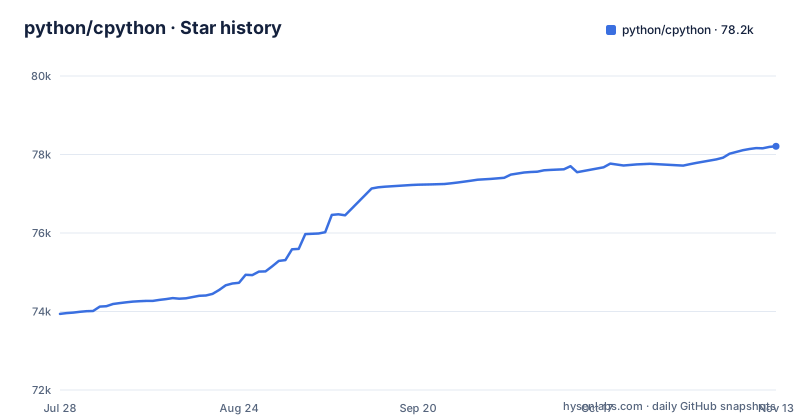
- python/cpython78,209 ★ · +4,271
| Repository | 2026-07-28 | 2026-11-13 |
|---|---|---|
| python/cpython | 73.9k | 78.2k |
4,271 Stars in the last 108 days, measured from the daily GitHub snapshot. Compare with other projects
Editorial analysis
The README calls itself 3.16.0 alpha 0, and the repository publishes no tags
The first line of the README is the version, and on this branch it reads Python version 3.16.0 alpha 1+dev. That is a development state, not a distribution. A repository clone gives you whatever the branch currently holds, and the last push to the default branch was 2026-11-01, so the version string in the README moves as the branch moves.
What makes this worth stating plainly is that the repository has no GitHub releases to check out. If your build needs a specific interpreter to be reproducible, the version has to come from outside this repository, and the README points at python.org for installable kits and for information about using Python.
The consequence for a build pipeline is that the README is a moving document describing a moving branch. Instructions read today describe the state of main today, and the two change independently, so a documented step and the version it applies to are only ever as accurate as the last commit.
A debug build in a subdirectory fails if you also built at the top level
The documented way to get a debug interpreter is to configure from a subdirectory, and the README warns about exactly one thing before you do it:
mkdir debug
cd debug
../configure --with-pydebug
make
make test
The warning is that this will fail if you also built at the top-level directory, and that you should run make clean at the top level first. So the two build modes are mutually exclusive in the working tree, not merely different directories.
The cost of finding that out is a wasted build. You compile the interpreter once in place, discover you want `--with-pydebug`, follow the documented procedure, and the second configure or build step fails because of the first. Recovering means a make clean at the top level, which removes the build you had just finished, and then the whole cycle runs again from the subdirectory.
A working habit follows from it. Pick one mode before the first make, and if you might want a debug build at any point in the session, start in the subdirectory rather than migrating later, because the migration is the part that costs you the build.
make test leaves the disk and memory cases off unless you ask for them
Testing is one command in the top-level directory, and the output needs reading rather than skimming:
make testSkipped tests are expected. Messages about tests skipped because an optional feature cannot be imported can be ignored, and the README says so directly. What means something is wrong is a message about a failed test, a traceback, or a core dump.
The larger caveat is what the default run leaves out. By default, tests are prevented from overusing resources such as disk space and memory, and the suite that exercises them only runs if you ask:
make buildbottestSo a green `make test` on a workstation is a weaker signal than it looks. The disk and memory stress cases are excluded by design, which means the run says nothing about the code paths that allocate aggressively or fill a filesystem. Any team treating a local pass as evidence that a change is safe has to decide separately who runs the buildbottest variant and on what machine.
When something does fail, the README gives the re-run form, which takes a test name list and raises verbosity:
make test TESTOPTS="-v test_os test_gdb"That is the fast path from a red run to a reportable failure, and it is worth having in a runbook before you need it.
A finished build still does not give you the whole standard library
The README is explicit that not all standard library modules are buildable or usable on all platforms, and that a complete installation needs various additional third-party libraries that depend on your build platform and on the configure options you chose. The count and identity of those libraries is not in this document, and the README links out to the Developer's Guide for current per-distribution details.
That matters most for the first build, because a missing dependency does not announce itself as a licensing or packaging problem. The `Lib` and `Modules` directories at the top of the tree are where that surfaces, and there is no single list here telling you which module maps to which system package on your distribution.
The second-order effect is on the test suite. Skipped tests caused by optional features that cannot be imported are the normal case, which is a direct consequence of this platform variance. A contributor on one platform and a reviewer on another are not looking at the same set of runnable tests.
The optimized build needs a recent GCC or Clang and prints nothing while it works
An optimized interpreter is one configure flag, run before make:
./configure --enable-optimizations
make
The README describes the stages in detail, and two details matter more than the rest. First, Profile Guided Optimization takes advantage of recent versions of the GCC or Clang compilers. Second, after the instrumented interpreter is built, the Makefile runs a training workload, and any output it produces, on both stdout and stderr, is suppressed.
Put together, those two facts make a correct build look like a hung one. The training run is expected to be quiet, it is not the last step, and it is followed by a final build that uses the profile data it collected. An impatient cancel at that point costs you the whole optimization cycle.
The same passage offers a manual route, make profile-opt, usable regardless of the configure flags, and a separate `--with-lto` flag for Link Time Optimization, which works across the object file boundary when building the final executables. Both routes assume the toolchain, and neither is a default, so a plain ./configure and make gives you the unoptimized interpreter even though the flag to change that is documented right next to the install instructions.
The changelog stops short on purpose, and the commit log is the rest
There is a change log in this repository and it is not complete, and the README says why rather than pretending otherwise. A comprehensive overview lives in the What's New document, a more detailed change log lives in Misc/NEWS, and then the sentence that matters: a full accounting of changes can only be gleaned from the commit history.
So the curated layers are for orientation and the commit log is the record. That is a defensible split for a project of this size, but it has a practical consequence. If you need to answer whether a specific behaviour changed between two points, the two news files may both be silent, and the only place with the answer is the diff of the commits in between, which means reading history rather than reading documentation.
For an upgrade decision, the sequence to follow is the What's New page for the version, then NEWS for the detail, then the commits for the rest.
Windows and macOS have build systems the Unix instructions never reach
The four-line Unix recipe covers Unix, Linux, BSD, macOS and Cygwin, and it is the only build procedure given in full:
./configure
make
make test
sudo make install
The rest of the README routes other platforms elsewhere rather than extending this. macOS has additional configure and build options for framework and universal builds, documented in Mac/README.rst. Windows is pointed at PCbuild/readme.txt for building, and at a separate layout document for producing packages. Those are not variations on the recipe above, they are separate build systems, and the PCbuild and PC directories at the top of the tree are where they live.
There is a smaller naming consequence inside the Unix path worth knowing. The install step puts the interpreter on your PATH as `python3`, but the executable produced by the build is called `python.exe` on macOS case-insensitive file systems and on Cygwin, and simply `python` elsewhere. Scripts written against the built binary rather than the installed one have to account for both names, and the difference shows up on exactly the platforms where a case-insensitive filesystem is already in play.
The repository also carries a .devcontainer directory and an .azure-pipelines directory alongside the GitHub Actions workflow.
Editorial conclusion
This repository is worth reading by anyone who wants to build, test or contribute to the reference implementation, because the build and test instructions are unusually candid about their own failure modes. It is not the place to get a stable interpreter, since the README on this branch describes 3.16.0 alpha 1+dev and the repository has no GitHub releases, so anything you build from main is a snapshot of someone's in-progress work. Before you build, work out which platform you are on, because the Unix path through configure and make does not cover the separate Windows build system or the extra macOS framework and universal build options, and decide whether you need the optimized build, since the Profile Guided Optimization steps require a recent GCC or Clang and quietly produce no output while they run.
Frequently asked questions
what is cpython
It is the repository for the Python programming language, and what it produces is the interpreter itself. The build runs ./configure, then make, then make test, and sudo make install puts Python on your system as python3. The most recent push to the default branch was 2026-11-01.
what is cpython vs python
Python is the language, and this repository is the implementation of it, so the two names do not compete. The build step is what shows the relationship: the sources here compile to the interpreter you invoke. One thing to keep straight is that the built executable and the installed executable are not always the same name, since the build produces python.exe on macOS case-insensitive file systems and on Cygwin while the install step names it python3.
what is cpython used for
Reading the repository as a build document, its uses are building the interpreter, testing changes to it, and reading the development documentation. The README also points at a Developer's Guide for contributing and a Testing section for running and writing tests. The tree carries the standard library, the parser, the object files and the Windows PCbuild layout, which is what a from-source build draws on.
Do I need to install CPython?
Not to use Python. The README points to python.org for installable kits and for information about using Python, and the build instructions here are for producing the interpreter from source. If you only need to run code, you are compiling the language implementation for no benefit. Install from source when you want a specific version, a debug interpreter, or to change the implementation itself.
how to use cpython
Build it with ./configure, make and make test, then sudo make install, which installs Python as python3. Run ./configure --help for the available options, and use configure --enable-optimizations before make if you want an optimized interpreter. A debug build is configured from a subdirectory with ../configure --with-pydebug.
Official sources
Where developers are discussing it
Posts on Hacker News, dev.to and Lobsters that link to this repository, found by our scan of those communities. 1 in the last 30 days; newest first.
- TimsortHacker News · Nov 12, 2026 · 5 points · 1 comments
- The problem of shrinking standard lists in PythonHacker News · Oct 4, 2026 · 3 points · 1 comments
Add this badge to your README
If you maintain this project, the badge below links readers to this analysis and shows its maintenance status from the daily GitHub snapshot. Paste the markdown into your README; add ?metric=license or ?metric=stars to the image URL for a different field.

[](https://hysenlabs.com/projects/python-cpython)Star history chart for your README
[](https://hysenlabs.com/projects/python-cpython)Was this useful?