cibuildwheel: one CI job that builds and tests your wheels on Mac, Linux and Windows
🎡 Build Python wheels for all the platforms with minimal configuration.
At a glance
- What is it?
- cibuildwheel turns a single CI configuration into a matrix of native wheel builds and tests across Mac, Linux and Windows, including Linux container targets and mobile platforms. It is aimed at library maintainers who publish to PyPI and want one command instead of hand-written per-platform recipes.
- Who is it for?
- cibuildwheel is worth adopting if you maintain a library that ships binary wheels to PyPI and you would otherwise maintain separate Linux, macOS and Windows build recipes. Skip it for a pure Python package, for Python 2 or for unsupported interpreter targets, where the project points you to the older 1.x documentation instead.
- Can I use it commercially?
- Yes. BSD-2-Clause is a permissive licence: you can use, modify and sell software built on it, as long as you keep its copyright and licence notices.
- Is it still maintained?
- Yes. The repository received new commits within the last day.
- What is it written in?
- Mainly Python, according to GitHub's language statistics.
Answers come from the project's GitHub data, last synced on October 23, 2026, and from our analysis. They are not legal advice.
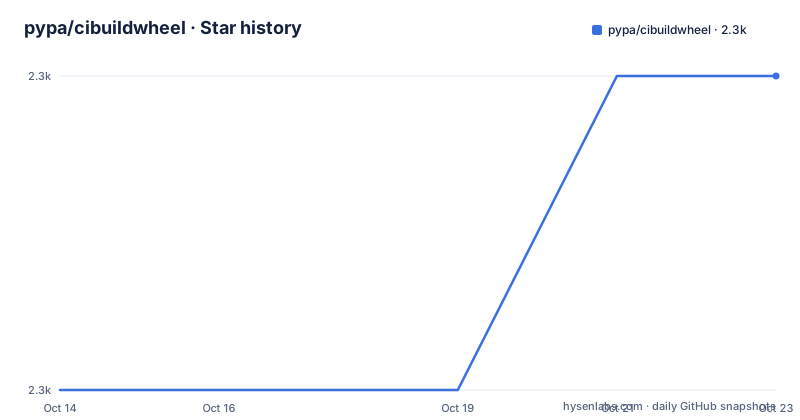
Star history
- pypa/cibuildwheel2,269 ★ · +1
| Repository | 2026-10-14 | 2026-10-23 |
|---|---|---|
| pypa/cibuildwheel | 2.3k | 2.3k |
1 Stars in the last 9 days, measured from the daily GitHub snapshot. Compare with other projects
Editorial analysis
Why one Linux runner cannot produce your Mac wheel
Wheels are platform specific, so a package with a compiled extension cannot be produced by a single machine. The stated problem in the README is blunt: "Python wheels are great. Building them across Mac, Linux, Windows, on multiple versions of Python, is not." The answer is to stop building on the developer's laptop and move the whole matrix onto a CI service. cibuildwheel runs inside an existing CI job, and it supports GitHub Actions, Azure Pipelines, CircleCI and GitLab CI.
That means the platform coverage you get is bounded by what your CI provider can give you. The README lists the supported CI platforms as Linux, macOS, Windows, Linux ARM, macOS ARM and Windows ARM. A GitHub Actions workflow on a Linux runner cannot conjure a macOS machine, so the runner matrix still has to come from your workflow file. cibuildwheel consumes that matrix rather than replacing it.
The other job it takes off your plate is verification. Beyond producing artifacts, it runs your library's tests against the wheel-installed version of your library. That distinction matters: a test run against the source checkout proves nothing about whether the built artifact imports and works once installed elsewhere.
Bundling shared libraries through auditwheel, delocate and delvewheel
A wheel that links against a system library such as libpng or libssl will not load on a machine that lacks it. Each platform has its own repair tool, and cibuildwheel drives the right one per target: auditwheel on Linux, delocate on macOS, delvewheel on Windows. That choice is the core of the value, because getting the tool invocation flags right per platform is precisely the fiddly part that most projects get wrong.
On Linux the repair work happens inside container images that already satisfy the manylinux and musllinux policies. The compatibility table shows six Linux targets for CPython: manylinux and musllinux for x86_64, i686, aarch64, ppc64le, s390x and armv7l. Six architectures times two libc families is twelve wheel variants from one command, and no local machine in the loop.
Note what this architecture is not. cibuildwheel does not implement a wheel builder of its own; it drives the existing backend that your project already declares in its build system, then hands the produced artifacts to the platform bundler. The repository lists hatchling as its own build backend, but that is for cibuildwheel itself, not for the packages it builds.
The compatibility table marks four corners as experimental
Reading the table closely, four footnotes carry caveats that a skim loses. Footnote 2 marks Windows arm64 as experimental for every CPython version from 3.9 through 3.15. Footnote 4 marks manylinux armv7l as experimental, and gives the reason: there is no RHEL based image for that architecture, so an Ubuntu based image is used instead. A wheel produced that way may not behave the same as a true RHEL derived build.
Footnote 3 is the sharpest one. CPython 3.12 is the only CPython row with Pyodide coverage, and the note says it is not supported on PyPI and uses the old pyodide tag instead of pyemscripten. So the tag on your 3.12 WebAssembly wheel will not match what a newer PyPI upload path expects, and it requires the pyodide-eol enable option. CPython 3.13, 3.14 and 3.15 all get pyemscripten coverage for Pyodide, iOS and Android, while 3.9 through 3.11 are marked N/A for those three columns.
Interpreter support is uneven as well. PyPy 3.9, 3.10 and 3.11 v7.3 are supported only for manylinux wheels, and Windows 32bit plus Windows Arm64 are N/A for PyPy. GraalPy 3.12 v25.0 is limited to macOS, Windows 64bit and Linux x86_64 and aarch64. The table has real gaps, and they are per-cell gaps, not blanket statements.
Running it needs Python 3.11 or newer, with no upper bound declared
The README says cibuildwheel itself requires a recent Python version to run, adding in parentheses that only the last three are supported. The package metadata states it differently. In pyproject.toml the requirement is written as requires-python = ">=3.11", an open lower bound with no cap, and the classifiers enumerate 3.11, 3.12, 3.13, 3.14 and 3.15.
That is a genuine mismatch between the two statements. Three declared runtimes are supported in prose, five interpreter versions are claimed by classifiers, and the install check would accept anything above 3.11. The runtime dependencies are modest and all pure packaging tools: bashlex!=0.13, bracex, build>=1.0.0, certifi, dependency-groups>=1.2, filelock, humanize, packaging>=20.9 and platformdirs. An optional uv extra is declared separately.
The command line entry point is a plain function reference:
[project.scripts]
cibuildwheel = "cibuildwheel.__main__:main"
The build backend is equally plain.
[build-system]
requires = ["hatchling"]
build-backend = "hatchling.build"
The install requirements name no compiler and no system package. The heavy lifting happens later, inside containers and hosted runners.
It plugs into pyproject validation and existing CI service files
One detail rewards a close read of pyproject.toml. The project registers itself under the entry point group validate_pyproject.tool_schema, mapped to cibuildwheel.schema:get_schema. That is a machine-readable schema for a tool table, which lets a pyproject.toml validator check cibuildwheel configuration keys and warn on unknown ones at edit time rather than at build time. Configuration is therefore validated by an external tool using a schema the project ships.
At the repository root, service integration is visible in the file names: action.yml for GitHub Actions, azure-pipelines.yml for Azure Pipelines, a .circleci/ directory for CircleCI and .gitlab-ci.yml for GitLab CI. Under examples/ sit eight ready configurations, one per combination of service and options, including github-minimal.yml, github-pipx.yml, github-with-qemu.yml, github-deploy.yml, azure-pipelines-minimal.yml, circleci-minimal.yml, gitlab-minimal.yml and gitlab-with-qemu.yml.
The pipx example and the two qemu examples are the ones to look at first. They point at the two hard cases: installing the tool into a CI environment, and cross building the ARM Linux targets where the runner is x86_64. The qemu variants exist precisely because Linux ARM is listed as a supported CI platform but not every service provides native ARM runners. Start from the minimal file for your service and add options only when a build needs them.
Where hand-rolled per-platform recipes win: older interpreters and one-off builds
There is a documented escape hatch. The README points readers who need to build unsupported Python versions, Python 2 among them, to the cibuildwheel 1 documentation at cibuildwheel.pypa.io/en/1.x/. The current tool does not attempt to cover those targets, and it does not pretend to.
The other alternative is doing it yourself: a matrix job per platform, a call to auditwheel or delocate or delvewheel in each, plus the platform flags for repair modes and target versions. The difference in approach is scope and repeatability. A hand written recipe gives exact control per job and costs maintenance on every new architecture, while cibuildwheel makes the platform decision from the config table and keeps the repair tool invocation in one place.
There is a real cost to the choice. cibuildwheel only runs inside one of four named CI services, so an existing pipeline on another runner has to change service or change tools. Builds run outside CI, such as a published build from a laptop, are not what it is built for.
Mobile and WebAssembly targets arrive with naming and host constraints
The feature list names the artifact families: manylinux, musllinux, macOS, Windows, pyemscripten, iOS and Android wheels. Reading the target table alongside that list exposes the awkwardness. Android and iOS are marked N/A for CPython 3.9, 3.10, 3.11 and 3.12, and for every PyPy and GraalPy row. Coverage starts at CPython 3.13.
Pyodide is the stranger of the group. Only 3.12 through 3.15 have cells, and 3.12 uses the deprecated tag. If your package ships to Pyodide today, the version you can build depends on which interpreter line you target, and the 3.12 path carries an explicit tag mismatch plus an extra enable flag.
The practical consequence is that "supports every platform" is false as a blanket claim even inside this project's own table. Check the cell for your interpreter and platform pair rather than the header.
What running cibuildwheel costs you in CI minutes
Multiply the columns, and you get the bill. A full CPython build that covers macOS Intel, macOS Apple Silicon, Windows 64bit, Windows 32bit, Windows Arm64 and six Linux architectures across two libc families reaches for more than a dozen artifacts, each of which is then installed and tested. Every cell is a runner with a container image pulled.
Maintenance cost sits on two sides. The tool itself is a Python package installed in CI, and the support window for running it moves as new Python versions arrive, since only recent interpreters run it. Your side is the config: architecture and version lists in pyproject.toml, plus the CI matrix that provides the runners. Both sides have to be updated when you add a platform, and cibuildwheel cannot add a runner your service does not have.
The payoff is that each of those artifacts is repaired by the right tool and tested after installation. Projects with an optional C or Rust extension get that for free on every platform; pure Python packages get little from it.
Editorial conclusion
cibuildwheel is worth adopting if you maintain a library that ships binary wheels to PyPI and you would otherwise maintain separate Linux, macOS and Windows build recipes. Skip it for a pure Python package, for Python 2 or for unsupported interpreter targets, where the project points you to the older 1.x documentation instead. Before switching, check the compatibility table for your exact platform and interpreter pair, confirm that the CI service you run is one of GitHub Actions, Azure Pipelines, CircleCI or GitLab CI, and note that Linux shared library bundling still depends on auditwheel doing the work under cibuildwheel's orchestration.
Frequently asked questions
How do I install and run cibuildwheel in a GitHub Actions workflow?
cibuildwheel runs inside a CI service rather than being installed and run locally; supported services are GitHub Actions, Azure Pipelines, CircleCI and GitLab CI. The repository ships ready configurations under examples/, including github-minimal.yml and github-pipx.yml, and a root action.yml for the GitHub Actions service.
Which Python versions can cibuildwheel build wheels for?
The compatibility table covers CPython 3.9 through 3.15 on macOS, Windows and the manylinux and musllinux targets, plus PyPy 3.9 to 3.11 v7.3 and GraalPy 3.12 v25.0. Running cibuildwheel itself needs a recent Python; pyproject.toml sets requires-python to ">=3.11".
Does cibuildwheel work with Python 2 or unsupported interpreter versions?
No. The README directs anyone who needs unsupported versions such as Python 2 to the cibuildwheel 1 documentation at cibuildwheel.pypa.io/en/1.x/ instead of the current tool.
How does cibuildwheel make wheels portable across Linux distributions?
It bundles shared library dependencies on Linux through auditwheel, on macOS through delocate, and on Windows through delvewheel, then runs the library's tests against the wheel-installed version. Linux targets include manylinux and musllinux across x86_64, i686, aarch64, ppc64le, s390x and armv7l.
Are the Windows Arm64 and Linux armv7l targets stable?
Both are marked experimental in the compatibility table. For armv7l the stated reason is that no RHEL based image exists for that architecture, so an Ubuntu based image is used instead.
Official sources
Add this badge to your README
If you maintain this project, the badge below links readers to this analysis and shows its maintenance status from the daily GitHub snapshot. Paste the markdown into your README; add ?metric=license or ?metric=stars to the image URL for a different field.

[](https://hysenlabs.com/projects/pypa-cibuildwheel)Star history chart for your README
[](https://hysenlabs.com/projects/pypa-cibuildwheel)Was this useful?