Twine for PyPI Publishing: A Build-Independent Upload Utility
Utilities for interacting with PyPI
At a glance
- What is it?
- Twine is a Python utility for uploading source and binary distribution artifacts to PyPI independently of the build system that produced them. It fits maintainers who need a dedicated upload step, while its hosted documentation contains the operational details absent from the README.
- Who is it for?
- Twine is a sensible choice for maintainers who build Python distributions separately and want a dedicated PyPI upload utility. It is not a package builder and is less suitable for workflows that require its upload command to construct an artifact.
- Can I use it commercially?
- Yes. Apache-2.0 is a permissive licence: you can use, modify and sell software built on it, as long as you keep its copyright and licence notices.
- Is it still maintained?
- Yes. The repository last received commits 25 days ago.
- What is it written in?
- Mainly Python, according to GitHub's language statistics.
Answers come from the project's GitHub data, last synced on November 7, 2026, and from our analysis. They are not legal advice.
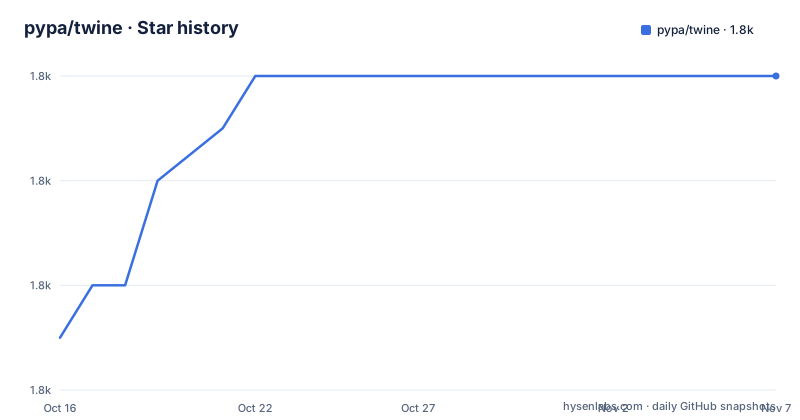
Star history
- pypa/twine1,792 ★ · +5
| Repository | 2026-10-16 | 2026-11-07 |
|---|---|---|
| pypa/twine | 1.8k | 1.8k |
5 Stars in the last 22 days, measured from the daily GitHub snapshot. Compare with other projects
Editorial analysis
What Twine Publishes and Who Uses It
Twine addresses the publication step for Python packages. The README describes it as a utility for publishing packages on PyPI and specifies build system independent uploads. That boundary matters because creating an artifact and sending it to a package index are separate operations. A project may build a source distribution, a wheel, or both with tooling selected by its maintainers, then use Twine as the client for the upload.
The intended users are Python package maintainers and contributors responsible for releasing an existing package. Twine supports uploads for both new and existing PyPI projects. It handles distribution artifacts rather than application source trees alone. The README links to the Python Packaging User Guide for publishing and distribution terminology, while the project documentation is the source for features, installation, and usage details.
The repository does not present Twine as a build backend. Its own `pyproject.toml` identifies `setuptools.build_meta` as its build backend, but that describes how Twine itself is packaged. It does not make Twine responsible for building another project's wheel or source archive. That separation gives maintainers a choice of build system while keeping publication behavior centered in a separate utility.
Build-Independent Artifact Upload Flow
The visible project boundary is straightforward: a build process produces distribution artifacts, and Twine publishes those artifacts to PyPI. The README specifically names source and binary distribution artifacts. These are files intended for Python package distribution, rather than an arbitrary collection of repository files.
The repository layout places the implementation under `twine/`, with tests under `tests/` and documentation under `docs/`. The README points readers to the hosted documentation for features, installation, and usage. It does not expose the internal command implementation or describe a complete lower-level sequence covering validation, authentication, index selection, and HTTP requests.
The package metadata does reveal several runtime dependencies associated with a client application. `requests`, `urllib3`, and `requests-toolbelt` support HTTP communication. `keyring` is included except on `ppc64le` and `s390x` platforms. `packaging` and `rfc3986` are also listed, while `rich` appears in the dependency set. These entries indicate a command-line publishing client, although the README does not document the complete internal request flow.
Installation and First PyPI Use
Install Twine in the Python environment you use for releases, then build distribution files with your chosen build tool. The official documentation gives this example:
python -m pip install twine
python -m build
twine upload -r testpypi dist/*
The build step requires the separate `build` package. TestPyPI is a separate package index and requires its own account or token; inspect the built files and test the upload before publishing to PyPI with `twine upload dist/*`. The upload command publishes the artifacts matching `dist/*`, so check that the directory contains only the intended release files.
Twine supports PyPI and other package indexes. Its documentation describes repository selection, token authentication, and credential storage; use the current instructions for your environment and do not put secrets in shared command history.
Credential and Platform Boundaries
Twine is designed for PyPI publication, so credentials and index selection form part of the operational boundary even though the README does not document their configuration. The dependency on `keyring` is explicit, with a platform exception for `ppc64le` and `s390x`. That exception is a concrete installation consideration for maintainers selecting an environment. The metadata does not explain how `keyring` participates in the upload command, so it would be inaccurate to require a particular keyring backend based on the available repository files.
The supported Python versions are bounded by `requires-python = ">=3.10"`. The classifiers list Python 3.10 through 3.14 and identify CPython as the implementation. Maintainers running an older interpreter should not assume compatibility with the current package metadata. The project also lists `requests >= 2.20`, `urllib3 >= 1.26.0`, `requests-toolbelt >= 0.8.0`, and other dependencies, meaning a deployment resolves a dependency set rather than running as a dependency-free script.
The repository is not archived, and its last push was on 2026-10-14. Recent releases include 7.0.0 on 2026-07-28, 6.2.0 on 2025-09-04, and 6.1.0 on 2025-01-21. These dates provide a concrete maintenance signal, but the README does not document an upgrade procedure, compatibility policy for older releases, or rollback process.
Limits Compared with Build Tools
The main limitation is scope. Twine uploads artifacts and does not, according to the README, replace the build system that creates them. A maintainer who needs to generate a wheel or source distribution must arrange that work separately. If the package is not already built correctly, an upload utility cannot turn a source checkout into a release by itself.
A real alternative is to make the build system the central release tool and handle publication inside that workflow. The practical difference is architectural: a build system owns artifact construction, while Twine is dedicated to sending the resulting distributions to PyPI. The repository does not document a specific competing publisher or its command surface, so a named product comparison would not be reliable. It also does not claim that one approach eliminates credential management, artifact validation, or release automation.
The description and README focus on PyPI, and the available repository files give no broader index-support details. Likewise, the README does not establish whether a particular authentication storage method, proxy setting, repository configuration, or rollback workflow is supported. Those points should be checked against the current hosted documentation before release automation is built around the tool.
Apache-2.0 License and Upgrade Surface
Twine is licensed under Apache-2.0. The `pyproject.toml` declares that license and points to the repository's `LICENSE` file. This is a licensing fact, not legal advice. Users still need to review the license text and their own distribution, attribution, and compliance obligations for the way they use the project.
The package is a Python distribution with declared dependencies and a version supplied dynamically through the build configuration. Upgrading therefore means resolving the new package version and its dependency requirements, then checking whether existing release automation still matches the documented CLI and authentication behavior. The repository's release history shows recent version changes, including 7.0.0, but the README does not contain the changelog entries or upgrade instructions needed to identify behavioral changes.
The README also does not document a rollback path for release operators. A published artifact may be immutable in a package-index workflow, but this repository excerpt does not state Twine's policy or provide a recovery procedure. The supportable scope is narrower: Twine's license and package requirements are documented in `pyproject.toml`, while release recovery and version-specific behavior must be checked in the project documentation and release notes.
Editorial conclusion
Twine is a sensible choice for maintainers who build Python distributions separately and want a dedicated PyPI upload utility. It is not a package builder and is less suitable for workflows that require its upload command to construct an artifact. Before adopting it, verify the current installation and upload procedure in https://twine.readthedocs.io/ and confirm that your chosen build system produces the files you intend to publish.
Frequently asked questions
What is Twine used for?
Twine is a utility for publishing Python packages on PyPI. The README says it uploads source and binary distribution artifacts for both new and existing projects independently of the build system.
Does Twine build Python packages?
The repository describes Twine as an upload utility and emphasizes build-system independent uploads. It does not claim that Twine creates the source distribution or wheel.
Which Python versions does Twine support?
The project metadata specifies Python 3.10 and later and lists Python 3.10 through 3.14. It identifies CPython as the supported implementation in the classifiers.
Official sources
Add this badge to your README
If you maintain this project, the badge below links readers to this analysis and shows its maintenance status from the daily GitHub snapshot. Paste the markdown into your README; add ?metric=license or ?metric=stars to the image URL for a different field.

[](https://hysenlabs.com/projects/pypa-twine)Star history chart for your README
[](https://hysenlabs.com/projects/pypa-twine)Was this useful?