PyTorch Hub Submission and CI Guide
Submission to https://pytorch.org/hub/
At a glance
- What is it?
- The pytorch/hub repository collects model documentation for the PyTorch Hub website. It serves model maintainers who already provide a `hubconf.py`, rather than developers installing a standalone package.
- Who is it for?
- PyTorch Hub is appropriate for maintainers of repositories that can be loaded through `torch.hub.load(...)` and want their models included in the PyTorch Hub catalog. It is not appropriate for users seeking a packaged model library, a place to upload pretrained weights, or release management for a Python distribution.
- Can I use it commercially?
- Not without permission. GitHub finds no licence file in the repository, and without a licence all rights are reserved by default: you may read the code but not reuse it. Check the README, or ask the authors, before using it.
- Is it still maintained?
- Yes. The repository last received commits 36 days ago.
- What is it written in?
- Mainly Python, according to GitHub's language statistics.
Answers come from the project's GitHub data, last synced on November 6, 2026, and from our analysis. They are not legal advice.
Star history
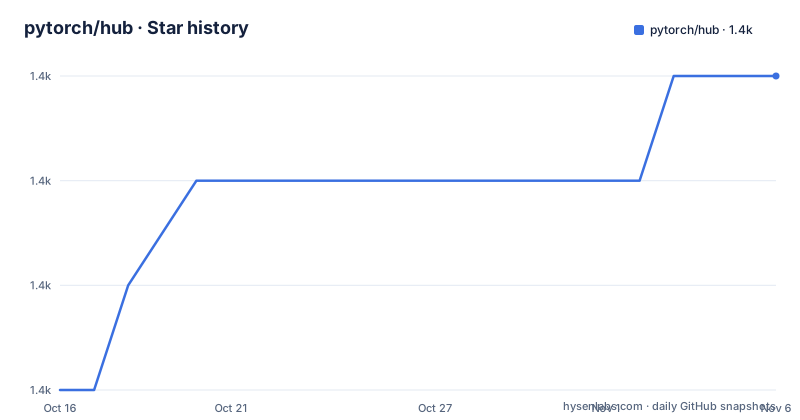
- pytorch/hub1,443 ★ · +3
| Repository | 2026-10-16 | 2026-11-06 |
|---|---|---|
| pytorch/hub | 1.4k | 1.4k |
3 Stars in the last 21 days, measured from the daily GitHub snapshot. Compare with other projects
Editorial analysis
Why `pytorch/hub` accepts model entries
The `pytorch/hub` repository is the publication path for model listings shown on the PyTorch Hub website. Its intended users are maintainers of model repositories that expose an entry point compatible with `torch.hub`. A submission does not turn an arbitrary Python project into a PyTorch package. Instead, it adds documentation that tells PyTorch Hub visitors where the model lives and how the project's Hub configuration can be loaded.
According to the README, a new model requires a `hubconf.py` in the model repository. The author must verify that file locally through `torch.hub.load(...)`, then create a Markdown file in this repository naming the repository owner, repository name and model title. Once the pull request is merged into `master`, the README says the listing will appear on the PyTorch website within 24 hours.
The repository layout supports this catalog role. Root-level files such as `pytorch_vision_resnet.md`, `nvidia_deeplearningexamples_tacotron2.md` and `hustvl_yolop.md` represent separate model entries. Other entries group closely related models, matching the README's guidance that models with similar structures, such as `resnet18` and `resnet50`, may share one Markdown file. The implementation of those models remains in their own repositories.
How the `hubconf.py` submission path works
The external model repository supplies the executable integration point, `hubconf.py`. `pytorch/hub` consumes that interface by documenting how the model can be loaded through `torch.hub.load(...)`. Model definitions, weights, loading logic and third-party imports stay in the submitted repository. This repository mainly holds catalog records and the checks needed to validate them.
The process spans two repositories. First, the model author publishes a repository with a working `hubconf.py`. Second, the author adds a Markdown record to `pytorch/hub`. That Markdown supplies the information rendered for the model entry, including executable Python examples. The entry is useful only if the remote repository and the catalog document agree on the call that users can make.
The repository entries also demonstrate that the catalog spans more than image classification. Visible files cover translation, segmentation, object detection, speech synthesis, source separation and other model families. However, inclusion does not mean that `pytorch/hub` hosts their code. The README is also explicit that this catalog does not host pretrained weights. A publisher must host downloadable assets through the mechanism required by the model repository.
Submitting a model listing
Begin in the repository that contains the model. Add `hubconf.py`, following the publishing instructions linked in the README as `torch.hub doc`, and verify the model locally with `torch.hub.load(...)`. The exact arguments depend on the repository and model, so the README does not provide a universal invocation that can be copied safely.
After the external repository works, return to `pytorch/hub` and create a pull request. For each new model, add a Markdown file named in this form:
<repo_owner>_<repo_name>_<title>.mdThe repository supplies `docs/template.md`, which is the required starting point for that file. If the entry uses images, the README says to place them in `images/` and reference them through the `[images/featured_image_1/featured_image_2]` fields. The documentation also says to use only the predefined tags currently listed in `scripts/tags.py`.
After opening the pull request, the Netlify bot builds it with the latest `pytorch.github.io` repository and comments on the pull request with a preview link. Pushing additional commits updates that preview, giving the submitter a way to inspect the rendered page before merge. The bot supports review of the submission process, but it does not replace the CI checks.
Running `pytorch/hub` validation scripts
The README lists two local test commands for a proposed submission. Run the sanity check first, followed by the project script that prepares and runs its PyTorch environment. The README does not document operating system prerequisites or installation dependencies for these scripts.
python scripts/sanity_check.py
./scripts/run_pytorch.sh
The first command invokes `scripts/sanity_check.py`. The second invokes `scripts/run_pytorch.sh`, whose repository script is intended to run the submission checks with PyTorch. If either command fails, a submitter should address the reported problem before requesting review. The repository also contains `preview_setup.sh` and a `package.json` with front-end dependencies, but the README does not present those as prerequisites for the two submission checks, so they should not be assumed to be part of the model CI workflow.
CI combines every Python code block in a Markdown entry and executes the result against the latest PyTorch release. Code fences therefore affect whether an example participates in testing. The required marker is:
`
python ````
This looks awkward when represented alone, but it reflects the README's requirement that Python blocks use the language marker. Every executable example in a model page needs that marker. If an example imports a dependency absent from the CI machine, declare it in `scripts/install.sh`. When execution fails, the README says CI leaves a new `temp.py` file so the submitter can reproduce the failure.
Weight hosting, tagging and catalog boundaries
The largest constraint is pretrained-weight hosting. The README states that `pytorch/hub` does not support hosting pretrained weights. Authors with weights must host them properly themselves. The catalog can therefore point users toward a model, but it does not provide storage, distribution policy or availability guarantees for the model's checkpoint files.
Tagging is another controlled boundary. Submitters may use only a predefined set of tags, currently declared in `scripts/tags.py`. Pull requests to expand that set are accepted, which means a desired taxonomy may require a separate change to repository tooling rather than an arbitrary tag in a model page. This can make categorization less flexible than a general documentation site, but it gives the catalog a common vocabulary.
This project should not be confused with PyTorch itself, a Python package registry, or the repositories that implement the listed models. It does not document a general release process for a model package, and the repository has no GitHub releases. Users who only want to call an existing Hub model should consult the PyTorch Hub documentation and `torch.hub`, not treat `pytorch/hub` as an installable library. The repository's own `package.json` contains website dependencies such as `bootstrap`, `jquery`, `popper.js` and `anchor-js`, which further indicates that this checkout belongs to the presentation and submission workflow.
Maintenance, licensing and adoption boundaries
The repository is not archived, and its last push was on 2026-10-03. That supports treating the current submission workflow as recent, although the README does not promise a future release schedule. The repository has no GitHub releases, so adopters should not expect release notes or packaged versions to define changes here. Individual model listings can also change in their external repositories, which means the listing file is not the only component that determines whether an example works.
No license is identified in the repository information. The README also does not state the license of the model repositories represented by the Markdown entries. Contributors must therefore establish usage and redistribution terms from the relevant repository rather than assuming that inclusion grants a particular set of rights. This review cannot classify the contents of those external repositories.
Adopt this workflow when you maintain a model repository with a valid `hubconf.py`, can make its executable examples work with the latest PyTorch release, and can host any pretrained weights yourself. Do not use it as a release channel, model registry, binary distribution system or generic issue tracker. For a library intended for repeatable environment management, a proper Python package and versioned release process would be a different kind of project.
Editorial conclusion
PyTorch Hub is appropriate for maintainers of repositories that can be loaded through `torch.hub.load(...)` and want their models included in the PyTorch Hub catalog. It is not appropriate for users seeking a packaged model library, a place to upload pretrained weights, or release management for a Python distribution. Before submitting, verify that the repository works locally with the latest PyTorch release, that every Python block is marked as Python, and that all dependencies needed by CI are declared in `scripts/install.sh`.
Frequently asked questions
What must a model repository provide before submission to PyTorch Hub?
It must provide a `hubconf.py` following the linked `torch.hub doc`, and the author should verify it locally with `torch.hub.load(...)`.
Does PyTorch Hub host pretrained model weights for submitters?
No. The README states that pretrained weights must be hosted properly by users who provide them.
How can a PyTorch Hub submission be tested locally?
The README lists `python scripts/sanity_check.py` followed by `./scripts/run_pytorch.sh` as the commands for testing a pull request locally.
Official sources
Add this badge to your README
If you maintain this project, the badge below links readers to this analysis and shows its maintenance status from the daily GitHub snapshot. Paste the markdown into your README; add ?metric=license or ?metric=stars to the image URL for a different field.

[](https://hysenlabs.com/projects/pytorch-hub)Star history chart for your README
[](https://hysenlabs.com/projects/pytorch-hub)Was this useful?