ddns-updater: sixty providers, one JSON file, and a 12MB Scratch image
Container to update DNS records periodically with WebUI for many DNS providers
At a glance
- What is it?
- A Go program that keeps A and AAAA records pointed at your address across about sixty DNS providers, shipped as a twelve megabyte container, as zero-dependency binaries, and as an Arch package. Its README is versioned to match the program, which is unusual and useful.
- Who is it for?
- Use ddns-updater if you have records on more than one DNS provider and want one process with one configuration file and a web interface to look at them, especially if you already run containers, since the image is twelve megabytes, runs on nine CPU architectures and ships a healthcheck that actually resolves your domain. Do not reach for it if you have one record at one provider, since a client on the host would do.
- Can I use it commercially?
- Yes. MIT is a permissive licence: you can use, modify and sell software built on it, as long as you keep its copyright and licence notices.
- Is it still maintained?
- Yes. The repository last received commits 14 days ago.
- What is it written in?
- Mainly Go, according to GitHub's language statistics.
Answers come from the project's GitHub data, last synced on November 25, 2026, and from our analysis. They are not legal advice.
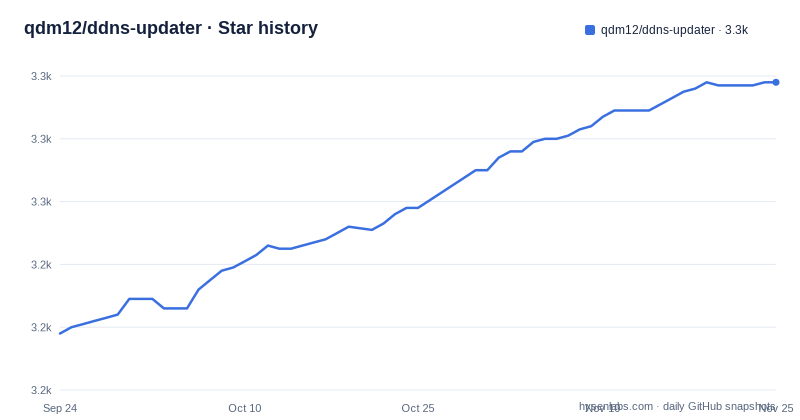
Star history
- qdm12/ddns-updater3,298 ★ · +80
| Repository | 2026-09-24 | 2026-11-25 |
|---|---|---|
| qdm12/ddns-updater | 3.2k | 3.3k |
80 Stars in the last 62 days, measured from the daily GitHub snapshot. Compare with other projects
Editorial analysis
Sixty providers, one file, and a README that matches the version
The program keeps DNS A and, if you want, AAAA records pointed at your current address, across a long list of providers. The list is alphabetical and runs from Aliyun through Zoneedit, and includes the names most people reach for first: Cloudflare, Route53, Gandi, GoDaddy, Namecheap, DigitalOcean, Hetzner Cloud, OVH, Vultr, Porkbun and DuckDNS, alongside smaller ones. Hetzner appears twice, once for a legacy API and once for its cloud, which tells you the project keeps old integrations alive rather than dropping them.
The list ends with an invitation to open an issue for a provider that is missing, which is how the list grows.
The more interesting decision is the documentation. The README and the docs directory are versioned to match the program, and the page carries a table linking the README and the docs for the latest version and for four older minor versions, each pinned to its tag.
That is rare, and it is the difference between documentation you can trust and documentation that describes a version you are no longer running. When a release note matters, you can read the documentation that shipped with it.
The configuration is a list of settings objects
There is one configuration file, it is JSON, and it lives at a fixed path inside a data directory you create.
{
    "settings": [
        {
            "provider": "namecheap",
            "domain": "sub.example.com",
            "password": "e5322165c1d74692bfa6d807100c0310"
        }
    ]
}
The shape is deliberately dull: a settings array, and inside each entry a provider name, the domain to update, and the credential for that provider. Adding a second record means adding a second entry, not a second file.
Two details matter more than they look. The same JSON can be supplied as a single environment variable, and when you do that it takes precedence over the file. So a deployment that generates configuration at startup can skip the volume entirely, and a configuration baked into a container can be overridden without rebuilding it.
The second is that every environment variable has a matching command line flag, named by lowercasing it and replacing underscores with dashes. One setting has one name in two syntaxes, which is the kind of consistency that saves an afternoon when you are reading a compose file and a troubleshooting thread at the same time.
Every public IP source is its own setting
The compose file is the best configuration reference in this repository, because it lists every knob with its default value.
The settings fall into groups, and the largest group is about finding out where you are. There are separate variables for fetchers, for HTTP providers, for IPv4 HTTP providers, for IPv6 HTTP providers and for DNS providers. All five default to all, meaning every source in that category is used. Then two timeouts: one for DNS lookups, three seconds, and one for HTTP, ten seconds.
That structure is a design decision you can act on. If your address is behind carrier grade NAT, or if you are on a network where one particular lookup service lies, you can narrow a single group without disabling the rest. If you distrust all of them, you can turn each off.
The other groups are easier. There is a period, five minutes by default, and a cooldown for updates, also five minutes, which is the difference between how often the program looks and how often it is allowed to push. There is a log level and a caller flag. And there are two backup settings, a period and a directory, with the period documented as zero to disable.
So the operational defaults are visible in one file, which is either a good starting point or an invitation to change them deliberately.
A twelve megabyte Scratch image, with root certificates from Go
The container is built on the Scratch image, which contains nothing: no shell, no package manager, no certificate bundle. The README advertises the result as a twelve megabyte image, and the dependency list explains how that is possible.
One direct dependency is a library of root certificates compiled into the program. On a normal system those live in the operating system; on Scratch there is no operating system, so the binary has to carry them. That is the standard consequence of a distroless image and this project handles it by embedding rather than by copying.
The rest of the container story is about ownership and permissions. The image runs as a built-in user with id 1000, and the setup instructions make you create the data directory owned by that id with read, write and execute permission, and the configuration file owned by the same id with read permission. The commands are given explicitly.
If you need a different user id, the escape hatch is to build the image yourself and pass a build argument for the user id. Running as root is possible with a user flag, and the documentation says plainly that it is not advised.
The architecture list is long: amd64, 386, arm64, several 32-bit ARM variants, s390x, ppc64le and riscv64. So this is a container intended for odd hardware as well as servers.
The healthcheck resolves your domain, which is the real test
Two container features do more work than they look.
The healthcheck verifies the DNS resolution of your domains. Not that the process is alive, not that the port is listening, but that the name resolves. For a dynamic DNS updater that is the only health signal that matters: a process that is running and a name that resolves are different claims, and this one checks the second.
The other feature is persistence, and it is a file rather than a database. A JSON file named for updates stores the old IP addresses with the change times for each record.
That file is what turns a sequence of updates into a history, and it has two uses. It tells you when a record last changed rather than only what it currently points at, which matters when a provider's API starts failing silently. And it is what the backup settings operate on, with a period and a directory, defaulting to off, pointed at the mounted data directory.
Notifications are the third piece, and they are not built in. The program sends them through a separate notification library, configured by an environment variable holding a list of addresses, which means the notification targets are described in that library's format rather than in this project's own.
The build copies directories one at a time, and tests the README
The build file is written by somebody who thinks about layer caching, and one of its stages is about documentation.
Three stages pull prebuilt images for the tools the build needs, then a base stage installs git, a compiler and one extra package, with a comment explaining that the extra package is there because its argument flag is needed later. The source is then copied as separate commands for the module files, the packages, the command entry points and the internal code, so a change to one does not invalidate the layers of the others.
The test stage is the interesting one. It copies the readme directory and the README file itself, then runs the test suite with the race detector, coverage across all packages, an atomic coverage mode, and a coverage profile written out. Two comments explain the setup: cgo is enabled for that stage so the race detector works, and a compiler was installed to support it.
So the README is an input to the test run. That only makes sense if the provider list and the documentation are generated from the provider implementations, and if a change that regenerates them differently is a test failure rather than a silent documentation drift. Given that the tree has a readme directory and a docs directory, that is almost certainly the mechanism.
The remaining two stages are conventional: a lint stage with a ten minute timeout, and a mocks stage that initialises a throwaway git repository, commits everything, and then searches for files declaring themselves generated, which is how mock regeneration is kept honest.
State lives in one mounted directory, and the compose file is the manual
Running the container is one command, and the volume it mounts is the whole state of the program:
docker run -d -p 8000:8000/tcp -v "$(pwd)"/data:/updater/data ghcr.io/qdm12/ddns-updaterEverything else is either in the compose file or in the documentation beside it. The compose file sets a bridge network, publishes one port for the web interface, mounts the data directory, and lists the settings from before with their defaults, then restarts always.
The web interface has its own pair of settings, an address to listen on and a root URL, which suggests it is meant to be mounted behind something rather than exposed directly. The feature list describes two interfaces, one for desktop and one for mobile, which for a tool like this is a reasonable pair of ambitions.
Beyond compose there is a Kubernetes directory with an installation guide and examples, a note that other image tags are available, and a pull command for updates.
The release history shows a steady project rather than a hobby: a minor release in late 2024, then two releases on the same day in May 2026, with commits continuing afterwards. Combined with the versioned documentation, that is the profile of something you can depend on and pin.
Editorial conclusion
Use ddns-updater if you have records on more than one DNS provider and want one process with one configuration file and a web interface to look at them, especially if you already run containers, since the image is twelve megabytes, runs on nine CPU architectures and ships a healthcheck that actually resolves your domain. Do not reach for it if you have one record at one provider, since a client on the host would do. Before you deploy, read the public IP settings rather than accepting all sources, because that is the setting that determines whose answer you trust, and remember the data directory must be owned by the image's built-in user id or the container will not be able to write its state.
Frequently asked questions
what is ddns updater
A program that keeps DNS A and, optionally, AAAA records updated for many providers. It ships as a lightweight 12MB container based on the Scratch image, as zero-dependency binaries for Linux, Windows and MacOS, and as an Arch package.
how to setup ddns updater
Create a data directory, write data/config.json containing a settings array with a provider, a domain and its credential, then run the binary or the container. For the container, the data directory must be owned by user id 1000, which is the image's built-in user.
how to use ddns updater
Behaviour is set with environment variables after the program starts, and every variable has a matching command line flag whose name is the variable lowercased with underscores replaced by dashes. The JSON configuration can also be supplied as one environment variable, which takes precedence over the file.
Official sources
Add this badge to your README
If you maintain this project, the badge below links readers to this analysis and shows its maintenance status from the daily GitHub snapshot. Paste the markdown into your README; add ?metric=license or ?metric=stars to the image URL for a different field.

[](https://hysenlabs.com/projects/qdm12-ddns-updater)Star history chart for your README
[](https://hysenlabs.com/projects/qdm12-ddns-updater)Was this useful?