Nimble: matchers, four install routes, and one matcher SPM will not give you
A Matcher Framework for Swift and Objective-C
At a glance
- What is it?
- Nimble is the Quick organisation's matcher framework for Swift and Objective-C, used to express expected outcomes in test code. Its README is an index to a Documentation Catalog and four installation routes, and the detail worth knowing before you pick one is which matcher the Swift Package Manager route does not ship.
- Who is it for?
- Nimble suits a Swift or Objective-C suite that wants matchers instead of hand written assertions, and CocoaPods is the route to pick when a test relies on raiseException, since the Swift Package Manager route does not provide it.
- Can I use it commercially?
- Yes. Apache-2.0 is a permissive licence: you can use, modify and sell software built on it, as long as you keep its copyright and licence notices.
- Is it still maintained?
- Activity is slowing. The repository last received commits 6 months ago.
- What is it written in?
- Mainly Swift, according to GitHub's language statistics.
Answers come from the project's GitHub data, last synced on November 15, 2026, and from our analysis. They are not legal advice.
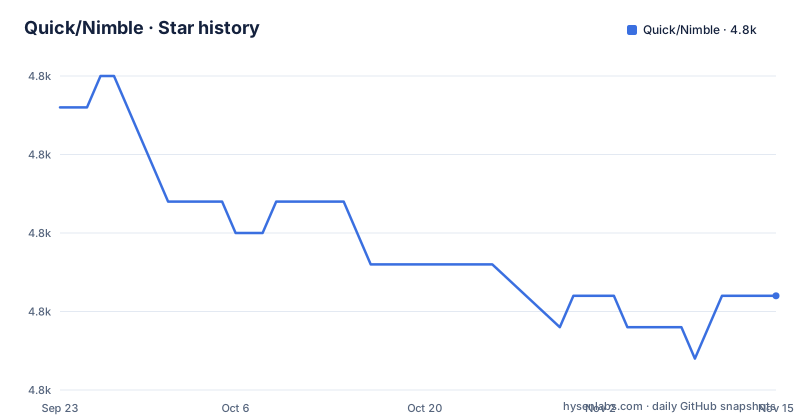
Star history
- Quick/Nimble4,833 ★ · -6
| Repository | 2026-09-23 | 2026-11-15 |
|---|---|---|
| Quick/Nimble | 4.8k | 4.8k |
-6 Stars in the last 53 days, measured from the daily GitHub snapshot. Compare with other projects
Editorial analysis
expect(1 + 1).to(equal(2)) and the matchers behind it
Nimble exists to express one thing: the expected outcome of a Swift or Objective-C expression. The README opens with six lines that show the vocabulary in miniature, and they are worth reading slowly because every later assertion in your suite is built from the same parts.
`expect(1 + 1).to(equal(2))` is the shape most assertions take, a value handed to `expect`, then a matcher handed to `to`. `expect(1.2).to(beCloseTo(1.1, within: 0.1))` replaces exact comparison with a numeric tolerance passed as an argument, which is what float results need. `expect(3) > 2` drops the matcher call entirely and writes the assertion as an operator. `expect("seahorse").to(contain("sea"))` and `expect(["Atlantic", "Pacific"]).toNot(contain("Mississippi"))` show the same matcher applied to a substring and to a collection, and that negation is spelled `toNot`.
The last line changes how you write asynchronous tests. `expect(ocean.isClean).toEventually(beTruthy())` polls instead of asserting once, so a value that becomes true later still passes instead of failing on the first frame.
The project says it was inspired by Cedar.
The reference manual moved into Sources/Nimble/Nimble.docc
The root README is short enough to read in a minute, and that is because it no longer holds the reference. The documentation now lives in `Sources/Nimble/Nimble.docc` as a Documentation Catalog, browsable at `quick.github.io/Nimble/documentation/nimble/`. A catalog is a folder of articles that Xcode assembles into a browsable manual, so the matcher list, the predicate matchers and the asynchronous matchers are found there instead of in the file you land on from the repository.
The install section has the same shape. For the path where both libraries arrive together, the README sends you to the sister project Quick and points at `InstallingQuick.md` in that repository's documentation; the git submodule route links to Quick's install guide with an instruction to ignore the steps that add Quick when you only want Nimble.
Two repositories, one matcher library, and the file you are reading is the index to both. The project homepage is that same hosted documentation address, so the manual and the README are two entrances to one body of content rather than two versions of it.
Four install routes, and the one that drops raiseException
Nimble can be installed in one of four ways: Swift Package Manager, CocoaPods, Carthage or git submodules. Each route puts the library in a different place in your project, so the choice is about your build setup as much as about the matchers.
With Swift Package Manager you add the package to your `Package.Swift` and link it with your test target:
    dependencies: [
        // ...
        .package(url:  "https://github.com/Quick/Nimble.git", from: "13.0.0"),
    ],
The Xcode route asks for the same URL through the Package Dependencies tab, and it carries a warning that is easy to skim past: add Nimble as a dependency of your unit test target, not your app target.
Then the cost of that route. The README states that if you install Nimble using Swift Package Manager, `raiseException` is not available. That is a gap rather than a caveat, because it is the matcher you reach for when an expectation cannot be written as a value at all. A suite that depends on it has to take CocoaPods, Carthage or submodules instead.
The podfile marks the test target exclusive
CocoaPods is the route the README describes most concretely, and the podfile it hands you is specific rather than generic:
platform :ios, '13.0'

source 'https://github.com/CocoaPods/Specs.git'

# Whatever pods you need for your app go here

target 'YOUR_APP_NAME_HERE_Tests', :exclusive => true do
  use_frameworks!
  pod 'Nimble'
end
Two lines in that block carry decisions rather than boilerplate. `use_frameworks!` is what enables Swift support for CocoaPods, so without it the Swift matchers are not available to your target. `:exclusive => true` stops the test target from inheriting the app target's pods, which is why this block declares its own instead of relying on what the app already has. The platform line pins iOS 13.0 as the deployment target, and the same route is described as covering macOS, iOS, tvOS and watchOS. The final step is `pod install`.
Carthage asks for 13.2 while the newest release is v14.0.0
Carthage is the shortest instruction in the file. One line goes into `Cartfile.private`:
github "Quick/Nimble" ~> 13.2After that the rest is the Carthage quick start, then linking Nimble with your unit tests.
That version pin is the interesting part. The newest release listed for this repository is v14.0.0, published on 2025-11-28, with v13.8.0 on 2025-10-01 and v13.7.1 on 2024-12-16 behind it. The Swift Package Manager example is older still and asks for `from: "13.0.0"`. Copy either snippet verbatim and you stay inside the 13 line while 14 is already published, and the README does not say what changed in it. There is no changelog file at the top level of the tree either, so the difference between the two major versions is something you have to read out of the commits or the release diff yourself. The last push to the default branch was on 2026-05-04, so the tree is moving even though the install examples are not.
Two Package.swift files and a Dockerfile.test the README never explains
The top-level tree is where the rest of the story sits. `Package.swift` and `[email protected]` are both present, which is how Swift Package Manager serves one package to more than one toolchain: the version-suffixed manifest is picked when the tools version matches it.
Then there is `Dockerfile.test`, a `Gemfile` with a `Gemfile.lock` next to it, and `Nimble.podspec`. Ruby tooling and a container image sitting in the same repository as a Swift library is what a containerised test job needs, and the README does not say what runs inside that image or which tasks it executes.
Two more files answer small questions. `Cartfile.resolved` and `Package.resolved` are committed, so the dependency versions the test suite builds against are pinned for everyone rather than resolved fresh on each machine. `.swiftlint.yml` holds the lint configuration, and `CONTRIBUTING.md` is where a contributor is pointed instead of the root README.
Test-only code that must never reach the App Store binary
The privacy statement is short and unambiguous. Nimble is a library that is only used for testing and should never be included in the binary submitted to App Store Connect. It adds that, despite not being shipped to Apple, Nimble does not and will never collect any kind of analytics or tracking.
That statement has an engineering consequence, and it is the same instruction the Xcode route gives: add Nimble as a dependency of your unit test target, not your app target. Attach the package to the app target instead and a test framework ends up in the shipped binary, which is exactly what the privacy statement rules out. That is the whole compliance surface of this library: one link, in the right target.
The git submodule route asks the most of you by hand. Clone the Nimble repository, add `Nimble.xcodeproj` to the Xcode workspace for your project, link `Nimble.framework` to your test target, and only then start writing expectations. The project is Apache-2.0 licensed, and Nimble can be used on its own or together with Quick.
Editorial conclusion
Nimble suits a Swift or Objective-C suite that wants matchers instead of hand written assertions, and CocoaPods is the route to pick when a test relies on raiseException, since the Swift Package Manager route does not provide it. Check the version pin before you copy either snippet: the Carthage example asks for 13.2 and the Swift Package Manager example for 13.0.0, while v14.0.0 is the newest release, and the root tree carries no changelog to tell you what moved between them.
Frequently asked questions
Which Nimble installation method works for an iOS test target?
All four routes are offered, and the README names platforms for three of them: CocoaPods and Carthage cover macOS, iOS, tvOS and watchOS, while git submodules cover macOS, iOS and tvOS. For the Swift Package Manager route the README gives no platform list, only that Nimble must be added as a dependency of the unit test target rather than the app target.
Does Nimble work with Swift Package Manager?
Yes, with one documented exception: if you install Nimble using Swift Package Manager, `raiseException` is not available. The SPM instructions also ask you to add the package as a dependency of your unit test target and not your app target.
Does Nimble collect analytics or send anything to Apple?
No. The privacy statement says that, despite not being shipped to Apple, Nimble does not and will never collect any kind of analytics or tracking, and that the library should never be included in the binary submitted to App Store Connect.
Which Nimble version should I pin in my Cartfile?
The README example pins `github "Quick/Nimble" ~> 13.2`, and the Swift Package Manager example asks for `from: "13.0.0"`, while the newest release listed for the repository is v14.0.0 from 2025-11-28. The README does not describe what changed in v14.0.0, and the top-level tree holds no changelog file.
Official sources
Add this badge to your README
If you maintain this project, the badge below links readers to this analysis and shows its maintenance status from the daily GitHub snapshot. Paste the markdown into your README; add ?metric=license or ?metric=stars to the image URL for a different field.

[](https://hysenlabs.com/projects/quick-nimble)Star history chart for your README
[](https://hysenlabs.com/projects/quick-nimble)Was this useful?