oh-my-cli resolves credentials through four layers, and trust is the switch
A minimal autonomous code-agent CLI built with Qwen Code
At a glance
- What is it?
- A small Node code-agent CLI with file and shell tools, an Electron shell and a headless JSON event stream. Its real substance is configuration: four precedence layers for the model endpoint, a folder-trust boundary around .env, and an autonomy contract that stops the repository Bot from editing its own rules.
- Who is it for?
- oh-my-cli is a reasonable thing to read if you want a code agent whose safety model is written down rather than implied, and the configuration section is the reason: the precedence table, the trust store, the refusal to auto-discover a project settings file and the redacted preflight output are all things you can verify. Three things to check before you trust it.
- Can I use it commercially?
- Yes. Apache-2.0 is a permissive licence: you can use, modify and sell software built on it, as long as you keep its copyright and licence notices.
- Is it still maintained?
- Yes. The repository last received commits 105 days ago.
- What is it written in?
- Mainly TypeScript, according to GitHub's language statistics.
Answers come from the project's GitHub data, last synced on November 25, 2026, and from our analysis. They are not legal advice.
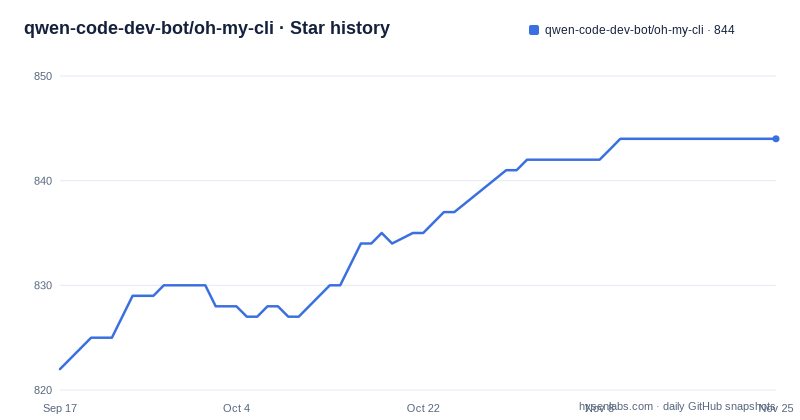
Star history
- qwen-code-dev-bot/oh-my-cli844 ★ · +22
| Repository | 2026-09-17 | 2026-11-25 |
|---|---|---|
| qwen-code-dev-bot/oh-my-cli | 822 | 844 |
22 Stars in the last 69 days, measured from the daily GitHub snapshot. Compare with other projects
Editorial analysis
A trusted workspace .env outranks your own settings file
Three variables carry the model configuration: `OPENAI_API_KEY`, `OPENAI_BASE_URL` and `OPENAI_MODEL`, with the base URL defaulting to `https://api.openai.com/v1`. The two entries marked as required are not required when the user settings file supplies them.
Each field resolves through four layers, highest first. For the base URL that is the environment variable, then the workspace `.env` value, then `model.baseUrl` in the settings file, then a built-in default. The credential follows the same shape with one difference: the third layer is not a literal value in the file but the name of an environment variable, given as `model.apiKeyEnv`.
That ordering is the security story. Your own `~/.oh-my-cli/settings.json` only points at a variable by name, and a trusted workspace `.env` can supply the credential value directly, sitting above the file you own. Folder trust is therefore not a checkbox about one file, it is a grant over which credential wins.
Folder trust is the switch that opens .env at all
The workspace `.env` is only read when the workspace is trusted. Trust is recorded in a user-owned store through `--trust-workspace`, or granted for the current run alone with `--trust`. An untrusted workspace's `.env` is never opened, and a missing file is a silent no-op rather than an error.
Two constraints keep that boundary from leaking. Environment variables you already exported always beat `.env` values, so an export-based setup keeps working unchanged. And the file is parsed for model configuration only: `process.env` is never mutated, so values in it are not inherited by spawned tools or child processes. Diagnostics report the file path and variable names, never values.
The variants are closed too. `.env.local` and `.env.production` are not read, and neither are nested `.env` files, so the only file that matters is the one at the workspace root.
A settings file inside a project is never auto-discovered
The settings file is either the user-owned default at `~/.oh-my-cli/settings.json` or a path you pass explicitly with `--settings <path>`. Nothing else is picked up, and the stated reason is the important part: a settings file inside a project is never auto-discovered, so an untrusted repository cannot redirect your endpoint or your credential.
The file holds non-secret configuration. A raw credential field such as `model.apiKey` is rejected outright, and `apiKeyEnv` names the environment variable instead. The same file also backs the `--health` inventory of MCP servers and extensions.
`--preflight` is the verification tool, and its design is the useful part: it prints a redacted summary of the resolved model, the endpoint host, the settings source and the credential variable name, never the value, and it labels which layer supplied each one, as `env`, `workspace-env`, `settings` or `default`. That label is the thing to read when something resolves differently from what you expected.
npm test runs unit tests, and integration tests drag in Electron
The test scripts are layered, and the layering has consequences. `test` is `vitest run tests/unit`. `test:integration` is `vitest run tests/integration && npm run test:desktop`. `test:desktop` builds first and then runs `timeout 30 xvfb-run -a electron --no-sandbox --disable-gpu scripts/test-desktop.mjs`. `smoke` is `vitest run tests/smoke`.
Two frictions follow. The unit suite is all that `npm test` runs, so integration and smoke coverage are opt-in, and a green default test says less than it appears to. And the integration command cannot run without an X virtual framebuffer, because the desktop test is Electron launched under `xvfb-run` with a 30 second timeout, the sandbox disabled and the GPU disabled. On a Linux box without xvfb installed, the integration command fails for a reason that has nothing to do with your code.
A postbuild step produces the Electron main, and there are three runtime deps
The runtime dependency list is short enough to read in full: `commander` for the command line, `openai` for the client, and `zod` for validation. Everything else is a dev dependency, including Electron, esbuild, tsx, typescript and vitest. Node 22 or later is required, and the package is ESM at version 0.1.0.
Two fields in package.json explain the shape of the project. `bin` maps `oh-my-cli` to `./dist/index.js`, which is the terminal entry point. `main` points at `dist/desktop/main.js`, the Electron main process, and a `postbuild` script runs `node scripts/build-desktop.mjs` to produce it. So a plain build produces both the CLI and the desktop shell, and `npm run desktop` rebuilds and then launches Electron.
Install from a clone is three commands:
npm install
npm run build
npm link
The last one puts `oh-my-cli` on your PATH so the documented examples run as written, `npm unlink -g oh-my-cli` removes it later, and if you would rather not link anything, the built entry runs directly as `node dist/index.js`.
The Bot files issues against itself and cannot change its own rules
The project describes itself as developing itself, through an autonomous, evidence-bound queue under a protected governance plane set out in `AUTONOMY.md`.
Three sources feed the queue: promoted user reports, findings from a bounded community-source registry, and reproducible self-discoveries. Each becomes a normalized Issue authored by the repository Bot before execution, so the work arrives as a tracked item rather than as a silent edit.
The split of powers is the interesting part. The autonomy contract, its policy files, the GitHub workflows and CODEOWNERS form the protected plane, and it is maintained by `qqqys`. The Bot may propose governance changes but cannot apply them. A `.autonomy/` directory at the top level holds that machinery, next to the ordinary `CONTRIBUTING.md` and `SECURITY.md`.
So the codebase is explicit about the difference between a change it can make and a change it can only suggest.
Sessions are JSONL files you can resume, compact and undo
Every run is a JSONL session file rather than an in-memory conversation. What that buys is resume or continue on a session, compaction, export, and undo or redo of a completed turn.
The headless story is built on the same substrate: a versioned JSON event stream, a privacy-safe run summary, a run scorecard, provider cost and spend budgets with run caps, recovery from checkpoints, and an exportable evidence archive. Those are the pieces that make a run reviewable afterwards rather than only observable while it happens.
The tools themselves are the conventional set: file, search and shell, operating inside a workspace path containment boundary, with mutating tools failing closed by default and a deterministic command policy in front of them. The approval preview is described as spoof-resistant, which in this context means text returned by a tool cannot be used to fake the approval prompt.
The Chinese guide states that English wins
The configuration examples all point at DashScope rather than OpenAI. The settings sample sets a base URL of `https://dashscope.aliyuncs.com/compatible-mode/v1`, a model named `qwen-latest-series-invite-beta-v77` and `DASHSCOPE_API_KEY` as the credential variable.
Model profiles extend the same file, so several endpoints sit side by side. The example declares a `qwen` profile, marked as the default and described as the hosted Qwen, alongside a `local` profile using the model `llama3` at `http://127.0.0.1:11434/v1`, and `defaultProfile` chooses between them.
There is a Simplified Chinese guide at `docs/ZH-CN.md` covering install, DashScope and OpenAI-compatible endpoint configuration, CLI and Desktop startup, session and file safety boundaries, and troubleshooting. It carries a precedence line of its own: the English documentation is the authoritative version, and where the two differ, English wins.
Editorial conclusion
oh-my-cli is a reasonable thing to read if you want a code agent whose safety model is written down rather than implied, and the configuration section is the reason: the precedence table, the trust store, the refusal to auto-discover a project settings file and the redacted preflight output are all things you can verify. Three things to check before you trust it. First, what folder trust actually grants, because a trusted workspace .env outranks your own user settings file for the credential, so trusting a directory is closer to trusting a reviewer than to trusting a config file. Second, that the default test command only runs unit tests, since the integration command also launches Electron under xvfb-run with a 30 second timeout, and the smoke suite is a separate command. Third, the version: package.json reads 0.1.0, there are no GitHub releases, and the last push was 2026-08-12. Node 22 or later is required, Apache-2.0 covers the code, and AUTONOMY.md governs what the Bot may do to itself.
Frequently asked questions
what is oh my cli
oh-my-cli is a small, self-hosted code agent: a terminal CLI with file and shell tools, built with Node.js 22, TypeScript and ESM, running against any OpenAI-compatible endpoint. You install it with `npm install`, `npm run build` and `npm link`.
How does oh-my-cli decide which API key to use?
Four layers, highest first: the environment variable, the workspace `.env` value, the user settings file, then a built-in default. For the credential the third layer is not a value but `model.apiKeyEnv`, the name of an environment variable. Raw credential fields such as `model.apiKey` are rejected.
Can a project in oh-my-cli redirect my API key or endpoint?
Not without your trust. A settings file inside a project is never auto-discovered, and a workspace `.env` is only read once the workspace is trusted through `--trust-workspace`, or for one run with `--trust`.
What does the default test command run in oh-my-cli?
Only the unit suite, `vitest run tests/unit`. The integration command also runs the desktop test, which needs `xvfb-run` and launches Electron with `--no-sandbox --disable-gpu` under a 30 second timeout, and the smoke suite is a separate script.
Can the oh-my-cli repository Bot change its own rules?
No. The autonomy contract, its policy files, the GitHub workflows and CODEOWNERS form a protected governance plane maintained by `qqqys`, and the Bot may propose governance changes but cannot apply them.
Is there a Chinese version of the oh-my-cli documentation?
Yes, `docs/ZH-CN.md`, covering install, DashScope and OpenAI-compatible endpoint setup, CLI and Desktop startup, session and file safety boundaries, and troubleshooting. It states that the English documentation is authoritative and wins where the two differ.
Official sources
Add this badge to your README
If you maintain this project, the badge below links readers to this analysis and shows its maintenance status from the daily GitHub snapshot. Paste the markdown into your README; add ?metric=license or ?metric=stars to the image URL for a different field.

[](https://hysenlabs.com/projects/qwen-code-dev-bot-oh-my-cli)Star history chart for your README
[](https://hysenlabs.com/projects/qwen-code-dev-bot-oh-my-cli)Was this useful?