Fun-Audio-Chat runs a 5 Hz speech backbone with a 25 Hz refinement head
Fun-Audio-Chat is a Large Audio Language Model built for natural, low-latency voice interactions.
At a glance
- What is it?
- Fun-Audio-Chat is an Apache-2.0 licensed 8B audio language model from the FunAudioLLM group that introduces dual-resolution speech representations, a shared 5 Hz backbone with a 25 Hz refined head, cutting GPU hours by nearly 50 percent, plus core-cocktail training to keep its text capabilities intact.
- Who is it for?
- Fun-Audio-Chat fits a speech research team that needs a spoken dialogue and audio understanding model with published weights, training code and evaluation scripts on HuggingFace or ModelScope, and it fits a team building a low-latency voice agent that needs the 5 Hz frame rate for inference cost.
- Can I use it commercially?
- Yes. Apache-2.0 is a permissive licence: you can use, modify and sell software built on it, as long as you keep its copyright and licence notices.
- Is it still maintained?
- Yes. The repository last received commits 45 days ago.
- What is it written in?
- Mainly Python, according to GitHub's language statistics.
Answers come from the project's GitHub data, last synced on November 7, 2026, and from our analysis. They are not legal advice.
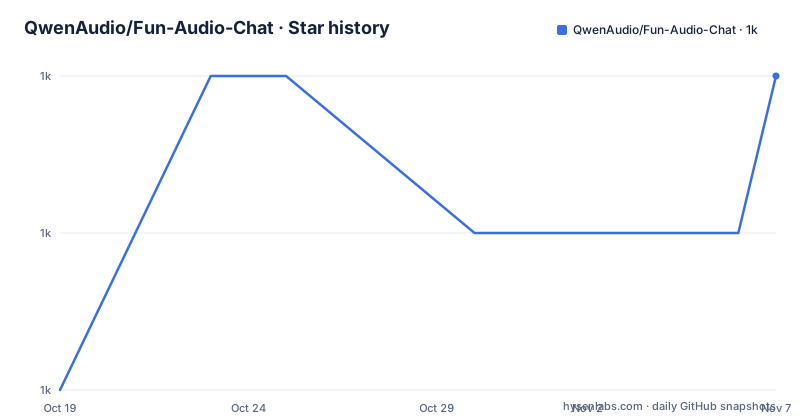
Star history
- QwenAudio/Fun-Audio-Chat1,011 ★ · +2
| Repository | 2026-10-19 | 2026-11-07 |
|---|---|---|
| QwenAudio/Fun-Audio-Chat | 1k | 1k |
2 Stars in the last 19 days, measured from the daily GitHub snapshot. Compare with other projects
Editorial analysis
Two frame rates, one shared backbone
Fun-Audio-Chat is a Large Audio Language Model built for natural, low-latency voice interactions, and the technical contribution is stated in one sentence in the Overview. It introduces Dual-Resolution Speech Representations, an efficient 5Hz shared backbone plus a 25Hz refined head, to cut compute while keeping high speech quality, and Core-Cocktail training to preserve strong text LLM capabilities.
The dual-resolution idea is the one to understand first. The Key Features list puts the frame rate in context, an efficient 5Hz frame rate (vs. 12.5Hz or 25Hz for other models), reducing GPU hours by nearly 50% while maintaining high speech quality.
Speech models turn audio into a sequence of frames, and every frame is a token the language model has to process. At 25 Hz, which is the rate other models in this space use, a minute of audio is 1,500 frames. At 12.5 Hz it is 750. At 5 Hz it is 300. The compute saving is roughly proportional to the sequence length, so dropping the rate by a factor of two or five is a large reduction in the transformer work for the same audio.
The cost of a low frame rate is that the representation has less temporal resolution, and that is where the second half of the design comes in. A cheap 5 Hz representation of the whole conversation is computed first, shared across the sequence, and a 25 Hz refined head produces the higher resolution output only where it is needed. So the bulk of the audio is carried at the coarse rate and the fine detail is recovered at the fine rate, rather than paying for fine resolution over the entire recording.
The other half is Core-Cocktail training, which exists because an audio model that is fine at speech can lose its text ability. The stated purpose is to preserve strong text LLM capabilities, and it is a training recipe rather than an architecture change.
The model is published as Fun-Audio-Chat-8B on both HuggingFace and ModelScope, with a demo page, and the paper is on arXiv as 2512.20156. The repository also carries a technical report PDF, Fun-Audio-Chat-Technical-Report.pdf, along with a Qwen-Audio-3.1-Realtime-Technical-Report.pdf, so the related realtime work is documented alongside.
What the benchmarks claim, and where to check them
The evaluation claims are stated in the Key Features list with the benchmark names attached, which is the right way to make them checkable.
The claim is that the model ranks Top among models of the same size (around-8B parameters) on OpenAudioBench, VoiceBench and UltraEval-Audio, MMAU, MMAU-Pro, MMSU, Speech-ACEBench, Speech-BFCL, Speech-SmartInteract, and VStyle. The capabilities listed are spoken QA, audio understanding, speech function calling, speech instruction-following and voice empathy.
The README then points at where the data and the scripts live for each one, and this is the part that makes the claims usable. VoiceBench and the MMAU evaluation come from Kimi-Audio-Evalkit, OpenAudioBench is a dataset on HuggingFace, and UltraEval-Audio is a separate repository from OpenBMB.
So the benchmarks are third party in the sense that the evaluation data and scripts are hosted by the teams that built them, which is a stronger position than a self-reported number in a paper, since anyone can rerun the same protocol. That is the difference between a claim and a measurement.
The evaluation section also splits the model into two inference paths, and the split matters for anyone reading the code. For S2T, speech to text, the instruction is to use DEFAULT_S2T_PROMPT from utils/constant.py, with the script in examples/infer_s2t.py. For S2S, speech to speech, it is DEFAULT_S2M_PROMPT with examples/infer_s2s.py. So the same weights are driven by different prompts for the two modes, and the prompts are centralised in one file rather than being inline in the scripts.
The repository listing shows the rest of the structure, with evaluate/ for the evaluation harness, examples/ for the inference scripts, funaudiochat/ for the model code, training/ for the training pipeline, utils/ for the shared code, third_party/ for vendored components, and web_demo/ for the web application.
Installation, and the size of what you are downloading
The requirements are stated plainly and they are not small.
- Python == 3.12 - PyTorch == 2.8.0 - ffmpeg - GPU Memory: ~24GB for inference, 4×80GB for training
The clone has a flag that matters.
git clone --recurse-submodules https://github.com/FunAudioLLM/Fun-Audio-Chat
cd Fun-Audio-Chat
The submodules are the third_party/ directory, and the .gitmodules file at the root confirms it.
The environment setup is the standard PyTorch-with-a-specific-CUDA-build recipe.
apt install ffmpeg
conda create -n FunAudioChat python=3.12 -y
conda activate FunAudioChat
pip install torch==2.8.0 torchaudio==2.8.0 --index-url https://download.pytorch.org/whl/cu128
pip install -r requirements.txt
The cu128 index means CUDA 12.8, and the requirements file pins transformers to 4.52.3 and datasets to 3.6.0, and it constrains numpy to under 2.0.0 with the comment that it is a basic dependency, which tells you the stack predates the numpy 2 migration.
Then the model weights, and there are two of them, not one.
pip install huggingface-hub
hf download FunAudioLLM/Fun-Audio-Chat-8B --local-dir ./pretrained_models/Fun-Audio-Chat-8B
hf download FunAudioLLM/Fun-CosyVoice3-0.5B-2512 --local-dir ./pretrained_models/Fun-CosyVoice3-0.5B-2512
So the 8B model is the dialogue and understanding model, and the 0.5B model is a separate speech synthesis model, CosyVoice3, and the speech-to-speech mode needs both. The directory layout makes that explicit.
pretrained_models/
├── Fun-Audio-Chat-8B/     # 8B parameter main model
└── Fun-CosyVoice3-0.5B-2512/  # Speech synthesis model
ModelScope offers the same downloads for users who cannot reach HuggingFace, which is a practical option given the origin of the project.
The web demo is a research server plus a Node client
The web demo is described in two parts, and the split tells you what it is for.
The server is a Python process with a model path, a port and a separate TTS GPU argument.
pip install sphn aiohttp
python -m web_demo.server.server --model-path pretrained_models/Fun-Audio-Chat-8B --port 11236 --tts-gpu 1
The --tts-gpu flag is the interesting one, since the comment says to use another GPU for better perfermance, the typo in the original notwithstanding. A model that needs a separate speech synthesis model running alongside it can be given its own device, which on a multi-GPU machine is the difference between one saturated card and two.
The client is a Node application, and the setup is a full Vite development environment.
cd web_demo/client
curl -o- https://raw.githubusercontent.com/nvm-sh/nvm/v0.39.0/install.sh | bash
nvm use
openssl req -x509 -newkey rsa:4096 -keyout key.pem -out cert.pem -days 365 -nodes
npm install
npm run dev
The .env.local file configures the API path.
VITE_QUEUE_API_PATH=/apiThe VITE_QUEUE_API_PATH name is a clue about the architecture. The client talks to a queue, not directly to the model, which is the right shape for a low-latency voice application. A streaming model server with a request queue in front of it is the standard arrangement, because the inference is a long-running generation and the browser needs a job identifier it can poll or subscribe to.
The self-signed certificate is generated with a 365 day validity and the -nodes flag, so no passphrase, and the client is expected to talk to the server over HTTPS. For a research demo that is a reasonable tradeoff, since the browser will otherwise refuse a microphone permission request on an insecure origin, and the Web Audio API requires a secure context.
The README defers to the two README files inside web_demo/server/ and web_demo/client/ for the details, so the top level document is the overview and the two directories carry the specifics.
A vLLM contribution changed the deployment maths
The first item in the News section is about an inference optimisation rather than a model release, and it is worth a paragraph because it changes what the model costs to run.
On 2026.01.29, the project thanked @nemoramo for contributing S2T inference support to the official vLLM repository, achieving ~20x speedup for short audios and ~50x for long audios.
That is a large speedup and it is the kind of contribution that only happens when a model is structured in a way that a serving engine can exploit. The dual-resolution design, a cheap 5 Hz pass shared across the sequence and a refined head on top, is a structure that maps onto separate stages of execution, and the S2T path is the one that can be batched and cached.
The 20x for short audios against 50x for long ones also says something about where the win comes from. If the win were in raw per-token compute it would be roughly constant. A speedup that grows with audio length points at something that was previously recomputed and is now reused, which for a shared backbone over a long sequence is exactly the kind of saving you would expect.
The second news item is that the previous work, DrVoice: Parallel Speech-Text Voice Conversation Model via Dual-Resolution Speech Representations, was accepted by ICLR 2026. So the dual-resolution idea was published first as its own paper, and Fun-Audio-Chat is the follow-on that applies it to a general audio language model with core-cocktail training for text retention.
The third item is the original release on 2025.12.23 of the model, the training code and the inference code, with the performance claims across spoken question answering, audio understanding, speech function calling, speech instruction-following and voice empathy.
The repository has no GitHub releases, and the last push to main was on 2026-09-24, so the model artefacts are distributed through HuggingFace and ModelScope rather than through release tags.
Where Fun-Audio-Chat is the wrong choice
The first wrong case is a team without a GPU. The requirements are explicit, about 24 GB of memory for inference and four 80 GB GPUs for training. That is a research and prototyping budget, and the alternative for a product that needs a voice model is a hosted API.
The second wrong case is a team that needs a packaged runtime. The web demo is a Python server plus a Node client with a self-signed certificate, an npm install and a Vite dev server. There is no container image described, no service configuration, no health check, no production deployment story, and the VITE_QUEUE_API_PATH configuration suggests a development setup. A team shipping a voice product needs all of that, and none of it is here.
The third wrong case is a project that needs the model to run on a device. The 8B parameter model needs 24 GB of memory for inference. On-device speech models are a different class of artefact, and the related Qwen-Audio-3.1-Realtime-Technical-Report.pdf in the repository suggests that direction is being explored elsewhere.
The fourth wrong case is a team that wants the text side of the model to be excellent. The core-cocktail training is described as preserving strong text LLM capabilities, which is a defensive framing, and the text benchmarks are not the focus of the evaluation section. If a use case is mostly text with occasional audio, a text-first model with a separate speech component is a different and possibly cheaper answer.
How it differs from a speech-to-text model with a separate dialogue layer
The comparison worth making is with the common architecture of a speech recognition model feeding a text language model, and the difference in approach is what the frame rate buys.
In the cascaded arrangement, audio is transcribed into text and the text goes to a language model. That has two costs. The transcription is lossy, everything the recogniser does not understand about tone, emphasis, hesitation or emotion is gone before the language model sees it, and the model's ability to reason over prosody is zero. And the latency is the sum of the two stages rather than the maximum of them, and in a spoken dialogue the round trip is what the user feels.
A single audio language model removes the transcription step. The README's benchmark list makes the difference visible, because the set includes voice empathy and speech instruction-following, which are properties of a model that heard the audio rather than a transcript of it.
The second difference is the compute argument, and it is the one the project leads with. A 5 Hz representation of the same audio carries five times less sequence for the shared part of the model, and the README quantifies it as reducing GPU hours by nearly 50% against the 12.5 Hz or 25 Hz alternatives. In a system where the audio model runs on every turn of a conversation, that is the difference between a demonstration and something a company can afford to run.
The third difference is the speech output path. The S2S mode uses a separate CosyVoice3 model for synthesis, so the generation and the speaking are two models, and the --tts-gpu flag in the web demo exists so the synthesis model can sit on its own device. A cascaded system with a commercial text to speech service has the same shape, but the pairing here is a CosyVoice checkpoint rather than a hosted voice API, which keeps the audio path local.
The fourth difference is the tradeoff the project is not hiding. Low frame rate is low temporal resolution, and the refined head exists to recover what the coarse pass lost. The recovery is a second pass, so the saving is real but not free, and the accuracy of the two-stage design is the open question the technical report in the repository root is there to address.
Editorial conclusion
Fun-Audio-Chat fits a speech research team that needs a spoken dialogue and audio understanding model with published weights, training code and evaluation scripts on HuggingFace or ModelScope, and it fits a team building a low-latency voice agent that needs the 5 Hz frame rate for inference cost. It does not fit a team without a GPU, since the requirements ask for about 24 GB for inference and four 80 GB GPUs for training, and it does not fit a project that needs a packaged runtime, since the web demo is a research server and a Node client rather than a product. Before deploying it, read the technical report in the repository root, note that the model is 8B parameters and the speech synthesis model is a separate 0.5B download, and expect to pin Python 3.12 with PyTorch 2.8.0.
Frequently asked questions
What is the dual-resolution speech representation in Fun-Audio-Chat?
It is an efficient 5Hz shared backbone plus a 25Hz refined head. The 5Hz frame rate is lower than the 12.5Hz or 25Hz used by other models, which the README says reduces GPU hours by nearly 50% while maintaining high speech quality.
What are the hardware and software requirements?
Python 3.12 exactly, PyTorch 2.8.0, ffmpeg, and about 24GB of GPU memory for inference or four 80GB GPUs for training. The PyTorch install uses the cu128 index, and the requirements file pins transformers 4.52.3 with numpy constrained below 2.0.0.
Which models do I need to download to run it?
Two. Fun-Audio-Chat-8B is the 8B parameter main model and Fun-CosyVoice3-0.5B-2512 is the speech synthesis model used for the speech to speech path. Both go into the pretrained_models directory, from HuggingFace with hf download or from ModelScope with modelscope download.
How is the speech to speech and speech to text inference driven?
The S2T path uses DEFAULT_S2T_PROMPT from utils/constant.py with the script examples/infer_s2t.py, and the S2S path uses DEFAULT_S2M_PROMPT with examples/infer_s2s.py. The example scripts are run with PYTHONPATH set to the repository root.
What did the vLLM contribution change?
S2T inference support was contributed to the official vLLM repository in January 2026, achieving about a 20x speedup for short audios and about 50x for long ones. The model itself, its training code and its inference code were released on 2025.12.23, and the earlier DrVoice work on dual-resolution representations was accepted by ICLR 2026.
Official sources
Add this badge to your README
If you maintain this project, the badge below links readers to this analysis and shows its maintenance status from the daily GitHub snapshot. Paste the markdown into your README; add ?metric=license or ?metric=stars to the image URL for a different field.

[](https://hysenlabs.com/projects/qwenaudio-fun-audio-chat)Star history chart for your README
[](https://hysenlabs.com/projects/qwenaudio-fun-audio-chat)Was this useful?