Qwen-MM-Plugins: what installing a capability actually gives your harness
Make any agent harness multimodal-native.
At a glance
- What is it?
- A plugin set that turns an agent harness into a multimodal one, shipped as a Skill plus an optional MCP server per capability. The install routes differ by harness, and the capability you can run depends on which keys and tools it needs.
- Who is it for?
- Reach for Qwen-MM-Plugins when your agent's main model can already look at images and you want it to read files itself instead of shipping them to a separate API or a shell command. Skip it when your harness is not on the list of supported ones and you are unwilling to do the manual Skill plus MCP setup, or when the model you run cannot take images at all, since core works by giving the main model native file access.
- Can I use it commercially?
- Yes. Apache-2.0 is a permissive licence: you can use, modify and sell software built on it, as long as you keep its copyright and licence notices.
- Is it still maintained?
- Yes. The repository last received commits 4 days ago.
- What is it written in?
- Mainly Python, according to GitHub's language statistics.
Answers come from the project's GitHub data, last synced on November 13, 2026, and from our analysis. They are not legal advice.
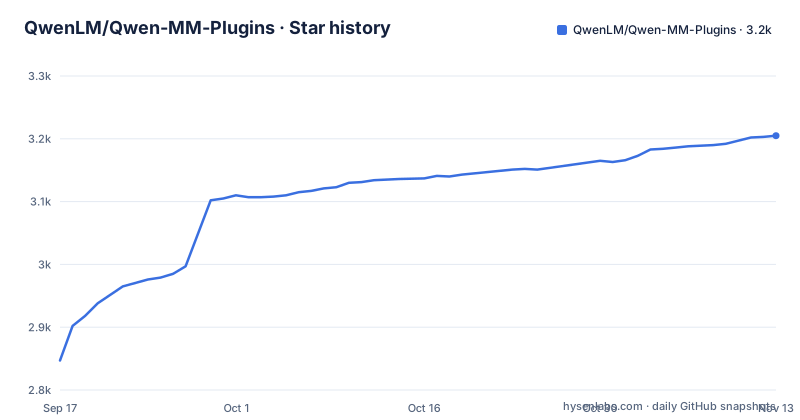
Star history
- QwenLM/Qwen-MM-Plugins3,205 ★ · +358
| Repository | 2026-09-17 | 2026-11-13 |
|---|---|---|
| QwenLM/Qwen-MM-Plugins | 2.8k | 3.2k |
358 Stars in the last 57 days, measured from the daily GitHub snapshot. Compare with other projects
Editorial analysis
Three install routes, chosen by your harness
There is no single install command that fits everyone. The guided installer covers Claude Code, CodeBuddy, Codex, Qoder, OpenClaw, Qwen Code and Gemini CLI. WorkBuddy, QoderWork and QwenWork get in-app setup instead, and DeepSeek Harness, Hermes Agent, opencode, pi and QwenPaw are handled by a manual procedure written up in `docs/en/manual_harnesses.md`. Configuration is shared between them and lives in `~/.qwen-mm-plugins/config`, so a machine with two harnesses does not need two configurations.
There is also a route that involves no terminal at all. The project hands your agent a sentence to read and follow:
Install the core and api plugins following https://raw.githubusercontent.com/QwenLM/Qwen-MM-Plugins/main/docs/en/installation.mdReplace `core` and `api` with whatever you actually need. That instruction points the agent at the installation guide rather than at a package index, so the agent fetches the guide and does the work.
curl to bash, and one verb for updating
For the guided path the whole install is one piped command.
curl -fsSL https://raw.githubusercontent.com/QwenLM/Qwen-MM-Plugins/main/install.sh | bashUpdating what a harness already has uses the same script with a verb appended.
curl -fsSL https://raw.githubusercontent.com/QwenLM/Qwen-MM-Plugins/main/install.sh | bash -s -- updateRead what that means before running it: both commands pull a script from the main branch, not from a versioned release, so what executes is whatever that branch holds at the moment you run it. The repository publishes no GitHub releases at all. Released capabilities are cut as independent, immutable tags, and a `plugin-versions.json` sits next to `install.sh` in the tree. Rollback, local checkout installs, manual Skill plus MCP setup, dependency notes and Windows on WSL2 are all pushed into `docs/en/installation.md` rather than kept on the front page.
Every capability is a Skill plus an optional MCP server
A capability is not a Python package you import. It installs as a Skill, optionally paired with an MCP server, under the name `qwen-mm-plugins-<capability>`, and each one is installed on its own so you take only what you use.
The reason the project exists is visible in the difference between `core` and everything else. `core` lets the main model read images, video and files natively instead of routing them through a separate API or ad-hoc shell commands, and that is why it is recommended for multimodal models. In its default native mode it needs no API key. It reads local images and video frames, and visualizes documents, code, data and 3D models for the agent to inspect, with media metadata, cropping, bounding box annotation and page or frame export.
Everything else is an addition on top of that: `nifti` for medical volumes, `api` for hosted model calls, `search` for the web, `mhs` for physical hardware, plus the video and 3D capabilities.
A DashScope key, ffmpeg and Node decide what you can run
The capability tables are effectively a requirements list. `core`, `search` and `mhs` carry no model requirement, and `search` and `mhs` are marked as working for any model. Everything that touches a hosted model service runs through `api`, which uses DashScope or a compatible self-hosted service, configured per model family; with DashScope, oversized local audio and video can be handed to model bound temporary object storage automatically, so you do not upload the whole file yourself.
The two video capabilities name their tools outright. `video-memory` needs a DashScope key and ffmpeg, and `video-edit` needs a DashScope key, ffmpeg and Node. That third requirement is the one that surprises people: media generation and editing is not a pure Python path. `video-spatio` answers 3D questions about images and video, including distance, size, orientation and left or right, over the same model series.
src/capabilities holds one directory per plugin, some with vendored add-ons
The packaging metadata shows how the tree is arranged. `pyproject.toml` declares the distribution `qwen-mm-plugins`, requires Python 3.10 or newer, and classifies it as production stable for CPython 3.10 through 3.13 on an operating system independent target. The dependency list starts at `mcp>=1.0.0,<2`, and the comment above it says the base runtime covers the server, `read_image` and optional text only image captions, with everything else treated as an extra.
The `license-files` array is a map of the source tree: one directory per capability under `src/capabilities/`, with `NOTICE.md` files for blender, freecad and omni-chatcut, a vendored FreeCADMCP `LICENSE` under the freecad add-on, and the SIL Open Font License text for the fonts under `omni-chatcut/skill/music-to-mv/workflows/video-generation/assets/fonts/`. Those entries exist so third party attribution ships inside the wheel rather than only in the repository. Alongside `src/` sit `scripts/`, `tests/`, `docs/`, `ruff.toml`, `.claude-plugin/`, `AGENTS.md`, `CLAUDE.md` and a Chinese `README.zh.md`.
Two capability tables, and the model family picks the row
The capabilities are not one flat list. A general table covers what works regardless of model, and a second table is headed by the Qwen VL series, with Qwen3.8-Max and Qwen3.7-Plus given as the examples. The instruction attached to both tables is to pick by your agent's main model, which is why a row can sit in one table and not the other.
Reading the general table: `core` for native file reading, `nifti` for NIfTI header metadata and configurable source axis slices with volume level intensity normalization and window presets, `api` for VL vision chat, OCR and grounding plus Omni transcription, diarization, captioning and event analysis with dedicated ASR and SAM3 segmentation, `search` for web search and page extraction through Serper, Exa, Tavily or Serply with Serper handling reverse image search, and `mhs` for driving cameras, sensors, lamps, arms and lab equipment through Model Hardware Standard adapters.
`mhs` is the one with a safety story attached: limits are enforced on the host side, there is an emergency stop, adapters run by the hardware's owner, and no cloud key is involved.
No releases here, and capabilities arrive weekly
The cadence is the thing to notice. The first release on 2026-08-03 shipped `core`, `video-memory`, `video-edit`, Blender, FreeCAD and `edu-agent`. On 2026-08-11 `api` and `search` were split out as standalone plugins, separating model services and web search from local file tools. On 2026-09-03 came `omni-memory` for audio visual memory across long videos, on 2026-09-10 the Plugin Hub plus `omni-chatcut` and `omni-video2note`, on 2026-09-16 `omni-skill-creator` for turning demonstration videos into reusable Skills, and on 2026-09-20 `mhs` and `video-spatio`.
Six weeks after the first release the set had already moved twice per week, and each addition was versioned independently. In this snapshot the repository has no GitHub releases, its last commit is dated 2026-10-02, and it carries 3108 stars, 206 forks and 11 open issues. Immutability is claimed per capability tag, so what you installed once does not silently change under you, but the installer itself tracks main.
Editorial conclusion
Reach for Qwen-MM-Plugins when your agent's main model can already look at images and you want it to read files itself instead of shipping them to a separate API or a shell command. Skip it when your harness is not on the list of supported ones and you are unwilling to do the manual Skill plus MCP setup, or when the model you run cannot take images at all, since core works by giving the main model native file access. Before installing, check which of the three routes your harness uses, decide whether you want the curl to bash path that pulls whatever sits on main, and confirm the key, ffmpeg and Node requirements of the specific capability you are after rather than of the set as a whole.
Frequently asked questions
Does Qwen-MM-Plugins need an API key?
It depends on the capability. The core plugin needs no API key in its default native mode, and mhs says no cloud key is involved, while api runs on DashScope or a compatible self-hosted service, and video-memory and video-edit both require a DashScope key.
Which agent harnesses does Qwen-MM-Plugins support?
The guided installer covers Claude Code, CodeBuddy, Codex, Qoder, OpenClaw, Qwen Code and Gemini CLI. WorkBuddy, QoderWork and QwenWork use in-app setup, and DeepSeek Harness, Hermes Agent, opencode, pi and QwenPaw are covered by the manual harness guide.
How do I update Qwen-MM-Plugins in an existing harness?
Run the installer again with the update verb: curl -fsSL on install.sh piped to bash -s -- update. Released capabilities use independent immutable tags, and rollback for local checkout installs is described in the installation guide.
What does the core plugin of Qwen-MM-Plugins actually read?
Local images and video frames, and it visualizes documents, code, data and 3D models for the agent to inspect. Media metadata, cropping, bounding box annotation and page or frame export are included, all inside the main model rather than a separate API call.
Can Qwen-MM-Plugins use a self-hosted model service instead of DashScope?
Yes. The api capability uses DashScope or a compatible self-hosted service, configured per model family, and it covers VL vision chat, OCR and grounding as well as Omni transcription, diarization, captioning and event analysis.
Official sources
Add this badge to your README
If you maintain this project, the badge below links readers to this analysis and shows its maintenance status from the daily GitHub snapshot. Paste the markdown into your README; add ?metric=license or ?metric=stars to the image URL for a different field.

[](https://hysenlabs.com/projects/qwenlm-qwen-mm-plugins)Star history chart for your README
[](https://hysenlabs.com/projects/qwenlm-qwen-mm-plugins)Was this useful?