devtools is a facade over nine packages, and the one failure it admits is reload
Tools to make an R developer's life easier
At a glance
- What is it?
- The R package development toolkit, distributed from CRAN and now mostly a front door for testthat, roxygen2, pak, pkgbuild, pkgload, rcmdcheck, revdepcheck, sessioninfo and usethis. Its own documentation admits its book has drifted, two license files sit at the root with the repository's license field unresolved, and its newest tag is five months behind its last commit.
- Who is it for?
- devtools remains the right front door for R package development, and the right mental model is a facade rather than a toolbox. Anything you depend on in your own package should depend on the specific package that now owns it, because that is what the project tells you to do, and because the split is still moving.
- Can I use it commercially?
- Check first. The repository uses a licence we do not classify automatically, so read its LICENSE file before any commercial use.
- Is it still maintained?
- Yes. The repository last received commits 6 days ago.
- What is it written in?
- Mainly R, according to GitHub's language statistics.
Answers come from the project's GitHub data, last synced on November 24, 2026, and from our analysis. They are not legal advice.
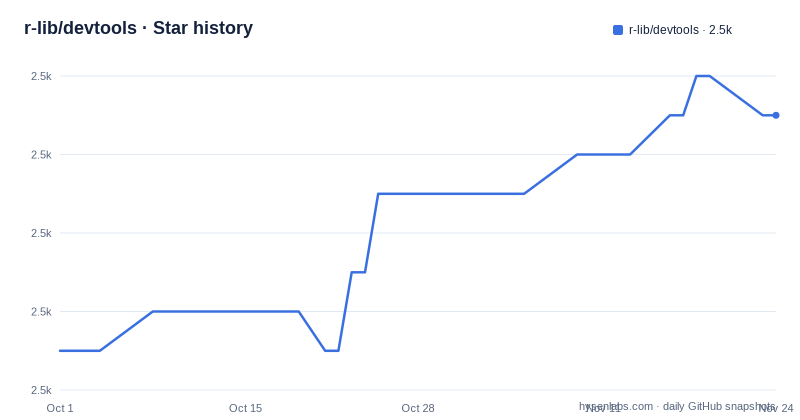
Star history
- r-lib/devtools2,527 ★ · +6
| Repository | 2026-10-01 | 2026-11-24 |
|---|---|---|
| r-lib/devtools | 2.5k | 2.5k |
6 Stars in the last 54 days, measured from the daily GitHub snapshot. Compare with other projects
Editorial analysis
Nine packages hold the functions and devtools installs all of them
The project used to do everything itself and then split itself apart, in a move the file calls a conscious uncoupling. What is left behind is the entry point and the parts nobody else wanted.
The mapping is explicit. Writing and running tests went to testthat, which is what `test()` now calls. Function and package documentation went to roxygen2, which is what `document()` calls. Installing went to pak, which is why the development install line in the file calls into another package rather than one of its own. The whole install block is four lines, and one of them is commented out:
install.packages("devtools")
pak::pak("r-lib/devtools")
Copying it verbatim gives the released version. Uncommenting the line above it, which installs pak first, is what turns the second call into the development version from GitHub. Building binary packages, including checking whether build tools exist, went to pkgbuild. Simulating package loading went to pkgload, behind `load_all()`. Running the language's own check command and reporting the result went to rcmdcheck. Reverse dependency checking went to revdepcheck. Session information went to sessioninfo. Package setup automation went to usethis.
For everyday use the split is invisible, because devtools installs all of them automatically. It stops being invisible in exactly two situations, and the file names both: filing a bug, and reusing devtools functionality inside your own package or deployed application, where the advice is to depend on the particular package instead.
That second point is the one that matters for anything you publish.
load_all() hands you a namespace your users will never get
The loading function simulates installing and reloading a package, which means it reads the R directory for code, the src directory for compiled shared objects, and the data directory for data files, then makes the result available in your session.
Then it does something no user ever gets. It exposes every function, including unexported internal ones, on the premise that during development you would usually want to reach all of them. The file describes the effect as working as if all functions were exported in the package namespace file.
That is a deliberate convenience and it has a direct consequence for testing. A test that calls an internal helper passes under `load_all()` and fails for anyone who installed the package, because the call is not part of the public surface. The same asymmetry applies in reverse: code that accidentally relies on an internal can look fine for months.
Nothing here warns about it. The three functions people run most often, loading, documenting and testing, all execute in that permissive namespace, so the mismatch is the default rather than the exception.
The only admitted failure mode points at another function's documentation
Scanning the file for the places it admits something can go wrong, exactly one comes back in the installation section.
The install function reinstalls the package, detaches the version currently loaded, then reloads the new one with the library call. Immediately after that sentence comes the warning: reloading a package is not guaranteed to work, and the caveats are in the documentation for the unload function.
That is worth noticing for two reasons. The first is that detaching and reloading really is the fragile part of this workflow, because a package that has allocated resources, registered S3 methods or cached state in its namespace may not survive being torn down and put back inside one session. The second is where the explanation lives. Rather than stating the conditions under which reload fails, the file redirects to another function's manual page, which means the practical knowledge is split across two documents and the reader has to know that the answer is not in the one they are reading.
Everything else in the file describes what the functions do. Only this one describes something that might not work.
Windows and macOS checks happen by uploading your package elsewhere
Local checking is straightforward. The check function updates the documentation, then builds and checks the package on the machine it is running on.
The other platforms are not local. Three functions exist for them, one for a Windows release check, one for a Windows development check, and one for a macOS release check, and both are backed by external services: a hosted Windows builder and a hosted macOS builder you submit to through a web form. There is no macOS development variant in the list, so the pair is asymmetric in both directions.
What that means operationally is that checking on those platforms is not a local command with a remote backend, it is a submission. The package you built is handed to a service you do not control, which compiles it on its own machines and hands back a report. For a package that is about to go to a public repository that is a normal trade, and for a package containing anything a compiler will read from a path outside the package it is a decision rather than an obvious yes.
The two submission functions differ in exactly one documented way. `release()` handles the mechanics of submission and re-runs a lot of local checks first. `submit_cran()` handles the mechanics without re-running them, which makes it the faster path and the one that will let a regression through.
update_packages() will move a dependency you installed from GitHub
The update function is described as bringing a package to its latest version, and the sentence that follows is the interesting one: it works both on packages installed from the public repository and on those installed by any of the install functions.
Those install functions cover eight sources. GitHub, GitLab, Bitbucket, an arbitrary URL, an arbitrary git repository, an arbitrary SVN repository, a local file on disk, and a specific version from the public repository. Two of those names are worth pausing on for a package that is still being used. Subversion is in the list of supported sources, which tells you how much of the pre-git era this interface still carries.
The combination is the part with consequences. If a package was installed from a specific GitHub commit because that commit worked, a single call to update everything replaces it with whatever is at the head of that repository now, and there is no record of the pin afterwards except in a lockfile the user may not have. For a package managing a developer's whole toolchain, that is the difference between reproducing an environment and approximating one.
The file presents all of this as convenience, which it is. It does not mention that the update path ignores the reason a version was chosen.
Two license files sit at the root and the license field is unresolved
The tree has a file named LICENSE and a separate file named LICENSE.md. The repository's own license field is recorded as unresolved, which means nothing has asserted which terms govern the code.
Two files with those names is not self contradictory in a project that has changed how it records licensing, since one of them is often a pointer rather than the terms themselves. But the file does not say which is which, so a reader who needs to comply has to open both and work it out, and a tool that reads only the metadata gets nothing at all.
For a package that most users install rather than read, this matters less than it would elsewhere. For the audience that matters most here, people who copy code out of the package, or who vendor it, or who want to know whether a derived work has obligations, an unresolved field is the first thing that stops the automated answer.
The honest reading is that the terms are declared somewhere in those two files and the metadata is simply out of date. Which one is authoritative is not something this repository states, and guessing would be worse than saying so.
The book built around this workflow is documented as out of sync
The project is the spine of a book, and the file says so at the top. Then, in the resources section, it admits the first edition of that book has grown somewhat out of sync with the current version of devtools, and notes that the first edition is no longer available online while still being in print.
A second edition reflecting the current state of devtools is available online and in paperback, with new topics such as package websites and continuous integration. Two specific chapters are recommended as starting points, one covering the whole game and one covering package structure.
The honesty is welcome and the timing is awkward. The workflow this package exists to simplify has been rearranged underneath the book's first edition, which is exactly what a book built around a tool's workflow will do to it. Anyone starting from the print copy is learning an interface that the package has since redistributed across nine others.
The rest of the resources follow the same shape: a community forum category, a third party style guide, four blog posts about writing a first package, and the language's own manual chapter as the exhaustive reference. The readme is a list of places to read rather than a place that explains anything, which is consistent with the website existing for that purpose.
The package uses every tool it recommends and keeps its own reverse dependency report
The tree shows what this project dogfoods. Documentation is generated, with a template directory for the manual pages and a generated directory beside it, which is the roxygen2 layout. Tests live in their own directory. A site configuration and a site directory say the package documents itself, and a coverage configuration says coverage is tracked. A lint configuration and a formatter configuration file sit at the root next to an editor configuration.
Two files stand out for what they say about process rather than layout. One is the submission notes file, which is the text a maintainer sends to the public repository's reviewers with a new submission. The other is a reverse dependency directory, because devtools is depended on by a very large number of packages and someone has to check what a change breaks.
There is also a maintenance file, a news file and an R project file, plus a directory for the editor configuration used by one commercial toolchain and a directory of similar configuration for an assistant.
The last commit on the repository is dated 2026-09-30. The newest release is v2.5.2 from 2026-04-30, with 2.5.1 in April and 2.5.0 in March. So five months of work sit above the newest tag, which for a package whose releases are its distribution channel means the version you install from the public repository is not the current source.
Editorial conclusion
devtools remains the right front door for R package development, and the right mental model is a facade rather than a toolbox. Anything you depend on in your own package should depend on the specific package that now owns it, because that is what the project tells you to do, and because the split is still moving. Two things to know before you start. Your tests run against a namespace that exposes unexported internals, so a green local run does not prove your public API works. And the newest published version is v2.5.2 from 2026-04-30 while the repository was committed to on 2026-09-30, so pinning to the tag means pinning to a build five months behind the source. Neither is a reason to avoid it; both are reasons to know which layer a failure belongs to before you file it.
Frequently asked questions
how to install devtools in r
From the public repository with `install.packages("devtools")`. The development version from GitHub needs a different installer first: the file shows that line commented out above `pak::pak("r-lib/devtools")`, so uncommenting it and running it gives you the version on GitHub rather than the released one.
Which packages does devtools delegate its functions to?
Nine. Tests went to testthat, documentation to roxygen2, installing to pak, binary builds to pkgbuild, simulated loading to pkgload, running the language check command to rcmdcheck, reverse dependencies to revdepcheck, session information to sessioninfo and package setup to usethis. devtools installs all of them automatically, so most users never see the split.
Why should a devtools bug be filed in another repository?
Because the function that broke now lives elsewhere. The file says explicitly that you will need to care if you are filing a bug, because reporting it at the correct place leads to a speedier resolution, and it lists which package owns testing, documentation, installing, building, loading, checking and reverse dependency checks.
Does load_all() give the same package a user would install?
No. It loads code from the R directory, compiled shared objects from src and data files from data, and it exposes unexported internal functions too, working as if every function were exported in the namespace file. Tests run in that permissive namespace, so calling an internal helper in a test will pass locally and fail for anyone who installed the package.
How do you check an R package on Windows and macOS with devtools?
Not locally. Three functions submit the package elsewhere: `check_win_release()`, `check_win_devel()` and `check_mac_release()`, backed by a hosted Windows builder and a hosted macOS builder you submit to through a web form. There is no macOS development variant. The local `check()` updates documentation and then builds and checks on the machine it runs on.
What is the difference between devtools release() and submit_cran()?
Both handle the mechanics of submission to the public repository. The difference is that release() re-runs a lot of local checks first and submit_cran() does not, which makes the second one faster and more likely to let a regression through. Separately, `update_packages()` updates both public repository installs and anything installed by the install functions, which includes GitHub and SVN sources.
Official sources
Add this badge to your README
If you maintain this project, the badge below links readers to this analysis and shows its maintenance status from the daily GitHub snapshot. Paste the markdown into your README; add ?metric=license or ?metric=stars to the image URL for a different field.

[](https://hysenlabs.com/projects/r-lib-devtools)Star history chart for your README
[](https://hysenlabs.com/projects/r-lib-devtools)Was this useful?