r5n.es-js-snippets for React and TypeScript in VS Code
Extension for React/Javascript snippets with search supporting ES7+ and babel features
At a glance
- What is it?
- ES JS Snippets gives VS Code users searchable React, JavaScript, and TypeScript scaffolds, including Redux Toolkit and React Router examples. It suits developers who want configurable component templates, but it does not read a project's Prettier configuration.
- Who is it for?
- Adopt r5n.es-js-snippets if your work centers on React, TypeScript, or Redux Toolkit and you want searchable, configurable scaffolds in VS Code. Do not choose it if automatic integration with project-specific Prettier settings is a requirement, or if browser-hosted extension execution is mandatory.
- Can I use it commercially?
- Yes. MIT is a permissive licence: you can use, modify and sell software built on it, as long as you keep its copyright and licence notices.
- Is it still maintained?
- Yes. The repository last received commits 97 days ago.
- What is it written in?
- Mainly TypeScript, according to GitHub's language statistics.
Answers come from the project's GitHub data, last synced on November 7, 2026, and from our analysis. They are not legal advice.
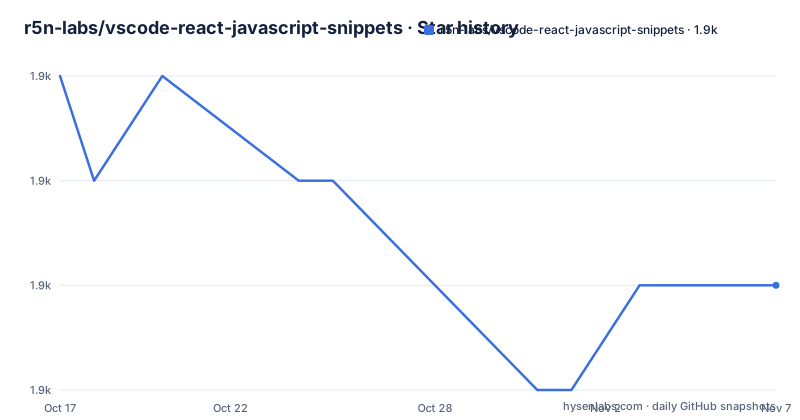
Star history
- r5n-labs/vscode-react-javascript-snippets1,870 ★ · -2
| Repository | 2026-10-17 | 2026-11-07 |
|---|---|---|
| r5n-labs/vscode-react-javascript-snippets | 1.9k | 1.9k |
-2 Stars in the last 21 days, measured from the daily GitHub snapshot. Compare with other projects
Editorial analysis
What ES JS Snippets generates for React work
ES JS Snippets addresses a narrow and familiar editor problem: writing the same boilerplate around components, hooks, imports, tests, Redux state, and routing. It is intended for developers working in VS Code and compatible desktop clients, particularly people who build React applications with JavaScript or TypeScript. The snippet catalog is broader than its legacy roots suggest. It covers React 17 through 19, React Native, Redux Toolkit, RTK Query, React Router v6, hooks, prop types, imports, and tests.
The extension is not an application framework and does not generate a complete application architecture. Its value is insertion of small source templates. Component generation can produce different forms for JavaScript and TypeScript, while configuration controls details such as whether React is imported and whether Props and State use a type alias or an interface. Redux slice templates cover the newer Redux Toolkit patterns, including createSlice and createApi.
The repository identifies itself as a continuation of the original vscode-es7-javascript-react-snippets extension. It uses the Marketplace identifier r5n.es-js-snippets. The separate dsznajder.es7-react-js-snippets installation should not be kept alongside it, because both extensions can register overlapping snippets and command keybindings. This distinction matters during adoption because a successful new installation alone does not create a clean editor environment if the old package remains enabled.
Search, snippets, and editor configuration
Snippet discovery is the central editing path rather than requiring users to memorize every prefix. The README documents a snippet search action on ⇧⌘R for macOS and Ctrl+Alt+R for Windows and Linux. The same action is available from the VS Code Command palette under "Snippet search." Searches can match either the snippet description or its prefix. The complete generated list is kept separately in docs/Snippets.md, although the README does not reproduce that catalog.
Generated snippets are restricted through reactSnippets.settings.languageScopes. Its default is a comma-separated collection containing typescript, typescriptreact, javascript, and javascriptreact. This gives the extension a defined set of VS Code language identifiers in which completions and snippet search should participate. Because settings are application-scoped, VS Code windows share the same generated snippet artifact. The README therefore instructs users to reload VS Code when prompted after changing a setting.
Several options materially affect output. importReactOnTop defaults to false, matching React 17 through 19 components that no longer require a default React import by default. Enabling it adds import React from 'react' for projects using the legacy JSX transform. typescript defaults to true and includes the ts*, exptp, and expint snippets. typescriptPropsStatePrefix selects type or interface, while typescriptPropsNaming selects the generic name Props or a component-derived name such as ButtonProps.
Component naming has two documented sources. componentNameSource can use filename or directoryForIndex. Under directoryForIndex, an index.tsx file inside Button uses Button as the component name. Other files use their basename. Names are converted to PascalCase, so delete-modal.tsx produces DeleteModal. Redux slice names follow a different rule because slices are not components. An invalid identifier such as user-slice.ts is converted to userSlice, while UserSlice.ts remains unchanged.
Installing r5n.es-js-snippets and finding a first snippet
The documented Marketplace installation starts from VS Code Quick Open. On Linux and Windows, press Ctrl+P. On macOS, press ⌘P. Then run the extension install command:
ext install r5n.es-js-snippetsThis installs the extension under the r5n.es-js-snippets identifier. The README also links to the Marketplace listing for users who prefer the Extensions interface. Browser extension hosts are explicitly unsupported. Marketplace installation is the documented path for VS Code and Cursor, while VSCodium support is described as pending namespace verification.
For a first use, open a JavaScript, JSX, or TypeScript React file and invoke "Snippet search" from the Command palette or use the documented keyboard action. Search by a description such as a component concept or by a known prefix. The matching entry is supplied by the extension's searchable snippet catalog, whose full list is documented in docs/Snippets.md. This first-use sequence is verifiable from the README, although it does not specify one universal snippet prefix that applies to every desired scaffold.
Users moving from dsznajder.es7-react-js-snippets should install r5n.es-js-snippets, uninstall the legacy extension, and reload VS Code when prompted. Existing user-level reactSnippets.settings.* keys carry over because the configuration names remain the same. Workspace-specific generation settings do not carry over in the same way because generation settings are now application-scoped.
Prerelease 5.0.1 versus stable 5.0.0
The README describes 5.0.1 as a Marketplace prerelease and states that existing stable users remain on 5.0.0 unless they opt in. To switch, open Extensions, select ES JS Snippets with identifier r5n.es-js-snippets, and use the extension menu to select the prerelease. The expected installed version is then 5.0.1. This is a channel choice rather than an automatic upgrade.
The repository's package.json currently declares 5.0.2, while the repository has no GitHub releases. Those facts describe different surfaces. package.json is the declared package version, but the README does not state that 5.0.2 is already published to the Marketplace. It also says that the stable follow-up will use 5.0.2 because Marketplace versions cannot be reused between prerelease and stable channels.
This distinction affects upgrade planning. A repository version number should not be treated as proof of Marketplace availability. Users who require stable distribution should check the installed extension version in VS Code rather than assuming that the package manifest value has reached the stable channel.
Bun development build for coc.nvim and Packer
The repository documents source installation for coc.nvim and Packer users rather than treating those clients as ordinary Marketplace installations. Both examples invoke the same build command, which installs dependencies from the lockfile and compiles the TypeScript extension.
For vim or neovim with coc.nvim, add the plugin declaration to init.vim:
Plug 'r5n-labs/vscode-react-javascript-snippets', { 'do': 'bun install --frozen-lockfile && bun run compile' }After saving, the README says to run :PlugInstall and reload the file with :source %. For Packer, add the equivalent Lua declaration:
use {
  'r5n-labs/vscode-react-javascript-snippets',
  run = 'bun install --frozen-lockfile && bun run compile'
}
Saving the file triggers the build under the documented Packer flow. The package scripts show that compile delegates to scripts/build.ts, while generate:check checks generated snippets. The stated local development stack is bun ≥ 1.3 plus VS Code. Browser extension hosts remain outside the supported configuration.
Prettier integration limits and alternative setup paths
The most important limitation is explicit. The experimental reactSnippets.settings.prettierEnabled option was removed, and generated snippets no longer read project Prettier configuration. The extension can generate syntactically suitable templates, but the README does not claim that those templates inherit line width, quotes, semicolons, or other rules from a .prettierrc file. Projects that require snippet output to exactly match Prettier conventions will still need to format or adjust generated code.
The maintained extension is also the relevant alternative to the legacy dsznajder.es7-react-js-snippets package. The actual difference is not an abstract claim about a competitor. The README states that r5n.es-js-snippets continues the original project, carries user-level reactSnippets.settings.* keys, supports current React and Redux Toolkit patterns, and adds a snippet-search command. Because extension IDs differ, VS Code cannot update the old listing automatically. Installing the maintained package and leaving the legacy one installed can create duplicate snippets and command bindings.
For users unwilling to accept Prettier disconnection, the practical alternative is any editor snippet setup that explicitly generates code to the repository's formatting convention, whether through project-specific snippet configuration or manual formatting. The repository does not document such a Prettier-aware alternative in enough detail to supply exact configuration, so no unsupported flag should be inferred.
Maintenance, MIT licensing, and upgrade responsibilities
The repository is not archived, and its last push was on 2026-08-03. That is recent enough to indicate current repository activity, but it does not establish a release cadence. There are no GitHub releases, and the README describes Marketplace prerelease and stable channels separately. Users therefore need to distinguish source changes, package.json version values, installed Marketplace versions, and GitHub release records.
The package is licensed under MIT. That permits use, modification, distribution, and sublicensing subject to the license terms, although this review does not interpret those terms as legal advice. For organizations modifying snippet text or maintaining a private build, the LICENSE file is the primary source. The coc.nvim and Packer installations also create a direct maintenance responsibility because they run dependency installation and compilation from the repository rather than relying only on Marketplace packaging.
Configuration upgrades require attention to application scope. A VS Code window cannot have generation settings isolated per workspace because the generated snippet artifact is shared. Moving from workspace-specific values to User settings can resolve that mismatch, but teams with different conventions per repository may find one global configuration insufficient.
Editorial conclusion
Adopt r5n.es-js-snippets if your work centers on React, TypeScript, or Redux Toolkit and you want searchable, configurable scaffolds in VS Code. Do not choose it if automatic integration with project-specific Prettier settings is a requirement, or if browser-hosted extension execution is mandatory. Before migration, verify that the generated component imports, Props naming, wrapper markup, and TypeScript snippets match the conventions enforced by your repository, then confirm that the legacy dsznajder extension has been uninstalled to avoid duplicate snippets.
Frequently asked questions
How do I install ES JS Snippets in VS Code?
Open Quick Open with Ctrl+P on Linux and Windows or ⌘P on macOS, then run `ext install r5n.es-js-snippets`. The README also provides a direct Marketplace listing for installation through the Extensions interface.
How do I search for React and TypeScript snippets in ES JS Snippets?
Run "Snippet search" from the Command palette or press ⇧⌘R on macOS or Ctrl+Alt+R on Windows and Linux. Search can match a snippet description or prefix, and the full catalog is documented in `docs/Snippets.md`.
Does ES JS Snippets use my project's Prettier configuration?
No. The experimental `reactSnippets.settings.prettierEnabled` option was removed, and the README states that generated snippets no longer read project Prettier configuration.
Official sources
Add this badge to your README
If you maintain this project, the badge below links readers to this analysis and shows its maintenance status from the daily GitHub snapshot. Paste the markdown into your README; add ?metric=license or ?metric=stars to the image URL for a different field.

[](https://hysenlabs.com/projects/r5n-labs-vscode-react-javascript-snippets)Star history chart for your README
[](https://hysenlabs.com/projects/r5n-labs-vscode-react-javascript-snippets)Was this useful?