tiny-inline-diagnostic.nvim for Neovim Diagnostic Displays
A Neovim plugin for displaying inline diagnostic messages with customizable styles and icons.
At a glance
- What is it?
- tiny-inline-diagnostic.nvim replaces Neovim's built-in diagnostic virtual text with configurable inline messages, severity styling, source labels, wrapping, counts, and multiline support. It suits Neovim 0.10 or newer users who want direct control over how diagnostics appear.
- Who is it for?
- Adopt this plugin if you want Neovim diagnostics rendered as configurable inline messages and can tolerate disabling the built-in virtual text display. Do not choose it if that replacement model conflicts with another diagnostic renderer or if the configuration defaults do not match your workflow.
- Can I use it commercially?
- Yes. MIT is a permissive licence: you can use, modify and sell software built on it, as long as you keep its copyright and licence notices.
- Is it still maintained?
- Yes. The repository last received commits 30 days ago.
- What is it written in?
- Mainly Lua, according to GitHub's language statistics.
Answers come from the project's GitHub data, last synced on November 7, 2026, and from our analysis. They are not legal advice.
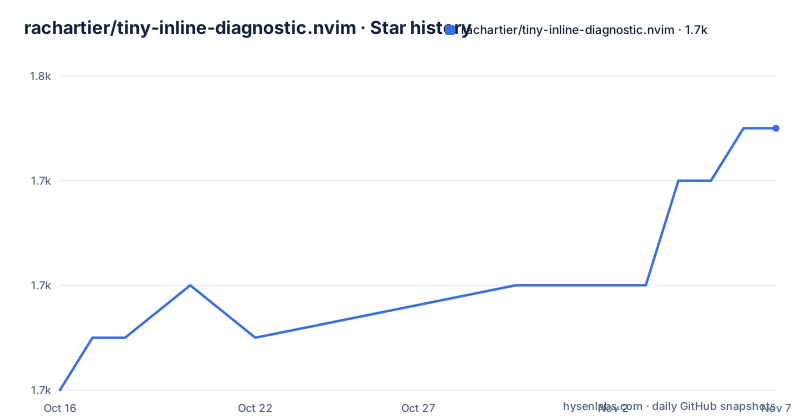
Star history
- rachartier/tiny-inline-diagnostic.nvim1,749 ★ · +5
| Repository | 2026-10-16 | 2026-11-07 |
|---|---|---|
| rachartier/tiny-inline-diagnostic.nvim | 1.7k | 1.7k |
5 Stars in the last 22 days, measured from the daily GitHub snapshot. Compare with other projects
Editorial analysis
Why tiny-inline-diagnostic.nvim Replaces Virtual Text
tiny-inline-diagnostic.nvim addresses a presentation problem in Neovim: diagnostic messages can consume meaningful screen space or look inconsistent when rendered through the editor's standard virtual text mechanism. The plugin is for Neovim users who want diagnostics beside the affected code with control over severity colors, icons, sources, codes, wrapping, and multiline behavior. Its central integration choice is deliberate. The Lazy.nvim example disables Neovim's default virtual text diagnostics after calling `setup()`, while the LazyVim example sets `diagnostics = { virtual_text = false }` for `nvim-lspconfig`.
This is not an additional layer placed safely on top of every diagnostic renderer. It is presented as the plugin's own inline diagnostic display. If both renderers remain enabled, the same diagnostics may appear twice. That requirement narrows the plugin's audience. Users with an existing diagnostic display should first determine whether it also manages virtual text, because the README does not describe a compatibility mode for preserving the built-in display.
The supported runtime is also explicit: Neovim 0.10 or newer. The project is written in Lua and distributed as a Neovim plugin. Its default branch is `main`, and the repository includes Lua source, documentation, tests, formatting configuration, and a CI workflow. Those repository elements support ongoing plugin development, although they do not establish compatibility with every Neovim configuration.
Installation with Lazy.nvim and the Required Virtual Text Change
The Lazy.nvim configuration loads the plugin after startup, calls its Lua setup function, and disables Neovim's built-in virtual text diagnostics. The documented plugin specification is shown below. The surrounding `config` function is part of the example, so retain both the setup call and the `vim.diagnostic.config()` line unless another part of your Neovim configuration already disables virtual text.
{
    "rachartier/tiny-inline-diagnostic.nvim",
    event = "VeryLazy",
    priority = 1000,
    config = function()
        require("tiny-inline-diagnostic").setup()
        vim.diagnostic.config({ virtual_text = false })
    end,
}
After adding the specification, follow the normal process used by your Neovim plugin manager to install or synchronize the repository. The README does not document a separate binary installation path, standalone executable, or package-manager command. The first concrete result should be that `require("tiny-inline-diagnostic").setup()` runs without error and that diagnostic text is no longer rendered through Neovim's default virtual text setting.
For LazyVim, the documented configuration changes the LSP integration rather than calling `vim.diagnostic.config()` directly. This distinction matters because the exact configuration ownership depends on the user's setup. The plugin is loaded with `event = "VeryLazy"` and `priority = 1000`, while `nvim-lspconfig` receives `virtual_text = false` under its `diagnostics` options.
{
  {
      "rachartier/tiny-inline-diagnostic.nvim",
      event = "VeryLazy",
      priority = 1000,
      opts = {},
  },
  {
      "neovim/nvim-lspconfig",
      opts = { diagnostics = { virtual_text = false } },
  },
}
The expected first result is still the same: one inline presentation should own diagnostic messages instead of the plugin and Neovim both rendering them.
Initial Styling, Sources, Codes, and Diagnostic Counts
Calling `setup()` without options selects the documented defaults. The default preset is `modern`, source names are hidden, diagnostic codes are shown, and plugin preset icons are used unless the user opts into icons from `vim.diagnostic.config`. Backgrounds remain opaque by default, while cursor-line diagnostics are configured for transparency. These defaults provide a useful first use without requiring the complete configuration surface to be copied immediately.
The presets documented by the README are `modern`, `classic`, `minimal`, `powerline`, `ghost`, `simple`, `nonerdfont`, and `amongus`. Preset selection changes the diagnostic appearance as a single named choice. For finer control, the `hi` table accepts Neovim highlight group names or hexadecimal colors in `#RRGGBB` form. Severity mappings cover `error`, `warn`, `info`, and `hint`, while separate entries control the arrow, background, and mixing color. This is a direct mapping into Neovim's highlighting vocabulary rather than a separate theme format.
Source and count displays require additional decisions. Enabling `show_source.enabled` adds provider names such as `lua_ls` or `pyright`, as stated in the configuration comments. Its `if_many` setting can limit source text to cases where multiple sources exist for the same diagnostic. Diagnostic counts can replace full messages when the cursor is not on the affected line, but the README explicitly requires `multilines.enabled = true` when `display_count` is true. Enabling `always_show` can keep counted diagnostics visible on all multiline lines.
require("tiny-inline-diagnostic").setup({
    options = {
        show_source = {
            enabled = true,
        },
        add_messages = {
            display_count = true,
        },
        multilines = {
            enabled = true,
        },
    },
})
This configuration asks the plugin to show source names and diagnostic counts while enabling multiline support. The reader should verify that counts replace messages away from the cursor line and that provider names appear where configured.
Multiline Messages, Cursor-Line Severity Filtering, and Wrapping
Long or multiline diagnostics create a layout problem because a message attached to one source line may need several display lines. The `multilines` option addresses that case directly. Its `enabled` switch turns on multiline diagnostic support, `always_show` controls whether those messages remain visible on every related line, and `trim_whitespaces` removes leading and trailing whitespace from each displayed line. The `tabstop` setting controls tab expansion within that behavior.
Multiline mode can also apply severity filtering. The README documents a configuration that keeps errors visible on every line while warnings, information, and hints appear only on the cursor line. The mechanism is the `multilines.severity` list, which accepts `vim.diagnostic.severity.ERROR`. Severities included in the list remain visible across all lines, while severities outside it are limited to the cursor line.
require("tiny-inline-diagnostic").setup({
    options = {
        multilines = {
            enabled = true,
            always_show = true,
            severity = { vim.diagnostic.severity.ERROR },
        },
    },
})
For readers of this configuration, errors should remain visible on every affected line, while warnings, information, and hints should appear only when the cursor is on the relevant line.
Message width is governed separately by `softwrap`, whose default is 30 characters. That value represents the minimum number of characters before a long message wraps. It is a layout threshold, not a documented character limit on the full diagnostic. Update frequency is controlled by `throttle`, which defaults to 20 milliseconds. Setting it to `0` requests immediate updates, although the README warns that this may cause lag on slow systems. Larger values reduce update frequency at the cost of possible visible delay. These controls expose a direct responsiveness versus processing trade-off without requiring users to change diagnostic providers.
Neovim Virtual Lines as the Main Alternative
Neovim's built-in `virtual_lines` diagnostic option is the clearest alternative because it also changes how diagnostics are placed relative to buffer text. Rather than loading `tiny-inline-diagnostic.nvim`, configuring presets, icons, source text, counts, multiline rules, and the plugin's update throttle, a user can keep diagnostics within Neovim's built-in rendering system and select its supported layout through `vim.diagnostic.config`.
The practical difference is ownership. Neovim's built-in options remain part of the editor configuration, while this plugin adds a Lua configuration surface and becomes responsible for its inline display. Keeping `virtual_lines` active may be preferable when the user wants to avoid an external display plugin or retain Neovim's native configuration model. This article does not claim how the built-in layout compares visually because the README contains no controlled visual or performance comparison.
The trade-off is customization scope. Neovim can render virtual text and virtual lines through its own diagnostics API, but the documented options here belong to tiny-inline-diagnostic.nvim and include named appearance presets, severity-colored arrows, source-name conditions, diagnostic glyphs, multiline severity filtering, message wrapping, overflow handling, and related diagnostics. A user who values those specific controls has a concrete reason to accept the extra configuration. A user who only needs an alternative vertical placement may not.
Multiple diagnostics on a line are represented through options such as `show_multiple_glyphs`, `use_max_severity`, and `display_count`. Related diagnostics and overflow handling are presented as default behaviors in the examples, although the excerpted configuration does not expose every default control. That limits any claim about complete runtime behavior beyond the documented settings.
Maintenance, Release History, and MIT Upgrade Considerations
The repository is not archived, and its last push was on 2026-10-08. That supports treating the project as recently changed, but it does not imply compatibility with a particular future Neovim release. The repository has no GitHub releases, so there is no documented release cadence or stable-version channel. Upgrades therefore need to be assessed through repository changes rather than through named releases.
The project uses the MIT license. That permits use, modification, distribution, and sublicensing subject to the license conditions, but this review does not provide legal advice. Users who vendor or redistribute Lua code should retain the required license notice and inspect the repository's `LICENSE` file themselves.
The plugin's upgrade cost is mostly configuration integration rather than external service migration. It modifies how diagnostics appear and requires virtual text to be disabled. A configuration review should therefore cover at least `disabled_ft`, `preset`, `hi`, `show_source`, `show_code`, icon selection, `add_messages`, `multilines`, `softwrap`, and `throttle`. The repository contains tests and CI configuration, but the README does not publish a compatibility matrix or a formal upgrade guide. It also does not document rollback, so users should not assume a documented recovery path beyond checking the repository version previously managed by their plugin manager.
Editorial conclusion
Adopt this plugin if you want Neovim diagnostics rendered as configurable inline messages and can tolerate disabling the built-in virtual text display. Do not choose it if that replacement model conflicts with another diagnostic renderer or if the configuration defaults do not match your workflow. Before adopting it, verify Neovim 0.10 or newer, select the intended preset, confirm the wrapping and update settings, and check how `multilines`, `show_source`, and `display_count` affect your normal diagnostic patterns.
Frequently asked questions
What Neovim version does tiny-inline-diagnostic.nvim require?
The README requires Neovim 0.10 or newer.
Should I disable Neovim's built-in virtual text when installing tiny-inline-diagnostic.nvim?
Yes. Both documented installation examples disable virtual text because tiny-inline-diagnostic.nvim supplies its own inline display, and leaving the built-in renderer enabled can cause duplicate diagnostics.
Can tiny-inline-diagnostic.nvim show sources and diagnostic counts?
It can show source names through `show_source.enabled` and diagnostic counts through `add_messages.display_count`. Diagnostic counts require `multilines.enabled = true`.
How can multiline diagnostics be limited to errors on every line?
Enable `multilines`, set `always_show = true`, and list `vim.diagnostic.severity.ERROR` in `multilines.severity`. The README states that listed severities remain visible on all lines, while other severities appear only on the cursor line.
Does tiny-inline-diagnostic.nvim throttle diagnostic updates?
The `throttle` setting defaults to 20 milliseconds. The README says higher values reduce update frequency, while setting it to `0` requests immediate updates but may cause lag on slow systems.
Official sources
Add this badge to your README
If you maintain this project, the badge below links readers to this analysis and shows its maintenance status from the daily GitHub snapshot. Paste the markdown into your README; add ?metric=license or ?metric=stars to the image URL for a different field.

[](https://hysenlabs.com/projects/rachartier-tiny-inline-diagnostic-nvim)Star history chart for your README
[](https://hysenlabs.com/projects/rachartier-tiny-inline-diagnostic-nvim)Was this useful?