Rackula: a rack drawer that mounts nothing below one U and ships with auth switched off
rack layout designer
At a glance
- What is it?
- A browser based rack layout designer with real device images, whole-U placement rules, and an optional persistence and auth layer. The persistent install instructions fetch a compose file from the main branch, while the config file recommends pinning release tags instead.
- Who is it for?
- Rackula is a good fit for planning a rack before it exists and for documenting one that already does, especially if you want a hosted instance with no install at all. The modelling rule is strict by design, whole units only, which suits real rails and makes exported drawings match what a technician will find in the cabinet.
- Can I use it commercially?
- Yes. MIT is a permissive licence: you can use, modify and sell software built on it, as long as you keep its copyright and licence notices.
- Is it still maintained?
- Yes. The repository received new commits within the last day.
- What is it written in?
- Mainly TypeScript, according to GitHub's language statistics.
Answers come from the project's GitHub data, last synced on October 22, 2026, and from our analysis. They are not legal advice.
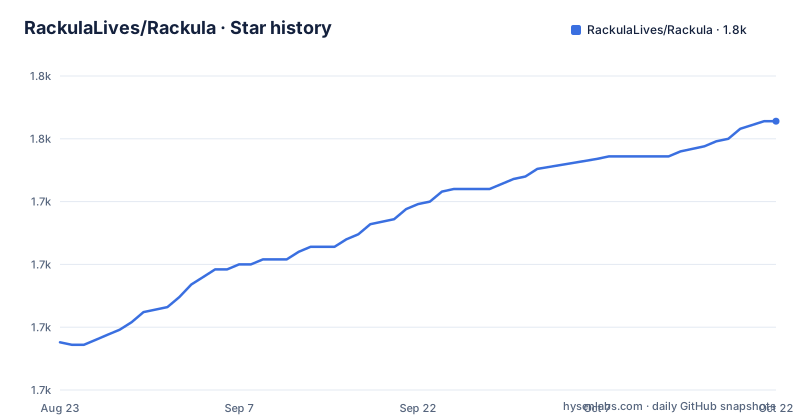
Star history
- RackulaLives/Rackula1,757 ★ · +88
| Repository | 2026-08-23 | 2026-10-22 |
|---|---|---|
| RackulaLives/Rackula | 1.7k | 1.8k |
88 Stars in the last 60 days, measured from the daily GitHub snapshot. Compare with other projects
Editorial analysis
Authentication defaults to none and the write token to empty
The shipped configuration is permissive in three specific ways. `RACKULA_AUTH_MODE` is set to `none`, documented as no auth gate, with `local` for a single username and password account of at least twelve characters and `oidc` for a provider-backed identity. `RACKULA_API_WRITE_TOKEN` is empty, which the template says leaves write-route token enforcement disabled. And `CORS_ORIGIN` points at `http://localhost:8080`, with a separate `ALLOW_INSECURE_CORS` flag that defaults to false and should stay there.
The written instructions for a real deployment generate the two secrets with `openssl rand -hex 32`, one for the API write token and one for the session secret. Turning auth on also makes the session secret mandatory, at a minimum of thirty-two characters, so an auth mode without that value fails at startup rather than running open.
The session knobs are specific enough to be worth reading before you expose an instance: an absolute session lifetime defaulting to 43200 seconds, an idle timeout of 1800 seconds, a session generation value you increment to invalidate every active session at once, and a cookie same-site setting. Nothing here is a default you would want on a shared deployment.
The persistent install downloads its compose file from main
The one-line container run is the simple path, and it is explicitly the client-side only frontend with no persistence across browser sessions:
docker run -d -p 8080:8080 ghcr.io/rackulalives/rackula:latestThe persistent path is three commands, and the first one fetches a compose file straight from the main branch of the repository:
curl -fsSL https://raw.githubusercontent.com/RackulaLives/Rackula/main/deploy/docker-compose.persist.yml -o docker-compose.yml
mkdir -p data && sudo chown 1001:1001 data
docker compose up -d
That combination contradicts the project's own advice. The configuration template carries a comment recommending that production pin specific release tags rather than latest, and then updates them deliberately for reproducible deploys. Yet both image defaults in that same file are the latest tag, and the compose file you download is whatever main holds at that moment rather than what your release notes described. The `sudo chown 1001:1001` exists because the container writes as a fixed non-root user, so the data directory has to belong to that uid on the host.
Nothing can be placed between two units
The rack model is strict in a way that shapes what you can draw. Rack height is measured in units, one U being 1.75 inches of vertical space, with 42U named as a common full-height rack. Devices occupy a whole number of units and mount on a whole-U boundary, which the project ties to the way real rails register equipment under the EIA-310 standard. If something sits at U5, it is at U5, and not part of a unit above it.
The consequence is that anything smaller than 1U cannot be placed on its own. Half-height brackets and side-by-side half-width pairs do not bolt to the rails by themselves; they have to ride inside a carrier, a bracket, tray or shelf, that occupies one whole U and holds them. The carrier registers to the rails, and the small devices register to the carrier.
This is the right call for documentation, because an exported drawing then matches the cabinet. It also means a design that would fit ten half-width devices in 3U on paper becomes five 1U carriers occupying 5U in the tool. The README treats that as the correct answer rather than a limitation.
Two compose files and a script that keeps them in step
There are two compose files and a check that exists to stop them drifting. The root `docker-compose.yml` is labelled the development one, with a header comment saying that for self-hosting with persistence you should use `deploy/docker-compose.persist.yml` instead. Running it plainly gives you the frontend only; adding the persist profile brings up the API sidecar.
A script in the package manifest runs `bash scripts/check-compose-persist-parity.sh`, which is the mechanism keeping the two files in agreement about ports and environment variables. That matters because the number of knobs is not small. The frontend host port, the port nginx listens on inside the container, an IPv6 listen setting that can be auto, true or false with auto detecting from `/proc/net/if_inet6`, the API port defaulting to 3001, the API hostname nginx proxies to, and container names for both services.
Storage is the switch that decides what you get: a browser mode where layouts stay in the browser, and a server mode where layouts are saved through the API. The persist stack defaults to server, and the template tells you to set it explicitly when running the development compose with the persist profile.
The test scripts ask for eight gigabytes of heap
The test configuration is unusually specific about resources. The unit test, the single run and the coverage run all set `NODE_OPTIONS=--max-old-space-size=8192`, so running them on a machine with less than that headroom is where a first run tends to fail.
The end-to-end layer is a matrix of Playwright configurations rather than one: a full config, a dev config, a smoke config, a visual config and an accessibility config, with a separate script that updates the visual snapshots. A visual snapshot suite for a drawing tool means pixel diffs on rendered racks, which is a deliberate choice for a layout product and a slow one to maintain.
Two budget checks sit alongside. One reads `performance-budget.json` to fail when the bundle grows past a limit, and a `.trivyignore` is present, so container scanning runs somewhere in the pipeline. There is also formatting through prettier, linting through eslint, a svelte-check pass for types, husky for commit hooks and markdownlint configuration for the documentation.
Device pictures come from an external library and are bundled by script
The claim that distinguishes this from a diagram tool is the hardware library. Instead of grey rectangles, devices carry real images sourced from the NetBox devicetype-library, and that credit is repeated in the acknowledgements alongside the two communities the project was built for and the colour theme it borrows from.
Getting those images into a static frontend is a build pipeline of its own. The manifest carries separate scripts for processing images, generating bundled images, generating brand assets and generating a schema, and the tree keeps `assets-source/` beside `assets/` so there is a clear line between originals and the processed output that ships. The public logo follows the same pattern, with light and dark lockups and a script to regenerate brand assets.
One implication follows from the data being external. The images are somebody else's project, credited in `ACKNOWLEDGEMENTS.md`, and the pinned copies in `assets/` are what a self-hosted instance serves, so an offline deployment carries a snapshot of that library rather than fetching it.
Calendar versioning, four deployment targets, one of them pre-release
Versions are calendar based. The manifest says 26.9.2, the newest tag is v26.9.2 published on 2026-09-30, and the two before it are v26.9.1 on 2026-09-21 and v26.9.0 on 2026-09-14. The manifest version and the tag agree, which is worth noticing because the same project leaves the branch moving between releases, with the last commit dated 2026-10-02.
The deployment surface is wide. There is the hosted instance at count.racku.la with no account and no install, a Docker image, a persistent compose stack, and bare metal, where the build produces a `dist/` folder to serve however you like because, as the instructions put it, it is just files. Proxmox support is offered through LXC, and that one carries a note saying it is currently in pre-release, with the self-hosting guide holding the detail.
The tree also carries a wrangler configuration, which points at a serverless target, and a second HTML entry point at the root next to the main index file for the login screen. The project describes itself as built with AI-assisted development and marks substantial contributions with Co-authored-by tags, which is a level of transparency about provenance that few repositories bother with.
Editorial conclusion
Rackula is a good fit for planning a rack before it exists and for documenting one that already does, especially if you want a hosted instance with no install at all. The modelling rule is strict by design, whole units only, which suits real rails and makes exported drawings match what a technician will find in the cabinet. Before you self-host it, read two things carefully. The defaults are open: authentication mode none, an empty API write token, and a localhost CORS origin, which is fine on a laptop and wrong the moment you publish a URL to a team. And the persistent install path downloads its compose file from the main branch while both image references use the latest tag, so pin a release tag yourself if you care about reproducibility. The audit and bundle checks in the repository suggest the maintainer does care about the second point.
Frequently asked questions
Does Rackula require an account to use?
Not on the hosted instance, which the documentation describes as no account, no install. For a self-hosted deployment the authentication mode defaults to none, so you either set it to local for a single username and password account or to oidc for a provider-backed identity.
Can Rackula place a half-height or half-width device?
Not on its own. Rackula models racks in whole units with devices mounting on whole-U boundaries, so anything smaller than 1U has to ride inside a 1U carrier such as a bracket, tray or shelf, and the carrier occupies the whole unit.
How do I install Rackula with persistent storage?
The documented path downloads deploy/docker-compose.persist.yml from the repository, creates a data directory owned by uid 1001 with sudo chown, then runs docker compose up -d. Storage mode then decides where layouts live, browser by default or server through the API.
What protects the Rackula API from writes by default?
Nothing, by default. RACKULA_API_WRITE_TOKEN ships empty, which leaves write-route token enforcement disabled, and RACKULA_AUTH_MODE ships as none. The instructions generate a token and a session secret with openssl rand -hex 32 for production use.
Where do the device images in Rackula come from?
From the NetBox devicetype-library rather than placeholder boxes, credited in the acknowledgements. The repository processes and bundles them at build time with dedicated scripts, keeping originals in assets-source and the shipped output in assets.
Official sources
Add this badge to your README
If you maintain this project, the badge below links readers to this analysis and shows its maintenance status from the daily GitHub snapshot. Paste the markdown into your README; add ?metric=license or ?metric=stars to the image URL for a different field.

[](https://hysenlabs.com/projects/rackulalives-rackula)Star history chart for your README
[](https://hysenlabs.com/projects/rackulalives-rackula)