succinctly trades validation for memory on JSON
Succinct data structures
At a glance
- What is it?
- rust-works/succinctly is a Rust crate of succinct data structures: a bitvector with constant-time rank, balanced parentheses for tree navigation, and semi-indexing for JSON, YAML and CSV. Its own README admits that semi-indexing does minimal validation, and its benchmark tables contain a row labelled fastest next to a higher number.
- Who is it for?
- succinctly suits a Rust service that streams large JSON or CSV documents and needs to touch a few fields without materialising the whole structure, and it suits embedded and WebAssembly targets where there is no allocator to spare. It does not suit a parser that must reject malformed input, since the README says validation is minimal.
- Can I use it commercially?
- Yes. MIT is a permissive licence: you can use, modify and sell software built on it, as long as you keep its copyright and licence notices.
- Is it still maintained?
- Yes. The repository received new commits within the last day.
- What is it written in?
- Mainly Rust, according to GitHub's language statistics.
Answers come from the project's GitHub data, last synced on October 22, 2026, and from our analysis. They are not legal advice.
Star history
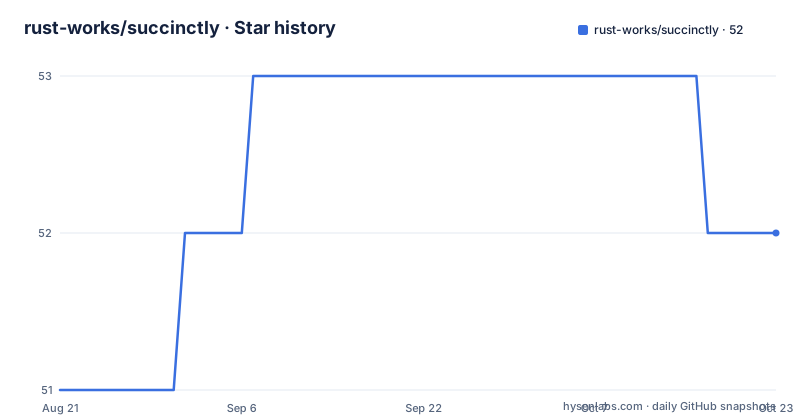
- rust-works/succinctly52 ★ · +1
| Repository | 2026-08-21 | 2026-10-22 |
|---|---|---|
| rust-works/succinctly | 51 | 52 |
1 Stars in the last 62 days, measured from the daily GitHub snapshot. Compare with other projects
Editorial analysis
Rank in constant time, select in logarithmic
The core structure is a bitvector with two operations and explicit complexities: rank counts the set bits before a position, and select finds the position of a numbered set bit. The quick start builds one from a vector of machine words and asserts both, so the semantics are pinned down in the first ten lines a reader sees. The interesting part is the trade the README names out loud. This is a three-level directory in the style the project calls Poppy-style, tuned for query speed over compactness, which costs it roughly 28 to 48 percent overhead over the raw bits. That is a deliberate inversion of the usual choice. A structure designed for minimal space would accept slower queries; this one accepts a third more memory and removes the logarithmic factor from the operation you do most often. The second structure, balanced parentheses, makes the opposite trade, costing about 6 percent for constant-time navigation of a tree.
Semi-indexing builds an index and defers the values
The document parsing story is the one the project is actually selling, and the mechanism has a name. Traditional parsers build a complete in-memory representation of the document, and a semi-indexer instead builds a lightweight structural index and extracts values only when they are asked for. Three benefits follow, and the README lists all of them: far less memory than a full representation, faster queries because only touched values are materialised, and streaming output with no intermediate allocation. The comparison table puts numbers on the first claim. Against three other Rust libraries on a one megabyte document, the peak memory is reported as 382 KB for this crate against 7 MB and 17.1 MB for the two slower parsers, and against 9.97 MB for the fastest one. The library is therefore not the fastest parser in the table, and it does not claim to be; the claim is about memory, with speed as a secondary benefit.
The validation trade-off is stated in one sentence
There is a trade-off paragraph, and it is the most useful line in the readme for anyone deciding. Semi-indexing performs minimal validation compared with full parsers, and for strict validation or for features such as YAML tags you should use traditional tools. That is a clean boundary rather than a hedge. It also explains a capability claim that would otherwise look overstated: the crate advertises a complete parser for the current YAML specification with anchor and alias resolution, which is a real feature, and yet you are told not to rely on it for validating tags. So the parsing is complete in coverage and minimal in checking, which is exactly the arrangement you want for extracting a value and exactly the wrong one for deciding whether a document is trustworthy.
The manifest disagrees with the readme on defaults and version
The readme lists compatibility with no standard library as a feature and says the crate works in embedded and WebAssembly environments. The manifest complicates that. The default feature set is not empty: it includes a flag that exists because runtime CPU detection needs the standard library, and the manifest comment says that with it enabled the JSON indexing automatically uses the wider instruction set on supported processors. It then says that users needing the no standard library path can disable it by turning default features off. So the feature is real and the readme is right, but the configuration required to reach it is not stated in the readme at all. If you are targeting something without an allocator, that is the first thing you will have to discover by reading the crate source rather than the documentation, and it is worth knowing before you design around the capability. The manifest also lists mutually exclusive popcount strategies for benchmarking, and says that if none is specified the code falls back to the language built-in popcount, which auto-vectorizes. That gives you three configurations rather than one: the default, the explicit intrinsics path, and the portable bitwise path.
[dependencies]
succinctly = "0.7"
The version in that snippet is the other disagreement. The readme pins the dependency at 0.7 and the newest tagged release is v0.7.0 from April, but the manifest itself declares 0.8.0, which means the main branch is already ahead of the last tag and the documented install line will resolve to something older than what you would build from a checkout. For a crate whose selling point is a pinned release profile, that gap matters more than it would for a typical library.
The benchmark table labels the slower row as fastest
The per-platform table has an internal contradiction, and it is the kind worth reading past. On one x86 processor, three implementations are listed: a table-driven parser at 679 MiB per second annotated as fastest on x86, a vectorised path at 732 MiB per second, and a scalar baseline at 494. The number in the row marked fastest is lower than the number in the row below it. There is probably a good reason, since the annotations differ between rows and one mentions a per-iteration width while the other does not, but as printed the table does not explain it. The same table handles its own uncertainty better further down, where a server-class ARM processor is listed as an estimate based on another tool's published figures rather than a measurement. A table that admits which rows are guesses is doing the right thing; a row labelled fastest that is not the fastest needs the note back.
The release profile is pinned for a measurement reason
The most interesting file in the repository is the manifest's profile section, and the comment above it is longer than most readmes. The release profile pins code generation to a single unit and turns on fat link-time optimisation, rather than accepting the defaults of sixteen units and no optimisation. The reason given is that the defaults made the shipped binary's speed depend on code a given query never runs: the same two commits, whose difference cannot reach one particular query, measured fourteen percent apart at sixteen units and two percent apart under the pinned settings. Thin optimisation was tried and rejected, because a single unit is what removes the effect. The cost is stated too, release builds compile about three times slower, and the debug builds used by the test and lint tooling are untouched. That is the profile of someone who has been burned by a benchmark that moved for the wrong reason.
Rank and select costs differ by an order of magnitude on ARM
The operation table is small and the two rows are worth comparing closely, because they change what you should expect from the same code on different hardware. On a desktop x86 processor, rank is reported at about three nanoseconds and select at about fifty. On an ARM laptop processor, rank is about twenty-one nanoseconds and select about three hundred and twenty. So select, the operation the structure trades memory for, is also the operation that costs most when the hardware is weaker, and it costs roughly six times more on ARM than on x86 while rank costs seven times more. If your workload is ARM, whether the select-heavy path is the bottleneck depends entirely on the mix of operations, and the readme's overhead figures for the directory do not change that arithmetic. Anyone benchmarking this on a desktop and deploying on ARM should measure both operations separately rather than assume the ratio holds.
Four assistant configuration directories sit at the root
Look at the repository listing and the tooling tells its own story. Alongside the expected files there are four directories whose names are all assistant or agent configuration, plus two instruction files at the root and a lock file for whatever those assistants depend on. There is also a fuzzing directory, a clippy configuration, a dependency-checking configuration, two separate benchmark locations including one named for comparison, an examples directory whose filenames are unusually specific, and a configuration file example for something called nodes. Those example names are the interesting part, because each one describes a specific investigation: allocation probing, a harness for block scalars, the output shape of the query formatter, resident memory across key hashes, anchor handling, and a YAML profiling run. So the repository is organised around the questions the author was asking while building the thing, which is a reasonable thing to find and an unusual amount of self-documentation.
Editorial conclusion
succinctly suits a Rust service that streams large JSON or CSV documents and needs to touch a few fields without materialising the whole structure, and it suits embedded and WebAssembly targets where there is no allocator to spare. It does not suit a parser that must reject malformed input, since the README says validation is minimal. Before adopting it, check three things: whether you need the no_std configuration, which is not the default and is not explained in the readme, which of the SIMD strategies you want, since they are mutually exclusive, and whether you can accept a build that compiles several times slower in release mode because its code generation is deliberately pinned.
Frequently asked questions
What does succinctly mean in the rust-works succinctly repository?
The repository does not discuss the word. It is a Rust crate of succinct data structures: a bitvector with constant-time rank and logarithmic select, balanced parentheses for tree navigation, and semi-indexing for JSON, YAML and CSV, usable without the standard library.
What does semi-indexing in succinctly give up?
Validation. The README states that semi-indexing performs minimal validation compared with full parsers, and that for strict validation or for features such as YAML tags you should use traditional tools. Parsing coverage is complete; checking is not.
How do I add succinctly to a Rust project?
With one command, cargo add succinctly, or by adding the dependency line to your manifest yourself. The README's example pins version 0.7, while the crate's own manifest declares 0.8.0, so copying the example installs a release behind the current one.
Can I use succinctly without the Rust standard library?
Yes, but not with the default configuration. The default features include the standard library because runtime processor detection requires it, and the manifest says users who need the no_std path must disable default features. The README lists the capability without stating that setting.
Official sources
Add this badge to your README
If you maintain this project, the badge below links readers to this analysis and shows its maintenance status from the daily GitHub snapshot. Paste the markdown into your README; add ?metric=license or ?metric=stars to the image URL for a different field.

[](https://hysenlabs.com/projects/rust-works-succinctly)Star history chart for your README
[](https://hysenlabs.com/projects/rust-works-succinctly)