friendly-snippets: one snippet collection for every language, loaded through any Neovim engine
Set of preconfigured snippets for different languages.
At a glance
- What is it?
- An MIT-licensed collection of VS Code format snippets covering many languages, installable through Lazy.nvim, Packer, vim-plug or coc.nvim. Aimed squarely at Neovim users, and it says so plainly.
- Who is it for?
- This repository is a good fit for a Neovim user who wants one snippet set instead of five, particularly if you write across languages and would rather not install a separate plugin per language. It is a poor fit if you need snippets that are not in VS Code format, or if you are on Vim without vim-vsnip, since the whole format assumption breaks there.
- Can I use it commercially?
- Yes. MIT is a permissive licence: you can use, modify and sell software built on it, as long as you keep its copyright and licence notices.
- Is it still maintained?
- Yes. The repository last received commits 42 days ago.
- What is it written in?
- Mainly JavaScript, according to GitHub's language statistics.
Answers come from the project's GitHub data, last synced on October 22, 2026, and from our analysis. They are not legal advice.
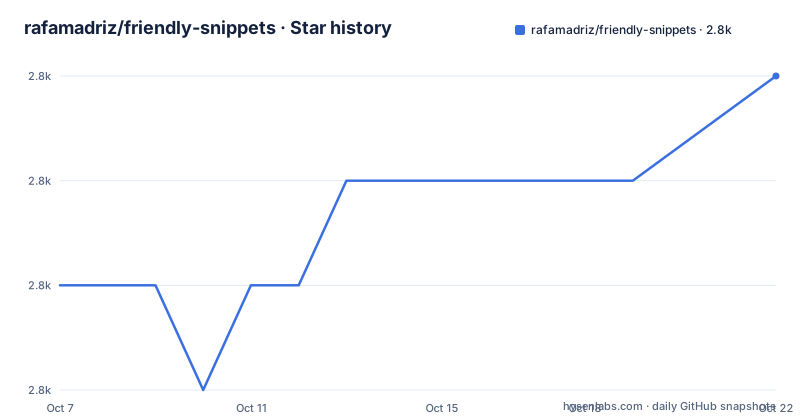
Star history
- rafamadriz/friendly-snippets2,782 ★ · +2
| Repository | 2026-10-07 | 2026-10-22 |
|---|---|---|
| rafamadriz/friendly-snippets | 2.8k | 2.8k |
2 Stars in the last 15 days, measured from the daily GitHub snapshot. Compare with other projects
Editorial analysis
VS Code format as the only interoperability contract
The repository states its format assumption in a single sentence: this collection of snippets should work with any snippet engine that supports loading vscode snippets. It then names the three that matter, vim-vsnip, LuaSnip and coc-snippets. That is the whole design. There is no custom loader, no Lua API to learn, and nothing that ties the collection to one engine.
The practical consequence is that the snippets are data, not code. In the tree, the `snippets/` directory is a set of JSON files, and `package.json` is a manifest that maps each JSON file to the languages it applies to, in the same `contributes.snippets` shape VS Code itself uses. Early entries map a single file, `./snippets/global.json`, to plaintext, markdown, tex, html, global and all at once, while `./snippets/c/c.json` maps to c, `./snippets/c/cdoc.json` to cdoc, and `./snippets/cpp/cpp.json` and `./snippets/cpp/cppdoc.json` to their respective languages.
The aliasing is visible in the manifest too. C# is registered under both `csharp` and `cs`, because filetype names differ between editors, and git commit messages are registered for `gitcommit` and `NeogitCommitMessage` so the snippets fire inside the Neogit plugin. Whoever assembled this thought about which filetype identifiers actually show up at the buffer level rather than only in the documentation.
Because the format is VS Code's, the `engines.vscode` field in `package.json` reads `^1.11.0`, a constraint inherited from the format's origin rather than from any runtime dependency.
Four install paths and the LuaSnip trap in the middle
Installation is delegated to whichever plugin manager you already use. For Lazy.nvim the plugin spec is a single line:
{ "rafamadriz/friendly-snippets" }For Packer it is the older `use` form, and for vim-plug a `Plug` line:
Plug "rafamadriz/friendly-snippets"coc.nvim users get a CocInstall command rather than a plugin manager entry:
:CocInstall https://github.com/rafamadriz/friendly-snippets@mainThe interesting part is a warning the README puts in a callout box, because it is the failure mode people actually hit. If you use LuaSnip, you have to load this collection through `require("luasnip.loaders.from_vscode").lazy_load()` and add friendly-snippets as a LuaSnip dependency. Skip that and the snippets may simply not be detected, or you get a slower startup. The README spells out the dependency declaration:
{
  "L3MON4D3/LuaSnip",
  dependencies = { "rafamadriz/friendly-snippets" },
}
The mechanism is the `lazy_load()` call. A snippet engine has to read every JSON file to learn its triggers, and doing that for a collection this wide at startup is the thing lazy loading exists to avoid. Get it wrong and you pay startup time for snippets you are not currently using, or you get nothing at all.
Frameworks ship but stay unloaded until you ask
The `snippets/frameworks` directory inside `snippets/` is where this collection differs from a plain language pack. The README is explicit that there are extra snippets included in the repository that are not added by default, because adding them would be irrelevant for people not using those frameworks. The stated example is adding Rails snippets to Ruby files.
The wiring is done in your configuration, not in the collection, and the README notes in a callout that this is handled by the snippet engine and has nothing to do with the snippets collection itself. With LuaSnip you extend a filetype by name:
require'luasnip'.filetype_extend("ruby", {"rails"})With vim-vsnip it is a global variable assignment:
let g:vsnip_filetypes.ruby = ['rails']Both do the same thing, which is the clearest illustration of why the format-based approach is worth the constraint. The collection provides data, each engine provides the mechanism to scope it to a filetype, and neither side needs to know much about the other.
Exclusion works the same way, again in engine configuration. The README shows excluding a whole language through the from_vscode loader:
-- will exclude all javascript snippets
require("luasnip.loaders.from_vscode").load {
    exclude = { "javascript" },
}
Note that this uses `load` rather than `lazy_load`, which is consistent with how the engine's API is split between loading everything now and loading on demand.
Most of the content is forked, and the README says which
A snippet collection is only as good as what people have already written, and this one leans on prior art heavily. The README's Credits section lists repositories it forked from, and the list is long enough to be worth reading: vscode-standardjs-snippets, python-snippets, vs-snippets, Wscats/html-snippets, Harry-Ross/vscode-c-snippets, vscode-jekyll-snippets, vscode-fortran-support, vscode_cobol, VSCode-LaTeX-Snippets, vscode-react-javascript-snippets, and honza's vim-snippets for Verilog, closing with an And more.
That list is unusually good practice for a collection of this kind, and it changes how you should evaluate the content. If a C snippet feels wrong, there is a named upstream it came from, and the upstream may have moved on. The Fortran and COBOL entries are the interesting ones: these are languages that most snippet collections skip, and their presence here is a direct consequence of the project folding in existing collections rather than writing everything from scratch.
The stated goal is one community-driven repository for all kinds of snippets in all programming languages, so you have it all in one place. That goal has an obvious failure mode, which is drift: a fork stops receiving upstream improvements unless someone notices. The repository shows signs of taking that seriously, with a `Makefile`, a `.prettierrc.yaml` for formatting the JSON, and a `stylua.toml` for the Lua debug scripts under `debug/`.
There is no GitHub release attached to this repository, so there is no version stream to track. The default branch is `main` rather than `master`, and the last push was on 2026-09-11 with the repository not archived.
Where this stops working
The format assumption is the boundary. Anything that does not read VS Code snippet JSON cannot use this collection, which in practice means classic Vim without vim-vsnip is out, and any engine that expects its own snippet syntax is out. The repository is honest about targeting a specific ecosystem rather than presenting itself as universal.
The second boundary is language coverage versus depth. A wide collection built by merging others will have some languages with thoroughly considered triggers and others with a handful of snippets that nobody has looked at since the fork. The README's HTML and JavaScript sections demonstrate the collection with animated GIFs rather than listing triggers, which is pleasant but not informative about anything except those two languages. For a language where a good, focused collection already exists and is actively maintained, a small dedicated plugin may well be the better choice.
The third is the one that catches people: snippets are invisible until you know they are there. There is no command to list what a language supports, so you either read the JSON or type a prefix and hope. The README's own TODO confirms this is unfinished, listing the task of adding all included snippets to the project wiki. Until that exists, the `snippets/` directory is the documentation.
A last practical note on the manifest: the language identifiers are editor-side filetype names, not file extensions. If your setup reports a filetype the collection does not register, nothing fires, and the fix belongs in your configuration rather than in the collection.
Editorial conclusion
This repository is a good fit for a Neovim user who wants one snippet set instead of five, particularly if you write across languages and would rather not install a separate plugin per language. It is a poor fit if you need snippets that are not in VS Code format, or if you are on Vim without vim-vsnip, since the whole format assumption breaks there. The `snippets/frameworks` directory is the part most people miss: those collections ship with the repository but stay unloaded until you wire them to a filetype yourself, which is a deliberate choice to keep startup fast. Install through LuaSnip with `lazy_load()` rather than the plain loader, since the README warns that startup time suffers otherwise, and read the credits list before assuming you have found something original.
Frequently asked questions
How do I install friendly-snippets in Neovim?
Through whichever plugin manager you use. For Lazy.nvim the spec is { "rafamadriz/friendly-snippets" }, for Packer it is use "rafamadriz/friendly-snippets", for vim-plug it is Plug "rafamadriz/friendly-snippets", and for coc.nvim it is the CocInstall command pointing at the repository's main branch.
Why are my friendly-snippets not detected in LuaSnip?
The README warns about exactly this. Load the collection through require("luasnip.loaders.from_vscode").lazy_load() and add friendly-snippets as a dependency of L3MON4D3/LuaSnip. Without lazy_load the snippets might not be detected at all, and startup time suffers.
Which snippet engines can use friendly-snippets?
Any engine that supports loading VS Code format snippets. The README names vim-vsnip, LuaSnip and coc-snippets, and the collection stores its snippets as JSON mapped to languages in package.json.
How do I add framework snippets such as Rails to Ruby?
The framework snippets live in the snippets/frameworks directory and are not loaded by default. Wire them to a filetype in your own configuration, for example require'luasnip'.filetype_extend("ruby", {"rails"}) with LuaSnip or let g:vsnip_filetypes.ruby = ['rails'] with vim-vsnip.
What license is friendly-snippets released under?
The MIT License, with a LICENSE file at the repository root. The repository's default branch is main and it has no GitHub releases attached.
Official sources
Add this badge to your README
If you maintain this project, the badge below links readers to this analysis and shows its maintenance status from the daily GitHub snapshot. Paste the markdown into your README; add ?metric=license or ?metric=stars to the image URL for a different field.

[](https://hysenlabs.com/projects/rafamadriz-friendly-snippets)Star history chart for your README
[](https://hysenlabs.com/projects/rafamadriz-friendly-snippets)Was this useful?