DLSS 5 Swapper: four install routes, one overlay, and the games it cannot help
Install, tune and restore DLSS 5 in your games with one click. Native RenoDX, DLSS5-Feeder for games without DLSS, OptiScaler and multipass routes; DirectX 8/9/11/12, Vulkan, OpenGL, DirectDraw and emulators. In-game F8 overlay, automatic backups, and a community page showing what works on your games and your graphics card.
At a glance
- What is it?
- A Windows app that finds your installed games and puts DLSS 5 Neural Rendering into them through four different routes. The routing logic, the F8 overlay, and the Blackwell and DirectX 10 gaps decide how far it reaches on your machine.
- Who is it for?
- Worth your time if your library mixes titles that ship DLSS with titles that do not, and you want one place to install, back up and undo. Two things decide the outcome before you start: the OptiScaler route needs a Blackwell card or a DLL you supply yourself, and a game that offers only DirectX 10 gets nothing here.
- Can I use it commercially?
- Yes. MIT is a permissive licence: you can use, modify and sell software built on it, as long as you keep its copyright and licence notices.
- Is it still maintained?
- Yes. The repository last received commits 47 days ago.
- What is it written in?
- Mainly JavaScript, according to GitHub's language statistics.
Answers come from the project's GitHub data, last synced on October 12, 2026, and from our analysis. They are not legal advice.
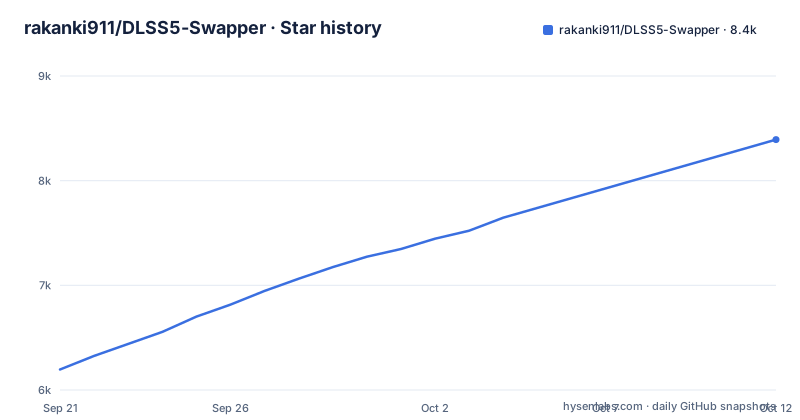
Star history
- rakanki911/DLSS5-Swapper8,392 ★ · +2,196
| Repository | 2026-09-21 | 2026-10-12 |
|---|---|---|
| rakanki911/DLSS5-Swapper | 6.2k | 8.4k |
2,196 Stars in the last 21 days, measured from the daily GitHub snapshot. Compare with other projects
Editorial analysis
Four routes, chosen per game, decide what lands in the folder
The app does not treat every title the same way. A game that already ships DLSS takes the native route. A game without DLSS of its own can go through DLSS5-Feeder, which wraps the renderer instead. OptiScaler is offered for 64-bit games that do have native DLSS enabled. Multipass is a separate route that runs the neural pass up to ten times per frame on DX12, DX11 and 64-bit DX9, and it also accepts games with no DLSS at all. Each title carries its own optional rendering API override, set per game, with Automatic as the default, and an explicit choice never overwrites what detection found. DirectX 10 is the one hole in the Feeder path, so pick DX11 when a game offers it. History keeps an installation record for every route, and a separate Add-ons page stays available alongside the integrated installation paths rather than being folded into them.
The F8 overlay only speaks the Feeder and RenoDX routes
Pressing F8 opens the app's own panel over a running game, where the real DLSS Neural Rendering sliders can be moved while you play. That panel is not universal. It covers the DLSS5-Feeder and RenoDX routes only, and the compatibility table narrows it further to 64-bit DirectX 11 and 12 games with ReShade add-on support. A title installed through the native route gets no overlay from this app. It knows both RenoDX builds it ships, 6.5.3 and the older 4.7. Sizing is per game: drag the grip in the panel's bottom right corner and each title keeps whatever size you left it at. Release 2.2.3 lists the overlay on a scaled display among the faults it fixed, which matters on any desktop where Windows is running at a resolution other than the panel's native one.
OptiScaler wants a Blackwell card unless you bring your own DLL
The bundled neural model behind the OptiScaler route runs on Blackwell, which covers RTX 50 and RTX PRO Blackwell. On any older card the app expects you to supply a modded `nvngx_dlssnr.dll` yourself, and it says plainly that this file is never overwritten. Driver 616.56 or newer is required. The route is also narrower than the Feeder one: 64-bit games with native DLSS enabled, plus eligible Vulkan games. A 32-bit title cannot take it even on the right card. Release 2.2.3 names OptiScaler on older cards among its changes, and 2.2.8 added a second OptiScaler build per game. On a pre-Blackwell card the install rests on a DLL you located and picked yourself, and the app does not say which card it expects that DLL to be good for.
Scanning stays inside the folders you added
Full-drive scanning is off by default, so the app does not wander across your machine hunting for installs. Folders you add are scanned normally. Discovery across all drives has to be switched on in Settings, and scan folders can be removed from the same place. The library covers Steam, Epic, GOG and modern Xbox Game Pass folders, plus games and emulators you add by hand. Filters combine title, graphics API, DLSS status and version, and add-ons, and each counter is clickable, so clicking the DLSS status count narrows the list to titles carrying it. Layout can group by store or show one flat list, with artwork and light or dark themes. Right-click shortcuts open or copy a folder, rescan, change the cover, restore originals, or hide a title from view.
A restore can now pick up a retired backup record
Every install keeps a backup of the files it replaced, and History holds installation records you can copy along with the activity and install logs. Release 2.2.9 rewrote part of this. A finished restore used to rename the backup record aside, and every check that decides whether a game has anything installed read only the live record, so a game whose files were still sitting on disk could look empty and restore nothing. The app now offers the newest retired record whose files are still in the game, and restores from the same backups. Save diagnostics gathers the install log, the game's own ReShade and Feeder logs, the manifest and your driver into one file, and shows you the whole thing before it is written.
Wrapped DirectX 8 and 9 titles break ReShade in a specific way
DirectX 8 games are 32-bit and reach the Feeder through dgVoodoo2, which hands them to DirectX 11 first. Inside that wrapper the game presents itself as a DX11 title, and some setups load only `d3d11.dll`. ReShade never started in those cases, which is why release 2.2.9 offers the ReShade file choice for wrapped DirectX 8 and 9 games. The same release moved dgVoodoo2 from 2.87.4 to 2.87.5, an upstream release put out because engines flag 2.87.4. That is the state of the bundle now: if an antivirus product objects to the wrapper, the version in the build is the one upstream published to settle it. For ReShade and Feeder routes the app names RTX 20, 30, 40 and 50 series, while anything older rests on what the author of the bundled modified runtime reports.
The compatibility table leaves several doors shut
Read the table closely and you save an afternoon. Vulkan and OpenGL games reach the ReShade and Feeder routes, and eligible Vulkan titles can also use OptiScaler. DirectX 11 works with Feeder for 32-bit and 64-bit games, and DirectX 12 takes native DLSS, Feeder or an eligible OptiScaler game. DirectX 10 is not directly supported by Feeder, so a game offering only DX10 has no route here at all. The overlay stops at 64-bit DirectX 11 and 12 games with ReShade support. System support is Windows 10 and 11 on x64, and the app states that older-series GPU support is a matter of what the bundled runtime's author says, not a guarantee the app makes.
Downloads are two archives, and building from source is a separate job
There is no command to install a user-facing product here. The releases page carries a Windows Installer and a Portable build, with `SHA256SUMS.txt` beside both so you can check what you downloaded before running it. The installer itself has a history worth knowing: on some machines setup died instantly with `0xc0000005`, no window and no prompt, while the portable build was fine, because the installer framework read past the end of a path Windows handed it. Release 2.2.9 is built with the fixed version. The repository is an Electron app, so running it from a checkout means the npm scripts in `package.json` are the entry points.
Community reports are opt-in, editable and shareable by anyone
The Community page is labelled BETA. You narrow it to the games on your own PC and the graphics card in it, read what worked for other people, leave a report yourself, and discuss underneath it. Everything you leave can be edited, deleted or withdrawn afterwards, which is a real comfort, but the audience is the same public list anyone with the app can open. Alongside it sits one live chat room for everyone using the app, with screenshots, game cards, replies with mentions and reactions. Nothing about it is scoped to your library once posted. Recent releases have been steady rather than spaced: 2.2.7, then 2.2.8 and 2.2.9 on the same day, September 29, 2026, the last of them fixing four faults that had all come from the tracker.
Editorial conclusion
Worth your time if your library mixes titles that ship DLSS with titles that do not, and you want one place to install, back up and undo. Two things decide the outcome before you start: the OptiScaler route needs a Blackwell card or a DLL you supply yourself, and a game that offers only DirectX 10 gets nothing here. Check each game's API and bitness in the library first, then confirm your install records sit in History before you close the app.
Frequently asked questions
What does NVIDIA DLSS actually do?
In this app DLSS 5 Neural Rendering is the thing being installed, by four routes: native for games that already ship it, DLSS5-Feeder for games that do not, OptiScaler for 64-bit games with native DLSS enabled, and Multipass for up to ten neural passes per frame.
What are the differences between RTX and DLSS?
RTX is the card family, DLSS is the feature running on it. The ReShade and Feeder routes name RTX 20, 30, 40 and 50 series, while the OptiScaler route runs its bundled neural model on Blackwell, RTX 50 and RTX PRO Blackwell, or needs a modded nvngx_dlssnr.dll you supply on an older card.
Is DLSS good or bad for gaming?
The app takes no position on quality and reports no frame rates or benchmarks. What it does is back up the files it replaces, keep installation records in History, and let you restore originals, so a bad result is reversible from the same library view.
Is it better to have DLSS on or off?
That call stays with you. The F8 panel moves the DLSS Neural Rendering sliders live on the Feeder and RenoDX routes, and the rendering API override is set per game with Automatic as the default, so an explicit choice never overwrites what detection found.
Official sources
Add this badge to your README
If you maintain this project, the badge below links readers to this analysis and shows its maintenance status from the daily GitHub snapshot. Paste the markdown into your README; add ?metric=license or ?metric=stars to the image URL for a different field.

[](https://hysenlabs.com/projects/rakanki911-dlss5-swapper)Star history chart for your README
[](https://hysenlabs.com/projects/rakanki911-dlss5-swapper)Was this useful?