Mindcraft: LLM-driven Minecraft bots on top of Mineflayer
Minecraft AI with LLMs+Mineflayer
At a glance
- What is it?
- Mindcraft wires a language model to a Mineflayer bot so the model decides what the bot does in Minecraft. The setup is small, the model surface is wide, and the security note about code execution is the part most readers will skip.
- Who is it for?
- Adopt Mindcraft if you want a readable JavaScript harness for putting an LLM inside a Minecraft world and you are comfortable editing settings.js and a profile JSON before the first run. Do not adopt it if you need a supported, versioned API surface: the README points to Discord for help and states the maintainers are not very responsive to GitHub issues.
- Can I use it commercially?
- Yes. MIT is a permissive licence: you can use, modify and sell software built on it, as long as you keep its copyright and licence notices.
- Is it still maintained?
- Yes. The repository last received commits 19 days ago.
- What is it written in?
- Mainly JavaScript, according to GitHub's language statistics.
Answers come from the project's GitHub data, last synced on November 15, 2026, and from our analysis. They are not legal advice.
Star history
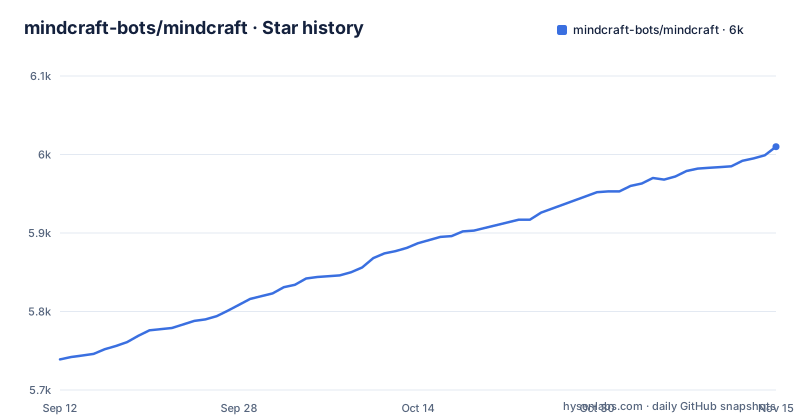
- mindcraft-bots/mindcraft6,010 ★ · +271
| Repository | 2026-09-12 | 2026-11-15 |
|---|---|---|
| mindcraft-bots/mindcraft | 5.7k | 6k |
271 Stars in the last 64 days, measured from the daily GitHub snapshot. Compare with other projects
Editorial analysis
What Mindcraft is for, and who ends up using it
Mindcraft connects a large language model to a Minecraft Java Edition client through Mineflayer, the PrismarineJS library that exposes a scriptable bot. The project describes itself as "Crafting minds for Minecraft with LLMs and Mineflayer", and that phrasing is accurate about the division of labour: Mineflayer handles movement, inventory and world state, while the model supplies the decisions.
The audience is narrower than the repository name suggests. You need a Minecraft Java Edition account, a Node.js toolchain, and at least one API key from a supported provider. The README lists seventeen providers, from OpenAI and Anthropic through to local Ollama and vLLM endpoints. That breadth is the point. If you have an opinion about which model should drive a bot, Mindcraft probably already speaks to it, and switching is a profile edit rather than a code change.
The second audience is research-adjacent. The README links a paper website and a MineCollab document, and the task format with a techtree type and a max_depth field reads like something built for evaluating multi-step planning rather than for casual play. If you want a bot that follows you around and mines what you point at, the task runner is more machinery than you need.
The mechanism: profiles, prompts, and a Mineflayer client underneath
The architecture is a loop. A profile JSON such as andy.json holds the agent's name, the model identifier and the prompts. The model field takes values like "gemini-2.5-pro". settings.js holds the connection parameters and project-level switches. main.js starts the process, reads the profile, opens a Minecraft connection, and hands the model a view of the world that Mineflayer can produce.
Check the source for the exact prompt assembly, the memory model, and how often the model is queried if you intend to reason about latency or token spend before running anything.
One detail is documented and worth attention. The bot's name in the profile must exactly match the Minecraft profile name, or, in the README's words, "the bot will spam talk to itself". That is a small configuration trap with an outsized symptom, and it tells you the bot identifies itself by name in chat rather than by some internal session token.
Tasks are the other entry point. A task JSON declares a goal, an initial_inventory, an agent_count, a target block or item, a number_of_target, a type such as techtree, a max_depth, a timeout in seconds, and a blocked_actions map. The example gathers four oak logs with a wooden axe already in the initial inventory, a timeout of 300, and max_depth 1. This is a declarative wrapper around the same agent loop, and the techtree type plus depth fields imply a search over crafting dependencies rather than a flat instruction.
Getting it running: the actual commands and files
The install path in the README is six steps and no build system. Clone the repository or unzip the latest release, rename keys.example.json to keys.json, and fill in one API key. The model itself is set in andy.json or another profile, not in keys.json. Then run npm install from the installed directory.
After that, start a Minecraft world and open it to LAN on localhost port 55916. Then run node main.js. The port matters: the default connection targets that LAN port, and the online-server section of the README shows the alternative, editing settings.js to set "host", "port" and "auth" to "microsoft" for a real Microsoft account.
For a scripted run, the README gives this example: node main.js --task_path tasks/basic/single_agent.json --task_id gather_oak_logs. The task_id selects a key inside the task file, which is why the example JSON wraps its contents in a "gather_oak_logs" object.
For local inference the README supplies a concrete command: ollama pull sweaterdog/andy-4:micro-q8_0 && ollama pull embeddinggemma. That second pull is an embedding model, which suggests retrieval over something.
Version constraints are stated plainly. Minecraft Java Edition up to v1.21.11, with v1.21.6 recommended. Node v18 or v20 LTS recommended, with a warning that Node v24 or newer may cause issues with native dependencies. On Windows, the Node installer needs the box for automatically installing the necessary tools checked. On macOS, npm install failures around native module builds are common enough to have their own FAQ entry.
The code-execution switch is the real security boundary
The README opens with a caution block, and it is not boilerplate. Mindcraft allows the model to write and execute code on your machine. The project states the code is sandboxed but still vulnerable to injection attacks. Writing is off by default and is enabled by setting allow_insecure_coding to true in settings.js. The README's own instruction is blunt: do not connect the bot to public servers with coding enabled.
The threat model here is unusual compared to most LLM tooling. In a chat application, a prompt injection produces bad text. Here, the injected content can originate from other players in a multiplayer world, and the output path ends at a code interpreter on your machine. The strength of that boundary is something you would have to verify in the source before relying on it.
Even with coding disabled, an online connection carries risk. The bot authenticates with a Microsoft account, which means account credentials and session handling are in scope. The README describes the account-switching workflow for running a bot alongside your own player: connect with one account via the launcher, run node main.js, then switch the launcher back to your main account. That works, but it means the process holds a live session you are not watching.
Where Mindcraft is the wrong tool
The clearest limitation is support. The README says the maintainers are currently not very responsive to GitHub issues and directs users to Discord and the FAQ. A project where the primary support channel is a chat server is fine for hobby use and awkward for anything with a deadline. If you need a tracked issue and a release that fixes it, this is the wrong dependency.
The second limitation is version coupling. Minecraft Java Edition changes break client libraries, and the README pins the supported range at up to 1.21.11 while recommending 1.21.6. Running a newer server version is outside the stated support envelope. The Node constraint points the same way: v18 or v20 LTS, with v24 or newer flagged for native dependency problems. You are choosing your toolchain around the bot.
The third is cost and latency. Every decision the model makes is an API call unless you run locally through Ollama or vLLM. For a long session on a hosted model, the bill is a function of how often the loop fires. If you need predictable spend, run the local models or measure the loop yourself before committing to a hosted provider.
Finally, the release cadence is sparse. v0.1.4 in March 2026 was labelled general maintenance, following v0.1.3 in September 2025 and v0.1.2 earlier that month. A version number still below 0.2 after that timeline tells you the interface is not frozen.
The alternative: a plain Mineflayer script
The obvious comparison is Mineflayer without the LLM layer. Mineflayer is the same library Mindcraft sits on, and it is the right choice when the behaviour you want is known in advance. A Mineflayer script that walks to coordinates and mines a specific block is deterministic, debuggable with a breakpoint, and costs nothing per action. Mindcraft trades that determinism for a model that can respond to a situation nobody wrote a branch for.
The practical difference shows up in failure. When a hand-written Mineflayer bot gets stuck, the stack trace points at your code. When a Mindcraft bot gets stuck, the cause is somewhere between the prompt, the model's interpretation of world state, and the action the model chose. If your task can be expressed as a fixed sequence, the LLM is overhead. If it cannot, Mindcraft is one of the few JavaScript options that puts a model in the loop with a working Minecraft client underneath.
Within the LLM-bot space, the distinguishing choice is provider breadth. Seventeen backends including local Ollama and vLLM means you are not locked to one vendor's pricing or availability. That is a genuine design decision, and it is the main reason to prefer this over writing your own Mineflayer-plus-OpenAI glue.
Licence, maintenance and what upgrading costs you
Mindcraft is MIT licensed. In practical terms that permits commercial use, modification and redistribution provided the copyright notice and permission notice are included. This is not legal advice; read the LICENSE file in the repository before shipping anything derived from it. One consequence worth noting: MIT says nothing about the model providers you connect to. Your obligations to OpenAI, Anthropic, Google or any other listed provider come from their terms, not from this licence, and the README's provider table is a list of integrations rather than an endorsement of any particular usage right.
Maintenance cost is mostly version chasing. The README's own constraints mean a Minecraft update past 1.21.11 or a Node upgrade to v24 or newer can put you outside supported territory, and the native dependency warnings on both Windows and macOS suggest npm install is the first place breakage appears. Budget for pinning your Node version and your Minecraft version rather than tracking latest.
Upgrade cost between releases is hard to judge. The release notes name themes (general maintenance, villagers and buckets, UI and AI speech and tool use). If you modify the agent loop or the prompt assembly, assume a merge on every release, because the project is pre-1.0 and the README gives no compatibility promise. The safest posture is to keep your changes in profiles and settings where the documented interface lives, and to treat edits inside main.js as yours to maintain.
Editorial conclusion
Adopt Mindcraft if you want a readable JavaScript harness for putting an LLM inside a Minecraft world and you are comfortable editing settings.js and a profile JSON before the first run. Do not adopt it if you need a supported, versioned API surface: the README points to Discord for help and states the maintainers are not very responsive to GitHub issues. Before installing, check three things: that your Minecraft Java Edition version is at or below 1.21.11 and preferably 1.21.6, that your Node version is 18 or 20 LTS rather than 24 or newer, and that allow_insecure_coding is still false in settings.js.
Frequently asked questions
What does Mindcraft need before it can run a Minecraft bot?
Minecraft Java Edition up to v1.21.11 with v1.21.6 recommended, Node.js installed with v18 or v20 LTS recommended because v24 or newer may cause issues with native dependencies, and at least one API key from a supported provider, with OpenAI as the default. A world opened to LAN on localhost port 55916 covers the local case.
How do I turn on code writing in Mindcraft?
Set allow_insecure_coding to true in settings.js. It is disabled by default, and the project warns that the setup lets an LLM write and execute code on your computer, that the code is sandboxed but still vulnerable to injection attacks, and that the bot should not be connected to public servers with coding enabled.
Why does the Mindcraft bot need a separate Minecraft account on online servers?
An auth value of microsoft makes the bot use an official Microsoft/Minecraft account, so you need another account if you want to play at the same time. The bot connects with whichever account the launcher is currently using, so you switch in the launcher, run node main.js, then switch back after it connects.
Official sources
Add this badge to your README
If you maintain this project, the badge below links readers to this analysis and shows its maintenance status from the daily GitHub snapshot. Paste the markdown into your README; add ?metric=license or ?metric=stars to the image URL for a different field.

[](https://hysenlabs.com/projects/mindcraft-bots-mindcraft)Star history chart for your README
[](https://hysenlabs.com/projects/mindcraft-bots-mindcraft)Was this useful?