Map-OS: a CodeIgniter work order system for service businesses
Sistema de Controle de Ordens de Serviço
At a glance
- What is it?
- Map-OS is an Apache-2.0 licensed PHP application for managing service orders, built on CodeIgniter with a web installer, a Docker compose path, cron driven email queues and a documented update routine that runs database migrations from the admin panel. It suits a small or mid-sized service company running a call-out or repair desk, and it is a poor fit for a team that wants a general purpose framework.
- Who is it for?
- Map-OS fits a service business that needs order intake, tracking and status notification for technicians, because it arrives as a working CodeIgniter application with a web installer and a Docker compose stack rather than as a library you assemble yourself.
- Can I use it commercially?
- Yes. Apache-2.0 is a permissive licence: you can use, modify and sell software built on it, as long as you keep its copyright and licence notices.
- Is it still maintained?
- Yes. The repository last received commits 4 days ago.
- What is it written in?
- Mainly PHP, according to GitHub's language statistics.
Answers come from the project's GitHub data, last synced on November 7, 2026, and from our analysis. They are not legal advice.
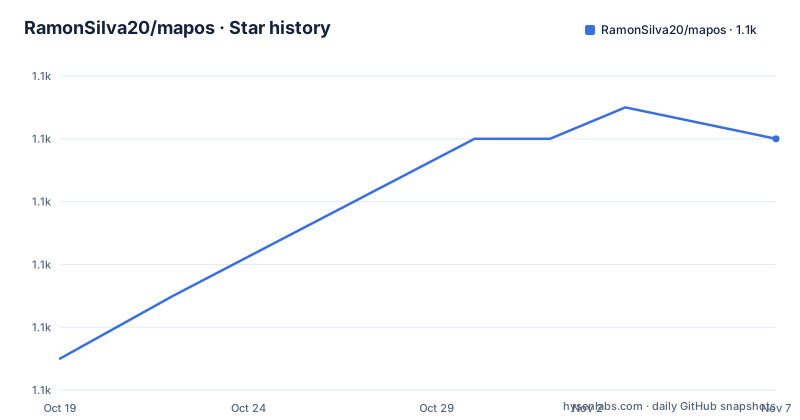
Star history
- RamonSilva20/mapos1,122 ★ · +7
| Repository | 2026-10-19 | 2026-11-07 |
|---|---|---|
| RamonSilva20/mapos | 1.1k | 1.1k |
7 Stars in the last 19 days, measured from the daily GitHub snapshot. Compare with other projects
Editorial analysis
An order management application rather than a framework
The repository describes Map-OS as a service order control system, and the topic tags name the stack plainly, with CodeIgniter, order of service, and system. That is a deliberate scope. The repository root is an application rather than a library, with index.php at the front, an application/ directory holding the code, assets/ for the interface, an install/ directory for the setup wizard, a docker/ directory for the containerised stack, a banco.sql file, an updates/ directory, and scripts such as install.sh and install.bat for automated installation. There is also a .htaccess at the root and a robots.txt, which tells you the deployment target is a conventional Apache or Nginx PHP host with the document root pointed at the project. The primary language is PHP and the licence is Apache-2.0.
Three installation paths, and the Docker one is the shortest
The manual install is four steps. Download the files, extract the package and copy it to your webserver, run composer install --no-dev from the project root, then open your URL and complete the MAPOS installation assistant, which is described as straightforward. After that you set the outgoing email under Settings, System, E-mail, and configure two cron jobs.
*/2 * * * * php /var/www/index.php email/process
*/5 * * * * php /var/www/index.php email/retry
The Docker path asks you to install Docker and Docker Compose, enter the docker folder and run docker-compose up --force-recreate, then open http://localhost:8000/ and start the installation. The database connection details the assistant expects are host mysql, user mapos, password mapos and database mapos, and the URL is http://localhost:8000/. The README also flags that the docker/data folder holds the MySQL files and losing it loses the database, and that PhpMyAdmin is installed and reachable at http://localhost:8080/. That last detail is worth noticing, since an administrative database UI exposed on a second port is a decision to check before exposing the stack to a network.
A scripted installer exists for Windows and for Linux hosts
Beyond the manual and Docker routes there is an automated installation path, documented with a video tutorial. On Windows 10 and 11 you open Command Prompt or PowerShell as administrator and run a single command that downloads install.bat from the repository and executes it.
PowerShell -command "& { iwr https://raw.githubusercontent.com/RamonSilva20/mapos/master/install.bat -OutFile MapOS_Install.bat }; .\MapOS_Install.bat"On Linux, meaning Ubuntu and Debian, you open a terminal or reach the server over SSH, elevate with sudo su, and run the equivalent for install.sh.
curl -o MapOS_Install.sh -L https://raw.githubusercontent.com/RamonSilva20/mapos/master/install.sh && chmod +x MapOS_Install.sh && ./MapOS_Install.shYou then follow the on-screen instructions. The convenience here is real, and so is the tradeoff, since a script that fetches and runs a remote file as root is the pattern that security review always asks about. If your organisation has a policy against piping installers, the Docker path is the auditable alternative.
Updating means replacing files and migrating the database, in that order
The update procedure is the most operationally significant part of the README, because it defines what a rollback would cost. You back up first, using the admin interface at settings, backup, and then copy the anexos, arquivos, uploads and userimage folders from the Assets directory along with any customisation inside the img folder, and copy the .env file from the application directory. You then replace the files with the new version's files, run composer install --no-dev from the project root, restore the backups, and finally migrate the database, either by clicking the Update Database button under Settings, System, or from the terminal.
php index.php tools migrateThe Docker update is the same sequence with the container stopped and recreated rather than the files swapped in place, using docker-compose up --force-recreate in the docker folder. There is also an in-system update path, which the README says first requires manually updating to version v4.4.0 before the automatic updater can take over. That staging requirement is a sensible safety rail for a large schema, and it also tells you the automatic updater is not new.
A commercial company maintains the project, and the release tags show both lines
The README states the project is open source, maintained and developed by the company MountBit, which is responsible for its continuous evolution, fixes and community support. That is a meaningful difference from a hobby project, and the release history backs it up, with v4.55.3 and v5.0.0-beta.1 both tagged on 2026-10-15 and v4.55.2 the day before. The last push was on 2026-10-15 and the repository is not archived. The README also points at a partner hosting service, SYSGO, described as an automated installation with a dedicated environment, configuration and usage support, backups and high availability, and it asks people to support development through a donation page. There is a WhatsApp community link, a contact address, and a GitHub Discussions page for voting on suggestions.
The repository carries the process files a downstream fork would need
The root listing shows the governance and tooling that comes with a long-lived application. There is a CONTRIBUTING.md describing how to set up a development environment, the code standard and how to open a pull request, a CODE_OF_CONDUCT.md, an AGENTS.md, a CHANGELOG.md, a SECURITY.md, a .php-cs-fixer.php for code style, a .github/ directory, and a documentation folder that includes the dashboard screenshot and the SYSGO material. There is also a file whose name documents a recurring Windows annoyance, Cronjobs no Windows para enviar os e-mails.md, which is a small but telling sign of the audience, since it means the project has users running scheduled email on Windows where cron does not exist natively. The version badge in the README shows 4.55.3 and a theme badge naming the Matrix Admin theme, which tells you the interface is based on an admin template rather than being drawn from scratch.
Editorial conclusion
Map-OS fits a service business that needs order intake, tracking and status notification for technicians, because it arrives as a working CodeIgniter application with a web installer and a Docker compose stack rather than as a library you assemble yourself. It is a poor fit if you need a supported commercial product with a service level agreement, since the project is maintained by a company but the repository carries no support commitment, and a poor fit if your operation is complex enough to need a workflow engine rather than a fixed order lifecycle. Verify first the PHP and MySQL versions your environment offers against the install guide, and take the documented backups of the Assets folders and the .env file before running any update, because the update procedure replaces files in place.
Frequently asked questions
What is Map-OS?
It is a service order control system written in PHP on CodeIgniter, with a web installer, a Docker compose deployment, cron driven email processing and an admin panel that can run database migrations. The repository describes it as a complete application rather than a library.
How do I install Map-OS with Docker?
Install Docker and Docker Compose, change into the docker directory and run docker-compose up --force-recreate, then open http://localhost:8000/ and complete the installation assistant with the database host mysql, user mapos, password mapos and database mapos. PhpMyAdmin is installed as well at http://localhost:8080/.
What are the cron jobs Map-OS needs?
Two. One runs every two minutes to send pending emails, php /var/www/index.php email/process, and one runs every five minutes to retry failed emails, php /var/www/index.php email/retry. The path to index.php must be adjusted to your environment.
What does a Map-OS upgrade involve?
Back up the anexos, arquivos, uploads and userimage folders and the .env file, replace the application files, run composer install --no-dev from the project root, restore the backups, then migrate the database either with the Update Database button under Settings, System or with php index.php tools migrate from the project root.
Official sources
Add this badge to your README
If you maintain this project, the badge below links readers to this analysis and shows its maintenance status from the daily GitHub snapshot. Paste the markdown into your README; add ?metric=license or ?metric=stars to the image URL for a different field.

[](https://hysenlabs.com/projects/ramonsilva20-mapos)Star history chart for your README
[](https://hysenlabs.com/projects/ramonsilva20-mapos)Was this useful?