NetNewsWire: a free Swift feed reader for Mac and iPhone, and what a self-built copy leaves out
RSS reader for macOS and iOS.
At a glance
- What is it?
- Ranchero-Software/NetNewsWire is an MIT licensed RSS, Atom and JSON Feed reader for macOS and iOS. Building it yourself needs no paid developer account, but that build ships without iCloud, Feedly and the Reader View.
- Who is it for?
- NetNewsWire suits Mac and iPhone users who want a free, open-source reader for RSS, Atom and JSON Feed, and developers who want a readable Swift codebase to study or patch. It is the wrong pick for anyone on Android or Windows, since the project targets only macOS and iOS.
- Can I use it commercially?
- Yes. MIT is a permissive licence: you can use, modify and sell software built on it, as long as you keep its copyright and licence notices.
- Is it still maintained?
- Yes. The repository received new commits within the last day.
- What is it written in?
- Mainly Swift, according to GitHub's language statistics.
Answers come from the project's GitHub data, last synced on November 25, 2026, and from our analysis. They are not legal advice.
Star history
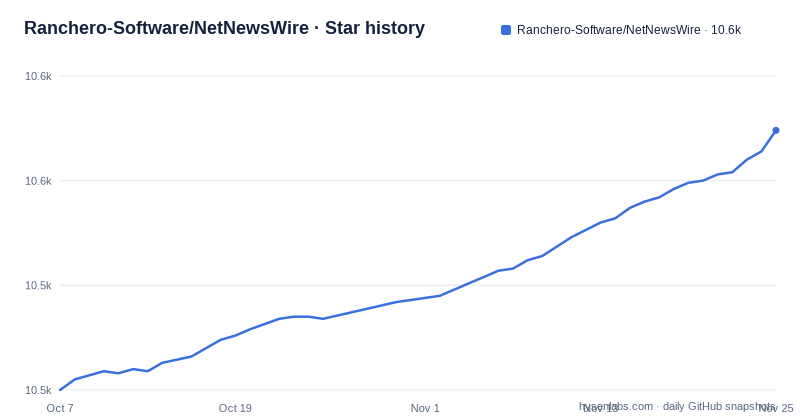
- Ranchero-Software/NetNewsWire10,574 ★ · +124
| Repository | 2026-10-07 | 2026-11-25 |
|---|---|---|
| Ranchero-Software/NetNewsWire | 10.5k | 10.6k |
124 Stars in the last 49 days, measured from the daily GitHub snapshot. Compare with other projects
Editorial analysis
Four feed formats, two Apple platforms
NetNewsWire is a free and open-source feed reader for macOS and iOS, written in Swift and released under the MIT license. It reads RSS, Atom, JSON Feed and RSS-in-JSON. That last pair matters if you follow sites that publish JSON feeds: you do not need a converter in between. The repository holds both apps side by side, with top-level Mac/, iOS/, Shared/ and Widget/ folders, a Modules/ folder for shared code, Themes/ for article styling, and an AppleScript/ folder for scripting support on the Mac. Bugs and feature requests go to GitHub issues, and change notes for each release live on the GitHub releases page; the app's Help menu links to both.
Mac betas move on their own tag line
Release tags are split by platform. The three most recent are all Mac builds: mac-7.2.1 (NetNewsWire 7.2.1 for Mac) on October 20, 2026, mac-7.3b1 the same day, and mac-7.3b2 on October 22, 2026. The last push to main was October 25, 2026, so work is current. The practical consequence for Mac users is a choice between the 7.2.1 stable line and the 7.3 betas, which arrived two days apart. iOS users should not read a Mac tag as an iOS release: the mac- prefix marks which app it covers. An Appcasts/ folder sits at the top of the repository alongside an AppStore/ folder.
Building without a paid Apple developer account
You can build and test NetNewsWire without a paid developer account. Start by cloning the repository:
git clone https://github.com/Ranchero-Software/NetNewsWire.gitCode signing is kept out of the project file. Instead, you create a `DeveloperSettings.xcconfig` file locally, which keeps the Xcode project pristine and means you never have to check personal signing settings into source control. The fastest route is the included setup script. From Terminal, `cd` into the NetNewsWire directory, make the script executable, and run it, answering its prompts:
chmod +x setup.sh
./setup.sh
After that you can open `NetNewsWire.xcodeproj` in Xcode and build without code signing errors.
The SharedXcodeSettings folder must sit next to the repository
If you prefer to skip the script, create a `SharedXcodeSettings` directory beside the repository, not inside it. With the project at /Users/name/projects/NetNewsWire/NetNewsWire.xcodeproj, the settings file belongs at /Users/name/projects/SharedXcodeSettings/DeveloperSettings.xcconfig. Give it these contents:
CODE_SIGN_IDENTITY = Mac Developer
DEVELOPMENT_TEAM = <Your Team ID>
CODE_SIGN_STYLE = Automatic
ORGANIZATION_IDENTIFIER = <Your Domain Name Reversed>
DEVELOPER_ENTITLEMENTS = -dev
PROVISIONING_PROFILE_SPECIFIER =
Set `DEVELOPMENT_TEAM` to your Apple supplied team ID, which Keychain Access can show you, and `ORGANIZATION_IDENTIFIER` to a reversed domain you control or make up. Leave `PROVISIONING_PROFILE_SPECIFIER` empty. Putting the folder in the wrong place, or filling in the profile specifier, defeats the point of the setup and brings the signing errors back.
A self-built copy has no iCloud, no Feedly and no Reader View
The build you produce this way is a special build with some functionality disabled. The project relies on API keys that cannot be stored in the repository or shared between developers, so certain account types are switched off. iCloud and Feedly accounts are not enabled, and the Reader View is not enabled either. The consequence is concrete: if you sync through Feedly or depend on iCloud to keep a Mac and an iPhone in step, a source build cannot stand in for the distributed app. It is fine for testing a patch to parsing, layout or themes, but you cannot reproduce a bug that only appears in those account types from your own build.
Pull requests need a conversation first
The contribution rule is blunt: ask before doing a pull request, before even starting work. CONTRIBUTING.md explains why asking first matters and also holds the code of conduct that every community member is expected to follow. The cost of ignoring this is wasted effort on a change the maintainers may not accept. Discussion happens on the forum at discourse.netnewswire.com, which welcomes help with testing, coding, writing and feedback, and is also where to go if the build setup fails. The repository adds a .swiftlint.yml for style checks and three test plans, NetNewsWire.xctestplan, NetNewsWire-iOS.xctestplan and NetNewsWire-CI.xctestplan, so a change can be run against the same plans CI uses.
Supporting the project does not involve money
NetNewsWire is free, and the project's own technote on how to support it opens with a spoiler: do not send money. The useful contributions are the ones the forum lists, such as testing betas, writing, coding and giving feedback. For a user deciding whether to rely on it, this means there is no paid tier hiding features: the gaps in a self-built copy come from private API keys, not from a subscription. Themes in the Themes/ folder and the Mac AppleScript support are part of the open code, so customisation does not require a separate purchase either.
Editorial conclusion
NetNewsWire suits Mac and iPhone users who want a free, open-source reader for RSS, Atom and JSON Feed, and developers who want a readable Swift codebase to study or patch. It is the wrong pick for anyone on Android or Windows, since the project targets only macOS and iOS. If you plan to build it from source, accept that iCloud and Feedly accounts and the Reader View stay disabled, and ask on GitHub before you start a pull request.
Frequently asked questions
What is NetNewsWire used for?
NetNewsWire is a feed reader for macOS and iOS. It reads RSS, Atom, JSON Feed and RSS-in-JSON feeds.
Is NetNewsWire free?
Yes. NetNewsWire is free, and its own guidance on supporting the project says not to send money.
Is NetNewsWire open source?
Yes. NetNewsWire is open source under the MIT license, with its Swift code on GitHub at Ranchero-Software/NetNewsWire.
How do I use NetNewsWire from source?
Clone the repository, run setup.sh or create SharedXcodeSettings/DeveloperSettings.xcconfig next to it, then open NetNewsWire.xcodeproj in Xcode. That build has iCloud, Feedly and the Reader View disabled.
Official sources
Add this badge to your README
If you maintain this project, the badge below links readers to this analysis and shows its maintenance status from the daily GitHub snapshot. Paste the markdown into your README; add ?metric=license or ?metric=stars to the image URL for a different field.

[](https://hysenlabs.com/projects/ranchero-software-netnewswire)Star history chart for your README
[](https://hysenlabs.com/projects/ranchero-software-netnewswire)Was this useful?