RapiDoc Web Component for OpenAPI Documentation
RapiDoc -WebComponent for OpenAPI Spec
At a glance
- What is it?
- RapiDoc renders OpenAPI 3.0.x, OpenAPI 3.1.x, and Swagger 2.0 specifications as an interactive custom element. It fits plain HTML and component-based frontends, but its README leaves deployment, private-spec access, and rollback procedures undocumented.
- Who is it for?
- RapiDoc is suitable for teams that want a client-rendered OpenAPI reference embedded in HTML, React, Vue, Angular, Svelte, or Lit. It is a poor fit when a private specification requires controlled hosting or when documentation must work without browser-side JavaScript.
- Can I use it commercially?
- Yes. MIT is a permissive licence: you can use, modify and sell software built on it, as long as you keep its copyright and licence notices.
- Is it still maintained?
- Yes. The repository last received commits 3 days ago.
- What is it written in?
- Mainly JavaScript, according to GitHub's language statistics.
Answers come from the project's GitHub data, last synced on October 23, 2026, and from our analysis. They are not legal advice.
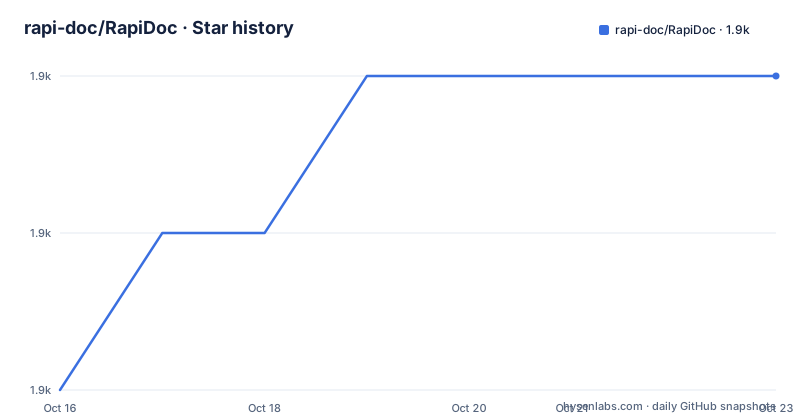
Star history
- rapi-doc/RapiDoc1,904 ★ · +2
| Repository | 2026-10-16 | 2026-10-23 |
|---|---|---|
| rapi-doc/RapiDoc | 1.9k | 1.9k |
2 Stars in the last 7 days, measured from the daily GitHub snapshot. Compare with other projects
Editorial analysis
Why RapiDoc Turns an OpenAPI File into an API Console
RapiDoc targets developers who already have an OpenAPI or Swagger document and need a browsable reference without designing a documentation interface from scratch. The specification remains the source of operational information: endpoints, schemas, examples, servers, and authentication information are presented through the component instead of being copied into manually maintained pages. This makes RapiDoc most relevant to API owners, internal platform teams, software vendors, and front-end developers who publish reference documentation.
The component supports OpenAPI 3.0.x, OpenAPI 3.1.x, and Swagger 2.0 according to the README. Its interface is designed for direct use rather than mere reference reading. The built-in API console can issue requests, models and examples open by default, and request fields can contain sample data. The documented side-by-side request and response view gives users a compact way to inspect both sides of an operation without leaving the documentation.
That scope differs from displaying an OpenAPI JSON or YAML file as text. RapiDoc parses the document and turns its structure into navigation and interactive controls. However, the component is primarily a browser UI. The README does not describe server-side HTML rendering, versioned documentation releases, indexed search across a large API catalog, or a publishing workflow for multiple specification revisions. Those requirements need separate verification rather than being inferred from the word "documentation."
The Monorepo Behind the rapidoc Package
The repository is an ESM monorepo with workspaces for `packages/*` and `docs`. The publishable core is under `packages/rapidoc`, where `src/` contains the Lit implementation and `dist/` contains production artifacts. The README identifies `rapidoc-min.js` as the production bundle. Other workspace directories have distinct purposes: `packages/rapidoc-cli` is described as a utility for linting, previewing, and bundling, while `packages/rapidoc-portal` is described as a PocketBase developer portal for hosting and securing specifications.
The documentation site lives under `docs/` and uses Astro. Public examples and specification files are kept separately from internal edge-case specifications under `docs/public/specs/` and `docs/public/specs-test/`. The root package exposes scripts for development, production builds, linting, formatting, publishing, and several test groups. Unit, component, end-to-end, parser, performance, and visual scripts are represented in the root configuration, although the README does not explain their coverage or expected outputs.
This layout is useful for maintainers because the browser component, CLI, portal, examples, and tests remain separate packages. It also increases the number of moving parts for a contributor. A change to the component may need to pass through the core build, documentation integration, and browser-oriented tests before the generated bundle is published.
Rendering Through the Lit Custom Element
The public integration boundary is an HTML custom element named `<rapi-doc>`. A page loads the module bundle, declares the element, and supplies a specification URL through `spec-url`. Attributes select visible behavior such as `theme="dark"` and `render-style="read"`. Because this is a web component, the same browser element can be placed into pages built with plain HTML or integrated into React, Vue, Angular, Svelte, and Lit, as stated in the README.
The component is built with Lit and modern ES modules. The production build uses Vite 6 and bundles `lit`, `@scalar/openapi-parser`, `marked`, `microlighter`, and `github-slugger` into a standalone file. The README describes this as zero runtime external dependencies. The build also minifies Lit templates, removes `console.*` and `debugger` statements, and inserts a license and version banner. That design can simplify deployment because consumers need to load the component bundle rather than resolve its internal libraries separately.
Customization extends beyond theme selection. The documented render styles are `read`, `view`, and `focused`. Web component slots named `fixed-header`, `overview`, `servers`, and `auth` accept custom content. The README also states that brand colors, typography, logos, and header styling can be changed. These are presentation and composition controls; the README does not describe a plugin API for replacing the parser, changing request execution policy, or connecting the console to an external authentication gateway.
Installing RapiDoc and Rendering the Petstore Specification
For a quick browser-facing integration, the README gives a CDN module and the public Petstore Swagger 2.0 URL. Save the following as an HTML page, serve it through a web server, and open it in a browser. The rendered reference should appear inside the `<rapi-doc>` element, using the supplied specification and the dark `read` layout.
<!DOCTYPE html>
<html>
<head>
  <meta charset="utf-8">
  <script type="module" src="https://unpkg.com/rapidoc/dist/rapidoc-min.js"></script>
</head>
<body>
  <rapi-doc
    spec-url="https://petstore.swagger.io/v2/swagger.json"
    theme="dark"
    render-style="read"
  ></rapi-doc>
</body>
</html>
For local development of the repository rather than CDN consumption, clone the project and install all workspace dependencies. The following commands are copied from the README.
git clone https://github.com/rapi-doc/RapiDoc.git
cd RapiDoc
npm install
The documented prerequisite is Node.js `>= 22.12.0`, or Bun. After installation, start the Astro documentation and example site with the root workspace command. Open `http://localhost:4321` as documented. Development mode serves live modules from `packages/rapidoc/src/index.js` rather than requiring the production bundle to be rebuilt for each source change.
npm run devThe README also defines `npm run stop` for stopping the background development server. The root configuration exposes `npm run build` for a sequential build of the core library and documentation site.
Development and Production Bundles Serve Different Purposes
RapiDoc separates live source development from inspection of the deployable bundle. During local documentation development, Astro middleware intercepts `/rapidoc/rapidoc-min.js` and `/rapidoc/rapidoc.js` and serves imports from `packages/rapidoc/src/index.js` through Vite. Changes under the component source then trigger browser reloading without waiting for a complete production compilation, according to the README.
A different command is needed when diagnosing the actual script artifact used by external pages. The development bundle build writes `packages/rapidoc/dist/rapidoc-min.js` and a source map. It retains console output and debugger statements and avoids minification. That mode is specifically useful when source-level diagnostics from the bundled element are required.
npm run build:rapidoc:devFor distribution, `npm run build:rapidoc` produces the minified standalone bundle. The full `npm run build` command first builds the `rapidoc` workspace and then builds `docs`. This sequencing matters because the documentation site consumes the generated component artifact in its production setup.
The distinction can prevent a misleading development experience. A page that works through `npm run dev` may use live source modules, while a deployed page loads the built distribution. Integrators should inspect both paths when a problem involves initialization, logging, browser compatibility, or a framework wrapper.
Operational Limits of Browser-Rendered API Documentation
The principal constraint is that RapiDoc is a client-side web component rather than a documented documentation hosting platform. The examples and README explain how to point the element at a specification URL, but they do not specify how RapiDoc handles unavailable network resources, cross-origin restrictions, expired links, rotating private tokens, or offline operation. Those are deployment concerns for the chosen specification host and must be checked with the actual URL.
RapiDoc is also the wrong tool when the required deliverable is a static artifact that remains useful with JavaScript disabled. The documented usage loads a module script and creates the interface through a custom element. The repository includes an Astro documentation site, but that site consumes RapiDoc; it does not document a static export that preserves the interactive component as ordinary HTML.
The repository mentions `rapidoc-portal` as a PocketBase developer portal for hosting and securing specs, but the README does not explain its deployment process, access model, persistence requirements, or supported operations. A team should not treat that directory comment as evidence that a private documentation portal can be deployed from the README alone.
There is another product-fit boundary. RapiDoc focuses on rendering one specification into an interactive reference and request console. It is not presented as a specification validator, design manager, SDK generator, changelog service, or multi-version documentation catalog. The root workspace does include a CLI described as supporting lint, preview, and bundle operations, but its commands and production workflow are not documented in the README.
MIT Licensing, Release Activity, and Upgrade Work
RapiDoc is distributed under the MIT License. The repository includes `LICENSE.txt`, and the README carries an MIT license badge. This identifies the declared license, but it does not by itself answer organization-specific compliance questions about bundled notices, internal policies, or third-party obligations.
The repository is not archived. Its last push was on 2026-10-16. Recent releases include v11.0.1 and v11.0.0 on 2026-10-14, followed by v10.1.0 on 2026-10-02. These dates indicate recent release activity around the version line represented by the repository. They do not guarantee compatibility across the major jump from v10.1.0 to v11.0.0.
The upgrade surface includes more than replacing one file in a simple application. The component is built from Lit, parser, Markdown-related, highlighting, and slugging dependencies that are bundled into the production artifact. Integration code may use attributes, render styles, or slots, while the documentation site relies on special development middleware. A version change should therefore be checked against the actual custom-element markup and the selected build path. The README does not document a migration guide or rollback procedure for RapiDoc.
Editorial conclusion
RapiDoc is suitable for teams that want a client-rendered OpenAPI reference embedded in HTML, React, Vue, Angular, Svelte, or Lit. It is a poor fit when a private specification requires controlled hosting or when documentation must work without browser-side JavaScript. Before adoption, verify access and CORS behavior for the chosen specification URL, then inspect the built `<rapi-doc>` behavior in the frameworks and browsers that the application supports.
Frequently asked questions
Which OpenAPI versions can RapiDoc render?
The README states that RapiDoc supports OpenAPI 3.0.x, OpenAPI 3.1.x, and Swagger 2.0.
How do I add RapiDoc to an HTML page?
Load `https://unpkg.com/rapidoc/dist/rapidoc-min.js` as a module, then add a `<rapi-doc>` element with the specification URL in `spec-url`. The README also demonstrates `theme` and `render-style` attributes.
Can RapiDoc call an API from the documentation?
Yes. The README identifies a built-in API console that can call and test APIs, with request and response data presented together.
Does the local development page use the production RapiDoc bundle?
No. According to the README, `npm run dev` makes the Astro server serve live ES modules from `packages/rapidoc/src/index.js` rather than a prebuilt production file.
Which frameworks can use the RapiDoc custom element?
The README names plain HTML, React, Vue, Angular, Svelte, and Lit. The documented integration surface is the `<rapi-doc>` custom element.
Official sources
Add this badge to your README
If you maintain this project, the badge below links readers to this analysis and shows its maintenance status from the daily GitHub snapshot. Paste the markdown into your README; add ?metric=license or ?metric=stars to the image URL for a different field.

[](https://hysenlabs.com/projects/rapi-doc-rapidoc)Star history chart for your README
[](https://hysenlabs.com/projects/rapi-doc-rapidoc)Was this useful?