RapidOCR: PaddleOCR's models in ONNX, running on six inference runtimes
📄 Awesome OCR multiple programing languages toolkits based on ONNX Runtime, OpenVINO, MNN, PaddlePaddle, TensorRT and PyTorch.
At a glance
- What is it?
- RapidOCR is a deployment layer rather than a new OCR model. It converts PaddleOCR's models into ONNX and ships toolkits for several languages and six runtimes. Language support beyond Chinese and English is a model swap, fine-tuning routes back through PaddleOCR, and the root Makefile does nothing except drive Docker, where clean deletes your volumes.
- Who is it for?
- Use RapidOCR when you need OCR to run offline, on a specific inference runtime, from one of several languages, because ONNX conversion plus six runtimes is what it actually provides and PaddleOCR is what it actually recognises with. Do not adopt it hoping for better accuracy, since the models are converted PaddleOCR models and the fine-tuning path routes back through PaddleOCR as well.
- Can I use it commercially?
- Yes. Apache-2.0 is a permissive licence: you can use, modify and sell software built on it, as long as you keep its copyright and licence notices.
- Is it still maintained?
- Yes. The repository received new commits within the last day.
- What is it written in?
- Mainly Python, according to GitHub's language statistics.
Answers come from the project's GitHub data, last synced on November 15, 2026, and from our analysis. They are not legal advice.
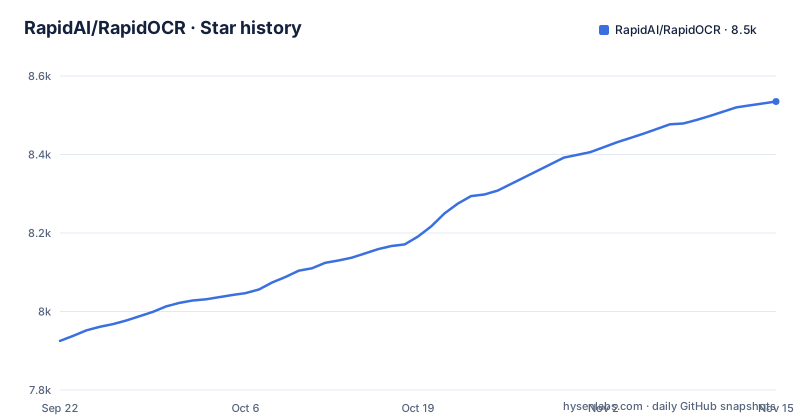
Star history
- RapidAI/RapidOCR8,535 ★ · +610
| Repository | 2026-09-22 | 2026-11-15 |
|---|---|---|
| RapidAI/RapidOCR | 7.9k | 8.5k |
610 Stars in the last 54 days, measured from the daily GitHub snapshot. Compare with other projects
Editorial analysis
RapidOCR is PaddleOCR's models in an ONNX wrapper
The project origin section explains what this actually is, and it is not a new OCR model.
The reasoning is that PaddleOCR still has room for optimization in engineering aspects, and that RapidOCR converted the models in PaddleOCR into the highly compatible ONNX format to simplify and accelerate the inference deployment of OCR models on various terminal devices. On top of that it did cross-platform porting in Python, C++, Java and C#.
So the split is clean. The recognition quality belongs to PaddleOCR's models. What RapidOCR contributes is the format and the deployment surface: one model set in a portable interchange format, running on whatever runtime your device has.
That is also visible in the acknowledgements, which thank PaddleOCR for everything, PaddleOCR2Pytorch for providing the converted PyTorch format models, and PaddleX for providing the document models.
The consequence is that choosing a runtime is not choosing a different OCR engine. Switching between ONNX Runtime and TensorRT changes how the same model is executed, not what it recognises, and you should compare accuracy between OCR projects rather than between runtimes.
Chinese and English by default, and every other language is a model
Language support is not a switch. The supported languages note states default support for Chinese and English recognition, and then points at the documentation's Model List for the other supported languages.
That distinction is the whole story. The default configuration in the usage example loads an engine with no arguments at all, and the test image it points at is named for exactly what it contains, Chinese, English and numbers.
So a model is what determines the languages, and picking a different language means swapping in a different model rather than passing a parameter or setting a locale.
The consequence is operational rather than theoretical. If your documents are in a language outside the Chinese and English default, the first thing to establish is which model in that Model List you actually need and where you will host it, because an offline deployment has to carry that file with it. And if your documents mix scripts, the combination you need may not be the one the default model assumes.
Fine-tuning takes you back to PaddleOCR
The user guide splits into two paths, and the second one leaves this project.
Direct deployment covers the case where the models provided in this repository meet your needs, in which case you follow the official quickstart documentation. That is the common path, and it never mentions training.
Custom fine-tuning is the other path, and its wording is specific. If the existing models cannot meet specific scenario requirements, you can fine-tune them using your own data based on PaddleOCR, and then apply the optimized models to the RapidOCR deployment process.
So the training happens on PaddleOCR, and the output is fed into RapidOCR for inference. RapidOCR is the runtime side of that arrangement, not the training side.
The consequence is that a custom model pipeline means depending on both projects. You need PaddleOCR to train, its exported and converted weights to satisfy RapidOCR, and a way to verify that the converted artefact still recognises what the original did. If that verification step is not in your plan, the fine-tuning path is more work than the direct path it is meant to unlock.
The root Makefile only drives Docker, and clean removes volumes
The first line of the Makefile is a comment stating what the file is for.
# RapidOCR Docker Dev Environments
COMPOSE_FILE := docker/docker-compose.yaml
ENGINES := onnxruntime-cpu onnxruntime-gpu tensorrt paddle openvino pytorch mnn
There is no target that installs, builds, or packages RapidOCR for Python. The pip line in the installation section is the install path, and `make` at the repository root is a convenience wrapper around Docker Compose for the seven engines listed in that variable.
Which makes the last target worth reading closely.
build-all:
	docker compose -f $(COMPOSE_FILE) build

clean:
	docker compose -f $(COMPOSE_FILE) down --rmi local --volumes
`clean` is not just teardown. It passes `--rmi local` to remove locally built images and `--volumes` to remove named volumes, which is where any persistent state in a development container lives.
The consequence is that `make clean` is destructive in a way the name does not suggest. If you have models, caches or downloaded weights cached into a container volume, they go with it, and there is no separate target that only removes containers.
Seven engines, three pattern rules, one compose file
The `ENGINES` variable holds seven names, and they match the runtimes named in the project description with one addition: onnxruntime is split into a CPU and a GPU variant.
.PHONY: help build-all clean $(foreach e,$(ENGINES),build-$(e) test-$(e) shell-$(e))That line generates the phony targets, and the recipes behind them are three pattern rules rather than twenty-one explicit ones.
build-%:
	docker compose -f $(COMPOSE_FILE) build $*

test-%:
	docker compose -f $(COMPOSE_FILE) run --rm $* pytest tests/ -v

shell-%:
	docker compose -f $(COMPOSE_FILE) run --rm $* bash
Each rule substitutes the stem into the compose service name. `test-%` runs the Python test suite inside the container against the `tests/` directory, with `--rm` so the container does not survive the run.
The consequence is that the seven engines are interchangeable at the make level, so comparing two runtimes is changing one word in a target name. It also means a typo in an engine name produces a Compose error about a missing service rather than a helpful list, and that the compose file has to define all seven for the pattern rules to be useful.
Installation is two packages, and the second one is your choice of runtime
The installation section is a single command.
pip install rapidocr onnxruntimeThe runtime is installed explicitly rather than pulled in as a dependency, which is why the Docker section then covers the other six engines and the Docker section is framed as development environments for all supported inference engines.
The usage example shows how little configuration the default path needs.
from rapidocr import RapidOCR

engine = RapidOCR()

img_url = "https://www.modelscope.cn/models/RapidAI/RapidOCR/resolve/master/resources/test_files/ch_en_num.jpg"
result = engine(img_url)
print(result)

result.vis("vis_result.jpg")
The engine is constructed with no arguments, called with an image URL, and the returned result can render a visualisation to a file.
The consequence is that the runtime choice is the only decision the install line forces on you, and the default is ONNX Runtime on CPU. The other engines, including the GPU variant and TensorRT, are covered by the Docker environments, and the README does not rank the seven against each other.
This is the Python component, and the tree still holds eight target directories
The contribution guide opens by stating something that is easy to skim past. This repository contains the Python component of RapidOCR, and components for other languages have been migrated elsewhere.
That statement sits oddly against the repository tree, which holds directories for `cpp/`, `dotnet/`, `jvm/`, `android/` and `ios/` alongside `python/`, plus `api/`, `ocrweb/`, `docker/`, `docs/` and `assets/`.
So the same repository both is the Python component and contains target directories for several others. Those directories are consistent with a project that has housed all the ports at once, and the note is consistent with those ports having since been split out.
The consequence is practical for anyone filing an issue or a pull request. The tree is a reasonable guide to what exists somewhere, and the contribution guide is the better guide to what belongs here. Check which repository owns the component you are about to change, because the two pieces of documentation answer different questions.
What RapidOCR cannot do for you, and what it leaves you owning
Four limits, and the first is the one the project states about itself.
It cannot improve recognition accuracy on its own. The models are PaddleOCR models converted to ONNX, and the fine-tuning path routes back through PaddleOCR as well. If accuracy on your documents is the problem, the answer is a different or a fine-tuned model, not a different runtime.
It cannot add a language without a new model. Default support is Chinese and English, and the rest comes from the documented Model List, which for an offline deployment means shipping that file.
It cannot show you a benchmark. The introduction claims extreme speed and extensive compatibility, the name section claims low resource consumption, high cost-effectiveness and accurate and efficient recognition, and the opening line calls it rapid offline deployment. No throughput figure, no latency measurement and no accuracy score appears in the README's introduction, so nothing there tells you whether it beats the OCR you already run.
And it cannot tell you which runtime to pick. Seven are listed. None is recommended, and the trade between a CPU build you can ship anywhere and a TensorRT build that needs a specific GPU is left entirely to you.
Editorial conclusion
Use RapidOCR when you need OCR to run offline, on a specific inference runtime, from one of several languages, because ONNX conversion plus six runtimes is what it actually provides and PaddleOCR is what it actually recognises with. Do not adopt it hoping for better accuracy, since the models are converted PaddleOCR models and the fine-tuning path routes back through PaddleOCR as well. Before you commit, check three things. Language support beyond Chinese and English is a model swap rather than a setting. The root Makefile only drives Docker, so make clean will remove your container volumes along with the containers and images. And the feature claims arrive with no benchmark attached. The documentation is in Chinese, so budget for that if your team does not read it.
Frequently asked questions
What is rapidocr?
A completely open-source, free OCR tool supporting multi-platform, multi-language operation and rapid offline deployment. Its models come from PaddleOCR converted into the ONNX format, and it is ported into toolkits for Python, C++, Java and C#.
How do I install rapidocr?
With pip, installing the inference runtime alongside the package: pip install rapidocr onnxruntime. The other runtimes are covered by the Docker environments, with make targets for onnxruntime-cpu, onnxruntime-gpu, tensorrt, paddle, openvino, pytorch and mnn.
How do I use rapidocr?
Create an engine and hand it an image. The example constructs RapidOCR() with no arguments, calls engine(img_url) with an image URL, prints the returned result, and writes a visualisation with result.vis('vis_result.jpg').
Which OCR engine is better, PaddleOCR or RapidOCR?
The README positions RapidOCR as the deployment layer rather than a competing model. It says PaddleOCR still has room for optimization in engineering aspects, and that RapidOCR converted those models into ONNX to simplify inference across terminal devices, so the recognition itself is PaddleOCR's.
What is OCR used for, per RapidOCR?
The README does not enumerate use cases. It frames the project around offline deployment on various terminal devices, multi-platform and multi-language operation, and rapid offline deployment, with default recognition support for Chinese and English.
Official sources
Add this badge to your README
If you maintain this project, the badge below links readers to this analysis and shows its maintenance status from the daily GitHub snapshot. Paste the markdown into your README; add ?metric=license or ?metric=stars to the image URL for a different field.

[](https://hysenlabs.com/projects/rapidai-rapidocr)Star history chart for your README
[](https://hysenlabs.com/projects/rapidai-rapidocr)Was this useful?