cuCIM splits its pip packages by CUDA version, and cuslide was due for removal in the release it shipped
cuCIM - RAPIDS GPU-accelerated image processing library
At a glance
- What is it?
- A RAPIDS library that moves whole-slide and n-dimensional TIFF images onto the GPU, with a CUDA kernel layer behind a Python interface that mirrors the OpenSlide API. The media handling is the interesting part and the format list is specific. The packaging has a rough edge, because the pip package name carries the CUDA major version and conda does not, and the plugin migration the README documents has no completion note.
- Who is it for?
- Use cuCIM if you are already inside a RAPIDS environment and your images are large tiled TIFF, SVS or Philips files, since the CUDA kernel layer is the reason to reach for it. Do not install it standalone with pip without reading the package names, because there is no plain cucim distribution and the CUDA suffix is mandatory.
- Can I use it commercially?
- Yes. Apache-2.0 is a permissive licence: you can use, modify and sell software built on it, as long as you keep its copyright and licence notices.
- Is it still maintained?
- Yes. The repository last received commits 1 day ago.
- What is it written in?
- Mainly Jupyter Notebook, according to GitHub's language statistics.
Answers come from the project's GitHub data, last synced on November 14, 2026, and from our analysis. They are not legal advice.
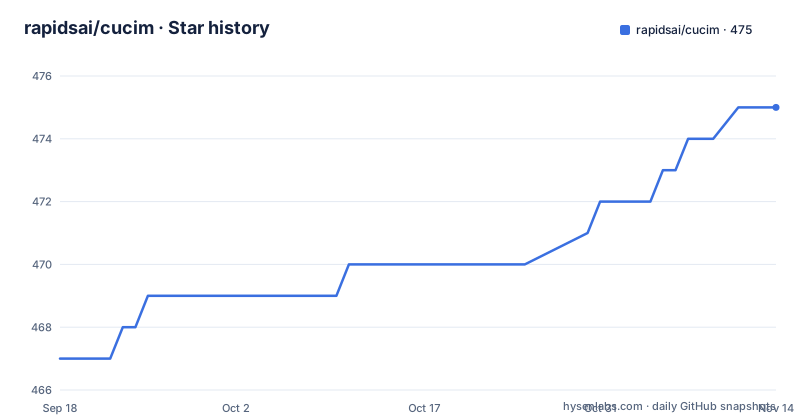
Star history
- rapidsai/cucim475 ★ · +8
| Repository | 2026-09-18 | 2026-11-14 |
|---|---|---|
| rapidsai/cucim | 467 | 475 |
8 Stars in the last 57 days, measured from the daily GitHub snapshot. Compare with other projects
Editorial analysis
There is no plain cucim on pip, the CUDA version is in the name
Two distributions, named by CUDA major version:
pip install cucim-cu12pip install cucim-cu13So `pip install cucim` does not resolve, and a script that installs cuCIM by name has to know which CUDA the host has before it can construct the package name. That is a deliberate and common pattern for GPU wheels, and the README states it plainly with no ambiguity. It is worth noting only because the conda route uses a different name, which is the subject of the next section.
The library itself is described as an open-source accelerated computer vision and image processing library for multidimensional images, aimed at biomedical, geospatial, material and life science, and remote sensing use cases. The name is pronounced koo-sim, and the README links an IPA lookup rather than spelling out the pronunciation, which is a small sign of how much presentation detail this page does carry.
Three capabilities are claimed. Accelerated processing of large and n-dimensional TIFF files, GPU-based image processing and computer vision primitives, and a straightforward Pythonic interface with a matching API for OpenSlide.
That OpenSlide compatibility is the real adoption story for anyone in digital pathology. It means a pipeline written against OpenSlide's reader API can point at this library and get GPU kernels behind the same calls, rather than needing its own access layer.
The supported formats are specific and bounded: Aperio ScanScope Virtual Slide files, Philips TIFF, and generic tiled multi-resolution RGB TIFF with no compression, JPEG, JPEG2000, LZW or Deflate. That list is short enough to check against your own data before installing.
CUDA 13 exists on pip and is missing from the conda instructions
The two package managers are not in sync.
Conda gets one package name and a CUDA constraint:
conda create -n cucim -c rapidsai -c conda-forge cucim cuda-version=`<CUDA version>`with the note that the CUDA version should be 12.0 or newer. Nightlies use a different channel, rapidsai-nightly, with the same package name and the same constraint.
So conda accepts 12.0 and up, which reads as covering CUDA 13, while pip has split into two wheels and one of them is explicitly for CUDA 13. The pip documentation is more precise than the conda documentation here, and the more precise one is the one people installing from pip will read.
That gap has consequences. A conda user on CUDA 13 is told only that they need 12.0 or newer, with no mention that a separate CUDA 13 distribution exists on the other channel, and no guidance on which conda build they would actually get. And the difference is not cosmetic in practice, because a binary compiled against the CUDA 12 runtime is not interchangeable with one built for 13.
The command itself has a small quirk worth copying exactly rather than cleaning up. The placeholder sits inside backticks, so `cuda-version=\`<CUDA version>\`` is the literal form in the README, and substituting a real value means removing the backticks as well.
A search for CUDA 13 support on this library is a common query, which suggests people arrive looking for it. The README does not answer that question.
Release notes live on a wiki page rather than in the repository, and a VERSION file sits at the root alongside the tags.
cuslide was scheduled for removal in 26.08 and the README never says if it went
There is one plugin deprecation notice in the whole project, and it has an unfinished edge.
Starting with 26.04, the original cuslide plugin was to be deprecated in favour of cuslide2, with removal of cuslide planned for 26.08. The replacement uses nvImageCodec for GPU-accelerated TIFF decoding, and adds tile-level caching, async batch decoding and broader format support. Existing workflows are told to plan to migrate.
Now look at the tags. v26.04.00 published 2026-04-08. v26.06.00 published 2026-06-03. v26.08.00 published 2026-08-05.
The release that was supposed to contain the removal shipped on 2026-08-05. The README still describes cuslide2 as the migration target, still frames cuslide as deprecated, and never reports the removal either way. So the page cannot tell you whether a 26.08 install has two readers or one.
That matters because both are real code paths in the same version. If cuslide was removed, then the environment variable that gates cuslide2 is not a preference, it is the only way in. If it was deferred, then you have a choice and the default is still the older plugin.
The release names carry no information either way. All three are bare version strings, v26.08.00, v26.06.00 and v26.04.00, with no summary line, so the removal would have to be found in the wiki release notes rather than in the tag list.
The versioning itself is the RAPIDS calendar scheme: year and month with a patch component, moving every two months across the three tags.
The last push was 2026-10-01, so the branch is current even though the newest tag is from August.
cuslide2 stays behind an environment variable, so the default reader is unchanged
Enabling the new plugin is a one-line opt-in:
ENABLE_CUSLIDE2=1 python your_script.pyThere is no configuration file, no CLI flag and no default-on behaviour in what is documented. Which means that after upgrading to a release where cuslide is gone, code that never set the variable stops working, and the fix is an environment variable rather than a version constraint.
The variable is also the only place the migration surface appears, so a reader scanning the README for a settings table will not find one.
Two test scripts ship for verifying behaviour per format, and they take the variable differently. For Aperio SVS there is a download mode:
# Download a sample SVS file and run the test
python scripts/test_aperio_svs.py --download

# Or test with your own SVS file
ENABLE_CUSLIDE2=1 python scripts/test_aperio_svs.py /path/to/your/file.svs
Note that the download variant does not carry the environment variable, so it runs without cuslide2 while the local-file variant explicitly enables it. The same asymmetry appears in the Philips test, where the direct run has the variable and the help listing does not.
A point worth raising before running either: --download fetches a sample slide from a source the README does not name. Whole-slide images are large, and a test that pulls one over the network at run time is not something to put on a shared CI machine without checking where it connects.
The broader verification surface is otherwise conventional: test scripts per vendor format, examples in both C++ and Python, a notebooks directory with a welcome notebook, and a benchmarks directory.
Getting the notebook sample images requires Docker, from a single-maintainer image
The documented way to get input images for the notebooks is a repository task:
./run download_testdataThe README notes you need Docker installed, which is an unusual requirement for a GPU image library where you may already have everything else set up. The alternative path spells out what that task does:
mkdir -p notebooks/input
tmp_id=$(docker create gigony/svs-testdata:little-big)
docker cp $tmp_id:/input notebooks
docker rm -v ${tmp_id}
So the sample data is a container image pulled by name. The pattern is careful, incidentally: create the container without starting it, copy the input directory out, then remove it with volumes. That is the right way to extract files from an image without running it.
The image itself is the point to look at. It lives under a single-maintainer Docker Hub namespace, gigony, and there is no version pin, no digest and no mirror in the documentation. Anyone who runs this command is pulling whole-slide test images from one person's account, unpinned, to populate a notebooks directory. For a project whose notebooks are the documented entry point, that is the weakest link in the getting-started path.
The repository does keep its own test_data directory, and the release process keeps changelog, security policy and contribution guide files alongside a third-party licence file listing the borrowed components.
Versioning lives in a dependencies.yaml file at the root as well as in the tags, which is how RAPIDS coordinates a multi-package stack.
cuCIM's version is tied to the RAPIDS calendar, not chosen independently
The root of the repository contains a dependencies.yaml file, and that single fact constrains how you can use the library.
RAPIDS is a coordinated stack, not a collection of independently versioned packages. A dependencies file at the root is how the libraries in a stack agree on which versions of their common dependencies to build against. The consequence for a user is that cuCIM's version is not free. You do not pick the newest cuCIM for your CUDA; you pick the RAPIDS release train, and cuCIM comes along at the version that train specifies.
That is a real constraint when you are not already a RAPIDS user. If your environment pins other RAPIDS packages, or if your CUDA version is ahead of what a train shipped, cuCIM's available versions are determined by the schedule rather than by what you need.
The calendar scheme makes that visible. The three most recent tags are v26.04.00, v26.06.00 and v26.08.00, two months apart, in a year-month.patch form. Combined with the notice that you should be on the main branch for the latest stable README, the intent is clear: main is stable, releases land on a fixed cadence, and there is no long-lived support branch visible in the tag list.
For a library holding a compiled CUDA extension, that cadence is the deployment plan. Rebuilding against a new CUDA major is not a patch, which is what makes the separate cu12 and cu13 wheels a packaging statement rather than a convenience.
The tree also carries a GPUDirect Storage directory, and the README points at cuCIM's GDS API examples hosted in NVIDIA's MagnumIO repository rather than here.
The README front matter is a conference link list from 2021 and 2022
The page opens, after the format list, with a wall of links.
There is a GTC 2022 session on accelerating storage IO to GPUs with Magnum IO, a SciPy 2021 presentation of cuCIM as a GPU image I/O and processing library, and a GTC 2021 toolkit session. Then a developer page, three NVIDIA blog posts including one on accelerating digital pathology pipelines, and a webinar.
The most recent of that material is from 2022. The library is now on calendar version 26.08 and the last push was 2026-10-01. So the front matter is four years older than the release it sits above, and it is the part of the page a new visitor reads first, before the install instructions.
The GDS link points somewhere else in a way that matters. The cuCIM GDS API examples are not in this repository; they live under the GDS readers directory of NVIDIA's MagnumIO repository. So the example code for a feature this library supports is versioned against a different project, and can drift from the API it demonstrates without anything in this repository noticing.
Documentation itself is hosted outside the repository, at the RAPIDS docs site, with release notes on a wiki page. The in-repository docs directory is not where a reader is pointed.
The licence posture is the tidiest part of the page. Apache-2.0, with a third-party licence file listing borrowed components, a LICENSES directory, and a copyright line reading 2020 to 2026, NVIDIA CORPORATION.
Editorial conclusion
Use cuCIM if you are already inside a RAPIDS environment and your images are large tiled TIFF, SVS or Philips files, since the CUDA kernel layer is the reason to reach for it. Do not install it standalone with pip without reading the package names, because there is no plain cucim distribution and the CUDA suffix is mandatory. Verify first whether cuslide still exists in the release you are pinning, since it was scheduled for removal in 26.08 and the documentation never reports whether that happened.
Frequently asked questions
how to install cucim
There are three routes. Conda, using `conda create -n cucim -c rapidsai -c conda-forge cucim cuda-version=12.0` or newer, with a rapidsai-nightly channel for nightlies. PyPI, using `pip install cucim-cu12` for CUDA 12 or `pip install cucim-cu13` for CUDA 13, since there is no plain cucim distribution. Or from source, following the build environment section of the contribution guide.
Which image formats does cuCIM support?
Aperio ScanScope Virtual Slide files, Philips TIFF, and generic tiled multi-resolution RGB TIFF with no compression, JPEG, JPEG2000, LZW or Deflate. The format list is bounded rather than open, so it is worth checking against your own files before installing.
What is the difference between the cuslide and cuslide2 plugins in cuCIM?
cuslide2 replaces the original cuslide plugin, using nvImageCodec for GPU-accelerated TIFF decoding and adding tile-level caching, async batch decoding and broader format support. The original was deprecated from 26.04 with removal planned for 26.08, and cuslide2 is enabled by setting ENABLE_CUSLIDE2=1 in the environment.
Why does cuCIM have separate pip packages for each CUDA version?
Because the CUDA major version is part of the distribution name. pip install cucim-cu12 targets CUDA 12 and pip install cucim-cu13 targets CUDA 13, so a CUDA 13 wheel is not interchangeable with one built against the CUDA 12 runtime. The conda route instead uses a single cucim package with a cuda-version constraint.
How do I get sample images to run the cuCIM notebooks?
Run `./run download_testdata` from the repository root, which needs Docker installed. The underlying step creates a container from the gigony/svs-testdata:little-big image, copies the input directory into the notebooks folder, and removes the container, so the sample slides come from an unpinned image in a single-maintainer namespace.
Official sources
Add this badge to your README
If you maintain this project, the badge below links readers to this analysis and shows its maintenance status from the daily GitHub snapshot. Paste the markdown into your README; add ?metric=license or ?metric=stars to the image URL for a different field.

[](https://hysenlabs.com/projects/rapidsai-cucim)Star history chart for your README
[](https://hysenlabs.com/projects/rapidsai-cucim)Was this useful?