aws/amazon-sagemaker-examples: a notebook reference for the SageMaker feature surface
Example 📓 Jupyter notebooks that demonstrate how to build, train, and deploy machine learning models using 🧠 Amazon SageMaker.
At a glance
- What is it?
- The official AWS repository of Jupyter notebooks that demonstrate SageMaker features, from training to inference. It is a reference and onboarding corpus, not a library you install, and that distinction decides whether it belongs in your workflow.
- Who is it for?
- Adopt this repository if you are learning SageMaker or need a working starting point for a specific feature, and treat it as sample code you fork rather than a dependency you track. Skip it if you want a maintained abstraction over the AWS APIs; SageMaker-Core, announced in the README, is the SDK-shaped answer to that need.
- Can I use it commercially?
- Yes. Apache-2.0 is a permissive licence: you can use, modify and sell software built on it, as long as you keep its copyright and licence notices.
- Is it still maintained?
- Yes. The repository last received commits 31 days ago.
- What is it written in?
- Mainly Jupyter Notebook, according to GitHub's language statistics.
Answers come from the project's GitHub data, last synced on November 13, 2026, and from our analysis. They are not legal advice.
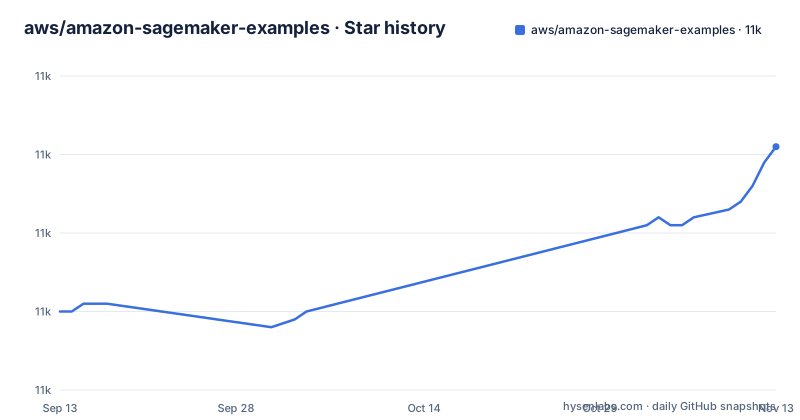
Star history
- aws/amazon-sagemaker-examples11,011 ★ · +21
| Repository | 2026-09-13 | 2026-11-13 |
|---|---|---|
| aws/amazon-sagemaker-examples | 11k | 11k |
21 Stars in the last 61 days, measured from the daily GitHub snapshot. Compare with other projects
Editorial analysis
The gap this repository fills, and the one it does not
SageMaker is a large surface. Training, model customization, evaluation and inference each expose their own APIs, containers and configuration, and the AWS documentation describes them one page at a time. This repository exists to show the features working end to end in a runnable form. The README states that it is entirely focused on covering the breadth of features provided by SageMaker and is maintained directly by the Amazon SageMaker team. That is the scope: breadth of feature coverage, not depth on any single workload.
The audience follows from that. If you are starting with SageMaker and need to see what a distributed training job or a fine-tuning recipe looks like in practice, the notebooks are the fastest path to a working configuration. If you are an experienced practitioner who wants an object-oriented client for the underlying resources, this is not that. The README opens by announcing SageMaker-Core, a separate Python SDK providing an object-oriented interface over TrainingJob, Model and Endpoint with resource chaining, and points readers to its own documentation. The two artifacts solve different problems, and conflating them leads to disappointment.
There is also a submission rule that tells you what the maintainers consider in scope. The README says the repository will only accept notebooks or examples which demonstrate a feature of SageMaker not yet covered anywhere in the repository, and directs contributors of additional material to the separate community repository. This is a coverage-driven editorial policy.
How the notebooks are organized and what self-contained means here
The repository sorts notebooks by ML capability in lifecycle order: train a model, customize it, evaluate it, deploy it, then operationalize it. The top level has five category folders: training, model_customization, evaluation, inference and mlops.
The training category is built around ModelTrainer from SageMaker Python SDK v3, according to the README. The listed coverage includes script and framework training, distributed training, managed spot training with checkpointing, heterogeneous clusters, bringing your own container, submitting work through AWS Batch training queues, and running local code as a training job with @remote. That list is useful as an inventory check: if the feature you need is not named there, check the other categories before assuming it is documented.
Model customization covers adaptation of pre-trained foundation models. The README enumerates supervised fine-tuning (SFT), direct preference optimization (DPO), reinforcement learning with verifiable rewards (RLVR), RL from AI feedback (RLAIF), multi-turn RL (MTRL) and continued pre-training (CPT), plus recipe overrides, data mixing, JumpStart fine-tuning with a private model hub, and distributed fine-tuning across serverless, serverful and HyperPod compute.
Evaluation is framed around a question the README states plainly: before promoting a customized model you need to know whether it actually got better. The examples cover standard benchmark evaluation, your own scoring function, an LLM acting as a judge, and Inspect AI, with the stated goal of evaluating a base model and a fine-tuned model on the same footing.
The structural claim worth noting is that every notebook is self-contained: it lives with the scripts, data and images it needs, and all of its references are relative to its own folder. That is a deliberate design choice, and it is why you can copy a single directory out of the repository and still have a runnable example. It also means the repository is a collection of folders rather than a coherent package with shared utilities.
Getting a notebook running without a SageMaker Notebook Instance
The README describes the quickest setup as four items: an AWS account, proper IAM User and Role setup, an Amazon SageMaker Notebook Instance, and an S3 bucket. Each links to the corresponding SageMaker developer guide page.
If you use a Notebook Instance, the notebooks are already there. The README states that they are automatically loaded into SageMaker Notebook Instances and can be accessed by clicking on the SageMaker Examples tab in Jupyter or the SageMaker logo in JupyterLab. No cloning step is required in that path.
Running outside a Notebook Instance is supported but not turnkey. The README says most examples can be run outside of Amazon SageMaker Notebook Instances with minimal modification, and names the two modifications: updating the IAM role definition and installing the necessary libraries. Expect to read each notebook's imports and resolve them yourself.
The release history matters for this step. The most recent release is v1.0.0, dated 2026-09-08 and titled SageMaker Python SDK v3 Golden Example Notebooks. The prior release, v0.1.0, is dated 2020-10-19 and described as an examples checkpoint prior to website launch. The gap between those two tags is nearly six years, which tells you the versioning does not track the notebook content continuously. A notebook you find useful may predate the v3 SDK generation, and the README's training section is explicit that its examples use ModelTrainer from SDK v3. Check which SDK generation a given notebook assumes before adapting it.
The maintenance model, and why the second repository exists
Two repositories divide the work. The official one, this project, is maintained by the SageMaker team and covers the breadth of SageMaker features. The community repository holds additional examples and reference solutions beyond what the official one shows, and is maintained by engineers and solution architects at AWS.
The practical consequence is a narrow acceptance window. Because the official repository only takes notebooks demonstrating a feature not yet covered anywhere in it, the marginal example you want to contribute probably belongs in the community repository instead. The README states this directly and recommends submitting there rather than risking rejection here.
For a consumer rather than a contributor, the split means you should search both repositories before concluding that a pattern is undocumented. It also means the official repository's coverage is stable by design: once a feature is demonstrated, the demonstration is not duplicated, so the corpus grows by feature rather than by use case. A use case that combines three features will not necessarily have a notebook, even though each feature individually does.
Treat older notebooks as historical examples of an API generation rather than as maintained code.
Licence and what Apache-2.0 lets you do with the notebooks
The repository is licensed under Apache-2.0. That is a permissive licence, and for a corpus of example notebooks it means the usual thing: you can copy, modify and redistribute the code, including in commercial work, provided you comply with the licence terms. The full terms are in the repository's LICENSE.txt file, and this is a description of the licence identifier rather than legal advice.
Two practical points follow. First, the code you lift from a notebook is covered, but the AWS services the notebook calls are not; running a training job, a fine-tuning job or an endpoint incurs charges under your own account, and the licence says nothing about that. Second, notebooks frequently embed dataset references and third-party library imports. Apache-2.0 covers the repository's own content, not the terms attached to whatever data or package a given notebook pulls in. Check those separately if you plan to redistribute.
Because the repository is example code rather than a library, there is no dependency to pin and no upgrade path to manage beyond re-reading the notebooks you forked. That is the real maintenance cost: the cost sits in the copies you made, not in the repository.
Where this is the wrong tool, and what to use instead
The clearest failure mode is treating the notebooks as a production foundation. They are demonstrations of SageMaker features. A notebook that shows managed spot training with checkpointing is not the same as a training pipeline you would run nightly.
The second failure mode is version drift. With a release gap from 2020 to 2026 and a v1.0.0 tag tied to SageMaker Python SDK v3, a notebook written against an earlier SDK generation may not run unchanged. The README's promise of minimal modification outside a Notebook Instance covers the IAM role and library installs; it does not promise that an old notebook matches a current SDK.
The alternative depends on what you actually wanted. If you wanted a programmatic client for SageMaker resources rather than examples, the README's own answer is SageMaker-Core, which provides an object-oriented interface over resources such as TrainingJob, Model and Endpoint, introduces resource chaining so resource objects can be passed as parameters, and abstracts low-level details like resource state transitions and polling logic. The README also claims full parity with the SageMaker APIs and lists auto code completion, documentation and type hints as usability features. The difference in approach is the important part: this repository shows you how to call the APIs, while SageMaker-Core wraps them so you do not specify parameters manually. If you want a lower-level client without that abstraction, Boto3 remains the baseline the README compares SageMaker-Core against.
A third option is the community repository, which is the right destination when your need is a reference solution rather than a feature demonstration.
Who should clone this, and what to check first
Clone it if you are onboarding to SageMaker and want to see a feature working before you design around it, or if you need a starting point for a specific capability such as distributed fine-tuning across HyperPod compute or an LLM-as-judge evaluation. The self-contained folder layout makes copying one example practical, and the category structure means you can go straight to the lifecycle stage you care about.
Do not clone it expecting a library. There is no package to install, no API surface to depend on, and no continuous versioning to track. If your need is an object-oriented SDK over SageMaker resources, the README points to SageMaker-Core instead, and if your need is a reference solution, the community repository is the stated destination.
Three checks before you invest time in a notebook. First, confirm the feature you need is not already covered elsewhere in the repository, since the acceptance rule implies the maintainers keep coverage non-overlapping and you may be looking at the wrong category. Second, confirm which SDK generation the notebook targets, given that v1.0.0 is explicitly the SageMaker Python SDK v3 release and the previous tag dates to 2020. Third, run it once in a Notebook Instance before adapting it, because that is the path the README describes as automatic and it isolates whether a failure comes from the notebook or from your external environment setup.
Editorial conclusion
Adopt this repository if you are learning SageMaker or need a working starting point for a specific feature, and treat it as sample code you fork rather than a dependency you track. Skip it if you want a maintained abstraction over the AWS APIs; SageMaker-Core, announced in the README, is the SDK-shaped answer to that need. Before you commit to any notebook, verify three things: that its example fits the narrow acceptance rule for this repository, that the notebook still runs after you update the IAM role and install the libraries it imports, and that the SDK generation it targets matches the one in your environment, since the v1.0.0 release is explicitly built around SageMaker Python SDK v3.
Frequently asked questions
What is Amazon SageMaker and what is it used for?
The repository presents it as a place to build, train, and deploy machine learning models. SageMaker Training is described as a fully managed service that containerizes your workload and manages the AWS compute, and the example folders extend from training through customization, evaluation, inference and MLOps.
Is SageMaker better than Azure ML?
The comparison the README draws is a different one: SageMaker-Core is an improvement over Boto3, giving a more intuitive object-oriented way to manage SageMaker resources with resource chaining.
Is Amazon SageMaker free?
The README lists an AWS account, proper IAM User and Role setup, a SageMaker Notebook Instance, and an S3 bucket as the setup you need.
What are some common use cases for Amazon SageMaker AI?
The folders imply the use cases directly: script and framework training, distributed training, managed spot training with checkpointing, heterogeneous clusters, bringing your own container, and submitting work through AWS Batch training queues. Customization covers SFT, DPO, RLVR, RLAIF, multi-turn RL and continued pre-training, followed by evaluation and deployment.
Official sources
Add this badge to your README
If you maintain this project, the badge below links readers to this analysis and shows its maintenance status from the daily GitHub snapshot. Paste the markdown into your README; add ?metric=license or ?metric=stars to the image URL for a different field.

[](https://hysenlabs.com/projects/aws-amazon-sagemaker-examples)Star history chart for your README
[](https://hysenlabs.com/projects/aws-amazon-sagemaker-examples)Was this useful?