sonar sorts localhost ports by the project that started them
CLI tool for inspecting and managing services listening on localhost ports
At a glance
- What is it?
- A Go CLI that scans every listener on localhost, files each port under a group and a service name, and can start a whole dev stack from a sonar.yaml with ports assigned for you. The grouping is the idea worth stealing; the inference rules are where it gets surprising.
- Who is it for?
- Sonar earns a place if you juggle several local stacks at once, because grouping, cross-service references and log prefixes remove real friction. Check first whether your services tolerate an arbitrary port and whether they read config from environment variables, since sonar hands out the number at launch rather than in a file you control.
- Can I use it commercially?
- Yes. MIT is a permissive licence: you can use, modify and sell software built on it, as long as you keep its copyright and licence notices.
- Is it still maintained?
- Yes. The repository last received commits 15 days ago.
- What is it written in?
- Mainly Go, according to GitHub's language statistics.
Answers come from the project's GitHub data, last synced on November 21, 2026, and from our analysis. They are not legal advice.
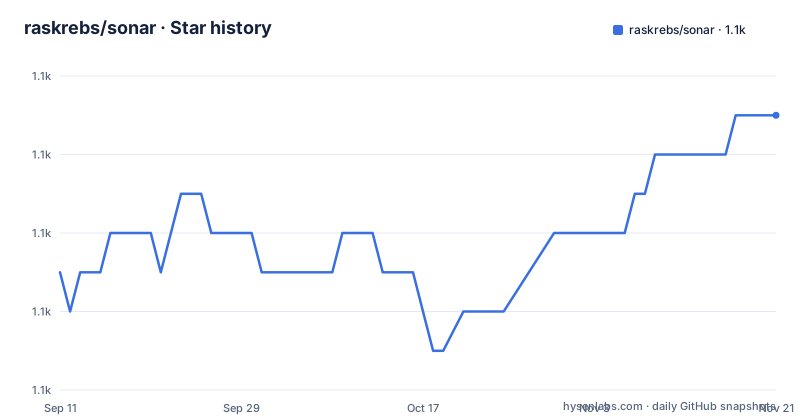
Star history
- raskrebs/sonar1,097 ★ · +4
| Repository | 2026-09-11 | 2026-11-21 |
|---|---|---|
| raskrebs/sonar | 1.1k | 1.1k |
4 Stars in the last 71 days, measured from the daily GitHub snapshot. Compare with other projects
Editorial analysis
A port number on its own is not context
The organizing claim is that a listening port tells you very little on its own. Sonar sorts every listener on localhost into a group, normally the repository the process was started from, and inside that group into a named service. That gives you a view keyed on the project in the current directory rather than on whichever port happens to be busy.
$ sonar list --tree
my-app  (3 ports, running)                        ~/code/my-app
├─ 5432  db          postgres:17                  http://localhost:5432
├─ 5173  frontend    vite (v5.4)                  http://localhost:5173
└─ 8000  api         uvicorn app:app              http://localhost:8000
ungrouped (1 port)
└─ 3000  next-server (v16.1.6)                    http://localhost:3000
The ungrouped block matters. A next-server on port 3000 that was never launched through sonar still appears, named for whatever was detected, because Docker containers, Compose projects and processes you started by hand are picked up with no configuration. Grouping is an annotation over a raw scan, not a precondition for the scan. Anything that is listening can be listed and killed, whether or not a sonar.yaml exists anywhere near it.
port: auto decides the number before the service binds
Port assignment is what makes two worktrees of one project coexist. A sonar.yaml service either names the port it wants, 5432 below, or sets port: auto. For an auto service, sonar picks a free port, hands the number to the command through ${port}, and publishes the result to the other services through references of the form ${api.url}.
name: my-app
services:
  - name: db
    cmd: docker compose up db
    port: 5432
  - name: api
    cmd: uv run uvicorn app:app --port ${port}
    port: auto
    depends_on: [db]
  - name: frontend
    cmd: npm run dev -- --port ${port} --strictPort
    port: auto
    depends_on: [api]
    env:
      VITE_API_URL: ${api.url}
Two choices in that file stand out. The db service keeps a fixed port, and the two application services pass ${port} through to the process that will bind it. The frontend also adds --strictPort; the documentation shows the flag in the command but does not say what it changes. The cross-service reference lands under env, so a browser bundle receives the api URL as VITE_API_URL rather than a hardcoded localhost address.
Naming two services still starts the third
Narrowing the command line narrows what launches, not what the graph contains. `sonar start api frontend` brings up those two, and the comment attached to it is explicit that they still wait for their dependencies, so db comes up underneath them regardless. Paths work the same way: `sonar start ../other-project` reads the sonar.yaml in or above another directory, which is how a sibling service gets brought up next to the current one.
sonar start                    # every service in the nearest sonar.yaml
sonar start api frontend       # only these (they still wait for their dependencies)
sonar start ../other-project   # the sonar.yaml in or above another directory
sonar start -d                 # in the background, like `sonar up`
When nothing is named, both the group and the service name are inferred. The group falls back through four sources in order: the --group flag, the name field in the nearest sonar.yaml, the git root directory name, and finally the current directory name. A worktree is labelled repo@worktree so a second checkout does not overwrite the first in the listing. The service name comes from --name, then from the sonar.yaml entry whose cmd matches, then from the command text itself, where npm run dev yields dev and uv run api yields api.
Foreground start goes through a daemon, and Ctrl+C is scoped
A foreground start is not a plain subprocess launch. Sonar starts the services through the daemon, attaches to their output, and puts the service name in front of every line, which is why the log sample labels output as api and frontend instead of interleaving two raw streams. Pressing Ctrl+C stops the services started in that session. A service that was already running is left alone, and the command returns by itself once every service it started has exited.
That scope is the part to understand. Starting a project a second time neither kills an existing database nor takes it over; it simply reports the services it owns. Detached mode, written -d, is described as behaving like `sonar up`: the same work in the background, undone by `sonar down`, which stops the stack and gives the ports back. Log files from a start are written to ~/.config/sonar/logs/<group>/<service>.log, so a detached project's output stays readable after the terminal that launched it is gone.
Desktop apps and system daemons stay out of the way
A raw scan of localhost on a Mac surfaces listeners that have nothing to do with your code: Figma, Discord, Spotify, ControlCenter, macOS .app bundles, and daemons under /System/Library/. Sonar filters them out by default, and -a brings them back. The default table is what you would want most of the time, since process noise crowds out the dev servers you opened the terminal to find.
The default columns are port, process, group, container, image, containerport and url. The process column is a fallback chain rather than a raw process name: it shows the label you assigned with `sonar rename`, then the service name, and only then whatever was detected. Twenty-one columns are selectable with -c, including cpu, mem, threads, uptime, state, connections, health, latency, compose, project, user, bind and ip. Two derived columns need extra work to populate and are worth knowing about before you build a script on them: health comes from HTTP health checks requested with --health, and the container columns only fill in for Docker and Compose listeners.
Remote hosts are treated the same way, with --host user@server scanning another machine over SSH.
Each install path has its own cost
Four routes are offered and they are not interchangeable. Homebrew takes the tap path and needs a one-time trust grant first, because Homebrew 6 refuses third-party formulae until you authorise the tap and reports `Error: Refusing to load formula raskrebs/sonar/sonar from untrusted tap`. The install script pipes a remote file into a shell, lands the binary in ~/.local/bin and edits your PATH, after which you restart the terminal or source ~/.zshrc. Two environment variables change its behaviour: SONAR_INSTALL_DIR moves the destination and SONAR_VERSION pins a release.
curl -sfL https://raw.githubusercontent.com/raskrebs/sonar/main/scripts/install.sh | SONAR_INSTALL_DIR=/usr/local/bin bashcurl -sfL https://raw.githubusercontent.com/raskrebs/sonar/main/scripts/install.sh | SONAR_VERSION=vX.Y.Z bashWindows has a separate PowerShell script, invoked with irm piped into iex, and it reads SONAR_VERSION from the environment as a PowerShell variable rather than a shell prefix. Go developers can skip the scripts with go install github.com/raskrebs/sonar@latest. Whichever route you pick, tab completion for port numbers is generated by the binary itself, written to the zsh fpath, to /etc/bash_completion.d/sonar, or piped into the shell for fish.
A macOS tray and an MCP SDK in a thirteen-entry module
go.mod lists Go 1.25.0 and thirteen direct requirements. The ones that reveal intent are modelcontextprotocol/go-sdk at v1.7.0, which puts an MCP server in a port-scanning tool, coder/websocket and hashicorp/yamux, a pair usually chosen for remote multiplexing over a single connection, and zalando/go-keyring for credential storage. modernc.org/sqlite is the pure Go SQLite implementation rather than the cgo binding, so there is no compiler dependency at build time. Two jsonschema libraries sit in the list, invopop/jsonschema alongside santhosh-tekuri/jsonschema/v6, which is a reasonable pairing when one generates a schema and the other validates against it, and Microsoft/go-winio covers Windows pipes.
The top-level layout matches that scope: cmd/ for subcommands, internal/ for the packages behind them, main.go at the root, a scripts/ directory holding the install scripts and readme-check.sh, docs/, and tray/ for the macOS menu bar component. The examples marked `# check` in the documentation are executed against a fresh build by scripts/readme-check.sh on every CI run, so the commands printed above are the ones the pipeline runs.
Three releases in the first two weeks of September
The version history is compressed. v0.8.0 shipped on 2026-09-13, v0.9.0 followed on 2026-09-15 at 07:53 UTC, and v0.9.1 landed the same day at 11:06 UTC. The last commit reached main on 2026-09-24, after those tags. The project is MIT licensed, written in Go on the main branch, and carries 1,093 stars, 35 forks and 20 open issues.
A sub-1.0 tag sequence with two releases on one day is worth weighing before you build a habit around it. Chords are not guaranteed between v0.9.0 and v0.9.1, and the one-day gap means the patch release fixed something specific rather than rolling up a batch. Pin the version explicitly, or use the install script with SONAR_VERSION set, if you want a repeatable setup.
Editorial conclusion
Sonar earns a place if you juggle several local stacks at once, because grouping, cross-service references and log prefixes remove real friction. Check first whether your services tolerate an arbitrary port and whether they read config from environment variables, since sonar hands out the number at launch rather than in a file you control. If you run one fixed stack and already know the ports, the scan alone is enough and the YAML layer is overhead.
Frequently asked questions
Does sonar need a sonar.yaml file before it will manage a port?
No. A sonar.yaml only describes how to start a project. sonar list and sonar kill work on anything that is listening, and sonar start -- npm run dev runs a single command as a named service, with group and name inferred when they are not passed.
Will sonar stop a service it did not start?
Not on its own. Ctrl+C in a foreground session stops only the services started in that session, and a service that was already running is left alone. sonar down is what tears down a detached stack started with -d.
Why does sonar list not show Figma, Discord or other desktop apps?
Desktop apps and system services are hidden by default, including macOS .app bundles and daemons under /System/Library/. Pass -a to include them in the listing.
Can sonar run two worktrees of the same project without a port clash?
Yes, if the services use port: auto. Sonar picks a free port per service, passes it in through ${port}, and shares each service URL through references such as ${api.url}. A worktree also gets its own group label, repo@worktree.
How do I install a specific sonar version on macOS or Linux?
The install script reads SONAR_VERSION, so you can pipe it with the version set. The Homebrew tap path takes whatever the tap has unless you pin it yourself, and go install github.com/raskrebs/sonar@latest tracks the newest tag.
Official sources
Add this badge to your README
If you maintain this project, the badge below links readers to this analysis and shows its maintenance status from the daily GitHub snapshot. Paste the markdown into your README; add ?metric=license or ?metric=stars to the image URL for a different field.

[](https://hysenlabs.com/projects/raskrebs-sonar)Star history chart for your README
[](https://hysenlabs.com/projects/raskrebs-sonar)Was this useful?