LeafWiki's first command passes a JWT secret on the command line, while its compose example uses environment variables
LeafWiki - Self-hosted wiki. Single Go binary, SQLite, Markdown on disk. No external database required.
At a glance
- What is it?
- A single-binary self-hosted wiki with SQLite and Markdown on disk, shipped as a Go build with CGO disabled and all three base images pinned by digest. The build is reproducible and the quickstart is not, authentication can be switched off two ways, and revision history coalesces on a five-minute window.
- Who is it for?
- LeafWiki is worth considering if you want a wiki your notes stay readable in after you stop running the software, because Markdown on disk with backup by copying a directory is the property the other systems give up, and the three-line not-a-fit section is more honest than most. Check four things before you deploy it.
- Can I use it commercially?
- Yes. MIT is a permissive licence: you can use, modify and sell software built on it, as long as you keep its copyright and licence notices.
- Is it still maintained?
- Yes. The repository received new commits within the last day.
- What is it written in?
- Mainly Go, according to GitHub's language statistics.
Answers come from the project's GitHub data, last synced on November 15, 2026, and from our analysis. They are not legal advice.
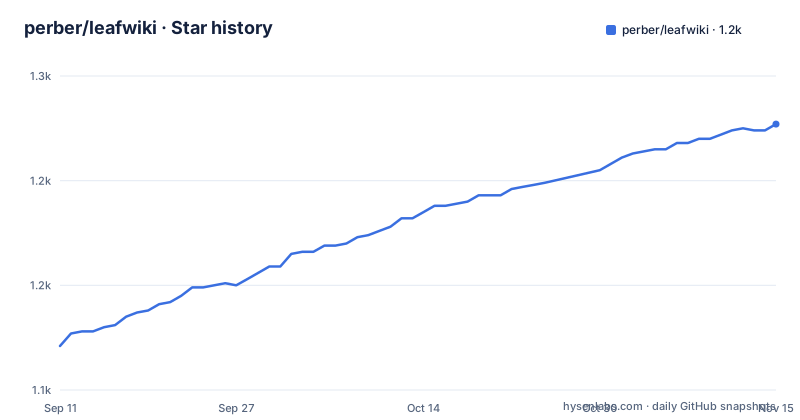
Star history
- perber/leafwiki1,227 ★ · +106
| Repository | 2026-09-11 | 2026-11-15 |
|---|---|---|
| perber/leafwiki | 1.1k | 1.2k |
106 Stars in the last 65 days, measured from the daily GitHub snapshot. Compare with other projects
Editorial analysis
The first command passes a JWT secret in argv, and the example below it uses variables instead
The first command on the page is the one most people will copy, and it passes both secrets as flags:
docker run -p 8080:8080 -v ~/leafwiki-data:/app/data \
  ghcr.io/perber/leafwiki:latest \
  --jwt-secret=yoursecret \
  --admin-password=yourpassword \
  --allow-insecure=true
A JSON web token secret and an admin password on a command line end up in the shell history, in the container's process listing, and in anything reading either. Both values also exist as environment variables, and the compose example that appears a few sections later uses them:
    environment:
      - LEAFWIKI_JWT_SECRET=yourSecret
      - LEAFWIKI_ADMIN_PASSWORD=yourPassword
      - LEAFWIKI_ALLOW_INSECURE=true  # Required for plain HTTP. Omit for HTTPS (ensure `X-Forwarded-Proto: https` is forwarded).
So the project ships both mechanisms and documents the weaker one first. That is a page-ordering problem rather than a design problem, and the fix is to scroll.
Two other things in that command are worth reading rather than skimming. The third flag is required for plain HTTP and is to be omitted when a reverse proxy terminates TLS, which means the application decides whether it is secure by looking at a forwarded protocol header. And the image reference ends in a floating tag.
That last point sets up the next section, because it is the one place in this project where reproducibility is given up.
All three base images are pinned by digest, and the published image is pulled by tag
The Dockerfile is three stages and every one of them names its base image by digest rather than by tag. The frontend stage is a Node alpine image with a sixty-four character digest appended. The backend stage is a Go alpine image, also digested. The final image is an alpine release, also digested. There is no floating base anywhere in the file.
That is stronger practice than most projects manage, and it is in direct contrast to the quickstart, every install example, and the compose file, all of which reference the published image by its latest tag. So the build is reproducible and the pull is not. If you want both, the digest of the published image is what you would pin, and the page does not print it.
The backend stage explains how a wiki with a database and a web UI ends up as one file. The build sets CGO off, and the module list contains a pure-Go SQLite driver rather than a cgo binding, so the result is a static binary. The linker flags strip the symbol table and debug information, and they inject four values: a flag enabling the embedded frontend, an environment name, the application version from a build argument, and one other flag whose default matters more than the other three.
That last injection is the subject of the next section, because it is a security control that can only be changed by rebuilding.
Refresh-token rate limiting is a compile-time flag, and the data directory is world-writable
The backend build stage takes a build argument for a refresh-token rate limit switch, defaulting to false, and passes it into the binary through the linker:
ARG APP_VERSION
ARG DISABLE_REFRESH_TOKEN_RATE_LIMIT=false
The injected symbol lives under the authentication package, so this is not a build-time convenience for a test fixture. It is a compiled-in switch on throttling refresh tokens, and it is set at build time rather than at run time. The default is the safe value, which matters, because a switch that defaults wrong is a vulnerability and a switch that is only reachable by rebuilding is a switch most operators never touch.
The other thing in the final stage is a one-line permission choice. Before the entrypoint is set, the data directory is created and given mode 777. That directory holds the SQLite database, and world-writable is a wider grant than the application needs.
It is there for a reason the documentation explains: the compose example runs the container as a fixed non-root user, and the text under the plain Docker variant says the data directory must be writable by the specified user. Without the 777, a bind-mounted host directory owned by a different user would not be writable, and the alternative would be asking every operator to pre-create the directory with the right ownership. So this is the permissive option chosen for convenience over a documented alternative.
The middle ground exists and is not offered: bind-mount the host directory with the ownership you already have and drop the 777, or keep 777 but only on the directory, never on the database file inside it.
The module is github.com/perber/wiki while the repository is perber/leafwiki
The go.mod file names the module with a different path than the repository it lives in:
module github.com/perber/wiki

go 1.26.0
That name is not incidental. It is the import path used everywhere a symbol is referenced at build time, in the Dockerfile's linker flags and in the Makefile's own flag variable, both of which reach into an internal package through the wiki path rather than the leafwiki one. So renaming the module to match the project would be a mechanical change across every build flag in the repository, not a one-line edit.
The language directive says 1.26.0 and the backend build image is one minor ahead at 1.27, which is the normal way to write these two things and worth knowing if you are reproducing a build exactly.
The dependency list reads like the feature list. A CommonMark parser for the Markdown support. An HTML sanitiser, which is what makes the sanitized inline HTML claim possible. A pure-Go git implementation, which is the git backup feature. A time-based one-time-password library, so there is a second factor available even though the visible page does not mention one. A Prometheus client, which pairs with the load-test directory in the tree. A command-line framework, which is where the long flag list comes from. A web framework. And the pure-Go SQLite driver that makes the static build possible. No ORM and no other database driver, consistent with a project whose selling point is that there is no database to run.
The indirect list is large and mostly belongs to the web framework, including a JSON codec and a validator. Two indirect entries are worth naming because they are defensive rather than incidental: a path-securing join library and a MIME type detector, both of which belong next to file upload and embedded assets.
Authentication can be disabled outright, and SSO trusts a header named Remote-User
The environment template is the most informative file on the page, because it enumerates what can be switched off rather than what can be switched on.
There are three access modes described in the features: fully internal, public read with login-only editing, and open editing without login. Separately, the template carries a variable that disables authentication, and the comment above the auth block notes that a secret and an admin password are required unless it is set. So there are two independent routes to a wiki with no login at all, and the variables all default to the safe value. A third flag is required for plain HTTP.
The single-sign-on path is the part to look at closely, and the design is right. Enabling it is off by default, the header name is configurable and defaults to a very common name, and there is a separate variable listing the proxy addresses that are trusted to set it. That last one is the actual boundary. A header-based authentication scheme is only as good as the list of sources allowed to assert it, and this one has that list.
The risk is the default header name rather than the mechanism. It is a header many reverse proxies already set from something the client can influence, so an operator enabling this without narrowing the trusted proxy list, or without changing the header name to something only their own proxy emits, may authenticate whoever they like.
One operational coupling is easy to miss. The template says the mail variables enable forgot-password and user invitations, and that unsetting the mail host disables mail. So on a fresh install with no mail configuration there is no password recovery and no email invitations, and the only way back in is the admin password reset operation the page lists under install.
Revision history coalesces on a five-minute window, and the API keys are labelled not ready
Four features are described as opt-in behind flags, and they carry three different readiness labels, which is worth reading as a set.
Revision history is a plain opt-in. Automatic link rewriting when pages are renamed or moved is a plain opt-in. Git backup is labelled experimental in both the feature list and the table of contents, and it is the feature that pushes your wiki content to a remote Git repository over SSH or HTTP. Email for password reset and invitations arrived in the current minor version.
Then there is the API key management, and here the label appears twice. The features list calls the API keys for programmatic and agent access admin-managed and read-only, and then says in the same bullet that they are in development and not yet ready for use. The environment template repeats the caveat as a comment on the variable that turns it on, with the default set to false. Two places, same words.
What is interesting about that arrangement is the revision history itself, because the variable list reveals what it actually is. Alongside the enable flag there is a maximum history setting and a coalescing window, which defaults to five minutes. So consecutive edits inside a five-minute window are merged rather than kept as separate entries. That makes revision history useful for undoing an accidental change and useless as an audit trail, since it cannot tell you what happened at a particular time to the resolution a log would need.
None of this is hidden, which is the point. A flag that ships disabled with a comment saying why is a different thing from a flag that ships enabled and turns out to be a problem.
Five release binaries, two installer architectures, and a Mobile section with nothing in it
A few small things line up when you read the Makefile and the page together.
The Makefile declares five release targets: linux on amd64 and arm64, windows on amd64, and darwin on amd64 and arm64. The environment template, which configures the shell installer, accepts an architecture of either amd64 or arm64. So the installer script handles two architectures while the release build produces five binaries, including Windows and both macOS variants. Anything on a Mac or on Windows gets a binary or a container, and the shell installer is a Linux path.
The frontend build target is more careful than it needs to be in a good way. It installs dependencies with scripts disabled, builds with the API URL and version injected, clears and recreates the embed directory, touches a keep file so a fresh clone has somewhere to put the output, and then finishes with an assertion that the built index file exists, failing the build if it does not. There is a separate target for an API-only binary with no embedded interface, explicitly for local development against a running frontend server, and a comment on the main build target saying it matches what the release and container builds produce.
The benchmarks, when they exist, are scoped to exactly two packages, the link handling and the revision core. Those are the two subsystems the feature list leans on hardest, so the attention matches the claims.
Then there is an empty section. The features list has a subsection headed Mobile, and what follows it is a single empty centred HTML paragraph. No content, no image, nothing. It reads like a placeholder that was never filled or a demo that was removed.
One last thing worth noting as context rather than criticism. The page advertises a free hosted beta with ten places starting in September 2026 and a waitlist, alongside the MIT-licensed self-hosted project in the repository. That is disclosed plainly, and the project's declared homepage is the site hosting it rather than the repository.
Editorial conclusion
LeafWiki is worth considering if you want a wiki your notes stay readable in after you stop running the software, because Markdown on disk with backup by copying a directory is the property the other systems give up, and the three-line not-a-fit section is more honest than most. Check four things before you deploy it. The quickstart passes a secret and an admin password as command-line flags while the compose example below it uses environment variables, so copy the second one. Authentication can be disabled outright as well as opened up through the access modes, so confirm which mode you are actually in. Revision history coalesces inside a five-minute window, which makes it a convenience rather than an audit trail. And without SMTP configured there is no password reset and no email invitations. The last commit is dated 2026-10-02, the newest release is v0.13.0 from 2026-09-08, and the licence is MIT.
Frequently asked questions
What does LeafWiki need to run?
One Go binary and a data directory. There is no Node.js, no Redis and no Postgres at runtime, and SQLite plus Markdown are stored on disk, so page content stays readable outside the application. It is described as running on Linux, macOS, Windows and Raspberry Pi on both x86_64 and ARM64.
How do I back up a LeafWiki installation?
By copying the data directory. The operations section says backup is a recursive copy of the data directory, with a parenthetical instruction to stop the application first, which matters because the SQLite database is inside it. The binary is also self-contained, so the application files are not part of the backup.
Can I turn off LeafWiki authentication?
There are two independent routes. One access mode is open editing without login, and the environment template also carries a variable that disables authentication, with the comment noting that a secret and admin password are required unless it is set. Every related variable defaults to the safe value, so this only happens deliberately.
Is LeafWiki revision history a full audit trail?
No. Revision history is opt-in and the environment template exposes a coalescing window that defaults to five minutes, so edits inside that window are merged rather than stored separately. That is enough to undo an accidental change and not enough to reconstruct what happened at a particular moment. Benchmarks for the revision core are among the two benchmarked packages.
What happens if I do not configure SMTP for LeafWiki?
Password reset and user invitations stop working. The environment template states that the mail variables enable both, and that unsetting the mail host disables mail. The recovery path then is the admin password reset operation listed under install, not an email.
Official sources
Add this badge to your README
If you maintain this project, the badge below links readers to this analysis and shows its maintenance status from the daily GitHub snapshot. Paste the markdown into your README; add ?metric=license or ?metric=stars to the image URL for a different field.

[](https://hysenlabs.com/projects/perber-leafwiki)Star history chart for your README
[](https://hysenlabs.com/projects/perber-leafwiki)Was this useful?