Superjson and the meta sidecar: how Dates, Maps and BigInts survive JSON.stringify
Safely serialize JavaScript expressions to a superset of JSON, which includes Dates, BigInts, and more.
At a glance
- What is it?
- Superjson wraps JSON.stringify and JSON.parse in an envelope that keeps the data under `json` and a description of the special cases under `meta`. It handles the types JSON drops, offers a mutating deserialize option for large payloads, and reaches Next.js through separate Babel and SWC plugins.
- Who is it for?
- Superjson fits JavaScript and TypeScript codebases that must move Dates, Maps, Sets, RegExps, Errors, URLs, undefined values or BigInts across a JSON boundary, and it fits Next.js props hooks that reject those values outright. It does not fit a codebase that needs a CommonJS entry point or deep imports, and it does not rescue payloads whose receivers only speak plain JSON.
- Can I use it commercially?
- Yes. MIT is a permissive licence: you can use, modify and sell software built on it, as long as you keep its copyright and licence notices.
- Is it still maintained?
- Yes. The repository last received commits 142 days ago.
- What is it written in?
- Mainly TypeScript, according to GitHub's language statistics.
Answers come from the project's GitHub data, last synced on November 6, 2026, and from our analysis. They are not legal advice.
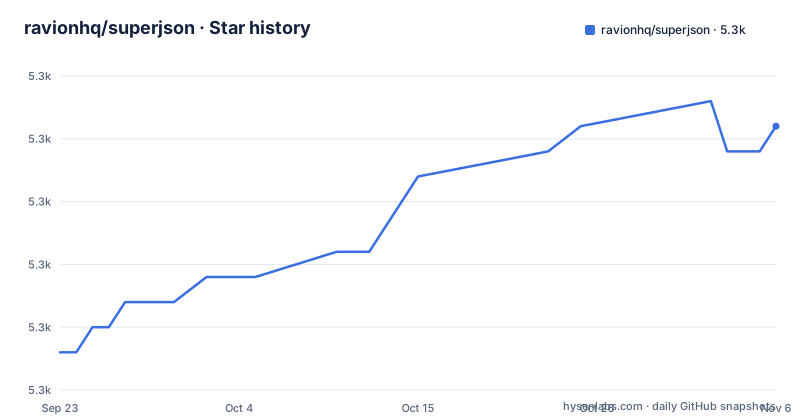
Star history
- ravionhq/superjson5,288 ★ · +9
| Repository | 2026-09-23 | 2026-11-06 |
|---|---|---|
| ravionhq/superjson | 5.3k | 5.3k |
9 Stars in the last 44 days, measured from the daily GitHub snapshot. Compare with other projects
Editorial analysis
Every payload ships as a json envelope plus a meta sidecar
Installing it takes one package manager call, and the basic API is a `stringify` and a `parse` pair:
yarn add superjsonThe first thing to understand is that superjson never emits bare JSON. `stringify` produces a string with two named parts, the data under `json` and a description of the special cases under `meta`:
import superjson from 'superjson';

const jsonString = superjson.stringify({ date: new Date(0) });

// jsonString === '{"json":{"date":"1970-01-01T00:00:00.000Z"},"meta":{"values":{date:"Date"}}}'
Reading it back takes `parse`, and the type argument is how the caller tells the compiler what comes back:
const object = superjson.parse<
{ date: Date }
>(jsonString);

// object === { date: new Date(0) }
The consequence for anyone mixing libraries is concrete. Hand that string to plain `JSON.parse` and you receive the envelope, not your object, and a receiver with no superjson sees a wrapped payload with a sidecar it has no way to interpret.
inPlace decides whether deserialize copies or rewrites your object
`serialize` and `deserialize` sit underneath the string API for callers who want the two halves separately. `serialize` takes any JavaScript value and returns `json` and `meta`, both JSON-compatible. `deserialize` accepts that pair back, and its one option is `inPlace`, a boolean that defaults to `false`:
const { json, meta } = serialize(object);

deserialize({ json, meta }, { inPlace: true });
At the default, deserialize returns a deep copy and leaves the input alone. Set `inPlace: true` and it mutates the input json object in place instead, which the documentation calls much more performant on large objects when it is safe to mutate. That safety is your judgment call: the object you passed in comes back changed, so reusing one `json` value for two deserializations hands you the second result over the first. Keep the default whenever the input is shared, cached or frozen.
meta names only the values plain JSON would have lost
The sidecar is sparse on purpose. In the worked example the object holds a plain string, a Date called `timestamp` and a regular expression called `test`, and the metadata records only `timestamp: ['Date']` and `test: ['regexp']`. The plain string is missing from meta because a string survives JSON.stringify untouched. Superjson handles everything JSON already handles, meaning strings, numbers, booleans, null, arrays and objects, plus eight types it does not: `undefined`, `bigint`, `Date`, `RegExp`, `Set`, `Map`, `Error` and `URL`.
Two of the stated features matter at that boundary. Type safety with autocompletion is what makes the `parse<{ date: Date }>` type argument worth writing, since the call returns the declared shape instead of an untyped value. Framework agnosticism is the second: the same two functions work outside Next.js, so a custom serializer is not a choice you have to defend in a code review.
What sparsity buys you is small metadata, since a payload with no special values produces no entries at all. What it costs is that meta is not a schema. A receiver that ignores the sidecar has no way to know that `1970-01-01T00:00:00.000Z` was ever a Date, so every crossing to a plain JSON consumer is a downgrade to plain JSON semantics.
registerCustom has to run before the first superjson call
Superjson registers built-in data types only, deliberately, to keep the bundle size as low as possible. Anything past that list is yours to add through `registerCustom`, and the documented recipe is Decimal.js or Prisma.Decimal:
import { Decimal } from 'decimal.js';Ordering is where this bites. The registration belongs in a central utility file that runs before any other SuperJSON call, and in a Next.js project the suggested home for it is `_app.ts`.
Next.js support arrives as an experimental SWC plugin or a stable Babel transform
The `getServerSideProps`, `getInitialProps` and `getStaticProps` hooks error on Dates unless you convert them to strings first. The fast route in is the SWC plugin, marked experimental and aimed at Next.js v13 or above:
yarn add next-superjson-plugin// next.config.js
module.exports = {
experimental: {
swcPlugins: [
[
'next-superjson-plugin',
{
excluded: [],
},
],
],
},
};The `excluded` array starts empty, so nothing opts out of the transform yet. The stable route is the Babel plugin:
yarn add babel-plugin-superjson-next{
"presets": ["next/babel"],
"plugins": [
...
"superjson-next" // 👈
]
}Both live in packages outside this repository, so version compatibility is tracked there rather than in the releases listed here.
Where the source lives, and who ships it
The top level of the repository is short: `.all-contributorsrc`, `.github/`, `.gitignore`, `LICENSE`, `README.md`, `benchmark.js`, `docs/`, `package-lock.json`, `package.json`, `src/` and `tsconfig.json`. The library sits under `src/`, the prose documentation under `docs/`, and a standalone `benchmark.js` stands beside them next to the `benchmark` devDependency that makes it runnable. `package-lock.json` is committed, so the dev tree is pinned even though only one package reaches production.
Style is declared instead of left to convention: prettier runs with `printWidth` 80, `semi` true, `singleQuote` true and `trailingComma` `es5`. The author field names Simon Knott, with Dylan Brookes and Brandon Bayer listed as contributors. Funding links to Flightcontrol, and the logo is credited to NUMI.
An ESM only package on Node 16, built by tsc and tested by vitest
The manifest pins the shape of the install: name `superjson`, version `2.2.5`, MIT license, `"type": "module"`, entry point `./dist/index.js`, typings at `dist/index.d.ts`, an exports map with a single root entry, a `files` list holding only `dist`, and `engines` requiring Node `>=16`. Two of those have teeth. There is no CommonJS entry in the manifest, and the exports map advertises only the package root, so deep imports are not part of the published surface.
Three scripts carry the work: `build` runs `tsc`, `test` runs `vitest run`, and `prepack` runs `npm run build` so a publish always compiles first. Exactly one runtime dependency is declared, `copy-anything` at `^4`; typescript, vitest, tsdx, benchmark, mongodb and decimal.js all sit in devDependencies.
Recent releases are v2.2.2 on 2024-12-05, v2.2.3 on 2025-10-24 and v2.2.5 on 2025-10-28, with the manifest already at 2.2.5 and the last push to main dated 2026-06-18. One loose end to check before you rely on anything from the manifest: the repository field still points at `https://github.com/blitz-js/superjson`, and the badge links do the same.
Editorial conclusion
Superjson fits JavaScript and TypeScript codebases that must move Dates, Maps, Sets, RegExps, Errors, URLs, undefined values or BigInts across a JSON boundary, and it fits Next.js props hooks that reject those values outright. It does not fit a codebase that needs a CommonJS entry point or deep imports, and it does not rescue payloads whose receivers only speak plain JSON. Before adopting it, confirm the reading side also uses superjson, decide whether `inPlace` is safe for the object you are holding, and register custom types in a file that runs before anything else.
Frequently asked questions
What is Superjson?
It is a thin wrapper over JSON.stringify and JSON.parse that keeps the types plain JSON throws away, including Date, bigint, RegExp, Set, Map, Error, URL and undefined. It ships on npm as superjson, version 2.2.5, under the MIT license.
What does Superjson do with a Date?
stringify writes the Date as an ISO string under the json key and records it under meta as a special case, giving '{"json":{"date":"1970-01-01T00:00:00.000Z"},"meta":{"values":{date:"Date"}}}' for new Date(0). parse reads that envelope back and hands you the Date again.
Why did Superjson need to exist if JSON is used everywhere?
JSON.stringify does not support Date, Map, Set or BigInt without converting them by hand, and the team at Blitz kept hitting that wall. Superjson wraps stringify and parse so those values survive a round trip without manual conversion.
Official sources
Add this badge to your README
If you maintain this project, the badge below links readers to this analysis and shows its maintenance status from the daily GitHub snapshot. Paste the markdown into your README; add ?metric=license or ?metric=stars to the image URL for a different field.

[](https://hysenlabs.com/projects/ravionhq-superjson)Star history chart for your README
[](https://hysenlabs.com/projects/ravionhq-superjson)Was this useful?