AcadHomepage has more forks than stars and writes citations to another branch
AcadHomepage: A Modern and Responsive Academic Personal Homepage
At a glance
- What is it?
- A Jekyll template for an academic personal homepage, with a Google Scholar crawler that runs on a schedule and writes its output to a second branch, a favicon step that has to be done by hand in a browser tool, and a configuration documented in the comments of the file it configures. The upstream projects it derives from are named, which is more than most templates manage.
- Who is it for?
- Use this template if you want a static personal site on your own account, published from a repository you control, with citation counts that refresh themselves and no server to maintain. Three things to know before you fork it.
- Can I use it commercially?
- Yes. MIT is a permissive licence: you can use, modify and sell software built on it, as long as you keep its copyright and licence notices.
- Is it still maintained?
- Yes. The repository last received commits 81 days ago.
- What is it written in?
- Mainly SCSS, according to GitHub's language statistics.
Answers come from the project's GitHub data, last synced on November 24, 2026, and from our analysis. They are not legal advice.
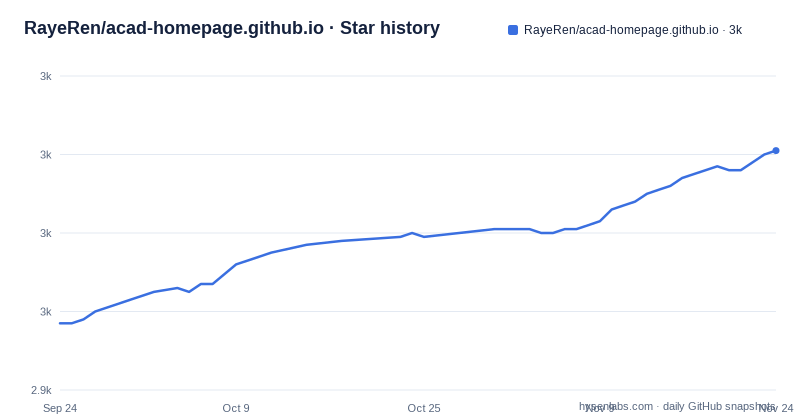
Star history
- RayeRen/acad-homepage.github.io3,001 ★ · +44
| Repository | 2026-09-24 | 2026-11-24 |
|---|---|---|
| RayeRen/acad-homepage.github.io | 3k | 3k |
44 Stars in the last 61 days, measured from the daily GitHub snapshot. Compare with other projects
Editorial analysis
More forks than stars, and a repository named like a placeholder
The repository is called a personal-pages domain with a template name in front of it, which is the shape of a name that is meant to be replaced. The quick start says so in its first step: fork the repository and rename it to your own user name followed by the pages suffix, and your site then appears at that address rather than at a project path. The template's own demo sits at the project path instead, inside the author's account, and the second example listed is the author's actual personal site. So the two examples are the template rendering itself and a live instance of it, which is a more useful pair than two demos would be. The counts tell the same story from the other direction. The repository has more forks than stars, roughly six thousand against three thousand, which is the signature of something people copy rather than watch. There are no releases, so a fork has no version to track and inherits whatever the branch holds.
Citation statistics are written to a second branch
The headline feature is automatic citation updates, and the mechanism is worth reading because it changes where your data lives. A crawler sits in its own directory in the repository and runs as a GitHub Action. It needs one value, your Google Scholar identifier, supplied not as a file but as a repository secret under the settings pages. When the action runs it produces a single JSON file of citation statistics, and that file is written to a branch whose name is not your site branch. The action is triggered two ways: by a push to your main branch, and by a schedule that fires at eight in the morning UTC every day. So the numbers on your site are a build artefact fetched from a branch that nothing else uses. That is a reasonable design, because it keeps generated data out of the commits you make by hand, and it means the site cannot be built offline unless that branch is already present.
Enabling the workflow takes a click most people miss
The quick start has a step that exists purely because of how the hosting platform behaves, and it is the step most forks get wrong. After adding the secret, the instruction is to go to the repository's actions page and enable the workflows by clicking the confirmation that reads as a statement of understanding. A workflow added by a fork does not run until a human does that, so a fresh clone looks like the automation is simply broken. The citation count itself appears through a span you put in your own content file, with the paper identifier in a data attribute:
<span class='show_paper_citations' data='DhtAFkwAAAAJ:ALROH1vI_8AC'></span>The file answers where that identifier comes from: open your Scholar profile, click the paper name, and read it out of the citation parameter in the address. So the chain is four manual steps long, all of them in somebody else's interface: enable the action, add a secret, read an identifier out of an address bar, and paste it into a page.
The favicon is made by hand in a browser tool
One step in the setup has no script behind it. You generate a favicon using a third party generator on the web, then download everything it produces and put all of those files into the images directory in your fork. All of them, not one: the instruction says every generated file, which is because generators emit several sizes and formats and the site references them by name. Nothing in the repository generates or validates them, and nothing checks that you actually did it, so a fork that skips this step still builds and publishes, it just has no icon and takes the previous repository's default. This is the one part of an otherwise automated setup that depends on a manual step through someone else's website, and it is also the part that will change shape without warning, since the generator is not this project's dependency and can change its output format at any time.
The configuration is documented in the comments of the file it configures
The site is configured through one YAML file at the root, and the documentation for it is not a document. The quick start names the keys you are most likely to change: a title, a description, a repository slug, an optional analytics identifier, a set of optional search engine keys taken from the consoles of the named engines, and an author block that holds other websites, an email address, a city and a university. Then it says the rest is described in the comments, which is the whole of the reference. That is a Jekyll convention and it works, but it means the configuration cannot be read without opening the file and scrolling, and it cannot be diffed against the documentation the way a separate page could be. The search engine keys are worth a second look for a different reason: they are per site verification values, so a fork that is renamed to a different account needs different values, and nothing in the setup checks that the ones you pasted belong to the address you are deploying to.
One shell script and a pinned gem set for local work
The local development path is four steps and one of them is the whole toolchain. You need the Jekyll build environment, which the file lists as Ruby, RubyGems, a C compiler and Make, following the upstream installation guide rather than a project-specific one. Then you run a shell script from the root to start the server with live reload, and open a loopback address on port four thousand. Changing source files refreshes the page without a manual rebuild, and when you are finished you commit and push with git as normal. The dependency set is committed as a lock file beside the dependency manifest, so a clone builds against the same gem versions rather than whatever the current release of each dependency happens to be. That matters more here than it would for an application, because a static site generator whose dependencies move can change output without any change to the site, and a pinned set makes that failure mode a deliberate decision rather than a surprise.
It names the two templates it is built from
The acknowledgements section lists three things and gives licences for each. The icon set included with the template is distributed under a permissive font licence and the MIT licence. And the template is influenced by two other academic page templates, both of which are also MIT licensed: a general purpose minimal Jekyll theme, and an earlier academic pages template that many such sites descend from. Naming both is worth more than it sounds, because a fork of a fork otherwise leaves a reader with no way to find the layer underneath, and because it tells you which of the two to look at when a layout behaves unexpectedly. The tree shows the Jekyll shape directly: data, include, layout and page directories, a stylesheet directory that is the only reason the primary language of the repository is a stylesheet preprocessor, an assets directory, an images directory, the crawler, and a documentation folder with a Chinese translation of the readme alongside the English one.
Editorial conclusion
Use this template if you want a static personal site on your own account, published from a repository you control, with citation counts that refresh themselves and no server to maintain. Three things to know before you fork it. The citation data does not live on your site branch, it lives on a second branch the action writes, so anything you deploy needs to read from there. The favicon is not automated and is produced by hand in a browser tool, which is the one part of the setup with no script. And the configuration surface is documented in comments inside the configuration file rather than in the documentation folder, so budget an hour reading it rather than hunting for a reference page. The repository has more forks than stars, which is what you would expect of something designed to be copied rather than depended on, and it names the two templates it derives from and the icon set it includes.
Frequently asked questions
What is AcadHomepage?
A template for an academic personal homepage, built as a static site with a layout, data, include and page structure, an icon set, and a pinned gem set. It offers responsive layout, optional analytics, search engine configuration keys, and automatic Google Scholar citation counts.
How do I set up automatic Google Scholar citations in AcadHomepage?
Find your Google Scholar identifier in the address of your profile page, add it as a repository secret named for the identifier, then enable the workflows from the repository's actions page and confirm. The action writes a statistics file to a separate branch and runs both on pushes to your main branch and on a daily schedule at 08:00 UTC.
How do I run AcadHomepage locally?
Clone the repository, install the Jekyll build environment, which the file lists as Ruby, RubyGems, a C compiler and Make, then run the shell script from the repository root to start the live reload server and open the loopback address on port 4000.
Which projects is AcadHomepage based on?
The acknowledgements name two upstream templates, both MIT licensed: a general purpose minimal Jekyll theme and an earlier academic pages template. The included icon set is distributed under a permissive font licence together with the MIT licence.
Official sources
Add this badge to your README
If you maintain this project, the badge below links readers to this analysis and shows its maintenance status from the daily GitHub snapshot. Paste the markdown into your README; add ?metric=license or ?metric=stars to the image URL for a different field.

[](https://hysenlabs.com/projects/rayeren-acad-homepage-github-io)Star history chart for your README
[](https://hysenlabs.com/projects/rayeren-acad-homepage-github-io)Was this useful?