Front-End Performance Checklist: A Practical Audit Guide
🎮 The only Front-End Performance Checklist that runs faster than the others
At a glance
- What is it?
- Front-End Performance Checklist organizes manual front-end performance reviews across HTML, CSS, fonts, images, JavaScript, and external measurement tools. It offers prioritized recommendations, but it does not provide automatic profiling, monitoring, or CI enforcement.
- Who is it for?
- Front-End Performance Checklist suits developers and reviewers who need a broad manual audit of an existing page. It does not suit teams seeking measured regression detection, executable profiling, or build failures, because the repository documents none of those capabilities.
- Can I use it commercially?
- Yes. MIT is a permissive licence: you can use, modify and sell software built on it, as long as you keep its copyright and licence notices.
- Is it still maintained?
- Yes. The repository last received commits 10 days ago.
- What is it written in?
- GitHub does not report a main language for this repository.
Answers come from the project's GitHub data, last synced on October 22, 2026, and from our analysis. They are not legal advice.
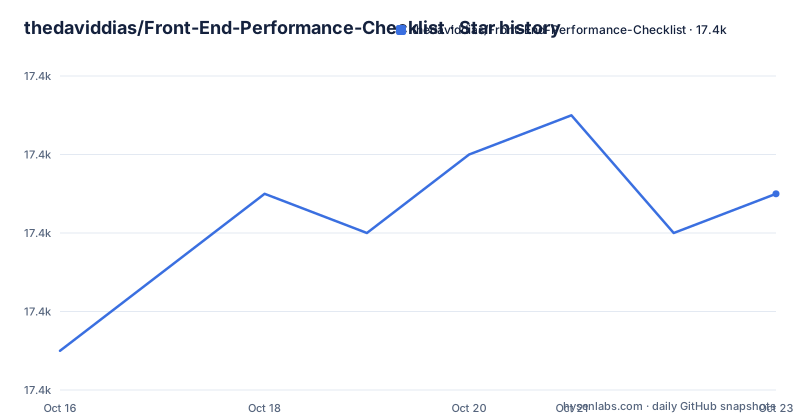
Star history
- thedaviddias/Front-End-Performance-Checklist17,378 ★ · +3
| Repository | 2026-10-16 | 2026-10-22 |
|---|---|---|
| thedaviddias/Front-End-Performance-Checklist | 17.4k | 17.4k |
3 Stars in the last 6 days, measured from the daily GitHub snapshot. Compare with other projects
Editorial analysis
Why Front-End Performance Checklist Covers Manual Review
Front-End Performance Checklist addresses the gap between knowing that a page feels slow and having a structured way to inspect likely contributors. It is aimed at front-end developers working on personal or professional projects. The README treats performance as a front-end responsibility and organizes checks across HTML, CSS, fonts, images, JavaScript, performance tools, and references.
Each checklist item combines a rule with an explanation of why it matters and guidance about how to correct it. That format makes the repository useful as an audit worksheet. A developer can move through the document before release, while a reviewer can use it to ask focused questions about markup, asset delivery, and script loading.
This is guidance, not instrumentation. The repository does not document an API, browser extension, command that profiles an application, CI check that fails a build, or dashboard that records regressions. Its value depends on a developer or team applying the checklist to a real page and confirming the outcome with separate performance tools.
How the Prioritized HTML and CSS Review Works
The central mechanism is a categorized Markdown checklist with priority indicators. The README defines low, medium, and high priorities. A low-priority item may be considered later, a medium-priority item should not be ignored, and a high-priority item is presented as a rule that should be followed.
The HTML section begins with production minification and the ordering of stylesheets and scripts. It assigns medium priority to minified HTML and high priority to placing CSS before JavaScript. The documented ordering looks like this:
<!-- Recommended -->
<link rel="stylesheet" href="foo.css" />
<script src="jquery.js"></script>
<script src="foo.js"></script>
The stated reason is that loading CSS before JavaScript permits better parallel downloading and improves browser rendering time. The checklist also calls for minimizing the number of iframes and labels that item as high priority. This gives reviewers concrete questions about production markup rather than leaving performance as an undefined goal.
The CSS section appears in the README table of contents. The repository does not include an executable CSS analyzer, so teams interested in CSS rules must consult the corresponding section of `README.md` and validate relevant findings through a separate measurement tool.
Starting the Repository's Formatting and Manual Review
There is no application to install for day-to-day use. The project is a checklist and reference, so the first real use is to review a page against its sections. The README does not document a clone command, package installation command, hosted dashboard, or command that scans a URL.
The repository does contain development scripts for maintaining the Markdown document. `package.json` defines the following script names:
{
  "scripts": {
    "format:check": "prettier --check README.md",
    "format:fix": "prettier --write README.md && markdownlint README.md"
  }
}
These are contributor commands for formatting `README.md`, not performance audit commands. The package manifest does not state a supported package runner or installation procedure, so this article does not invent a setup line. The presence of `pnpm-lock.yaml` shows that the repository includes a pnpm lockfile, but the README does not tell new contributors how to invoke it.
For a first page review, open the HTML section of `README.md`, choose one production page, and record every item that does not match its delivered markup. Start with high-priority rules because the README says they should not be skipped. Continue through the other documented categories, then use one of the listed measurement services or tools to inspect the page. A checked item is evidence of a review decision, not proof of a particular speed improvement.
How Asset Review Connects to External Performance Tools
The table of contents reserves separate sections for fonts, images, and JavaScript, placing those assets at the center of the review. The README links external references and tools for these categories, but it does not define one required measurement workflow.
The performance tools section offers external services and command-line projects. It lists WebPagetest, Dareboost, GTmetrix, PageSpeed Insights, Pingdom, Sitespeed.io, Lighthouse, Checkbot, Yellow Lab Tools, PWMetrics, Gravity CI, DebugBear, LogRocket, SpeedCurve, and other services. The entries cover page analysis, monitoring, browser development tools, browser extensions, pull-request artifact checks, and command-line metric collection.
That variety gives the checklist practical reach, but it also creates a selection problem. A one-time audit, local browser inspection, and continuous production monitoring answer different questions. The README does not prescribe one workflow for all of them. It also does not define which device profiles, test locations, network settings, metrics, or acceptance thresholds a project must use.
A page can satisfy visible checklist items and still need measurement under realistic conditions. A measured problem may also originate in a server, application architecture, or third-party dependency outside these static categories. The checklist is best understood as a review index that directs attention toward evidence, not as the measurement system itself.
Where Manual Review Cannot Identify the True Bottleneck
The largest limitation is the gap between prescriptive advice and diagnosis. A checklist can flag minified HTML, stylesheet ordering, excessive iframes, or unexamined assets, but it cannot determine which operation consumes time on a particular page. The linked tools may provide measurements, yet the README does not define a required sequence for collecting and comparing those results.
HTML minification illustrates the boundary. The README says removing unnecessary spaces, comments, and attributes reduces HTML size. That does not establish that minification is the first useful change for every slow page. The actual bottleneck may lie elsewhere, and the repository does not include a measurement model that locates the time cost.
The priority model also requires judgment. A high-priority label means the README considers the item important, but it does not calculate the likely improvement for a specific site. A low-priority item may matter more in an unusual application. The checklist does not document how priorities should change with traffic, device mix, business criticality, or architecture.
It is therefore the wrong tool when the required output is a trace, flame chart, bundle analysis, field metric, or repeatable performance budget. Those are analysis or monitoring tasks, while this repository organizes review knowledge and corrective guidance.
How This Checklist Differs from Lighthouse and Budgets
The README lists Lighthouse, but the two serve different roles. Front-End Performance Checklist is a manual reference spanning delivery categories and explanatory guidance. Lighthouse is listed as a browser and web performance auditing tool that performs analysis through an implementation separate from the checklist.
The difference is review guidance versus measured analysis. The checklist asks a developer to consider several classes of resource and explains why particular HTML practices matter. Lighthouse can audit a page and report diagnostic results, but the README does not claim that it evaluates every rule in the checklist or tracks its implementation. A developer can use the checklist to decide what to inspect and Lighthouse to gather evidence, although the README does not define that as a formal integrated workflow.
Performance budgeting provides another approach without requiring a named competitor. The README references "Start Performance Budgeting," but the repository implements neither a budget file nor a CI policy. A budget imposes measurable limits on assets or metrics. This project contains no configurable threshold and no documented failure condition. A team requiring enforcement must define that layer separately and choose metrics that match its product.
Maintenance Scope, MIT Terms, and Upgrade Cost
The repository is licensed under MIT. That license permits use, modification, distribution, and sublicensing subject to its conditions, but this article does not provide legal advice. The license does not turn the checklist into a hosted service, a supported consulting package, or a compatibility guarantee for every browser and framework.
The repository is not archived, and the last push was on 2026-10-13. It has no GitHub releases. Version `1.0.0` appears in `package.json`, but GitHub Releases do not serve as a documented publication stream for this project. There is no documented release cadence, migration note, compatibility matrix, or policy for retiring outdated recommendations.
Some linked reference titles contain older years, while the README also points to web performance resources. A recent commit demonstrates repository activity, but it does not confirm that every external service, metric, or linked page remains current. Reviewers should compare individual recommendations with the browser targets and build pipeline of their application before adopting them.
The operational cost of using a Markdown checklist is low. A fork adds editorial responsibility because the README does not describe a formal review cycle for external links, browser assumptions, or service availability. Teams that depend on it should record who checks those items and when.
Editorial conclusion
Front-End Performance Checklist suits developers and reviewers who need a broad manual audit of an existing page. It does not suit teams seeking measured regression detection, executable profiling, or build failures, because the repository documents none of those capabilities. Before adopting it, compare its HTML, CSS, font, image, and JavaScript rules with the browsers and delivery architecture used by the application. The repository is not archived and its last push was on 2026-10-13, but it has no GitHub releases or documented compatibility policy. For this repository, the appropriate first adoption is a manual review of `README.md`, followed by measurement with a separately selected tool.
Frequently asked questions
What is Front-End Performance Checklist used for?
It is a reference for reviewing front-end performance practices across HTML, CSS, fonts, images, and JavaScript. Each documented rule explains why it matters, how to address it, and whether its priority is low, medium, or high.
How do I install Front-End Performance Checklist?
The project is a Markdown checklist rather than an application, and the README does not document an application installation procedure. Repository contributors can inspect the formatting scripts defined in `package.json`, but those scripts maintain `README.md` and do not audit a website.
Does Front-End Performance Checklist monitor website performance automatically?
No automatic monitoring is documented for the checklist itself. The README separately lists services and tools such as SpeedCurve, DebugBear, LogRocket, PWMetrics, and Lighthouse for measurement or monitoring.
Official sources
Add this badge to your README
If you maintain this project, the badge below links readers to this analysis and shows its maintenance status from the daily GitHub snapshot. Paste the markdown into your README; add ?metric=license or ?metric=stars to the image URL for a different field.

[](https://hysenlabs.com/projects/thedaviddias-front-end-performance-checklist)Star history chart for your README
[](https://hysenlabs.com/projects/thedaviddias-front-end-performance-checklist)