Gentelella v4 and the removal of Bootstrap from a 3 million download admin template
Free admin dashboard template — vanilla JS, SCSS, Vite 8. No Bootstrap, no jQuery.
At a glance
- What is it?
- The Colorlib team rebuilt its most popular free admin template from the ground up with vanilla JavaScript, SCSS, and Vite 8, dropping Bootstrap and jQuery while adding RTL support, server-rendered hooks, and a command palette.
- Who is it for?
- What Gentelella v4 demonstrates is that removing a foundational dependency from a mature project is less about the code and more about the commitment afterwards. The dependency graph is smaller, the build is faster, and the token layer is cleaner, but every one of those gains only holds as long as someone keeps building the grid, the layout primitives, and the chart theming by hand.
- Can I use it commercially?
- Yes. MIT is a permissive licence: you can use, modify and sell software built on it, as long as you keep its copyright and licence notices.
- Is it still maintained?
- Yes. The repository last received commits 7 days ago.
- What is it written in?
- Mainly HTML, according to GitHub's language statistics.
Answers come from the project's GitHub data, last synced on October 20, 2026, and from our analysis. They are not legal advice.
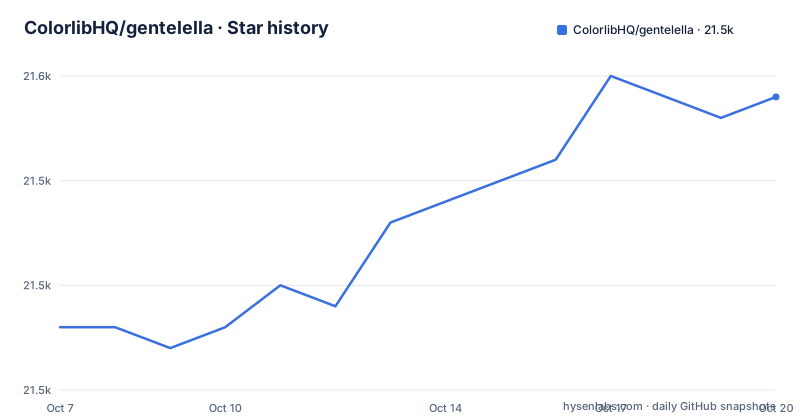
Star history
- ColorlibHQ/gentelella21,549 ★ · +11
| Repository | 2026-10-07 | 2026-10-20 |
|---|---|---|
| ColorlibHQ/gentelella | 21.5k | 21.5k |
11 Stars in the last 13 days, measured from the daily GitHub snapshot. Compare with other projects
Editorial analysis
A template that outgrew its own foundation
Gentelella has been a free admin dashboard template since 2014, and for most of that life it was a Bootstrap project. The README claims more than 3 million downloads and more than 21,000 GitHub stars for the Bootstrap-era original, which puts it in a small tier of free admin templates that have accumulated real institutional use rather than passing through a trend cycle.
Version 4 is a ground-up redesign, and the headline change is subtraction. The repository description states the position plainly: vanilla JavaScript, SCSS, and Vite 8, with no Bootstrap, no jQuery, and no SPA framework. The README repeats it as a badge and as the first line of the feature rationale.
The measurable result is the install footprint. The project puts the v4 dependency tree at roughly 165 MB of node_modules, down from roughly 600 MB on v2. That is not only a disk saving. It is a direct consequence of no longer shipping a CSS framework and a DOM library to every page, and it compounds into install time, container image size, and cold build cost on CI.
The stack itself is Vite 8, configured as a multi-page application with auto-discovered entry points and hashed assets. That pairing is deliberate. A 58-page admin template has no use for a single-page router, and auto-discovery means adding a page does not require editing a central route table. Hashed assets give long-lived caching without cache busting by hand.
The project is MIT licensed and states that it is free for personal and commercial use. The repository records 21,516 stars, 6,831 forks, and zero open issues, with the default branch on master and the most recent push dated 2026-09-16, which places the work inside the window where it can reasonably be called actively maintained.
What the rewrite actually put in the box
The surface inventory is unusually broad for a free template, and it is worth separating what is genuinely functional from what is a showcase page.
The core claim is 58 production-ready HTML pages and 20 ECharts chart variants. Dashboards come in four variants: operations, analytics with heatmap, funnel, and cohort matrix, sales with gauge, radar, and pipeline, and system health with resource bars, a deployment list, and an error log. Auth covers sign-in, social sign-in through Google and GitHub, register, forgot password, two-factor, lock screen, and the 403, 404, and 500 pages. Forms include a six-step wizard, drag-and-drop upload, a date-range picker, a multi-select, and a rich text editor. Tables are DataTables with sort, search, pagination, row selection, and CSV export.
Three features stand out as genuinely different from template filler. The live theme generator lets a developer pick a primary color and see charts, buttons, badges, and links restyle in real time, with the generated SCSS tokens copyable or downloadable, which means theme work becomes a token diff rather than a search-and-replace across stylesheets. The component playground puts every reusable component on one page next to its exact HTML with a copy button, which turns the template into a lookup surface. The command palette does fuzzy search across all 58 pages plus inline actions.
Beyond that, dark mode uses prefers-color-scheme detection with a pre-paint script so the correct theme is applied before first paint, and the manual toggle persists in localStorage. The sidebar has a rail mode that collapses to icons on desktop with hover tooltips and click-to-flyout submenus. Accessibility work includes a skip link, keyboard focus rings, ARIA labels on interactive controls, semantic landmarks, and screen-reader-friendly DataTables.
It is also installable as a PWA on macOS, Windows, iOS, and Android, with an offline shell and a service worker. For an internal tool that people keep open all day, an installable offline shell is a real quality of life gain rather than a checkbox.
npm run dev
npm run build
npm run preview
The npm package surface and its two consumers
The package manifest is where the rewrite's decisions become concrete. The package is an ES module, with main pointing at src/main-v4.js and TypeScript declarations shipped from types/gentelella.d.ts.
The exports map is worth reading closely, because it is what determines what a consumer can actually import. The root export resolves to the main module. A wildcard export exposes src/v4/*.js, which is how the versioned internals are reached. A second wildcard exposes src/scss/*, so a consuming project can import raw stylesheets rather than a prebuilt CSS bundle. A dedicated types export serves the declaration file, and package.json itself is exported for tooling that needs version metadata.
The published files list is dist, src, production, types, and vite.config.js. Shipping src and the vite config alongside dist means the package is meant to be both consumed as a finished asset and forked as a starting point, which matches how admin templates are actually used. Most teams that adopt one of these end up editing the source rather than importing it as a library.
The scripts tell a similar story about how the project is maintained. There are separate development and production builds, a lint and format pair for both eslint and prettier, an analyze script that opens a build stats page, and a smoke test. Two scripts stand out: a `new` script backed by scripts/new-page.mjs, which is a page generator for the 58-page inventory, and an `export:php` script backed by scripts/export-php-nav.mjs, which exists to serve the second consumer.
That second consumer is the Laravel edition, a separate Composer package that presents the same shell as Blade layouts with 25 components, a CRUD engine with server-side tables, and auth screens, plus all 58 pages as a bundled demo. This is the most ambitious thing the project does, because it asks the same templates to work both as static files and as the front end of a server-rendered application. The v4.2.0 release added the hooks that make that possible, which is discussed below.
The theme is the author's own commercial Colorlib business, and the README positions the template as free with a hosted live demo, which is a common and workable arrangement for this category of project.
npm run new
npm run export:php
npm run lint
What 4.2.0 added and what it deliberately did not change
The 4.2.0 release, published 2026-09-16, is the current version and the one the manifest declares. Its summary is careful in a way release notes rarely are: nothing is removed and no public API changed shape.
The headline addition is RTL support. Setting the direction attribute on the html element flips every layout rule for Arabic, Hebrew, Persian, and Urdu. The implementation is built on CSS logical properties, so there is no mirrored stylesheet to maintain, which is the correct approach and the main reason to trust it. The choice persists in localStorage and is applied before first paint, consistent with how dark mode is handled. The guidance lives in docs/rtl.md.
The second addition is server-rendered host support, and it is entirely opt-in. Server-side DataTables use a data-ajax attribute and filter attributes, meaning the table markup can be a static shell that a server fills, which is what a CRUD backend needs. This is the mechanism that makes the Laravel edition viable rather than a separate template that merely looks similar.
Also new in 4.2.0: a build-time sitemap, JSON-LD structured data, and a dependency refresh. Sitemap and JSON-LD are unglamorous additions that matter for a site that is also published as a demo and read by search engines.
One release note is worth flagging for anyone on the Laravel side. The Laravel edition installer asks for gentelella at caret 4.1, which until this release resolved to 4.1.1, a version that predates the new hooks. On that version, sign-in forms did nothing and server-side tables had no backend mode. The fix is to update the package to 4.2.0 explicitly rather than accepting the installer's resolved version.
The 4.1.1 release from 2026-08-07 is a small one, carrying everything from 4.1.0 plus a single link fix, and its note records that 4.1.0 itself was not the first 4.1.x version on npm. That is the kind of packaging correction worth noting if you track releases closely.
What the repository layout reveals about the workflow
The tree is where a template project stops looking like a design deliverable and starts looking like a software project. There is a src directory, a types directory with declarations, a tests directory, a scripts directory, and an examples directory. There is an eslint config, a prettier config with a matching ignore file, and an editor config. There is an .nvmrc pinning the Node version and a .devcontainer directory for containerized development.
The AI tooling directories are the most unusual entry. The tree includes .claude, .cursor, AGENTS.md, and CLAUDE.md, and the README describes the project as AI-assisted development that ships helper files for Claude Code, Cursor, GitHub Copilot, and any agents.md-compatible tool. Shipping agent configuration inside the repository rather than keeping it in each contributor's personal setup is a deliberate choice: it makes the assistant context part of the reviewable surface of the project.
There is also a dev-watch.sh at the root and a docs directory holding both the README screenshot assets and guides such as docs/rtl.md. The .github directory holds the workflows and issue templates.
Screenshots are generated rather than captured by hand. The README documents the pipeline: a build followed by the screenshots script boots Playwright and captures 22 key pages in both light and dark themes, producing 44 PNGs into docs/screenshots, plus downscaled WebP hero images for the README. That step needs the cwebp binary from the webp package. A screenshot pipeline wired into the repo means the images in the README cannot silently drift from the current theme, which is a genuine maintenance advantage over a template that reuses images from v2.
npm run screenshots
npm run smoke
npm run analyze
Where the project metadata lags the code
There is a real inconsistency in the repository's own topic list. Gentelella v4 is defined by the absence of Bootstrap, yet the GitHub topics still include bootstrap, bootstrap-admin-panel, and bootstrap-admin-panel-adjacent entries alongside admin-dashboard, scss, vite, and vanilla-javascript.
Read charitably, the Bootstrap topics are there for discovery. Most people searching for an admin template still type Bootstrap, and a template that removed Bootstrap entirely would otherwise be invisible to them. That is a rational marketing decision and probably deliberate. Read strictly, the topic list misdescribes the project, and a developer filtering by bootstrap topic will find a result that has nothing to do with Bootstrap.
The SERP data collected for this project shows the same lag in search behavior. The only question surfaced is what the best Bootstrap 5 admin template is, and the related terms include Gentelella Bootstrap 5 and Gentelella Bootstrap 3. People are still pairing the template name with the framework it no longer uses, and the Bootstrap 3 phrasing points at searches old enough to predate v2. The consequence is that a v4 article and a v3 discussion compete for the same query space, and readers arriving on either one may be several major versions behind.
The version history explains part of the confusion. A 2014 template with a decade of accumulated v1 through v4 naming has three Bootstrap-major generations of look and feel under one repository name, and the repository's default branch is still master rather than something versioned. Anyone pinning Gentelella by name rather than by exact version number is likely to get something they did not expect.
There is one more signal worth reading. The package ships `npm install [email protected]` as the documented install, and the Laravel edition's installer asks for a caret range that lagged the release. Both facts point to the same weakness: with one name covering many incompatible stacks, precise version pinning is the consumer's job, and the project cannot always enforce it from the dependency manifest alone.
Editorial conclusion
What Gentelella v4 demonstrates is that removing a foundational dependency from a mature project is less about the code and more about the commitment afterwards. The dependency graph is smaller, the build is faster, and the token layer is cleaner, but every one of those gains only holds as long as someone keeps building the grid, the layout primitives, and the chart theming by hand. Bootstrap absorbed that labor across a large community for a decade. Gentelella now carries it alone.
For adopters, the decision is about where that risk sits. If your team already ships vanilla JS and a Vite pipeline, the npm package is a sensible shell to start from, and the MIT license leaves you free to reshape it. If you are mid-way through a Bootstrap codebase, migrating to Gentelella is a rewrite rather than a swap, because there is no partial adoption path when the entire styling foundation is gone. Either way, pin an exact version, read docs/rtl.md before assuming RTL works in your layout, and check the Laravel edition's installer constraint if a Composer package will consume it.
Frequently asked questions
What is Gentelella v4 and what is it built with?
Gentelella v4 is a free MIT-licensed admin dashboard template from ColorlibHQ, a ground-up redesign of the Bootstrap-era template that had been free since 2014. It is built with vanilla JavaScript, SCSS, and Vite 8, and it deliberately includes no Bootstrap, no jQuery, and no SPA framework. It ships 58 production-ready HTML pages, 20 ECharts chart variants, a live theme generator, a component playground, a command palette, dark mode, and PWA support.
Why did Gentelella remove Bootstrap and jQuery?
The stated reason is footprint and build speed. The project reports roughly 165 MB of node_modules on v4 against roughly 600 MB on v2, a direct consequence of not shipping a CSS framework and a DOM library to every page. The rewrite also moved to Vite 8 with a multi-page setup, auto-discovered entry points, and hashed assets, so a 58-page template does not need a client-side router. The README frames the result as a modern alternative to Bootstrap admin templates for SaaS dashboards, CRM systems, internal tools, and e-commerce backends.
Does Gentelella support RTL and dark mode?
Both are supported. Dark mode is prefers-color-scheme aware, uses a pre-paint script so there is no flash of the wrong theme, and the manual toggle persists in localStorage. RTL arrived in 4.2.0: setting `<html dir="rtl">` flips every layout rule for Arabic, Hebrew, Persian, and Urdu, implemented on CSS logical properties so no mirrored stylesheet is needed, with the choice persisted and applied before first paint. The README points to docs/rtl.md for details.
Can I use Gentelella with a server-rendered framework like Laravel?
Yes, through the separate gentelella-laravel Composer package, which presents the same shell as Blade layouts with 25 components, a CRUD engine with server-side tables, and auth screens. This requires the opt-in server-rendered host support added in 4.2.0, which provides data-ajax and table filter attributes for server-side DataTables. Watch the version constraint: the Laravel installer asks for gentelella at caret 4.1, which previously resolved to 4.1.1 and left sign-in forms inert with no backend table mode, so update to 4.2.0 explicitly.
How do I build Gentelella locally and regenerate its screenshots?
The package exposes a normal Vite workflow. `npm run dev` starts the dev server, `npm run build` runs a production build, and `npm run preview` serves the build. There are lint and format scripts for eslint and prettier, plus a `new` script backed by scripts/new-page.mjs for adding pages. Screenshots are automated: a build followed by `npm run screenshots` boots Playwright and captures 22 key pages in light and dark, producing 44 PNGs into docs/screenshots along with downscaled WebP hero images, which requires the cwebp binary from the webp package.
Official sources
Add this badge to your README
If you maintain this project, the badge below links readers to this analysis and shows its maintenance status from the daily GitHub snapshot. Paste the markdown into your README; add ?metric=license or ?metric=stars to the image URL for a different field.

[](https://hysenlabs.com/projects/colorlibhq-gentelella)Star history chart for your README
[](https://hysenlabs.com/projects/colorlibhq-gentelella)Was this useful?