raylib-zig: Zig bindings for raylib with build customization
Manually tweaked, auto-generated raylib bindings for zig. https://github.com/raysan5/raylib
At a glance
- What is it?
- raylib-zig exposes raylib, raygui, and the native C library to Zig projects, while its build dependency supports shared linkage, OpenGL selection, feature macros, and WebAssembly export. It is a practical option for developers who want raylib from Zig, provided they account for its generated-binding and raylib-version boundaries.
- Who is it for?
- Adopt raylib-zig when a Zig game needs raylib and you accept the coupling between the binding and raylib versions. Do not choose it if you require a stable release series, a binding independent of raylib headers, or a documented migration path for every API change.
- Can I use it commercially?
- Yes. MIT is a permissive licence: you can use, modify and sell software built on it, as long as you keep its copyright and licence notices.
- Is it still maintained?
- Yes. The repository last received commits 2 days ago.
- What is it written in?
- Mainly Zig, according to GitHub's language statistics.
Answers come from the project's GitHub data, last synced on October 23, 2026, and from our analysis. They are not legal advice.
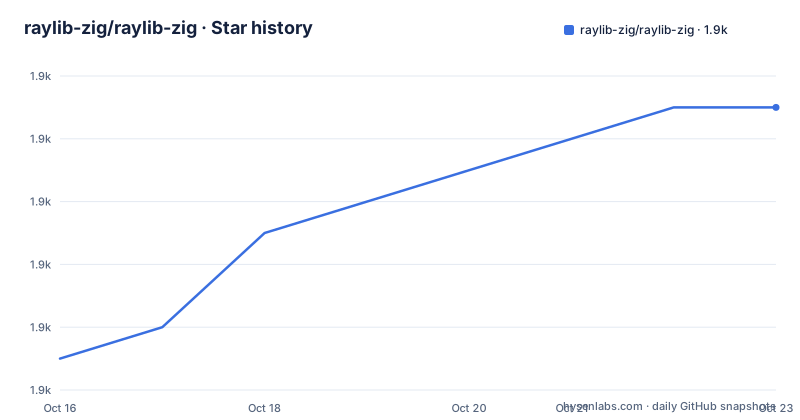
Star history
- raylib-zig/raylib-zig1,913 ★ · +8
| Repository | 2026-10-16 | 2026-10-23 |
|---|---|---|
| raylib-zig/raylib-zig | 1.9k | 1.9k |
8 Stars in the last 7 days, measured from the daily GitHub snapshot. Compare with other projects
Editorial analysis
What raylib-zig adds to a Zig project
raylib-zig is a binding layer for raylib, the C library used for window creation, input, drawing, audio, models, textures, and related game-development tasks. The repository describes the bindings as manually tweaked and auto-generated, which is an important distinction: the package is intended to track the raylib API while still receiving local adjustments. It is for Zig developers who want to work against raylib without maintaining the C API declarations themselves.
The package exposes more than one module. The README identifies `raylib` as the main module, `raygui` as the GUI module, and `raylib` as a native C library artifact. That split matters in `build.zig`, because the Zig modules provide imports while the artifact supplies the compiled C library that must be linked into the executable. A project can therefore use the binding, link raylib, and optionally import raygui without treating the GUI layer as part of the core module.
The binding is tested against raylib 6.1-dev and Zig 0.17.0, according to the README. This is a development-version pairing, not a claim of broad compatibility across every raylib release. The README also says updates are planned around major raylib releases, while implementation changes may require work on the consuming side. That makes version selection part of the adoption decision.
The dependency path and Zig build wiring
For a project created with `zig init`, the documented dependency command adds the Git repository at the `devel` branch. The build file then resolves the `raylib_zig` dependency with the target and optimization settings already available in the build context. It obtains three pieces from that dependency: the main raylib module, the raygui module, and the raylib C artifact.
The linking step is separate from the import step. `exe.root_module.linkLibrary(raylib_artifact)` connects the native library to the target, while `addImport` makes the modules available to source files under the names `raylib` and `raygui`. This is a clear integration boundary, but it also means that a successful package download is not by itself enough. The target configuration must match the platform and build requirements of the native library.
The documented template is useful when a project has not already been created. Its setup script creates a named folder that can be moved elsewhere, and `zig build run` is the documented way to test the generated project. The README does not describe a separate runtime installation for the bindings, so the package is handled through Zig's dependency and build system rather than a conventional application installer.
A first window through the raylib-zig example
The shortest documented first use is the basic window example. It imports the `raylib` module, initializes an 800 by 450 window, schedules window closure with `defer`, sets a target frame rate of 60, and enters a loop until the window-close button or Escape key is detected. The drawing section begins and ends a frame, clears the background to white, and draws a short confirmation message. The example is small enough to show the required lifecycle without introducing game-state code.
The README gives this source as the example to follow:
const rl = @import("raylib");

pub fn main() anyerror!void {
    const screenWidth = 800;
    const screenHeight = 450;

    rl.initWindow(screenWidth, screenHeight, "raylib-zig [core] example - basic window");
    defer rl.closeWindow();

    rl.setTargetFPS(60);

    while (!rl.windowShouldClose()) {
        rl.beginDrawing();
        defer rl.endDrawing();

        rl.clearBackground(.white);
        rl.drawText("Congrats! You created your first window!", 190, 200, 20, .light_gray);
    }
}
The repository also documents building every available example with `zig build examples`. To discover the available build steps, the README directs users to `zig build --help`. For the example named `basic_window`, it gives the command `zig build basic_window`. These commands exercise the repository's own build definitions rather than assuming that every example is a separate executable with a manually constructed linker command.
Adding the binding to an existing Zig project
An existing project can fetch the binding from its root directory with the command below. The branch is explicitly included in the URL because the README uses `devel` as the source branch.
zig fetch --save git+https://github.com/raylib-zig/raylib-zig#develThe resulting `build.zig` dependency setup is the central integration point:
const raylib_dep = b.dependency("raylib_zig", .{
    .target = target,
    .optimize = optimize,
});

const raylib = raylib_dep.module("raylib");
const raygui = raylib_dep.module("raygui");
const raylib_artifact = raylib_dep.artifact("raylib");
The target then needs both the artifact and imports:
exe.root_module.linkLibrary(raylib_artifact);
exe.root_module.addImport("raylib", raylib);
exe.root_module.addImport("raygui", raygui);
This arrangement gives the project a stable local name for each module. The native artifact is still required. If the build reports missing imports or unresolved native symbols, the first place to inspect is whether these dependency declarations and target modifications are present together. The README does not document a compatibility matrix beyond the tested raylib and Zig versions, so this setup should be treated as the documented path rather than an exhaustive troubleshooting guide.
Build options and raylib feature macros
raylib-zig exposes selected raylib build customizations through its dependency options. The README gives shared linkage and OpenGL version as examples. The dependency declaration remains based on `target` and `optimize`, with additional fields supplied when needed:
const raylib_dep = b.dependency("raylib_zig", .{
    .target = target,
    .optimize = optimize,
    .linkage = .dynamic,
    .opengl_version = rlz.OpenglVersion.gl_2_1,
});
The README explains that choosing an OpenGL version requires importing raylib-zig's build script as `rlz`. That detail is easy to miss because the option is attached to a dependency object while the enum name comes from the build-script namespace. The package therefore supports a native build decision, but the example does not show every required declaration surrounding the snippet.
Feature macros are passed to the raylib artifact before linking. For example, the documented syntax adds `SUPPORT_FILEFORMAT_JPG`:
raylib_artifact.root_module.addCMacro("SUPPORT_FILEFORMAT_JPG", "");The same mechanism can represent raylib options for image, font, model, and audio formats, as well as linkage variants. This is useful when a project needs a specific format or module set. It also creates a configuration responsibility for the user: the selected macros must agree with the source code and the features the application actually calls. The README does not provide a complete table mapping every macro to its effect, so a macro should be chosen only after checking the corresponding raylib documentation.
Web export through Emscripten
Web export is available through the Emscripten toolchain. The README says to add `emsdk` as a dependency, either through the dependency system or from a local folder. Its documented fetch command pins the dependency URL to a specific tag:
zig fetch --save=emsdk git+https://github.com/emscripten-core/emsdk#4.0.9The build file must detect an Emscripten target, import the `raylib_zig` build script as `rlz`, create a library for the project, derive Emscripten flags and settings, and attach the export step to the install and run steps. The repository provides a larger configuration example for this path. The target command is:
zig build -Dtarget=wasm32-emscriptenThe README states that the exported project should be placed in `zig-out/web`. That makes the web output easy to locate, although the example assumes the surrounding build variables and project modules already exist. Web support is not just a source-level binding feature. It depends on the target selection, Emscripten package, build-script import, and the raylib artifact all being configured together.
The main limitation is that the web path adds another toolchain and another set of build dependencies. Projects that only need native desktop builds should avoid carrying that complexity unless browser output is a stated requirement.
Maintenance, licensing, and practical boundaries
The repository is not archived, and the recorded last push was on 2026-10-16. The repository has no GitHub releases, so there is no release-based upgrade track documented by the repository metadata. The README says updates are planned for major raylib releases such as 2.5 and 3.0, but that statement is an update plan, not evidence that each major version has a corresponding tagged raylib-zig release here. For now, the documented dependency points at `devel`.
That arrangement has a direct maintenance cost. Changes in raylib headers can affect generated declarations, and the README acknowledges that implementation changes may need work on the consuming side. A project that pins to `devel` should treat its dependency fetch as part of upgrade review rather than assuming that a version identifier controls compatibility. The package uses the MIT license, so source reuse and modification are permitted under that license's terms, subject to its conditions. This is a licensing identification, not legal advice.
The repository's own TODO list also says that porting all examples and implementing member functions or initialisers remain work items. The repository includes example directories for audio, core, GUI, models, shaders, shapes, text, and textures, but the README does not claim that every raylib example or API shape is complete. Developers needing a less conventional workflow, stable semantic-version guarantees, or a binding with a fully documented migration policy may find another integration path more suitable.
Editorial conclusion
Adopt raylib-zig when a Zig game needs raylib and you accept the coupling between the binding and raylib versions. Do not choose it if you require a stable release series, a binding independent of raylib headers, or a documented migration path for every API change. Verify first that your Zig and raylib versions match the documented combination and that the required build artifact and platform options work in your project.
Frequently asked questions
How do I install raylib-zig in a Zig project?
From the project root, the README documents fetching the `devel` branch with `zig fetch --save git+https://github.com/raylib-zig/raylib-zig#devel`. Then add the `raylib_zig` dependency, its modules, and its `raylib` artifact to the target in `build.zig`.
How do I run the first raylib-zig example?
The basic example source initializes a window, enters a drawing loop, and closes when the window-close condition is detected. The README documents building all examples with `zig build examples`, listing available build steps with `zig build --help`, and building `basic_window` with `zig build basic_window`.
Can raylib-zig export a Zig game to the Web?
Yes, according to the README, web export uses Emscripten. It requires adding `emsdk`, importing raylib-zig's build script as `rlz`, configuring the export steps, and building with `zig build -Dtarget=wasm32-emscripten`. The exported output should be located at `zig-out/web`.
Official sources
Add this badge to your README
If you maintain this project, the badge below links readers to this analysis and shows its maintenance status from the daily GitHub snapshot. Paste the markdown into your README; add ?metric=license or ?metric=stars to the image URL for a different field.

[](https://hysenlabs.com/projects/raylib-zig-raylib-zig)Star history chart for your README
[](https://hysenlabs.com/projects/raylib-zig-raylib-zig)Was this useful?