Flog: a commit graph for Vim that borrows Fugitive's language
A blazingly fast, stunningly beautiful, exceptionally powerful git branch viewer for Vim/Neovim.
At a glance
- What is it?
- vim-flog is a Vim and Neovim plugin that renders a repository's commit graph as a navigable buffer, with a custom log format, multiline commit messages and contextual completion for git commands. It is aimed at people who live in their editor and want branch history without leaving it.
- Who is it for?
- Flog is a good fit for a Vim or Neovim user who already relies on Fugitive and wants branch history in the same buffer and key vocabulary, and for anyone who wants to script against their own git log format rather than accept a fixed rendering. It is the wrong choice for a team that does not use Vim, for someone who needs a graphical history view, and for a project with no tolerance for a plugin that shells out to git on every refresh.
- Can I use it commercially?
- Not without permission. GitHub finds no licence file in the repository, and without a licence all rights are reserved by default: you may read the code but not reuse it. Check the README, or ask the authors, before using it.
- Is it still maintained?
- Yes. The repository last received commits 106 days ago.
- What is it written in?
- Mainly Vim Script, according to GitHub's language statistics.
Answers come from the project's GitHub data, last synced on November 6, 2026, and from our analysis. They are not legal advice.
Star history
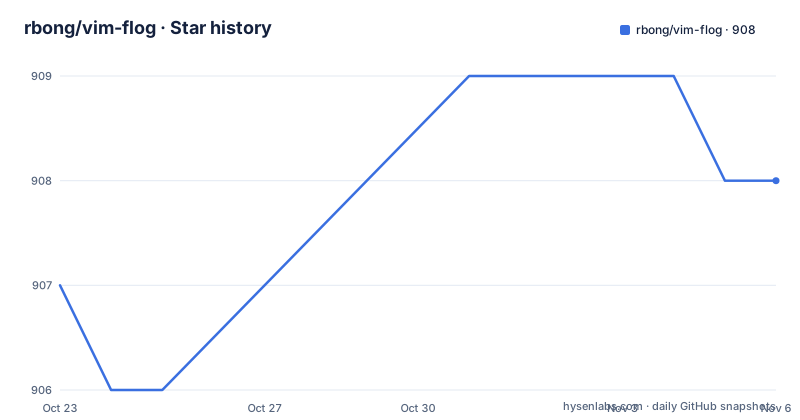
- rbong/vim-flog908 ★ · +1
| Repository | 2026-10-23 | 2026-11-06 |
|---|---|---|
| rbong/vim-flog | 907 | 908 |
1 Stars in the last 14 days, measured from the daily GitHub snapshot. Compare with other projects
Editorial analysis
Flog renders history in a buffer, not a separate window
The core idea is that a Git branch viewer belongs inside the editor rather than in a browser tab or a separate GUI. Opening a graph is done with two commands, :Flog and :Flogsplit, which mirror the buffer versus split window choice familiar from any Vim command. What you get is the commit graph drawn with symbols, and the graph characters are what make the plugin interesting to look at rather than merely functional. The commit history of a repository is a branching structure, and most text log formats flatten that into a line of hashes, whereas Flog renders the branch topology directly in the buffer. The documentation notes that extended graph symbol support currently works only in Kitty, so if you use a different terminal the graph still draws but with a plainer symbol set. That is a small limitation with a clear workaround, since the terminal choice is yours, and it is the kind of detail that separates a plugin written for a specific workflow from a generic one.
Custom log formats decide what the graph can show
Flog is built on git log, and the plugin's own list of features starts with custom log format support, which is the most consequential of them. The usual git log output gives you a hash, an author, a date and a subject. A custom format can give you more of what you care about, or less, and Flog can lay out the graph around whatever fields you choose. This is also why the documentation points you at running git log --help in a terminal for help with git log itself, alongside :help flog for the plugin's own documentation. The split is deliberate: the format language belongs to git, the rendering belongs to Flog. The consequence for a team is that log output configured for Flog is configured through git, and anyone who has customised their log format elsewhere will recognise the result. A related feature is multiline commit message support, which matters in practice because commit bodies often carry the detail that a one-line subject hides, and the plugin can also expand and collapse the commit body on demand.
Fugitive supplies the commit actions, Flog supplies the graph
Flog is not a replacement for Fugitive, it is a front end for it. Installing the plugin means installing tpope/vim-fugitive alongside it, and the dependency is declared explicitly in both the Plug and the lazy.nvim snippets. Opening a commit with the enter key hands the work to Fugitive, and the documentation makes a broader point worth repeating: many of the familiar mappings from the Fugitive :Git status window work in Flog too. That is the strongest argument for the plugin, because the learning curve is close to zero for anyone who already uses Fugitive. The remaining navigation is done with the same kinds of keys you would expect, jumping between commits with control-N and control-P, toggling whether all branches are shown with the a key, and quitting with gq. There is also a help mapping, g?, which lists the available mappings inside the buffer, which is the fastest way to learn what is there without leaving Vim.
Reading a range of the graph instead of the whole thing
One feature stands out for how much it changes day to day use: the ability to view history of a selected visual range. Flog tracks which commits are visually selected, and you can restrict the log to that selection rather than the whole repository. On a branch with a long history and a long-lived set of merges, the difference between seeing the last hundred commits and seeing the twelve you have selected is the difference between a graph you can read and one you scroll through. Marks are commit based, and the plugin keeps a jump history, so navigating to a commit and coming back works the way you would want it to in a long session. There is also a line about intelligently restore cursor position between updates, which sounds small and is not: when a graph refreshes because the repository changed underneath you, having the cursor stay on the commit you were looking at is the difference between the plugin being usable on an active branch and being annoying on one.
Floggit runs git with completion that follows the cursor
Beyond the graph, the plugin offers a command for running any git command from within the buffer, and its distinguishing feature is that it completes arguments contextually based on where the cursor is. The documentation describes this as running any git command using :Floggit, and says the command will contextually complete arguments based on your cursor position, with :help :Floggit for more. Contextual completion here is a real saving of typing: rather than remembering branch names, you can complete them, and rather than reconstructing a path, the plugin completes it. The argument completion of :Flog itself is reachable through tab completion or through :help :Flog, which is worth reading before you assume a missing option is a missing feature. The plugin also exposes functions for integrating with your Git workflow and plugins, so if you are writing your own tooling around your repository, the graph is not the only integration point. On Neovim specifically, the feature list includes dynamic branch highlighting and automatic updates.
Installation is a plugin manager entry and a Lua runtime
The setup is short but has a runtime requirement that catches people out. If you use Plug, the two lines go in your .vimrc:
Plug 'tpope/vim-fugitive'
Plug 'rbong/vim-flog'
For lazy.nvim users the plugin is declared as a lazy-loaded module with the three commands as the trigger:
{
  "rbong/vim-flog",
  lazy = true,
  cmd = { "Flog", "Flogsplit", "Floggit" },
  dependencies = {
    "tpope/vim-fugitive",
  },
},
The runtime point is the next one. In Vim, LuaJIT 2.1 must be installed, and Lua 5.1 is also supported but is described as less performant. Since Flog is written in Lua rather than Vim Script, despite the primary language field of the repository saying Vim Script, a Vim build without LuaJIT cannot run it at all. On Neovim, Lua is built in, so this step does not apply. The last push was on 2026-07-25, and the most recent tagged releases are v3.0.0 from 2024-09-06, v2.1.0 from 2024-08-30 and v2.0.0 from 2023-01-22, so the branch moves more often than the tags do.
A licence you will have to sort out yourself
The repository is not published under a licence that can be identified. No licence identifier is given for the project, which means there is no stated permission to use, copy or modify the code, and no stated terms about redistribution. This is not a technical limitation but a practical one, and it applies to a different audience than it might first appear. If you install a Vim plugin for your own machine, you are unlikely to care. If you intend to vendor the plugin into a company-wide configuration repository, publish a fork, or ship it as part of a product, the absence of a licence is a genuine obstacle, because without terms you have no grant to rely on. The rest of the repository is a conventional plugin layout, with autoload/, doc/, ftplugin/, lua/, plugin/, syntax/ and a t/ directory for tests, and there is a CONTRIBUTING.md, a FAQ.md, an EXAMPLES.md and a test workflow badge. What the project does not provide is a licence file, and that is a question for its author rather than something a reader can infer.
Editorial conclusion
Flog is a good fit for a Vim or Neovim user who already relies on Fugitive and wants branch history in the same buffer and key vocabulary, and for anyone who wants to script against their own git log format rather than accept a fixed rendering. It is the wrong choice for a team that does not use Vim, for someone who needs a graphical history view, and for a project with no tolerance for a plugin that shells out to git on every refresh. Before adopting it, confirm LuaJIT 2.1 is present, since plain Lua 5.1 works but is described as less performant, and check the licence situation for your organisation, because no licence identifier is given for the project and that gap has to be settled before you vendor the code.
Frequently asked questions
How do I install Flog in Vim or Neovim?
With Plug, add tpope/vim-fugitive and rbong/vim-flog to your .vimrc, and with lazy.nvim declare rbong/vim-flog with cmd = { "Flog", "Flogsplit", "Floggit" } and tpope/vim-fugitive as a dependency. In Vim you also need LuaJIT 2.1, since Lua 5.1 is supported but less performant.
What is the difference between :Flog and :Flogsplit?
Both open the commit graph, with :Flog using the current buffer and :Flogsplit opening a split window. Tab completion on :Flog, or :help :Flog, shows the available arguments for each command.
Does Flog require Fugitive to be installed?
Yes, the installation snippets for both Plug and lazy.nvim include tpope/vim-fugitive, and opening a commit with the enter key hands off to Fugitive. Many of the familiar mappings from the Fugitive :Git status window also work inside Flog.
How do I run a git command from inside Flog?
Use the :Floggit command, which runs any git command and completes its arguments contextually based on the cursor position. The full description is available through :help :Floggit.
Which terminals render the Flog graph symbols best?
Extended graph symbol support currently works only in Kitty, so the graph draws in other terminals with a plainer symbol set. The commit history itself is unaffected.
Official sources
Add this badge to your README
If you maintain this project, the badge below links readers to this analysis and shows its maintenance status from the daily GitHub snapshot. Paste the markdown into your README; add ?metric=license or ?metric=stars to the image URL for a different field.

[](https://hysenlabs.com/projects/rbong-vim-flog)Star history chart for your README
[](https://hysenlabs.com/projects/rbong-vim-flog)Was this useful?