react-native-sensors: sensor readings as RxJS streams in a React Native app
A developer friendly approach for sensors in React Native
At a glance
- What is it?
- react-native-sensors gives a React Native app one uniform interface over the accelerometer, gyroscope, magnetometer and barometer, delivering readings as RxJS observables across iOS, Android and Windows. The interesting wrinkle is that the code is still landing while the last tagged release is from 2022.
- Who is it for?
- react-native-sensors suits a React Native app that needs motion or orientation readings through one API on iOS, Android and Windows, and that is comfortable with an Observable-shaped interface rather than a callback per sensor. It does not suit a project that needs a maintained, tagged release stream, because the newest tag is v7.3.6 from 2022 while the repository itself is still receiving commits, and the README does not enumerate the individual sensor APIs.
- Can I use it commercially?
- Yes. MIT is a permissive licence: you can use, modify and sell software built on it, as long as you keep its copyright and licence notices.
- Is it still maintained?
- Yes. The repository last received commits 1 day ago.
- What is it written in?
- Mainly Objective-C, according to GitHub's language statistics.
Answers come from the project's GitHub data, last synced on November 7, 2026, and from our analysis. They are not legal advice.
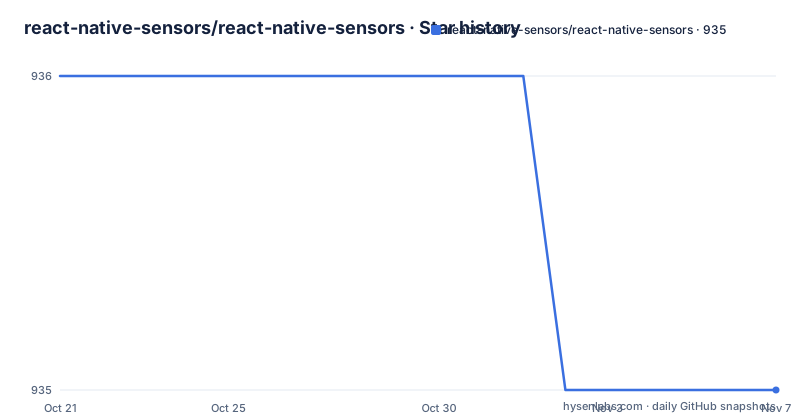
Star history
- react-native-sensors/react-native-sensors935 ★ · -1
| Repository | 2026-10-21 | 2026-11-07 |
|---|---|---|
| react-native-sensors/react-native-sensors | 936 | 935 |
-1 Stars in the last 17 days, measured from the daily GitHub snapshot. Compare with other projects
Editorial analysis
One uniform surface over four kinds of sensor
react-native-sensors is described as a developer friendly approach for sensors in React Native, and the repository topics name what it covers: acceleration, gyroscope, magnetometer and barometer.
The problem it addresses is not access to hardware, since the native SDKs expose that already. It is that each platform exposes sensors differently, with different names, different coordinate conventions and different delivery models, so an app that wants an accelerometer reading on iOS and an Android tablet ends up with two code paths and a translation layer between them. The README states the intent directly in its credits section: the project is inspired by react-native-sensor-manager and react-native-motion-manager, both of which have similar solutions with a non-uniform interface, and this project aims to unify both.
That is the whole design claim. One interface, one calling convention, one subscription model, and a native implementation per platform.
The honest limit of the README is that it does not enumerate the individual APIs. The list of sensor types comes from the repository topics rather than from an API listing in the text, and the documentation is hosted on a separate website. Anyone evaluating this needs the site, because the README does not tell you which sensors are exposed under which names or what the payload of each reading looks like.
Readings arrive as observables, not callbacks
The single runtime dependency tells you the delivery model. The package.json lists one dependency:
  "dependencies": {
    "rxjs": ">= 6"
  }
Sensor data is therefore delivered as a stream you subscribe to, and the RxJS operators you already know are the ones you use to shape it. That choice has consequences for how an app is written.
A callback-per-sensor design puts the filtering logic in the callback: check the timestamp, check the magnitude, decide whether to act. With a stream, that logic moves into the pipeline, where operators can drop samples, throttle a firehose of accelerometer events, or combine readings from two sensors before your component ever sees them. For a sensor like the accelerometer, which fires far faster than a user interface can usefully redraw, that difference is practical rather than stylistic.
It also means the library sits comfortably next to the rest of a React Native data flow. A component can unsubscribe when it unmounts by tearing down its subscription, and a screen can switch between sensors by swapping streams, both of which are awkward when each sensor has its own callback registration and removal function.
The cost is that the package assumes RxJS in your application. A codebase that does not otherwise use RxJS will inherit an operator library and a mental model along with it, which is the main reason to pick this package carefully rather than by default.
Native code for three platforms in one package
The repository layout is what an old-school React Native library looks like. Top level entries include android/, ios/, windows/, a RNSensors.podspec, src/, index.js, index.d.ts, mock.js, docs/, examples/, website/ and scripts/.
The podspec plus the ios/ directory is the CocoaPods integration for Apple platforms, android/ is the Android native module, and windows/ is the Windows implementation. The presence of windows/ is unusual and useful, and it is backed by a peer dependency that pins the expected React Native for Windows line:
  "peerDependencies": {
    "prop-types": "^15.6.0",
    "react-native": ">=0.39.0",
    "react-native-windows": "^0.68.15"
  }
The react-native peer dependency has a floor of 0.39.0, which is old enough to confirm that this package predates the current React Native release cadence and has not been re-baselined against it.
The website/ directory and the documentation site are maintained separately from the README, and docs/Changelog.md is where the release history is kept.
The release list stops in 2022 while the code keeps moving
Here is the fact an adopter has to plan around. The recent releases are v7.3.6 from 2022-11-21, v7.3.5 from 2022-02-04 and v7.3.4 from 2022-02-04. The newest tagged release is nearly four years old.
At the same time, the repository is not archived and the last push was on 2026-10-15, so work is still happening on master. And the package.json in the tree reports a version of 7.2.1-rc.2, which is older than the 7.3.6 tag, so the manifest in the checkout is not the authoritative version either.
The release process is automated rather than manual. The README says the project uses semantic-release for deployment of new versions and asks contributors to stick to that commit message format, and the badges point at Travis CI and at semantic-release. With a semantic-release pipeline driven by commits, a tag appears when a commit message warrants one, so a long gap in tags can mean a long stretch of non-release commits, a change in the pipeline, or both. The repository does not say which.
What follows for you is concrete. If you install from npm, you get whatever the registry holds, which the release list puts at 7.3.6. If you need a fix that exists on master but not in a tag, you are consuming unreleased code from a repository, and the semantic-release convention means the commit message tells you whether that commit was meant to be a release. Check the changelog at docs/Changelog.md before assuming a given master commit is safe to pin.
Version support matrix for React Native
The README publishes a compatibility table that is unusual to find, and it spans several generations of React Native:
React Native 0.60 and above maps to react-native-sensors 7.0 or later, React Native from 0.40 up to but not including 0.60 maps to a version from 1.0 up to but not including 7.0, and React Native 0.39 and older maps to a version below 1.0.
The shape of that table tells you the library has been carried across the major React Native transitions, including the introduction of autolinking, which arrived in React Native 0.60. The lower rows exist for applications that never migrated off very old React Native.
What the table does not cover is the other end. It has no row for React Native versions above the 0.60 threshold in finer detail, so it cannot tell you whether the newest React Native releases are supported, only that the version floor of the 7.x line is React Native 0.60. If you are on a current React Native release, the useful check is empirical: install the package, run one of the example projects, and confirm the readings arrive.
The Windows peer dependency of react-native-windows ^0.68.15 suggests a similar ceiling on that side.
Typings, mocks and the MIT licence
Two small files in the root of the repository carry more weight than their size suggests. index.d.ts is the TypeScript declaration file, and package.json points at it explicitly:
  "main": "index.js",
  "types": "index.d.ts",
So a TypeScript project picks up the types without a separate @types package. mock.js sits beside it at the root of the repository, and the documentation site is the place to check how it is meant to be used.
On licensing, the licence field on the repository says MIT and the LICENSE file sits at the top level. The package.json also declares MIT. For a library you link into an application, that is the simplest possible arrangement, with no copyleft obligation on the surrounding codebase.
The one piece of housekeeping the README asks of contributors is the commit format for semantic-release, and the README points to docs/Changelog.md for the changelog.
Editorial conclusion
react-native-sensors suits a React Native app that needs motion or orientation readings through one API on iOS, Android and Windows, and that is comfortable with an Observable-shaped interface rather than a callback per sensor. It does not suit a project that needs a maintained, tagged release stream, because the newest tag is v7.3.6 from 2022 while the repository itself is still receiving commits, and the README does not enumerate the individual sensor APIs. Before adopting, check the version your app will resolve from npm against the release list, read the documentation site for the exact API of the sensor you need, and confirm that the platform you target has a native implementation in the android/, ios/ or windows/ directory.
Frequently asked questions
How do I install react-native-sensors?
The package is published on npm as react-native-sensors and is a React Native library with native code for iOS, Android and Windows, so it is installed into a React Native app rather than run standalone. The repository ships a RNSensors.podspec for the iOS side and separate android/ and windows/ directories.
How does react-native-sensors deliver readings?
The single runtime dependency is rxjs at version 6 or later, so readings are delivered as observables you subscribe to and shape with RxJS operators. The peer dependencies are prop-types, react-native at 0.39.0 or above, and react-native-windows in the ^0.68.15 range.
Which React Native versions does react-native-sensors support?
The README publishes a table: React Native 0.60 and above uses react-native-sensors 7.0 or later, React Native from 0.40 to below 0.60 uses a version from 1.0 up to below 7.0, and React Native 0.39 and older uses a version below 1.0.
When was the last react-native-sensors release?
The recent releases list shows v7.3.6 from 2022-11-21, v7.3.5 and v7.3.4 both from 2022-02-04, with no tagged release since 2022 even though the repository is not archived and the last push was on 2026-10-15. The changelog is kept at docs/Changelog.md.
Can I test code that uses react-native-sensors without a device?
The repository ships a mock.js module at the root of the tree. Check the documentation site for how to use it in your own tests.
Official sources
Add this badge to your README
If you maintain this project, the badge below links readers to this analysis and shows its maintenance status from the daily GitHub snapshot. Paste the markdown into your README; add ?metric=license or ?metric=stars to the image URL for a different field.

[](https://hysenlabs.com/projects/react-native-sensors-react-native-sensors)Star history chart for your README
[](https://hysenlabs.com/projects/react-native-sensors-react-native-sensors)Was this useful?