Reatom for TypeScript state management and async logic
Reatom - the ultimate state manager
At a glance
- What is it?
- Reatom is a TypeScript library for state management, derived values, effects, forms, routing, and asynchronous data. Its small core and composable extensions fit small widgets as well as larger applications, but the documented examples depend on understanding its atom-based model.
- Who is it for?
- Adopt Reatom when a TypeScript application needs composable state and async logic without adopting React as its only execution model. Do not choose it merely because the core package is small, since the documented experience includes framework adapters, extensions, forms, and routing.
- Can I use it commercially?
- Yes. MIT is a permissive licence: you can use, modify and sell software built on it, as long as you keep its copyright and licence notices.
- Is it still maintained?
- Yes. The repository last received commits 2 days ago.
- What is it written in?
- Mainly TypeScript, according to GitHub's language statistics.
Answers come from the project's GitHub data, last synced on November 7, 2026, and from our analysis. They are not legal advice.
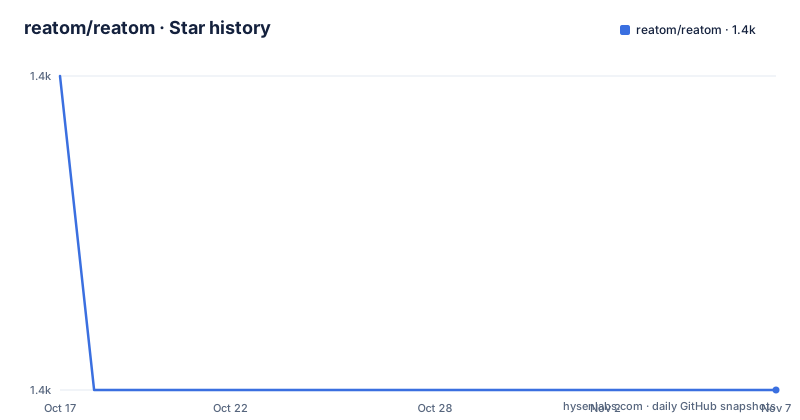
Star history
- reatom/reatom1,374 ★ · -1
| Repository | 2026-10-17 | 2026-11-07 |
|---|---|---|
| reatom/reatom | 1.4k | 1.4k |
-1 Stars in the last 21 days, measured from the daily GitHub snapshot. Compare with other projects
Editorial analysis
What Reatom solves for TypeScript applications
Reatom addresses the need to keep state, derived data, and side effects organized without making every component responsible for coordinating them. The README describes it as a state and logic manager for both small widgets and large single-page applications. Its intended users are TypeScript developers building reusable UI libraries, React applications, or framework-agnostic reactive code. The primary language is TypeScript, and the package set includes a React adapter alongside the core package.
The design is based on a few primitives rather than a large collection of specialized abstractions. An atom stores a value. A computed value derives another value from other atoms. An action groups state changes or related operations. An effect reacts when state changes. Higher-level features, including async data, search parameters, forms, and routing, are built on these primitives as extensions.
This differs from a library that treats state as component-local data and then adds a separate service layer for asynchronous work. Reatom makes those operations part of the same model. A form can expose fields and submission state, a route can expose a loader, and a computed resource can expose readiness, data, and error values. The tradeoff is that developers need to understand how Reatom names, extends, and composes these objects before using the higher-level APIs.
Atoms, computed values, effects, and async flow
The basic data flow is direct. Calling an atom reads its current value, while `set` replaces that value or applies an updater function. A computed value reads atoms inside its callback and lazily memoizes the derived result. The README's counter example changes `counter` from `0` to `1`, and `isEven` changes from `true` to `false` because its callback reads the new atom value.
An effect is used for immediate reactions. Its callback runs with reactive reads, so subscribing to `counter` and `isEven` connects the effect to both values. This is useful for logging or other reactions, although the README does not describe effect cleanup behavior in the excerpt.
Async work is represented through extensions and computed resources rather than a separate promise-only API. The documented `listResource` example reads search and page atoms, fetches `/api/data`, and is extended with `withAsyncData({ initState: [] })`. The resulting resource exposes `ready()`, `data()`, and `error()`. The README also states that Reatom supports caching, retrying, and automatic cancellation with native `await` and `AbortController`. Those capabilities are important for requests tied to changing dependencies, but their configuration and failure semantics need to be checked in the reference documentation before relying on retry or cancellation behavior in a production flow.
The action example adds an `isLoading` atom and an async `load` method. It sets loading before the request, assigns the response payload, and resets loading afterward. This illustrates the library's organization model, but the example does not show a `finally` block, so it does not establish what happens when the request or JSON parsing fails.
Installation and a first Reatom counter
The README gives an npm installation command for the core and React packages. The repository itself is a pnpm workspace, and its root `postinstall` script builds `@reatom/core`, but application users are directed to the package installation command below.
npm install @reatom/core @reatom/reactAfter installation, the smallest React example creates an atom and a computed value, then binds the atom's setter to a button. The following is the README's basic example:
import { atom, computed } from '@reatom/core'
import { reatomComponent } from '@reatom/react'

const counter = atom(0)
const isEven = computed(() => counter() % 2 === 0)

const Counter = reatomComponent(() => (
  <section>
    <p>{counter()} is {isEven() ? 'even' : 'odd'}</p>
    <button onClick={() => counter.set(v => v + 1)}>Increment</button>
  </section>
))
The page should initially display that `0` is even. Clicking `Increment` calls `counter.set` with an updater, so the atom changes to `1`, and the computed value causes the text to display that `1` is odd. This is a real first use because it exercises reading a stored value, deriving a value, rendering it through the React adapter, and updating state from an event.
For code outside React, only `@reatom/core` is needed for the basic atom example. The README does not document a separate initialization step for the core package.
Extensions for forms, routing, and request parameters
Reatom's higher-level APIs keep application behavior close to the reactive graph. The forms example creates `reatomForm` with `username`, `password`, and `passwordDouble`, adds validation for mismatched passwords, defines an async `onSubmit`, enables `validateOnBlur`, and assigns the name `loginForm`. The React example uses `bindField(fields.username)` and the other fields, then disables the submit button when `submit.ready()` is false.
The form API can reduce repetitive field wiring, but it also introduces conventions that developers must follow. The README does not specify field-level validation errors, server error handling, or the exact behavior of a rejected `onSubmit`. The shown implementation returns `await api.login(values)`, but `api` is not defined in the README, so the example is illustrative rather than a complete standalone form.
Routing uses `reatomRoute` with a `path` and async `loader`. The loader creates a form and returns it. The component first checks `loginRoute.loader.ready()`, then reads `loginRoute.loader.data()` after loading completes. This model gives route data a declared lifecycle, but the README does not document redirect rules, invalidation, nested routes, or server-rendering behavior in this section.
Search parameters are handled by extending atoms with `withSearchParams`, as shown for `search` and `page`. A computed resource can then use those atoms as request dependencies. Developers who need URL persistence should verify the parameter encoding and update semantics in the reference, because the README does not specify them.
Where Reatom is a poor fit or needs careful adoption
Reatom is not a minimal React helper for isolated component state. Even the smallest documented examples require understanding callable atoms and computed values, and the broader API expects developers to organize asynchronous work through extensions. A team that wants a conventional store with reducers, middleware, and a fixed action pipeline may find the action extension model less familiar. The README shows actions as objects extended with methods and related atoms, not as reducers.
The async examples also expose a practical limitation. `list.load` resets `isLoading` only after a successful response and JSON parse. If `fetch` or `response.json()` rejects, the shown method does not clear the loading flag in the displayed code. The README's feature list mentions automatic cancellation, caching, and retrying, but it does not provide enough configuration detail to determine default retry limits, cache invalidation, or handling of competing requests. Those points should be verified directly in the API reference.
Framework flexibility is a stated feature, but the only concrete adapter shown here is `@reatom/react`. The README says adapters exist for many frameworks, yet it does not enumerate their installation or compatibility requirements. React projects have a clearer documented path than projects targeting Astro, vanilla JavaScript, or another UI framework.
The claimed core size is listed as `2 KB` gzipped, but bundle size alone does not establish runtime behavior, extension size, or framework cost. The repository also contains many packages and examples, including forms, routing, observability, persistence, and JSX tooling. An application should measure its actual dependency surface rather than assume the core figure represents the complete feature set.
Reatom alternatives and maintenance considerations
The README credits Redux as an inspiration. Reatom instead documents atoms as callable state holders, computed values as lazy derivations, and actions as extendable objects, giving teams that already depend on Redux a different model to evaluate.
For React-only state, a library centered on hooks or reducer contexts may be simpler when the application needs little cross-component orchestration. Such an alternative avoids introducing a separate reactive graph, but it does not provide the same documented Reatom extensions for forms, routing, caching, and async resources. The choice is therefore about application structure, not a simple feature checklist.
Reatom uses the MIT license, which permits broad use under that license's conditions. This review does not provide legal advice, so license obligations should be read in `LICENSE.md` when integrating the package into a product.
The repository is not archived. Its last push was on 2026-10-14, and the recent releases include `1001.3.0` on 2026-07-21, `1001.1.0` on 2026-06-03, and `v1001.0.0` on 2026-05-14. The default branch is `v1001`. The release history shows recent project activity, but the README does not provide a formal compatibility policy or a migration guide for every v1001 change. Upgrading should therefore include checking package versions, adapter compatibility, and release notes rather than assuming a minor upgrade is behavior-neutral.
Editorial conclusion
Adopt Reatom when a TypeScript application needs composable state and async logic without adopting React as its only execution model. Do not choose it merely because the core package is small, since the documented experience includes framework adapters, extensions, forms, and routing. Before adoption, verify that the required adapters and extension APIs match your application, especially async cancellation, error handling, persistence, and upgrade requirements. The repository is MIT licensed, was not archived, and its last push was on 2026-10-14.
Frequently asked questions
How do I install Reatom for a TypeScript React application?
Install the core and React packages with the command documented in the README: `npm install @reatom/core @reatom/react`. The basic example then imports `atom`, `computed`, and `reatomComponent` from those packages.
How do Reatom atoms and computed values work?
An atom stores a value and can be read by calling it or changed with `set`. A computed value reads other atoms in a callback and lazily memoizes the derived result, so changing a dependency changes the computed value on its next evaluation.
Does Reatom support asynchronous operations and forms?
The README documents computed resources with `withAsyncData`, async action methods, and `reatomForm`. It also states that Reatom supports caching, retrying, and automatic cancellation with native `await` and `AbortController`, although detailed configuration is not included in the README excerpt.
Official sources
Add this badge to your README
If you maintain this project, the badge below links readers to this analysis and shows its maintenance status from the daily GitHub snapshot. Paste the markdown into your README; add ?metric=license or ?metric=stars to the image URL for a different field.

[](https://hysenlabs.com/projects/reatom-reatom)Star history chart for your README
[](https://hysenlabs.com/projects/reatom-reatom)Was this useful?