OFRAK: unpack, patch and repack firmware images with a Python API
OFRAK: unpack, modify, and repack binaries.
At a glance
- What is it?
- OFRAK is a Python and web GUI platform from Red Balloon Security for unpacking, patching and repacking firmware images, where the result still has to work. Its install paths, package layout and example scripts say more about what it covers than the feature list does.
- Who is it for?
- OFRAK is the right tool when a firmware image has to be patched and flashed back, and the wrong one when reading a binary is the whole job. Verify two things first.
- Can I use it commercially?
- Check first. The repository uses a licence we do not classify automatically, so read its LICENSE file before any commercial use.
- Is it still maintained?
- Yes. The repository last received commits 2 days ago.
- What is it written in?
- Mainly Python, according to GitHub's language statistics.
Answers come from the project's GitHub data, last synced on October 22, 2026, and from our analysis. They are not legal advice.
Star history
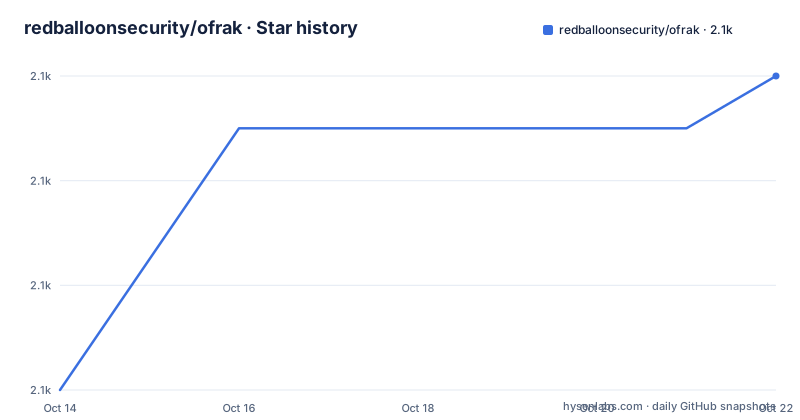
- redballoonsecurity/ofrak2,082 ★ · +6
| Repository | 2026-10-14 | 2026-10-22 |
|---|---|---|
| redballoonsecurity/ofrak | 2.1k | 2.1k |
6 Stars in the last 8 days, measured from the daily GitHub snapshot. Compare with other projects
Editorial analysis
Why repacking, not just unpacking, drives the design
OFRAK expands to Open Firmware Reverse Analysis Konsole, and it targets the files that a normal editor cannot touch: compressed and checksummed firmware, compressed filesystems, bootloaders, and RTOS or OS kernels. The README splits the work into three stages, identification and unpacking of many binary formats, analysis of what came out with field-tested reverse engineering tools, and modification and repacking with patching strategies. Repacking is what separates it from a plain unpacker, because the artifact has to stay usable instead of merely readable. Two front ends sit on that core. A web-based GUI gives a navigable resource tree, metadata, hex or text navigation, and a mini map sidebar that sorts regions by entropy, byteclass, or magnitude, with commenting, unpacking, analyzing, modifying and packing available from the same view. A Python API covers the same actions for scripts meant to apply to entire classes of binaries rather than one specific binary. The repository topics name the audience outright: ctf, firmware, firmware-tools, repacking, reverse-engineering, unpacker. The README also records DARPA support under Contract No. N66001-20-C-4032.
Why the Docker command names Ghidra and nothing else
The install table gives three methods and one command each. PyPI is the short path for quick testing and for users who prefer managing their own environment:
pip install ofrakDocker is the comprehensive environment with all dependencies and a consistent setup, and its command is pinned to one backend config:
python3 build_image.py --config ofrak-ghidra.yml --base --finishSource is a clone plus `make develop`, aimed at contributors and at anyone changing OFRAK code. That row carries a condition the other two do not: OFRAK uses Git LFS, so a checkout taken without LFS support does not give you the tree the build expects. That the Docker row names Ghidra matters, because the same script takes other config files and the top level ships 5 of them, `ofrak-angr.yml`, `ofrak-binary-ninja.yml`, `ofrak-dev.yml`, `ofrak-ghidra.yml` and `ofrak-tutorial.yml`. A backend image is therefore a config choice. Detailed steps live in `docs/install/index.md`, with the source route covered separately in `docs/install/source.md`, and API docs are published at `ofrak.com/docs`. No row states a minimum Python version.
Seven optional backends, each one allowed to fail
`make develop` does not stop at one package. It depends on `develop-core`, which installs 5 subpackages in order:
$(MAKE) -C ofrak_type develop
$(MAKE) -C ofrak_io develop
$(MAKE) -C ofrak_patch_maker develop
$(MAKE) -C ofrak_core develop
$(MAKE) -C pytest_ofrak develop
The optional set is a different list of 7, and it is the longer one:
-$(MAKE) -C disassemblers/ofrak_angr develop
-$(MAKE) -C disassemblers/ofrak_capstone develop
-$(MAKE) -C disassemblers/ofrak_ghidra develop
-$(MAKE) -C disassemblers/ofrak_cached_disassembly develop
-$(MAKE) -C disassemblers/ofrak_pyghidra develop
-$(MAKE) -C frontend develop
-$(MAKE) -C ofrak_tutorial develop
Every one of those lines opens with a single dash, the make prefix for ignoring errors, so a backend that fails to build will not abort the install. The target then prints Run 'ofrak list' to verify installation, and that advice is load-bearing here: with failures swallowed, the package list is the only place a missing backend becomes visible. Requirements are pulled in the same layered way, through `requirements-pip.txt`, `requirements-dev.txt`, `requirements-build.txt` and `requirements-build-docker.txt`, so a container build and a laptop build install different sets.
The root pyproject.toml declares formatting but no package
The root pyproject.toml is short enough to read in full, and the result is surprising for something you can install from PyPI. It holds two tables and nothing else:
[tool.black]
line-length = 100[tool.pytest.ini_options]
asyncio_mode = "auto"No build-system table, no project name, no dependency list. That absence is the reason a source install is a Makefile exercise rather than a pip exercise: packaging lives in the subdirectories, with `ofrak_core`, `ofrak_io`, `ofrak_patch_maker` and `ofrak_type` as separate projects, joined by `pytest_ofrak`, the `frontend`, and the disassembler packages, and each has its own develop target. The two keys that do exist cover tooling, not runtime: a Black line length of 100 enforced by `black . --check --diff`, and a pytest asyncio mode set to auto. Nothing in the root file pins an interpreter version, and the README does not document how to build a distributable package from the repository root.
Four backends named in the README, three shipped as configs
The README's backend list is longer than what the repository ships. It promises built-in, extensible integration with angr, Binary Ninja, Ghidra and IDA Pro. The top level carries `ofrak-angr.yml`, `ofrak-binary-ninja.yml` and `ofrak-ghidra.yml`, so 3 of those 4 names have a build config and IDA Pro has none. The optional package list tells the same story from another angle: `ofrak_angr`, `ofrak_capstone`, `ofrak_ghidra`, `ofrak_cached_disassembly` and `ofrak_pyghidra` are 5 backend directories, and neither Binary Ninja nor IDA Pro has one there. The mapping also runs the other way, because Capstone and the cached disassembly package appear in no README list. Read the sentence as architectural intent rather than 4 working image builds. For an integrator outside that set, the README points only at the contributor guide and at the common interface for writing additional OFRAK components, and it does not document a backend plugin protocol.
A first run through the tutorial image target
The Makefile offers a complete first run you do not have to assemble. Building the tutorial image:
$(PYTHON) build_image.py --config ofrak-tutorial.yml --base --finishuses a config the install table never mentions, and starting it is one line:
make -C ofrak_tutorial runFirst use of the tools also needs the licence accepted, which the README puts in a single command:
ofrak license --community --i-agreeThe code carries an OFRAK Community License that GitHub cannot classify, and the README ties it to educational uses, personal development, or just having fun, while commercial users are pointed at separate Pro and Enterprise licensing. After that, `ofrak list` is the command the Makefile names to verify an installation. Past those three, the README gives no command that starts the web GUI, so launching the interface is left to whichever image or source tree you built.
Nine examples climbing from string edits to flash writes
`examples/Dockerstub` is the fixture, and the 9 scripts numbered ex1 through ex9 walk a ladder up and back down. `ex1_simple_string_modification.py` changes a string, `ex2_simple_code_modification.py` changes code, `ex3_binary_format_modification.py` and `ex4_filesystem_modification.py` move out to formats and filesystems, `ex8_recursive_unpacking.py` goes the other direction through nested layers, and `ex9_flash_modification.py` ends at a flash write. `ex6_code_modification_without_extension.py` and `ex7_code_insertion_with_extension.py` sit side by side as one class of change built 2 ways, and the README's claim that a new file format or binary patching operation can be added through a common interface is the difference between them. Under `examples/` there are `assets/`, `src/`, a Makefile and `test_examples.py`, and because `pytest_ofrak` is a top-level package, those scripts sit inside the test suite rather than loose in a folder. Tags and commits then tell two different stories: the 2 newest tags are `ofrak-v3.2.0` and `ofrak-patch-maker-v4.0.2`, both dated 2023-08-10, the third listed tag `ofrak-patch-maker-v4.0.1` is dated 2023-06-12, and the last push on the default branch master is dated 2026-08-21.
Where the analysis backends alone are the better tool
The backends OFRAK integrates with are the honest alternative for plenty of jobs. The README positions angr, Binary Ninja, Ghidra and IDA Pro as backends OFRAK builds on, so a question about what a function does inside a binary you already hold needs none of the unpack and repack machinery. What that framing gives up is the half of the problem OFRAK exists for, an image that has to leave the toolchain valid enough to flash. Compressed and checksummed firmware, compressed filesystems and bootloaders are named as formats beyond userspace executables, and repacking is listed as a stage of its own rather than an export step. Two things stay undocumented in the README: how to roll back a repacked image when the patch is wrong, and how to confirm that a repack satisfies the checksum the original carried. The `ofrak list` check covers what installed, never what the output validates. If your work ends at understanding the binary, take a backend; if it ends at a device, the repack stage is the reason to reach for OFRAK.
Editorial conclusion
OFRAK is the right tool when a firmware image has to be patched and flashed back, and the wrong one when reading a binary is the whole job. Verify two things first. Run `ofrak list` after a source build and compare it against the 7 optional develop targets, since every one of those carries a dash prefix and fails quietly. Then confirm that a repacked image can be checksummed and rolled back, which the README does not document. Where the job stops at understanding a binary, the backends OFRAK wraps will answer sooner and cost less to set up.
Frequently asked questions
How do you install OFRAK?
Three routes are documented: `pip install ofrak` from PyPI, `python3 build_image.py --config ofrak-ghidra.yml --base --finish` for Docker, and a clone plus `make develop` for source, which needs Git LFS support as well. API documentation is published at `ofrak.com/docs`.
Which reverse engineering backends does OFRAK integrate with?
The README names angr, Binary Ninja, Ghidra and IDA Pro. Build configs exist at the top level for angr, Binary Ninja and Ghidra, and the optional develop targets cover ofrak_angr, ofrak_capstone, ofrak_ghidra, ofrak_cached_disassembly and ofrak_pyghidra.
What licence does OFRAK ship with?
An OFRAK Community License, described in the README as intended for educational uses, personal development, or just having fun, and accepted with `ofrak license --community --i-agree`. Commercial use goes through a separate Pro or Enterprise license.
Can OFRAK repack a patched firmware image?
Yes, repacking is one of the three stages the README lists, alongside identification and unpacking and analysis with field-tested tools. It names compressed and checksummed firmware, compressed filesystems, bootloaders and RTOS or OS kernels as supported inputs, and `ex9_flash_modification.py` works at the flash level.
How do I know my source install actually worked?
Run `ofrak list`. The Makefile prints that exact instruction after `make develop`, and it matters because each optional backend target is prefixed with a dash, so a backend that fails to build does not stop the install.
Official sources
Add this badge to your README
If you maintain this project, the badge below links readers to this analysis and shows its maintenance status from the daily GitHub snapshot. Paste the markdown into your README; add ?metric=license or ?metric=stars to the image URL for a different field.

[](https://hysenlabs.com/projects/redballoonsecurity-ofrak)Star history chart for your README
[](https://hysenlabs.com/projects/redballoonsecurity-ofrak)Was this useful?