Clock Update Windows Startup: a SYSTEM task, a shipped EXE, and a build recipe pointing at the wrong icon
Utility Windows untuk memperbaiki dan menyinkronkan jam otomatis saat PC menyala. Dibuat untuk memudahkan para IT support solo player di luar sana, supaya tidak selalu diganggu di pagi hari hanya karena jam PC user melenceng.
At a glance
- What is it?
- An Indonesian-language Windows utility that installs a SYSTEM scheduled task to sync the PC clock at every boot. It ships a prebuilt binary, documents no release and no license, and its own rebuild command points at a file on the author's Downloads folder.
- Who is it for?
- The mechanism is a reasonable answer for one person running Windows support tickets, and the absence of a stored Administrator password is the right call. Two things decide whether it is safe on your machines: whether you accept running an unsigned binary that was committed to the repository rather than built on your PC, and whether your network blocks the two public time servers it hardcodes.
- Can I use it commercially?
- Not without permission. GitHub finds no licence file in the repository, and without a licence all rights are reserved by default: you may read the code but not reuse it. Check the README, or ask the authors, before using it.
- Is it still maintained?
- Yes. The repository last received commits 167 days ago.
- What is it written in?
- Mainly C#, according to GitHub's language statistics.
Answers come from the project's GitHub data, last synced on November 15, 2026, and from our analysis. They are not legal advice.
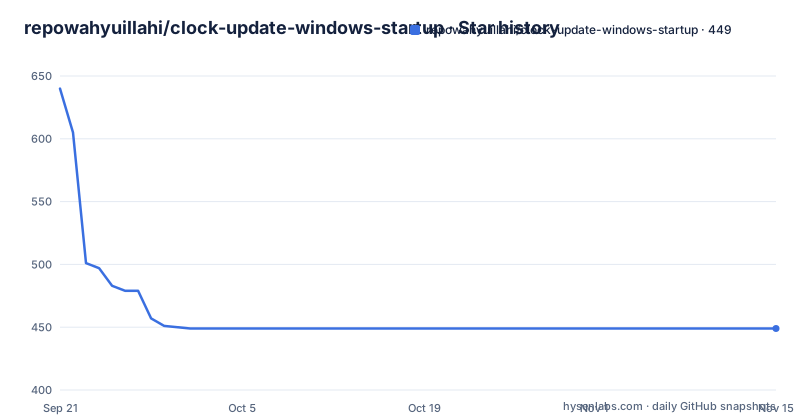
Star history
- repowahyuillahi/clock-update-windows-startup449 ★ · -191
| Repository | 2026-09-21 | 2026-11-15 |
|---|---|---|
| repowahyuillahi/clock-update-windows-startup | 640 | 449 |
-191 Stars in the last 55 days, measured from the daily GitHub snapshot. Compare with other projects
Editorial analysis
The rebuild command points at a file that is not in the repository
The one-command rebuild is the most useful thing in the project, and it will not run on your machine as written. It calls the C# compiler that ships with Windows and names a single source file, but the icon argument points at an absolute path under one particular user's profile:
C:\Windows\Microsoft.NET\Framework64\v4.0.30319\csc.exe /nologo /target:exe /platform:anycpu /win32manifest:UpdateJamOtomatis.exe.manifest /win32icon:"C:\Users\IT Support\Downloads\Paomedia-Small-N-Flat-Clock.ico" /out:UpdateJamOtomatis.exe UpdateJamOtomatis.csThe repository root does contain an icon file named UpdateJamOtomatis.ico, under a different name than the Paomedia icon the command expects, and no Downloads folder exists on anyone else's PC. Change that one argument or the compile fails. Everything else in the line is self-contained: the manifest sits next to the source, the compiler comes from the .NET Framework directory already installed on Windows, and no other file is referenced, so the executable depends only on that framework being present on the machine you deploy to. The output step is a plain file copy into the folder the README calls the ready-to-use directory.
Users are told to copy a prebuilt EXE from a flashdisk
The usage steps are four lines long: download or copy UpdateJamOtomatis.exe, double-click it, accept the Administrator prompt, wait for the success message. No install command, no package manager, no compiler. The file can be placed on a Desktop, a flashdisk or any other folder, and the README stresses that it does not need to travel with a .ps1 file, a .cmd file or source code. That is convenient and it is the reason the compiled binary sits in the repository root as well as in the ready-to-use folder, which means the file you run is a build artifact committed to git rather than something your own machine produced. Nothing in the project publishes a checksum, a hash, a version stamp or a signed binary, and the compile line above carries no signing switch. The repository has no GitHub releases and no tags, and the last recorded push is 2026-06-02, so there is no channel to compare your copy against.
A one-click installer sits in the root that the usage steps never name
Three PowerShell scripts and a batch file live at the repository root: Install-Update-Jam-Sekali-Klik.cmd, install-update-time-task.ps1, update-time-on-startup.ps1 and uninstall-update-time-task.ps1. The four usage steps say nothing about any of them, because the first run is expected to go through the EXE and the elevation prompt. Only one of the four is named in the copy at all, and it appears in the removal section rather than the install one. That is a documentation gap with a practical edge: anyone who wants to see what runs at startup, or wants to install the task from a script instead of from a binary, has to open the files. The same gap shows up in the shortcut section, where the fenced command contains nothing but the name of the batch file, Buat-Shortcut-Desktop.cmd, and the section never shows the command that creates the shortcut or the target of the resulting Update Jam Otomatis.lnk.
A SYSTEM task in Indonesian, a log directory in English
Once it runs, the tool leaves three names behind in three different languages. The Scheduled Task is named Auto Update Jam Saat PC Menyala, which is Indonesian for the same job the repository name describes in English. It runs under the SYSTEM account, so the clock sync happens before anyone logs in and without a stored password. The log lands at C:\ProgramData\AutoUpdateTime\sync-time.log, an English directory name under ProgramData. The executable is UpdateJamOtomatis.exe and the source is UpdateJamOtomatis.cs, while the icon the build wants is named after a third-party clock icon set. The documentation itself is written in Indonesian, from the feature list to the uninstall steps, so an English-speaking technician is reading translated instructions for a tool whose internal names are untranslated. The README also does not say what the scheduled task adds once the Windows Time service it enables is already running.
Two public time servers, no internal one, and one unrotated log
The feature list names the two sources the sync uses: time.windows.com and pool.ntp.org. It also says the Windows Time service, W32Time, is activated if it was not already running. That gives the machine two mechanisms that can correct the clock, the built-in service and a startup task of its own, and the documentation does not say which one wins or when the second is needed. There is no documented option to point the tool at an internal time source, which is the configuration most offices with their own domain controllers actually want, and no documented behavior for a machine that boots with no network, so a failed sync has to be diagnosed afterwards. The one diagnostic that exists is the log file, and nothing in the copy says how large it may grow, how it is rotated, or what ends up in it, even though the task runs with the highest privileges on the machine.
Uninstall removes the task and nothing else it touched
Removal is documented properly enough to run, as Administrator PowerShell:
powershell -ExecutionPolicy Bypass -File .\uninstall-update-time-task.ps1The alternative is deleting the Scheduled Task by name, Auto Update Jam Saat PC Menyala, which is the same string you would look for in the task scheduler. Note the ExecutionPolicy Bypass flag: it lowers the script execution policy for that one invocation, which is a normal way to run a vendor script but worth seeing before you type it. What the removal section does not cover is everything else the install changed. The log directory under ProgramData stays, the copies of the EXE on the Desktop or the flashdisk stay, and the state of the Windows Time service is not restored, so after removal a machine that had W32Time switched off by the tool still has it on. Plan those three cleanups yourself.
No license file next to a tool built to be passed around
The repository records no license and its file list contains no LICENSE file, while the README explicitly invites you to put the executable on a flashdisk and hand it to other machines. That combination is the part to raise with the author: a binary with no stated terms, distributed by the normal workflow its own documentation recommends. The project is a single C# source file plus scripts, and the rebuild command shows there is nothing to install to compile it, so asking for a license or for the source to be built on your own machine is a reasonable request rather than an unusual one. The intent behind the tool is stated plainly in its summary: it exists for one person doing Windows support, so that a wrong PC clock stops breaking logins, attendance records, office applications and website certificates every morning. Treat it as an internal tool with a real support burden behind it.
Editorial conclusion
The mechanism is a reasonable answer for one person running Windows support tickets, and the absence of a stored Administrator password is the right call. Two things decide whether it is safe on your machines: whether you accept running an unsigned binary that was committed to the repository rather than built on your PC, and whether your network blocks the two public time servers it hardcodes. Check the compiled EXE in a disposable VM first, plan your own removal of the ProgramData log directory, and get the author's answer on licensing before you redistribute the file to anyone else.
Frequently asked questions
What does clock-update-windows-startup install on a PC?
A single file named UpdateJamOtomatis.exe that asks for Administrator rights through UAC on the first run, then installs a Scheduled Task that runs as SYSTEM at every startup. It logs to C:\ProgramData\AutoUpdateTime\sync-time.log and syncs against time.windows.com and pool.ntp.org.
How do I remove the automatic clock sync installed by clock-update-windows-startup?
Run PowerShell as Administrator with `powershell -ExecutionPolicy Bypass -File .\uninstall-update-time-task.ps1`, or delete the Scheduled Task named Auto Update Jam Saat PC Menyala from the task scheduler yourself. The removal does not delete the log directory or the copies of the executable.
How do I rebuild UpdateJamOtomatis.exe from source?
With the C# compiler bundled in Windows, the documented line targets the .NET Framework csc.exe, passes the manifest with /win32manifest, names only UpdateJamOtomatis.cs and then copies the result into the Siap Pakai folder. The /win32icon argument points at C:\Users\IT Support\Downloads\Paomedia-Small-N-Flat-Clock.ico, so that path has to be changed before it compiles anywhere but the original machine.
Does clock-update-windows-startup store my Administrator password?
No. The copy states that the password is not kept in the executable, the scripts or the shortcut, because a stored password leaks whenever the file is copied. Elevation happens once through UAC, and the task then runs as SYSTEM.
Which time servers does clock-update-windows-startup use?
time.windows.com and pool.ntp.org, and the Windows Time service W32Time is activated if it was not already running. No internal or custom time server option is documented.
Can I redistribute the clock-update-windows-startup executable?
The repository records no license and holds no LICENSE file, yet the README suggests copying the executable to a Desktop, a flashdisk or another folder for use on other machines. Ask the author for terms before passing the binary on.
Official sources
Add this badge to your README
If you maintain this project, the badge below links readers to this analysis and shows its maintenance status from the daily GitHub snapshot. Paste the markdown into your README; add ?metric=license or ?metric=stars to the image URL for a different field.

[](https://hysenlabs.com/projects/repowahyuillahi-clock-update-windows-startup)Star history chart for your README
[](https://hysenlabs.com/projects/repowahyuillahi-clock-update-windows-startup)Was this useful?