gradle-release turns a version bump into a twelve-step checked release
gradle-release is a plugin for providing a Maven-like release process for projects using Gradle
At a glance
- What is it?
- gradle-release is a Gradle plugin that runs a Maven-style release process, refusing to publish while the working tree is dirty, while SNAPSHOT dependencies remain, or while a branch is wrong, and then tagging and committing for you. It suits a Java team that wants the safety checks without writing the release script.
- Who is it for?
- gradle-release suits a Java team that has adopted SNAPSHOT versions and wants the release run to be a single checked task rather than a documented manual procedure, and that is willing to keep a version file in the build script for the plugin to rewrite.
- Can I use it commercially?
- Yes. MIT is a permissive licence: you can use, modify and sell software built on it, as long as you keep its copyright and licence notices.
- Is it still maintained?
- Yes. The repository last received commits 15 days ago.
- What is it written in?
- Mainly Groovy, according to GitHub's language statistics.
Answers come from the project's GitHub data, last synced on November 7, 2026, and from our analysis. They are not legal advice.
Star history
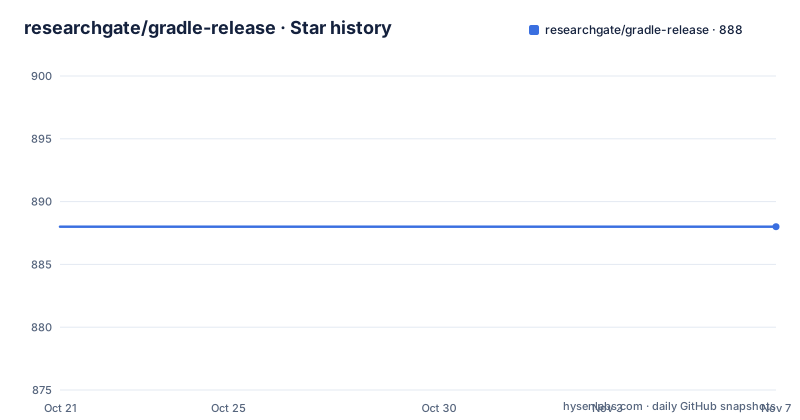
- researchgate/gradle-release888 ★ · +0
| Repository | 2026-10-21 | 2026-11-07 |
|---|---|---|
| researchgate/gradle-release | 888 | 888 |
0 Stars in the last 17 days, measured from the daily GitHub snapshot. Compare with other projects
Editorial analysis
Twelve steps, most of which are refusals
The gradle-release plugin is designed to work similar to the Maven release plugin, and the README lists the default release process of the `gradle release` task in order.
The first step is a check for any un-committed files, whether added, modified, removed or un-versioned. The second checks for any incoming or outgoing changes. The third is to check out the release branch and merge from the working branch, optional and for GIT only, with pushReleaseVersionBranch. Fourth, the plugin removes the SNAPSHOT flag on the project version, if used. Fifth it prompts for the release version. Sixth it checks whether the project is using any SNAPSHOT dependencies. Seventh it will `build` your project. Eighth it commits the project if SNAPSHOT was being used. Ninth it creates a release tag with the current version. Tenth it checks out the working branch, again optional and for GIT only. Eleventh it prompts for the next version. Twelfth it commits the project with the new version.
Read as a list of refusals rather than actions, the process is clearer. Six of the twelve steps are guards that stop the release before anything irreversible happens, and the actual mutations are the version rewrite, the build, the tag and two commits.
The order matters. The build happens after the version has been changed and before the tag is created, so a project that does not compile is caught with the release version already in the working tree, which is why the revertOnFail option exists.
The version prompts are interactive, so the plugin is meant to be run by a person at a terminal rather than by a CI job on a schedule. The README says exactly that: after the build.gradle file is configured, simply run gradle release and follow the on-screen instructions.
Applying the plugin, in old syntax or new
The plugin works with Gradle 6.0 and beyond, and the README documents two ways to apply it.
The legacy plugin application puts the plugin portal in the buildscript block and applies it by id:
buildscript {
  repositories {
    maven {
      url 'https://plugins.gradle.org/m2/'
    }
  }
  dependencies {
    classpath 'net.researchgate:gradle-release:3.2.0'
  }
}

apply plugin: 'net.researchgate.release'
The plugin DSL form is shorter:
plugins {
  id 'net.researchgate.release' version '3.2.0'
}
The README points readers at the Gradle DSL PluginDependenciesSpec documentation to understand the behaviour and limitations of the new syntax for declaring plugin dependencies, which is a fair warning, because the plugin DSL resolves plugins at configuration time in a way that differs from the older buildscript approach, and that difference matters for a plugin whose job is to rewrite the build.
The plugin id is net.researchgate.release and the coordinates are net.researchgate:gradle-release, published on the Gradle Plugin Portal under net.researchgate.release. The primary language of the repository is Groovy, which is consistent with a plugin that has to read and rewrite a version string inside a Gradle script.
Every guard is a switch you can turn off
The configuration table is the most useful part of the documentation, because it exposes exactly what the plugin will and will not tolerate.
The defaults are strict. failOnCommitNeeded defaults to true, failing the release when there are un-committed changes, and will commit files automatically if set to false. failOnPublishNeeded defaults to true, failing when there are local commits that have not been published upstream, for DVCS support. failOnSnapshotDependencies defaults to true, failing when the project depends on SNAPSHOT versions, unless those dependencies are listed as ignoredSnapshotDependencies using the $group:$name syntax. failOnUnversionedFiles defaults to true, failing when files are found that are not under version control. failOnUpdateNeeded defaults to true, failing when the source needs to be updated or there are changes available upstream that have not been pulled. And revertOnFail defaults to true, so that a failure reverts the plugin's changes to gradle.properties.
That last one is the most consequential default in the table, and it points at a detail worth understanding before the first run. The plugin edits gradle.properties, which is where the project version lives, and a failed release puts that file back. If your version lives somewhere else, in a version block in build.gradle for instance, the revert behaviour will not help you, and the revertOnFail option exists precisely because that scenario has bitten people.
The other group of settings is about what the plugin writes rather than what it refuses. tagTemplate defaults to $version and takes the variables $version and $name, with the README warning to always use single quotes so that $ is not interpreted in the build script. preCommitText is prepended to every commit the plugin makes, which the README suggests as a place for a code review reference or a ticket number. The three commit message properties, preTagCommitMessage, tagCommitMessage and newVersionCommitMessage, all carry a [Gradle Release Plugin] prefix by default, and tagCommitMessage is noted as not used with BZR projects. And snapshotSuffix defaults to -SNAPSHOT.
The convention is extensible, and a team that has house conventions for commit messages and tag names can express them here rather than fighting the defaults.
Git is where the interesting options are
The version control specific table is longer than the rest, and it is where a team with real release habits will spend its time.
requireBranch defaults to main and defines the branch releases must be done off of. The README suggests setting it to release to require releases on a release branch, or using a regular expression to allow releases from multiple branches, for example /release|main/, and setting it to an empty string to ignore it. That last option is the one to think about, because a plugin that insists on a particular branch and a plugin that ignores branches are very different tools, and the second is how a team with a two-person release habit ends up releasing from whatever is checked out.
The push and commit controls are unusually fine-grained for a release plugin. commitOptions is an array of options added to the git adapter during a commit, with the example commitOptions = ["-s"] for a signed commit. pushOptions does the same for a push, with the example pushOptions = ["--no-verify"], and the README suggests that as a way to have the version control hooks skipped during a release, which matters on a server where a pre-commit hook would otherwise run against a commit the plugin is making on your behalf.
signTag defaults to false and adds the -s parameter to the tag command. pushToRemote defaults to origin and is the remote that commits and tags are pushed to, and it can be set to false to disable pushing entirely, which is the switch that makes an air-gapped or offline release possible. pushToBranchPrefix is prepended when pushing with pushReleaseVersionBranch, with the example refs/for/ for Gerrit, which is a direct hint about where this plugin came from. And commitVersionFileOnly, defaulting to false, stages only the version property file before release commits instead of all modified files, which is what you want when the build touches other files as a side effect.
The plugin supports Bazaar, Git at 1.7.2 or newer, Mercurial and Subversion, so it is not Git-bound, but the options that matter are Git options.
What the plugin does not do, and the state of the project
Two limitations are worth stating plainly.
The first is scope. The plugin produces a version change, a build, a tag and commits. It does not generate a changelog, it does not publish to a repository, it does not create a GitHub release, and it does not move a version across several modules at once. The commit message properties are named as places for a ticket number, which implies the changelog is written by a person or by another tool. For a monorepo where several modules share a version, the plugin's model of one version in one properties file does not fit, and the release script has to stay custom.
The second is that the release is interactive. Two prompts, for the release version and for the next version, mean the task is designed for a person. That is a deliberate choice rather than a limitation in the usual sense, but it does mean this is not the plugin you point a CI pipeline at to publish on a schedule.
On maintenance, the facts are: the repository is not archived, the last push was on 2026-09-30, and the recent releases are 3.2.0 on 2026-09-30, 3.1.0 on 2024-12-23 and 3.0.2 on 2022-09-09. The gap between 3.0.2 and 3.1.0 is two years, and 3.2.0 arrived with a long gap before it, so the project moves in bursts rather than steadily.
The repository has an UPGRADE.md file at the root alongside the CHANGELOG.md, the CONTRIBUTING.md, a CODEOWNERS file and a catalog-info.yaml, and a gradle directory with a wrapper checked in. The presence of UPGRADE.md is the thing to read first when moving from an older major version, and the licence is MIT with the LICENSE file at the root.
Editorial conclusion
gradle-release suits a Java team that has adopted SNAPSHOT versions and wants the release run to be a single checked task rather than a documented manual procedure, and that is willing to keep a version file in the build script for the plugin to rewrite. It is the wrong tool for a project that publishes from a monorepo with a shared version, and it is the wrong tool if you need a release to create and push a changelog, since the plugin writes commits and tags and leaves the release notes to you. Before you adopt it, run the task once on a scratch branch with a deliberate dirty file so you can see which of the failOn checks fire, set requireBranch to the branch your team actually releases from, and read UPGRADE.md in the repository, since a 3.x plugin on a modern Gradle build is a combination worth checking rather than assuming.
Frequently asked questions
What does the gradle-release plugin do when I run gradle release?
It checks for un-committed files, checks for incoming and outgoing changes, optionally checks out and merges a release branch for Git, removes the SNAPSHOT flag from the version, prompts for the release version, checks for SNAPSHOT dependencies, builds the project, commits if SNAPSHOT was used, creates a release tag, returns to the working branch, prompts for the next version and commits that.
How do I add the gradle-release plugin to my build?
Either with the legacy buildscript block and an apply plugin statement, or with the plugin DSL using id 'net.researchgate.release' version '3.2.0'. The README points at the Gradle DSL PluginDependenciesSpec documentation for the limitations of the newer syntax, and the plugin works with Gradle 6.0 and beyond.
Can I make the release process less strict?
Yes, the failure guards are all switches that default to true: failOnCommitNeeded, failOnPublishNeeded, failOnSnapshotDependencies, failOnUnversionedFiles and failOnUpdateNeeded. Setting them to false lets the release proceed despite the corresponding condition, and revertOnFail controls whether a failure restores gradle.properties.
How do I control the tag name and commit messages?
tagTemplate defaults to $version and accepts $version and $name, and should be written in single quotes so the dollar sign is not interpolated by the build script. preCommitText is prepended to every commit the plugin makes, and preTagCommitMessage, tagCommitMessage and newVersionCommitMessage set the text of the individual commits.
Official sources
Add this badge to your README
If you maintain this project, the badge below links readers to this analysis and shows its maintenance status from the daily GitHub snapshot. Paste the markdown into your README; add ?metric=license or ?metric=stars to the image URL for a different field.

[](https://hysenlabs.com/projects/researchgate-gradle-release)Star history chart for your README
[](https://hysenlabs.com/projects/researchgate-gradle-release)Was this useful?