Better BibTeX for Zotero: where the citation keys live now, and what the exporter repairs
Make Zotero effective for us LaTeX holdouts
At a glance
- What is it?
- A Zotero extension for people who write in LaTeX or Markdown, covering citation keys, HTML to LaTeX conversion, and export. Since Zotero 8 took over the key field, the interesting parts are the migration, the five minute recovery window, and the integrations that broke.
- Who is it for?
- Adopt it if your Zotero library feeds a text-based toolchain and you are on Zotero 8, and treat the migration as the thing to plan for rather than the features. Two checks first: find out whether any script or tool you own reads the BBT database directly, because that now has to read Zotero's instead, and confirm your keys landed before you start citing, since a redo of the migration is only offered in the first five minutes after startup.
- Can I use it commercially?
- Yes. MIT is a permissive licence: you can use, modify and sell software built on it, as long as you keep its copyright and licence notices.
- Is it still maintained?
- Yes. The repository last received commits 1 day ago.
- What is it written in?
- Mainly TypeScript, according to GitHub's language statistics.
Answers come from the project's GitHub data, last synced on October 22, 2026, and from our analysis. They are not legal advice.
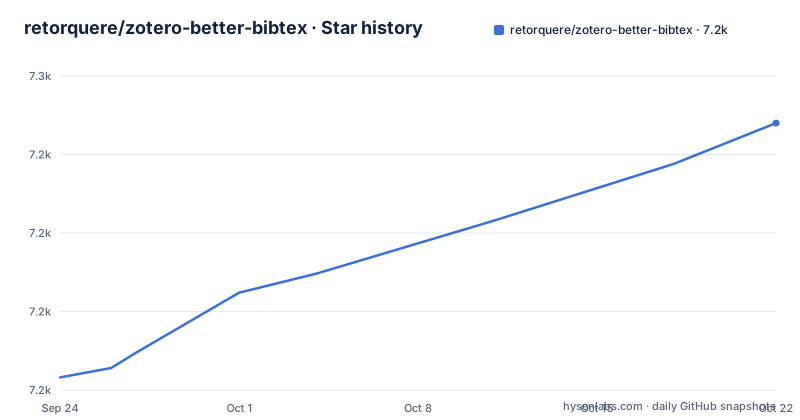
Star history
- retorquere/zotero-better-bibtex7,235 ★ · +81
| Repository | 2026-09-24 | 2026-10-22 |
|---|---|---|
| retorquere/zotero-better-bibtex | 7.2k | 7.2k |
81 Stars in the last 28 days, measured from the daily GitHub snapshot. Compare with other projects
Editorial analysis
Better X appears in the same menu as Zotero's own translators
At its core BBT behaves like any Zotero import and export module. Anywhere you can export or import bibliography items, Better X is listed among the choices, so there is no separate application and no second copy of your library. If nothing else, you could keep your workflow exactly as it stands and take only the improved LaTeX and unicode translation on import and export, plus more accurate field mapping. Juris-M is named as an in-principle target. Its BibTeX behaviour draws on BibTeXing, Tame the BeaST and The BibLaTeX Package, and the reason given for mixing them is candid: there is no definitive manual for either format that Bib(La)TeX editors and processors universally follow, so the implementation is pragmatic about what works. That is the tradeoff you accept. Your output is shaped by how real processors behave, so a construct that one editor tolerates may still trip another.
Zotero 8 owns the key field now, so keys moved and syncing came with it
Zotero 8 gave items a native citation key field, and that field replaced the one BBT had been keeping. Four consequences follow for anyone upgrading. Zotero 7 is no longer supported: BBT 8.0.25 still works on 7.0.32 but will not receive further updates. Every pinned key moves out of the `extra` field into the native one, and the concept of a pinned key is gone, because keys are always pinned now and Zotero has nowhere to store whether you had pinned it. Native keys live in a different place than BBT keys did. If you have no native keys yet, BBT migrates them silently, and if you do have some, a window opens and you choose how the migration runs. Anything that read the BBT database directly must read Zotero's instead. The stated payoff is that keys sync.
The redo migration item only exists for the first five minutes
When key migration looks like it has failed, the project's own warning is blunt: your citation keys are safe. The recovery path is narrow, and it is worth knowing before the day you need it. Move to the latest version first. Then, during the first five minutes after BBT starts, the Help menu carries a Re-do BBT citation key migration item. After five minutes it is no longer there, which means restarting Zotero rather than hunting through menus. From there you generate a debug log out of the Help menu and open a GitHub issue that notes the debug log ID. Because the window closes on a timer, someone who spots the problem an hour into a working session has to start the application again to get the option back.
Key generation counts keys you are not about to export
Citation keys are generated automatically and are built to avoid clashing. The detail that decides whether they clash is scope: generation takes into account keys already in your library even when those items are not part of what you export. That is the difference between keys surviving a partial export and keys colliding the first time you export a different collection. Keys can also be derived from item contents through citekey formulas, which is where a surname and year end up in a key without anyone typing them. You can also set your own stable keys, drag and drop LaTeX citations, and add other custom BibLaTeX fields. The stated purpose is preventing random breakage. The trade is that formulas read your item's contents, so a corrected author name or a changed year feeds straight back into the key the next time one is generated.
Item markup and LaTeX macros translate in both directions
Zotero does all of its work in UTF-8 Unicode, which is the right thing to do, but that leaves a gap for anyone still exporting BibTeX, and some items carry simple HTML markup that Bib(La)TeX will not understand. BBT maps the common tags to macros: `<i>...</i>` converts to `\emph{...}`, `\mkbibemph{...}` or `\textit{...}`, `<b>...</b>` converts to `\textbf{...}`, and `<sup>...</sup>` and `<sub>...</sub>` convert to `\textsuperscript{...}` and `\textsubscript{...}`. The reverse mapping runs on import. BBT also carries a list of LaTeX constructs, so `\"{o}` becomes `ö` on import, and becomes `\"{o}` again if you enable that option, which you need not do when you use BibLaTeX. To pass literal LaTeX through untouched, wrap it in `<script>` and `</script>`, or `<pre>` and `</pre>`. More conversions can be added on request, so a tag you depend on may not be there yet.
Export repairs dates that used to arrive empty
Export is where this extension does its most visible repair work, and the emphasis is on customized exports rather than one fixed shape. One concrete fix: a date field reading 'forthcoming' is written as 'forthcoming' instead of coming out empty, while valid dates are normalized to an unambiguous international format. Automatic journal abbreviation runs as part of citing, so journal names get shortened whether or not you asked for that in the file. A collection or an entire library can be exported automatically whenever it changes, or pulled on demand from the embedded webserver, which is the route for a build step that wants a file at a known moment. Each option carries a choice. Automatic export watches for change and writes on its own schedule, and pull export depends on a server being reachable when the other side asks for the file.
There is no install command here, and the build mixes Node with Python
The README does not carry an install command. It points at a separate installation instructions page, and what you end up with is an XPI identified as `[email protected]`, declared to cover Zotero 8.0.1 up to `10.*`. If you build from the repository instead, the tree mixes Node and Python in one checkout. `package.json` is an ES module sitting at version 9.0.68, setup runs a Python script and then a JavaScript one, the build step runs the rebuild target, and the test suite is behave driven with a `--stop` flag. Requirements are listed loosely in `requirements.txt`, where only snakemake carries a floor (`snakemake>=7.16`). The top level holds `content/`, `translators/`, `schema/`, `setup/`, `site/`, `pandoc/`, `patches/`, `hooks/`, `locale/` and a `fields.sql`, which is a fair picture of how many formats are being kept alive at once.
npm install && npm run setup
npm run build
npm run test
Bug reports are the support channel, and the template is deliberately strict
Support runs through GitHub issues rather than a forum, and the project asks for something specific from reporters. The support request guidelines are described as very detailed, to the point of being off-putting, but they are also said to express the maintainer's ideal bug submission, and the stated preference runs from clearly documented reports over fuzzy ones to fuzzy ones over missed ones. Clear reports are said to have a short time to fix, often short enough that the fix lands while you are still in the thread, which is also why staying around in the issue matters. The rhythm is consistent with that: the default branch, master, took a push on October 4, 2026, and v9.0.68 and v9.0.65 both shipped on September 30, 2026. For private information the maintainer points at matrix instead of the issue tracker.
Editorial conclusion
Adopt it if your Zotero library feeds a text-based toolchain and you are on Zotero 8, and treat the migration as the thing to plan for rather than the features. Two checks first: find out whether any script or tool you own reads the BBT database directly, because that now has to read Zotero's instead, and confirm your keys landed before you start citing, since a redo of the migration is only offered in the first five minutes after startup. If you are on Zotero 7, BBT 8.0.25 still works but receives nothing further.
Frequently asked questions
Is there a better BibTeX citation key for Zotero?
Better BibTeX generates keys automatically without clashes, and generation takes into account keys already in your library even when those items are not part of what you export. Keys can also come from citekey formulas, or you can set your own stable keys and drag and drop LaTeX citations.
How to install better BibTeX for Zotero?
The README carries no install command and sends you to a separate installation instructions page. The result is an XPI identified as [email protected], declared for Zotero 8.0.1 up to 10.*, and Zotero 7 is no longer supported even though BBT 8.0.25 works on 7.0.32.
What are the differences between Zotero and BibTeX?
Zotero works in UTF-8 Unicode throughout, while BibTeX cannot take that for granted, and some Zotero items carry simple HTML markup that Bib(La)TeX will not understand. Better BibTeX translates between the two, mapping tags such as <i>, <b>, <sup> and <sub> onto their LaTeX macros in both directions.
how to use zotero better bibtex
It registers like any other Zotero import and export module, so Better X appears wherever Zotero offers translator choices, and you can keep your existing workflow. On top of that sit auto export of collections or whole libraries when they change, pull export from an embedded webserver, and automatic journal abbreviation.
Official sources
Add this badge to your README
If you maintain this project, the badge below links readers to this analysis and shows its maintenance status from the daily GitHub snapshot. Paste the markdown into your README; add ?metric=license or ?metric=stars to the image URL for a different field.

[](https://hysenlabs.com/projects/retorquere-zotero-better-bibtex)Star history chart for your README
[](https://hysenlabs.com/projects/retorquere-zotero-better-bibtex)Was this useful?