m-cli version 2 rewrote the syntax and left three install steps to you
Swiss Army Knife for macOS
At a glance
- What is it?
- m-cli is a dependency-free shell front end that puts forty six macOS controls behind one m command. Version 2 replaced the command syntax outright, and the difference between the Homebrew path and the manual one is whether autocompletion is configured for you.
- Who is it for?
- Take the Homebrew route if you want the tool to configure your shell for you, and read CHANGELOG.md before reusing any version 1 habit, because the syntax changed rather than extended. Do not expect a command list you can filter down to harmless settings, since shutdown and wallpaper share one namespace and no confirmation behavior is described.
- Can I use it commercially?
- Yes. MIT is a permissive licence: you can use, modify and sell software built on it, as long as you keep its copyright and licence notices.
- Is it still maintained?
- Yes. The repository last received commits 165 days ago.
- What is it written in?
- Mainly Shell, according to GitHub's language statistics.
Answers come from the project's GitHub data, last synced on November 14, 2026, and from our analysis. They are not legal advice.
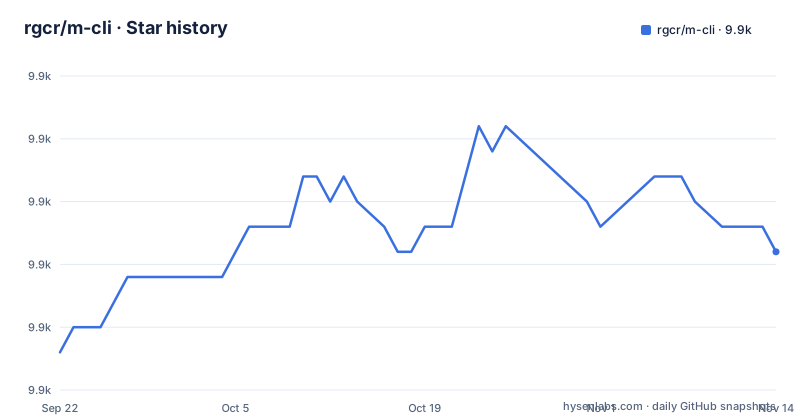
Star history
- rgcr/m-cli9,918 ★ · +4
| Repository | 2026-09-22 | 2026-11-14 |
|---|---|---|
| rgcr/m-cli | 9.9k | 9.9k |
4 Stars in the last 53 days, measured from the daily GitHub snapshot. Compare with other projects
Editorial analysis
Version 2 replaced the syntax instead of layering on top of it
The warning sits at the top of the Readme because version 2 is not additive. It carries breaking changes tied to a new standardized syntax and improved shell autocompletion, and CHANGELOG.md is named as the place where those differences are recorded. Nothing in the current docs shows a version 1 command form, so the syntax that worked before cannot be recovered from this repository's documentation. The consequence is specific to how this tool gets used: m is a thin layer over macOS commands, which is the sort of thing that ends up in a shell profile or a dotfiles repository, and a rewrite of the standardized syntax would break those saved invocations. If you adopted an earlier version, CHANGELOG.md is where the README points for what moved. The repository root is small: Readme.md, CHANGELOG.md, LICENSE.md, install.sh, the m entry point, and the completions/, plugins/ and tests/ directories. The current release is v2.0.9, published on 2026-06-02, and the default branch was last pushed the same day.
The curl installer puts m on disk but leaves your PATH to you
Manual installation is one pipeline, and it leaves two jobs unfinished:
curl -fsSL https://raw.githubusercontent.com/rgcr/m-cli/main/install.sh | bashThe next step is a PATH edit, because the installer targets ${HOME}/.local/bin and nothing claims it rewrites your shell config:
export PATH="${HOME}/.local/bin:$PATH"That line has to go into ~/.bashrc or ~/.zshrc to survive a new shell. Then autocompletion, which the Homebrew path handles for you, must be sourced by hand for whichever shell you actually run:
source ~/.local/opt/m-cli/completions/zsh/_mBash uses completions/bash/m and Fish uses completions/fish/m.fish under the same ~/.local/opt/m-cli prefix. The consequence for a reader is three unfinished things: a binary that may not resolve, a PATH entry that vanishes when the shell restarts, and a completion file that nothing loads. Until all three are handled, m runs and m with a tab does nothing.
Homebrew wires the autocompletion that the curl installer delegates
Two Homebrew formulas are offered. The first is the standard formula:
brew install m-cliThe second names a tap so you get the latest version:
brew install rgcr/formulae/m-cliOn either Homebrew path, autocompletion scripts are installed and configured automatically for Bash, Zsh and Fish, and no additional setup is needed. That note is the difference in post-install state between Homebrew and the manual route, which needs the PATH and completion edits done by hand. The README describes no difference in autocompletion between the two Homebrew formulas; the second is offered for the latest version. Removal is one command per route.
trash needs your terminal app in Full Disk Access before it can see the folder
Two notes near the end of the docs describe what m cannot do by itself. The trash command will not work unless your terminal, iTerm2 or Terminal.app as the examples go, holds the permission required to reach the Trash folder, and that grant lives in System Preferences under Security & Privacy > Privacy > Full Disk Access. The consequence is that a working install can still fail at the command people reach for first after a download. The second note says some macos commands need to be executed with sudo internally, so having sudo privileges is recommended. For a person typing commands that is a password prompt and nothing more. Inside a script or a remote session, a password prompt is a stall, and no flag is documented for pre-authorizing those calls or for answering them without a terminal attached.
m prints forty three names in one flat list with no groups
Discovery works the same way for every command. Running m alone prints all available commands, and m <command> --help shows the usage options for one of them:
m dock --helpThe documented inventory is a flat list of single words: airdrop, appearance, audio, battery, bluetooth, dir, disk, display, dns, dock, fan, finder, firewall, flightmode, gatekeeper, group, hostname, hosts, info, itunes, lock, music, network, nosleep, notificationcenter, ntp, permissions, powermode, printer, restart, remotelogin, safeboot, screensaver, service, shutdown, sleep, timezone, touchbar, trash, update, usb, user, volume, vpn, wallpaper and wifi. Apart from the name, the docs give no per-command entry, so the list and the help output are the only sources for what a name accepts. The consequence for a reader is that the namespace carries no prefixes or groups, which means you cannot narrow discovery to a safe corner of it with a prefix match. Remembering which of the forty six names you want becomes the only way to find it.
shutdown and safeboot share the namespace with wallpaper and volume
Read the list as one surface and the range is wide. Preference and cosmetic work sits in the same namespace as operations that change machine state or policy: restart, shutdown, sleep, safeboot, remotelogin, firewall, gatekeeper, ntp, timezone, powermode, nosleep and permissions appear beside appearance, dock, wallpaper, volume and finder. Nothing in the docs describes a confirmation step, a dry run, or any way to see what a name will do before it runs, and m <command> --help is offered as the only inspection path. The consequence for a reader is that familiarity with the list becomes the safety mechanism. You cannot ask m which commands are read-only, and you cannot restrict it to the display and audio half of the namespace without already knowing the names. For anyone who puts m commands into an alias, a shell function or a dotfiles file, the safety comes from the names you picked when you wrote them down, not from anything the tool enforces at run time.
Neither uninstall path mentions the PATH line or the completion files
Removal is one line either way:
brew uninstall m-clifor a Homebrew install, or:
m --uninstallfor a manual one. What the docs do not cover is the state a manual install created outside the binary itself: the export PATH line added to ~/.bashrc or ~/.zshrc, and the sourced completion file under ~/.local/opt/m-cli/completions that you added for Bash, Zsh or Fish. Neither command is described as touching a shell config file, and m --uninstall is documented only as removal of the manual install, with no option to keep or clean configuration. The consequence for a reader is a shell that still exports ${HOME}/.local/bin, plus a source line in your config that runs on every new shell and resolves to a file that no longer exists. Anyone who adopted the tool through the manual installer should plan a cleanup pass after uninstalling rather than assuming the machine went back to how it was.
The contribution steps never mention the tests and plugins directories
The contribution path is three git commands and a pull request:
git checkout -b my-new-feature
git commit -m 'Add some feature'
git push origin my-new-feature
Forking the repository and opening the pull request complete the list. The tree also carries tests/ and plugins/ directories, and neither the contribution steps nor anything else in the documentation says how to run the tests, what the plugins/ directory is expected to contain, or what a new command must satisfy before it shows up in the list. The consequence for a contributor is that the parts of the repository meant to be extended are the parts with no documented contract. The one external pointer given is a reference for the underlying system commands, the ss64 macOS Command Line Reference, which answers what a macOS command does but not how this project wraps it. The project is MIT licensed and maintained by Rogelio Cedillo, so the legal path for reuse is clear even where the technical path is not.
Editorial conclusion
Take the Homebrew route if you want the tool to configure your shell for you, and read CHANGELOG.md before reusing any version 1 habit, because the syntax changed rather than extended. Do not expect a command list you can filter down to harmless settings, since shutdown and wallpaper share one namespace and no confirmation behavior is described. Before depending on it, check the two failures the docs name: grant Full Disk Access if you need trash, and confirm your session can answer a sudo prompt if you plan to script the calls that need one.
Frequently asked questions
What is m-cli on a Mac?
m-cli is a command-line tool for macOS that lets you control system functions, manage utilities and tweak preferences from the Terminal. It has no third-party dependencies, and every function sits behind one entry point named m.
How do I install and access m-cli?
Install it with brew install m-cli, or run the manual installer and then add ${HOME}/.local/bin to your PATH. Run m with no arguments to print all available commands, and m <command> --help to see the usage options for one command, for example m dock --help.
Is m-cli still changed recently?
Version 2 arrived with breaking changes because of a new standardized syntax and improved shell autocompletion, and the changes are recorded in CHANGELOG.md. The current release is v2.0.9, published on 2026-06-02.
What does the CLI name mean in m-cli?
In this project the name refers to the m command, which is the single entry point for all listed commands. The repository root holds that entry point next to install.sh, completions/, plugins/ and tests/, and the project is written in Shell.
Official sources
Add this badge to your README
If you maintain this project, the badge below links readers to this analysis and shows its maintenance status from the daily GitHub snapshot. Paste the markdown into your README; add ?metric=license or ?metric=stars to the image URL for a different field.

[](https://hysenlabs.com/projects/rgcr-m-cli)Star history chart for your README
[](https://hysenlabs.com/projects/rgcr-m-cli)Was this useful?