233boy/v2ray: A Shell Script That Turns V2Ray Setup Into a Single Command
Project brief: V2Ray & . 1 V2Ray V2Ray : v2ray help.
At a glance
- What is it?
- This review examines the 233boy/v2ray one-click installer and manager for V2Ray, a Shell script that automates TLS, protocol selection, and config changes. It is fast and convenient, but it carries real operational risks you should weigh before adopting it.
- Who is it for?
- Adopt 233boy/v2ray if you manage a single V2Ray server, want zero-config TLS, and are comfortable with a script that hides many details. Do not use it if you need fine-grained control over every config file, or if you operate in a security-sensitive environment where you must audit every change.
- Can I use it commercially?
- Yes, with conditions. GPL-3.0 is a copyleft licence: if you distribute software that includes it, you must release that software's source code under the same licence. Running it internally without distributing it does not trigger that obligation.
- Is it still maintained?
- Activity is slowing. The repository last received commits 10 months ago.
- What is it written in?
- Mainly Shell, according to GitHub's language statistics.
Answers come from the project's GitHub data, last synced on November 13, 2026, and from our analysis. They are not legal advice.
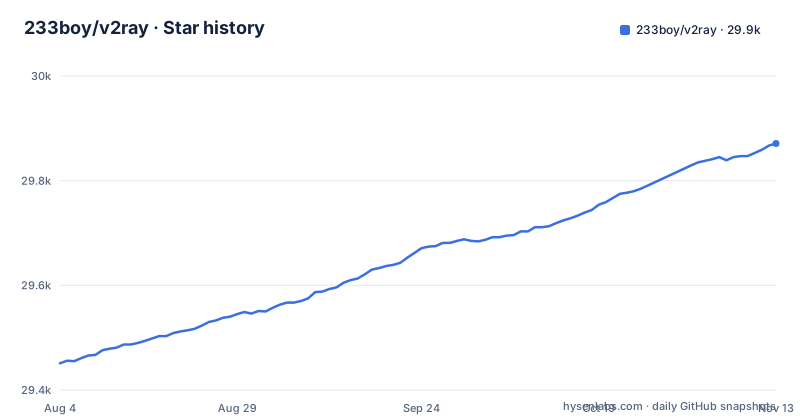
Star history
- 233boy/v2ray29,871 ★ · +420
| Repository | 2026-08-04 | 2026-11-13 |
|---|---|---|
| 233boy/v2ray | 29.5k | 29.9k |
420 Stars in the last 101 days, measured from the daily GitHub snapshot. Compare with other projects
Editorial analysis
What This Script Solves and Who It Serves
The script is written in Shell and released under GPL-3.0. The repository is active, with a release in January 2026. The README is in Chinese, which limits its audience. If you do not read Chinese, you will rely on the command help output, which is partially translated. The README links to wiki pages for the install script and a setup tutorial, and their titles are also in Chinese. So the primary audience is Chinese-speaking server administrators or those willing to work around the language barrier.
The Core Mechanism: Multi-Config via a Single Command
The script uses the V2Ray API for operations, according to the feature list. It also has automated TLS. The README lists support for VMess over TCP, mKCP, and QUIC, plus VMess, VLESS, and Trojan over WebSocket, HTTP/2, and gRPC with TLS. It also supports Shadowsocks and dynamic ports for VMess over TCP, mKCP, or QUIC. The script can enable BBR, change the camouflage website, and modify port, UUID, password, domain, path, encryption, SNI, and dynamic port settings. This is a broad feature set, but the README does not explain how the API interacts with the V2Ray core. You have to trust the script's implementation.
Getting It Running: Commands and Configuration
The script's design means you do not edit config files directly. Instead, you use the v2ray command to make changes. The change command can modify many settings, as listed in the README. The auto keyword suggests the script can pick sensible defaults. The script also blocks BitTorrent and blocks China IPs, according to the feature list. These are enabled by default or via a flag, but the README does not specify. You would need to run v2ray help or read the wiki to know. The script supports one-click BBR enablement, which is a TCP congestion control algorithm. That is a separate system-level change, not just a V2Ray config.
Limitations and Failure Modes
A real failure mode is the multi-config design. If you run many configs, the script must manage them all. If one config has a conflict, such as the same port or domain, the script may not detect it. The README does not mention conflict detection. The auto keyword might generate values, but it cannot know about your existing configs. Another risk is the blocking of China IPs. If your server is in China or you have legitimate China-based clients, this feature could block them. The README lists it as a feature, but it does not explain how to disable it. The script's speed claim, under one second for adding a config, is about the script's execution, not about network latency.
Alternative Approaches and the Difference
The difference in approach is fundamental. The script is a wrapper that generates configs on the fly. Manual config is static and transparent. A panel adds a database and an API. The script uses the V2Ray API for operation, but it is not a full control plane. It is a convenience layer. For a production environment where you need auditability, the script's opacity is a disadvantage. For a personal server, the speed and simplicity are valuable. The script also automates TLS, which is a significant time saver. Manual TLS setup involves certbot or acme.sh, plus config file edits. The script does that for you. The README does not explain how TLS renewal is handled.
Maintenance, Upgrade Cost, and License Implications
The maintenance cost for you as an adopter is learning the script's command set and keeping up with releases. The script's design of multi-config means you have to manage config names and remember what each one does. The info and qr commands help, but there is no export or backup command in the help output. If you lose the script's state, you might have to rebuild configs from scratch. The script does not mention a backup mechanism. That is a real operational gap. The license is GPL-3.0, a copyleft licence whose obligations apply when you redistribute. For a personal server, you can ignore those obligations as long as you do not share the script. For a company, you need to comply with the license if you redistribute modified versions. The script's homepage and wiki are part of the project, but they are not in the repository, so you cannot verify their content from the code itself.
Editorial conclusion
Adopt 233boy/v2ray if you manage a single V2Ray server, want zero-config TLS, and are comfortable with a script that hides many details. Do not use it if you need fine-grained control over every config file, or if you operate in a security-sensitive environment where you must audit every change. Before adopting, verify the script's exact behavior on your OS version, check the GPL-3.0 license obligations, and test the multi-config feature on a staging server, because the README gives no rollback or uninstall path.
Frequently asked questions
How do I install 233boy's v2ray script?
The repository ships install.sh and v2ray.sh with the implementation under src/, but the README contains no install command of its own and points to a wiki page for the one-click install script. After installing, run `v2ray help` to see the version banner and the available options.
How do I use 233boy's v2ray script?
The script's core design is running several configurations at once, with add, change, view and delete as the four optimized commands. The help output lists `a, add [protocol] [args... | auto]`, `c, change [name] [option] [args... | auto]`, `d, del [name]` and `i, info [name]`.
Does 233boy's v2ray script support Linux?
The project is a Shell codebase whose entry points are install.sh and v2ray.sh, and the README states no operating system, distribution or shell requirement. The illustrated build tutorial lives in a wiki page rather than in the repository, so platform details are documented there.
Can I run 233boy's v2ray script on Windows?
The repository contains install.sh and v2ray.sh and nothing else executable at the top level, so there is no Windows path documented for this project. The features it lists, blocking China IPs, changing a camouflage site, enabling BBR and returning the host IP, all act on a machine someone administers.
Can V2Ray traffic be detected?
The project publishes no measurement or analysis of detectability. Its feature list mentions automated TLS and a one-click change of the camouflage site, and its command reference offers `qr` and `url` for sharing a configuration, but nothing about whether traffic from a given setup is identifiable.
Official sources
Add this badge to your README
If you maintain this project, the badge below links readers to this analysis and shows its maintenance status from the daily GitHub snapshot. Paste the markdown into your README; add ?metric=license or ?metric=stars to the image URL for a different field.

[](https://hysenlabs.com/projects/233boy-v2ray)Star history chart for your README
[](https://hysenlabs.com/projects/233boy-v2ray)Was this useful?