pxe-vagrant puts a PXE gateway and four clients on one host
a Preboot Execution Environment (PXE) gateway
At a glance
- What is it?
- rgl/pxe-vagrant is a Vagrant environment for a Preboot Execution Environment gateway, with named PXE clients for Debian Live, LinuxKit, Tiny Core Linux and Windows PE. Every client depends on an artefact built in a sibling repository, and the README documents the full network boot in eight steps.
- Who is it for?
- This environment suits someone learning how PXE actually works, or reproducing a network boot under VirtualBox without a lab. It does not suit production use, since the last commit is dated 27 March 2022 and nothing describes hardening, failover or multi-client scale.
- Can I use it commercially?
- Not without permission. GitHub finds no licence file in the repository, and without a licence all rights are reserved by default: you may read the code but not reuse it. Check the README, or ask the authors, before using it.
- Is it still maintained?
- Probably not. The repository last received commits 55 months ago, on March 27, 2022.
- What is it written in?
- Mainly Shell, according to GitHub's language statistics.
Answers come from the project's GitHub data, last synced on October 23, 2026, and from our analysis. They are not legal advice.
Star history
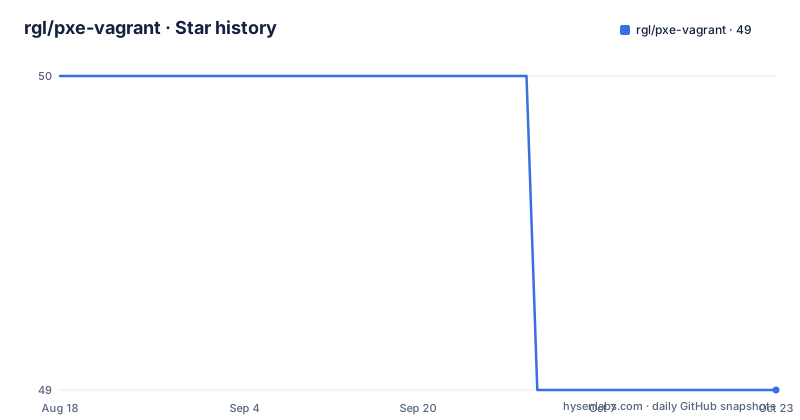
- rgl/pxe-vagrant49 ★ · -1
| Repository | 2026-08-18 | 2026-10-23 |
|---|---|---|
| rgl/pxe-vagrant | 50 | 49 |
-1 Stars in the last 66 days, measured from the daily GitHub snapshot. Compare with other projects
Editorial analysis
One gateway and four clients, launched the same way
The whole topology is one Vagrant environment with five named machines. First you install the Ubuntu 20.04 base box and run create_empty_box.sh to produce an empty environment, which the README is explicit is what the PXE client machines use as their base box rather than the Ubuntu image. Then each machine is brought up by name, always with the same flag:
vagrant ssh-config gateway >tmp/gateway-ssh-config.conf
wireshark -k -i <(ssh -F tmp/gateway-ssh-config.conf gateway 'sudo tcpdump -s 0 -U -n -i eth1 -w - not port 22')
The four clients are debian_live, linuxkit, tcl and winpe. What the capture command above also shows is the intended way to study the system: rather than reading about the boot, you record it, by writing the gateway's SSH config and piping a tcpdump from the gateway's second interface into wireshark. The repeated --no-destroy-on-error flag on every up command means a client that fails to boot is left running rather than discarded.
Three of the four clients need a file built elsewhere
This is the practical obstacle to actually running the environment. The debian_live client assumes a live image ISO exists at ../debian-live-builder-vagrant/live-image-amd64.hybrid.iso, built as described in the sibling Debian live builder repository. The linuxkit client assumes a kernel at ../linuxkit-vagrant/shared/sshd-kernel plus an initrd image beside it. The winpe client assumes an ISO at ../windows-pe-vagrant/tmp/winpe-amd64.iso. Only the tcl client, which boots Tiny Core Linux, has no such prerequisite. So the environment is not self-contained: to run three of its four clients you need three other repositories built first and their outputs left in the expected sibling directories. The relative paths are how the projects compose, and they are also why a fresh clone of this repository alone will not boot.
The winpe client exists to be watched, not to be logged into
The Windows PE machine comes with an explicit warning in the README: vagrant will not be able to connect to it, and the idea is just to see it PXE boot. That is an honest constraint rather than a bug, and it follows from how Windows PE behaves. A Windows Preboot Environment is a minimal environment for deployment tasks, not a running desktop with a network stack Vagrant can attach to, so there is no SSH or console session to offer. The value of the machine is in the boot sequence itself: you start it, watch the gateway hand out the DHCP offer, the TFTP address and the bootloader, and watch the loader pull its configuration and image. For a project whose stated purpose is demonstrating PXE, a client that cannot be used for anything else keeps the demonstration honest.
Windows installation arrives over SMB from a startup script
The Windows PE client is not the end of the story. The README notes that it can also install Windows from an SMB network share onto the local disk, and points at the end of a specific file for the details: windows-server-2022/startup.ps1. That path matters because it tells you where the machine lives. The repository holds a windows-server-2022 directory at the top level, so the installation source is a second virtual machine running Windows Server 2022 whose PowerShell startup script performs the share setup. That is a real SMB install rather than an unattended image drop, which means the network path between the PE client and the server is part of the design and has to work. It is also the one part of this environment that needs Windows licensing to be meaningful.
The boot sequence, eight steps from DHCP to squashfs
The README documents how Debian Live Linux boots on a PXE machine, and the sequence is specific enough to follow with a packet capture open. The PC broadcasts a DHCP request. The DHCP server replies, offering the TFTP server address in the next server field and the bootloader file, lpxelinux.0, in the boot file name field. The PC then TFTP downloads that file, and the loader uses HTTP to fetch its own module, sending requests with a Syslinux user agent and a set of cookies that carry the client's MAC address, system UUID, CPU model, system vendor and product. From there it downloads and loads the kernel and initrd, transfers control to the kernel, and the initrd downloads and mounts the root filesystem, which is a squashfs image. The gateway address in the example is on the 10.10.10.0 network.
The loader walks a ladder of config paths
Step five is the part that explains how one gateway serves many machines. The loader fetches its configuration from the first address that returns an HTTP 200, and the README lists the exact ladder it tries:
/debian-live/pxelinux.cfg/00000000-0000-4000-8000-000000000003
/debian-live/pxelinux.cfg/01-08-00-27-00-00-03
/debian-live/pxelinux.cfg/0A0A0A64
/debian-live/pxelinux.cfg/0A0A0A6
/debian-live/pxelinux.cfg/0A0A0A
/debian-live/pxelinux.cfg/0A0A
/debian-live/pxelinux.cfg/0A0
/debian-live/pxelinux.cfg/0A
/debian-live/pxelinux.cfg/0
/debian-live/pxelinux.cfg/default
The order is most specific to least specific: the system UUID first, then the MAC address, then the address encoded in progressively shorter hex forms, then zero, then a default file that always succeeds. That fallback chain is why one directory can serve many heterogeneous clients, and why a client with no dedicated configuration file still boots something.
An iPXE build script and a network diagram sit at the root
The repository is small enough to read in full, and the top level explains what is hand-written and what is generated. There is the Vagrantfile, a gateway.sh script, a create_empty_box.sh script, and a build-ipxe.sh script next to a boot.ipxe file, which together indicate that the boot loader itself is built here rather than taken from a distribution package. A network.uxf file defines the virtual network and a network.png diagram documents it, so the addressing scheme is a designed artefact rather than an accident of defaults. Everything else is the Windows Server machine already described. The README is a usage guide rather than a design document, and the repository has no releases and no licence file at the root; the last commit is dated 27 March 2022, which is the date to judge the whole environment by.
Editorial conclusion
This environment suits someone learning how PXE actually works, or reproducing a network boot under VirtualBox without a lab. It does not suit production use, since the last commit is dated 27 March 2022 and nothing describes hardening, failover or multi-client scale. Before starting, check three things: whether the sibling build repositories for your chosen client already exist on disk, since three of the four assume a file built elsewhere, whether your hypervisor supports the nested networking this relies on, and whether the Windows install path is something you need, since it depends on a specific startup script in the Windows machine.
Frequently asked questions
What does PXE stand for in rgl/pxe-vagrant?
Preboot Execution Environment. This repository is a Vagrant environment for a PXE gateway: it answers a DHCP request with a TFTP address and a bootloader filename, then serves the loader, its configuration, the kernel, the initrd and a squashfs root filesystem over the network.
What is PXE used for in the pxe-vagrant project?
For network booting of machines with nothing installed locally. The README traces Debian Live booting in eight steps, from the PC's DHCP broadcast through the loader's own downloads to the initrd mounting the root filesystem, and the environment also boots LinuxKit, Tiny Core Linux and Windows PE clients.
What is Vagrant used for in rgl/pxe-vagrant?
To run the gateway and its clients as virtual machines on one host. Each is brought up by name, such as vagrant up debian_live or vagrant up linuxkit, always with --no-destroy-on-error so a client that fails to boot is left in place to inspect.
Official sources
Add this badge to your README
If you maintain this project, the badge below links readers to this analysis and shows its maintenance status from the daily GitHub snapshot. Paste the markdown into your README; add ?metric=license or ?metric=stars to the image URL for a different field.

[](https://hysenlabs.com/projects/rgl-pxe-vagrant)Star history chart for your README
[](https://hysenlabs.com/projects/rgl-pxe-vagrant)Was this useful?