rgthree-comfy: a seed node with hidden sentinels and a version that is a timestamp
Making ComfyUI more comfortable!
At a glance
- What is it?
- rgthree/rgthree-comfy is a ComfyUI extension collection whose install step names one directory and clones into another, whose seed node reserves three numeric values and labels two of them secret, whose version is a date and a counter, and whose only release is a three-year-old tag with a dot in it.
- Who is it for?
- Install it by cloning into the custom_nodes directory, ignoring the sentence above the command, and expect the behaviour of whatever is on the default branch rather than a release, because there has not been one since 2023. Two things to check before you build a workflow on it.
- Can I use it commercially?
- Yes. MIT is a permissive licence: you can use, modify and sell software built on it, as long as you keep its copyright and licence notices.
- Is it still maintained?
- Yes. The repository last received commits 27 days ago.
- What is it written in?
- Mainly JavaScript, according to GitHub's language statistics.
Answers come from the project's GitHub data, last synced on November 24, 2026, and from our analysis. They are not legal advice.
Star history
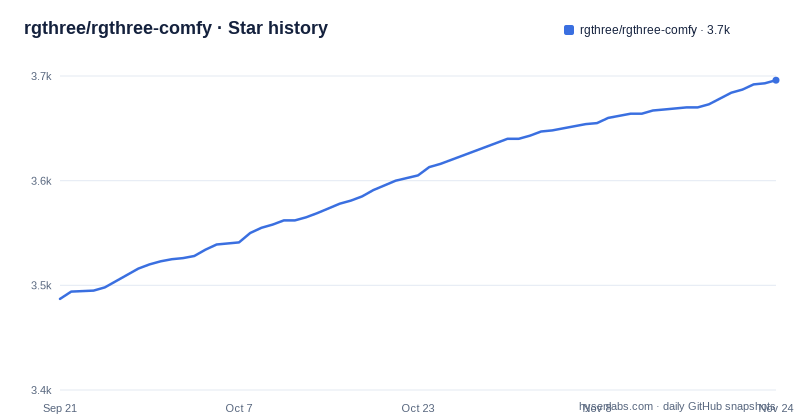
- rgthree/rgthree-comfy3,696 ★ · +209
| Repository | 2026-09-21 | 2026-11-24 |
|---|---|---|
| rgthree/rgthree-comfy | 3.5k | 3.7k |
209 Stars in the last 64 days, measured from the daily GitHub snapshot. Compare with other projects
Editorial analysis
The install step says custom_modules and the command underneath says custom_nodes
The installation section is three steps. Install ComfyUI. Clone this repository into a particular directory. Start ComfyUI.
The second step names the directory in prose and then contradicts it. The prose says clone this repo into custom_modules. The command block immediately below it changes into a directory called custom_nodes and clones the repository there.
The command is the right one and the prose is the wrong one. Every ComfyUI extension directory is called custom_nodes, which is why the same README refers to it that way everywhere else. So a reader who trusts the sentence and creates custom_modules ends up with a directory ComfyUI never scans, and the extension silently does not load.
That failure is quiet in the worst way. There is no error, because nothing asked ComfyUI to load a nonexistent directory. The nodes simply are not there, and the next thing a user does is search for why.
There is a second thing about that command. It clones the repository with no branch and no tag, so you get whatever is on the default branch at the moment you ran it. This project has exactly one GitHub release, tagged with a leading dot and named Initial Version, from September 2023. So there is no released version of this extension to pin to, and the clone gives you three years of unreleased commits.
For an extension that ships nodes which people put into saved workflows, that is worth understanding before you install rather than after.
The seed node reserves three numeric values and calls two of them secret features
The Seed node is described as an intuitive seed control that works much like the seed control in a different tool, and it is the first node in the list. Its documented behaviour is that minus one means a random seed every time, any other number is used as a fixed seed, and there are quick actions to randomize or reuse the last queued seed.
Under a bold label reading Secret Features, two more values appear. You can set the seed to minus two to increment the last seed value, or minus three to decrement it. Then the sentence that matters: if there was no last seed value, it will randomly use on first.
So the field takes three reserved sentinels out of the range a person would reasonably type, and two of them are labelled secret rather than documented as part of the interface. The failure mode follows directly from the sentinel values colliding with the sentinel behaviour. On a fresh session, set the seed to minus two because you want the next seed in a series, and instead of an error you get a random seed. Nothing tells you the increment was ignored, because the fallback is a valid seed and a valid render.
This matters more here than it would in most settings, because the node's own documentation says the seed value is written into image metadata, and that dragging a produced image back in leaves the seed field already fixed to it. So a silently randomised seed propagates: the image you get looks reproducible, its metadata says a fixed seed, and re-importing it pins you to a number that was never the one you set.
The rest of the node is well thought out. Quick actions for randomising and for reusing the last queued seed, and metadata round-tripping are both genuinely nice. The two hidden sentinels are the only part of it you would want to guard against.
The version is a date and a counter, and the only release is from September 2023
The packaging metadata declares version 1.0.2610050029. Everything after the 1.0 prefix is ten digits that read as a year, a month, a day and a per-day counter: a timestamp with a sequence number, not a version a person chose.
A version that changes on every build has consequences that are easy to miss. Package managers cannot cache by version, so every install is a miss. Version comparison has no meaning, because nothing is greater than anything else. And a user reporting a bug gives you a timestamp rather than a change you can locate, because there is no commit range between two numbers that means anything.
Against that, the repository has exactly one GitHub release. Its tag is a leading v followed by a dot and 1.0.0, which is not a valid semantic version tag, and its display name is Initial Version. It was published on 2023-09-12.
So the release stream and the version in the manifest share a prefix and nothing else. The last commit to the default branch is dated 2026-09-25. That is three years of development after the only release, on a repository with 312 open issues and 3534 stars.
This is the ordinary consequence of an extension nobody ever formally cut a release for, and it is not unusual for this kind of project. It does mean the one artefact a cautious installer would reach for does not exist, and that the version number you see in the interface tells you when it was built rather than what it is.
The one npm script uses a shell operator that Windows cannot parse
The JavaScript side of this project has five development dependencies and exactly one script. The script is the build, and its value is a command with a double-bar followed by an alternative.
The first form executes the build script as an executable file. The second form invokes Python on a Windows-style path with a backslash. The separator between them is the shell's or operator.
That separator is a POSIX shell construct. npm runs package scripts through a shell, and on macOS and Linux that shell understands it, so the first form runs and the second never does. On Windows npm uses the command interpreter, which has no or operator at all. So the line does not degrade to the Windows fallback; it fails to parse, and the fallback written after it never gets a chance to run.
The intent is obviously to support both platforms in one string, and the Windows half is written correctly in isolation, with the backslash path separator that the command interpreter expects. The composition is what is wrong: two platform-specific invocations joined by a third platform's syntax.
It is a one-line defect in a one-line script, and the honest reading is that this build path is exercised on one platform. That is entirely plausible for a single-developer extension, and it is also invisible to anyone who only ever built it on the platform it works on.
The ComfyUI frontend types are pinned to one exact version while everything else floats
Look at the five development dependencies and four of them are ranges. The formatter is a caret range, the compiler is a caret range, the stylesheet compiler is a caret range, and an incremental parsing library is a caret range.
The fifth is different. The package holding ComfyUI's frontend types is pinned to an exact version, no caret, no range.
That single exact pin is the clearest statement in the manifest about how this project stays compatible. An extension that injects nodes into another application's editor has to compile against that editor's type definitions, and a floating range would let the build start succeeding or failing as soon as ComfyUI shipped a frontend release. Pinning the one package that describes the host means the build breaks loudly at install time rather than at run time.
It also explains a sentence in the README that reads like an aside. The settings section says you can turn features off if, for instance, a future change to ComfyUI breaks this extension. That is the author telling you the failure mode is expected and giving you a switch, which is the right thing to document. The exact pin is the other half of the same answer: the repository tries to make sure you find out at build time, and the settings toggle covers the case where you find out anyway.
The incremental parsing library is the one dependency whose purpose the visible documentation does not explain.
Four dunder-named Python scripts sit at the root, including one that updates ComfyUI
ComfyUI extensions are Python packages with a frontend. This one has both, and the Python side is unusual in a way worth looking at before you clone it.
The repository root contains four Python files whose names begin and end with double underscores: an init file, a build file, a commit file, and a file whose name says it updates ComfyUI.
Double underscores at module level are not a package convention. They are the prefix and suffix Python uses for names it treats specially inside a class or a module, and using them for ordinary top-level scripts makes four files look like framework internals when they are actually the extension's own lifecycle hooks. A file named init at the root of a git clone is particularly odd, since that name only means anything inside a package directory.
The name that deserves the most attention is the update script. Whatever it does, its declared job is to modify the application it is installed into. That is categorically different from every other file in this repository, all of which extend ComfyUI from the outside.
There is a pre-startup script as well, and that name is a ComfyUI hook by convention: it runs before ComfyUI's own startup work, ahead of anything the user has configured.
None of this is a security claim. It is an observation about the shape of the thing you are installing, and the README's installation section does not mention any of these five files. It says clone the repository and start ComfyUI, which is the whole procedure.
Two lockfiles and an npmrc for a package with one script
The JavaScript manifest declares five development dependencies and one script. In exchange for that, the repository root carries three package-manager artefacts: an npm configuration file, an npm lockfile, and a pnpm lockfile.
Two lockfiles is a genuine ambiguity rather than a cosmetic one. Each records a different resolution of the same dependency graph, and they are generated by different tools, so they will drift. Whichever manager a contributor happens to have installed is the one whose lockfile updates, and the other silently goes stale until somebody notices it in a diff.
The npm configuration file compounds it, because npm configuration is what tells a project to use a different registry or a different install strategy, and there is a pnpm lockfile sitting next to it saying otherwise.
Set against that, the actual JavaScript dependency surface is small: a formatter, the compiler, a stylesheet compiler, a type package and a parsing library. Five entries do not need two lockfiles, and one script does not need an npm configuration file.
The Python side of the repository is configured with the same thoroughness in a different direction: a lint configuration, a formatter configuration, and a separate requirements file at the root. So the project has a formatter and a linter for its Python, a formatter and a compiler for its JavaScript, and two lockfiles for the JavaScript side alone.
Save Image acts on whichever half of the comparer you clicked
The Image Comparer node puts two images on top of each other. It takes a required first image and an optional second, and the optionality is narrow: the second is only optional if the first is a batch containing two images, in which case the comparer uses the first two images of that batch.
Then there is the note. The node's right-click menu may show image options such as Open Image and Save Image, and those options will act on the first image if you clicked the left half of the node, and on the second image if you clicked the right half.
So the same menu item has two targets depending on where inside the node you pressed. Save Image is a write to disk, and which image you get depends on the half of the node under the cursor at the moment you opened the menu rather than on anything visible in the menu itself. The menu does not say which one it will act on.
That is a defensible design. A side-by-side comparison node that defaulted every action to the left image would make the right image second class, and making the click position select the target is a reasonable way to avoid that. The gap is the affordance: the mechanism is documented in a note rather than surfaced in the menu, and the one option that writes a file is the one where guessing wrong costs you.
The node's other property is worth knowing because it changes what the menu means. There is a comparer mode property with a Slide and a Click option, defaulting to Slide. So the same node can be used as a wipe or as a toggle, and in either mode the context menu still resolves its target by half.
Editorial conclusion
Install it by cloning into the custom_nodes directory, ignoring the sentence above the command, and expect the behaviour of whatever is on the default branch rather than a release, because there has not been one since 2023. Two things to check before you build a workflow on it. The seed field treats minus two and minus three as increment and decrement rather than as numbers, and falls back to a random seed when there is no previous one, so a seed you set can be silently replaced and then written into image metadata. And the repository root holds five Python lifecycle hooks, one of which is named for updating ComfyUI itself, which the three-step install never mentions.
Frequently asked questions
what is rgthree comfy
A collection of custom nodes and interface improvements for ComfyUI, written by one developer while working with it, including a seed control, a reroute node, bookmarks, a context merge pair, an image comparer, a multi-lora loader and a prompt node. It is installed by cloning the repository into the ComfyUI custom_nodes directory and restarting ComfyUI.
How do I install rgthree-comfy?
Install ComfyUI first, then change into its custom_nodes directory and clone the rgthree-comfy repository there, then start ComfyUI. The README's prose names custom_modules while the command it gives uses custom_nodes. The clone takes no branch or tag, and the repository has one release, tagged v.1.0.0, from 2023-09-12.
What does the rgthree-comfy Seed node do with negative values?
Minus one means a random seed every time, any other number is used as a fixed seed, and minus two or minus three increment or decrement the last seed value. The README labels those last two as secret features and says that when there is no previous seed value it falls back to random on first use.
Where are rgthree-comfy's settings stored?
In an rgthree_config.json file inside the rgthree-comfy directory, reachable by right-clicking empty graph space or from the ComfyUI settings dialog. The README says some advanced settings can only be configured in that file, and that defaults can be copied from rgthree_config.json.default, which is committed at the repository root.
What is the version of rgthree-comfy?
The packaging metadata declares 1.0.2610050029, where the digits after 1.0. read as a year, month, day and a per-day counter, so the version changes on every build. The repository has a single GitHub release, tagged v.1.0.0 and named Initial Version, published 2023-09-12.
Does rgthree-comfy have any runtime dependencies?
The packaging metadata declares an empty dependencies list, while the repository root carries a separate requirements file that the metadata does not reference. The extension is installed by cloning into ComfyUI's extension directory rather than installed as a package.
Official sources
Add this badge to your README
If you maintain this project, the badge below links readers to this analysis and shows its maintenance status from the daily GitHub snapshot. Paste the markdown into your README; add ?metric=license or ?metric=stars to the image URL for a different field.

[](https://hysenlabs.com/projects/rgthree-rgthree-comfy)Star history chart for your README
[](https://hysenlabs.com/projects/rgthree-rgthree-comfy)Was this useful?