NovelForge replaced its DAG editor with code, and ships a Windows-only start script
AI-assisted long-form novel writing with card-based creation, supporting structured AI generation and contextual referencing based on JSON Schema, and highly extensible.
At a glance
- What is it?
- NovelForge is a Chinese-language AI writing tool for long novels, built on schema-checked cards, a knowledge graph and a workflow system that was migrated from a visual DAG editor into Python-style code. The changelog is unusually candid about what that migration cost, and the repository has one npm script, which happens to be PowerShell.
- Who is it for?
- NovelForge fits a writer working on a book long enough that consistency and control matter more than a blank page.
- Can I use it commercially?
- Yes, with strict conditions. AGPL-3.0 is a network copyleft licence: if people use a modified version over a network, for example as a hosted service, you must offer them its source code under the same licence.
- Is it still maintained?
- Yes. The repository last received commits 61 days ago.
- What is it written in?
- Mainly Python, according to GitHub's language statistics.
Answers come from the project's GitHub data, last synced on November 22, 2026, and from our analysis. They are not legal advice.
Star history
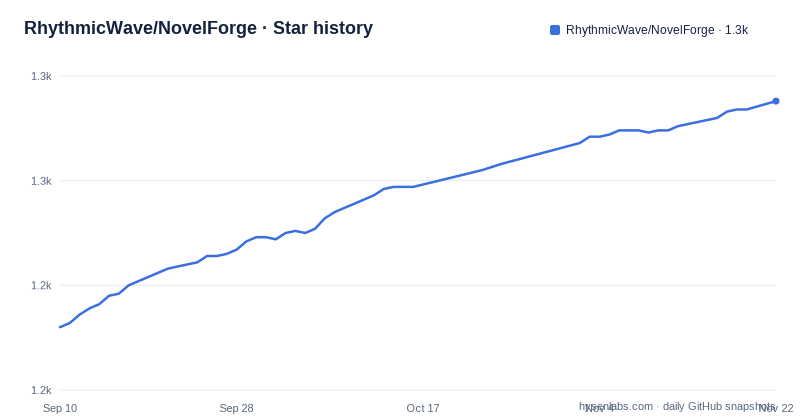
- RhythmicWave/NovelForge1,288 ★ · +108
| Repository | 2026-09-10 | 2026-11-22 |
|---|---|---|
| RhythmicWave/NovelForge | 1.2k | 1.3k |
108 Stars in the last 73 days, measured from the daily GitHub snapshot. Compare with other projects
Editorial analysis
The only npm script is PowerShell with a five second guess
The package manifest is three fields deep and contains one script, and that script launches the whole development stack:
"dev": "start \"Backend\" powershell -NoExit -Command \"python backend/main.py\" && start \"Frontend\" powershell -NoExit -Command \"Start-Sleep -Seconds 5; npm --prefix frontend run dev\""Two things are worth naming. `start` is the PowerShell cmdlet, not a Unix command, so the script only works where PowerShell is available to begin with. And the frontend is started after `Start-Sleep -Seconds 5`, which is a fixed pause standing in for a readiness check on the backend.
Five seconds is optimistic for a first Python start and generous for a warm one, so the same script is either flaky or slow depending on your disk cache. Nothing polls the backend port to decide when to start the frontend.
The two halves are still separate projects. The manifest is marked private, the frontend lives in its own directory with its own scripts, and the backend is a `python backend/main.py` entry point. The manifest does nothing else: no build, no test, no lint.
The workflow editor was a DAG, and the old one was deleted
Version 0.9.0 describes the largest change in the project's history, and marks it exploratory: workflows moved from a visual DAG editor to code-style workflows written as Python-like statements with a special marker DSL, and the old DAG scheme was progressively removed.
The reasons are given as a balance between maintainability and how friendly the format is to a model. Code-style logic is more linear, with wait and async semantics that map to real execution rather than to edges, and the executor can schedule by statement instead of routing around a graph. For the same feature, code-style is often tens of lines where a DAG configuration needed hundreds of nodes and connections.
The drawbacks are listed just as plainly. A DAG is more intuitive. Code-style is more sensitive to string and code formatting, where parameter serialization, dictionary field types and variable references are all places a validation or runtime error can start, which means stronger validation and prompt constraints are needed to compensate.
The surrounding mechanics are cheaper than the editor: node auto-registration means a new node is one decorator line and the frontend syncs itself, and the node library is loaded dynamically from the backend so there is no configuration step.
Word-count control comes in a cheap mode and an expensive one
Continuing a chapter has two modes, and the project describes both with their costs rather than presenting one as simply better.
The prompt-constraint mode only constrains length at the prompt level. The text comes out more natural and it costs less, which suits work where the exact count does not matter much.
The control mode splits the target total into multiple rounds and allocates a budget to each. Control is steadier, and it consumes more tokens. The 0.9.3 notes add that the control mode currently uses a fixed multi-round budget strategy, chosen to make long chapter continuations more predictable.
So the trade is stability against cost, and it is a per-request decision rather than a global setting. The related interaction design follows the same pattern elsewhere: a right-click quick edit in the chapter editor takes selected text and asks for polish or expansion, with the surrounding context assembled automatically so the rewrite joins the surrounding prose, and AI-generated content is highlighted dynamically so you can see what was just written.
Nothing is written back without a preview and a confirmation
One pattern runs through most of the feature work: extraction and generation produce a draft, the draft is shown, you adjust it, and only then does it land.
The review flow was unified around that. A review first generates a draft, then you confirm creating or updating a review result card. Results no longer depend on the old record model and are consolidated into a single content-review card type, which is archived automatically into a root-level review results folder so it can be found and reused. Different card types can use different review prompts while the result card structure stays the same.
Version 0.9.4 applied the same shape to the memory layer. Character updates, relationship extraction into the graph, scene state, organization state, item state and concept mastery all moved to one flow: extract from the current chapter text, show a preview, let you edit the preview by hand, then confirm to write back to the card or the graph. New lightweight state cards for scenes, organizations, items and concepts came with it, and the notes are explicit that they are optional and not all of them need to be used, to avoid inflating context.
The same caution appears in text replacement. Polish and expansion offer accept-and-replace or reject-and-restore, described as reducing the risk of replacing something you meant to keep.
Tool calling quality is treated as a variable, with two fallbacks
The assistant feature grew a tool layer, and the release notes show what happened when the models did not cooperate.
A React mode implements tool calling through formatted text rather than native tool calls, for models whose native support is weak. It is off by default and enabled in the assistant settings. A ReAct mode came earlier, and it carries an unusually honest warning: because of time constraints the implementation is rough and may have bugs, so the recommendation is to prefer models with good native tool-calling support.
There is also a thinking mode for reasoning models, and guidance on how to point the configuration at providers: models such as DeepSeek or Qwen are advised to be configured as OpenAI-compatible, while OpenAI is advised to be set only to official models.
By 0.9.6 the project added a capability test on the LLM configuration page that checks basic conversation, streaming, structured output and tool calling, so a user can find out before writing a chapter. The notes also record what still does not work: Responses mode compatibility was improved, except for the inspiration assistant, which remains incompatible.
The graph has two storage backends, and schemas patch themselves
The relationship graph is what keeps a long manuscript consistent, and version 0.9.1 gave it a second storage option: SQLite was added, and Neo4j remains compatible. The same release added graph management, with filtering, batch modification and import or export.
SQLite is the answer to running a personal project without standing up a database server. Neo4j is there for people who already have one, or who want to query the graph directly.
Schema management is the other half, and it is pragmatic rather than principled. Version 0.9.2 added automatic detection of the difference between model metadata and the existing table structure, and completion of missing columns that can be safely appended. So the system compares what the code expects against what the database has and adds what is additive, without a migration framework in the loop.
That works well for added columns and says nothing about renamed or retyped ones, which is the kind of boundary worth knowing before you rely on it.
A major release warns that your database may not come with it
The 0.9.0 notes end with a warning rather than a changelog line. Because that release changed a great deal, an older database may not be usable directly. The instruction is to try the published migration script, and the script is explicitly not guaranteed to succeed, with a recommendation to back up the database file first.
That is an unusual thing to publish and a useful one. A pre-1.0 tool that rewrites its own storage between minor versions should say so, and this one does.
Update awareness came earlier. Version 0.8.6 added version update detection, on by default, which shows a marker in the settings and about screen when a new version exists.
The release cadence is visible in the tags: 0.9.6 on 2026-06-20, 0.9.7 on 2026-08-24 and 0.9.8 on 2026-09-23. The repository is AGPL-3.0 licensed, is not archived, and its last push is dated 2026-09-23. The frontend moved into the main editor's centre pane in 0.8.0, and mobile web adaptation arrived in 0.8.6.
Port, prompts and built-in resources all have their own settings
Backend configuration lives in `backend/.env`, and 0.9.7 added the ability to set the service port there through `APP_PORT`, with the default left at `54321` and a range check for `1-65535`.
Built-in prompts and the knowledge base gained the same kind of care in that release. New entries show their state, distinguishing custom, built-in and modified items, so you can tell at a glance whether a prompt is yours or shipped. The safety constraints are the interesting part: guards against accidentally deleting built-in resources or overwriting your own modifications, plus work on pagination, initialization and reset.
That is what a project does when its prompts become part of a user's workflow, which is the same reason LLM configuration gained a copy function in 0.9.1 to avoid re-entering a working provider setup.
The repository layout is small and legible: a Python backend, a React frontend, a `rules/` directory, images for the documentation, a contributing guide, and a file of future plans written in Chinese. The architecture is described in four concepts: modular cards, a customizable dynamic output model, context injection through an `@DSL`, and the knowledge graph.
Editorial conclusion
NovelForge fits a writer working on a book long enough that consistency and control matter more than a blank page. Verify five things first: that your platform can start the development stack at all, since the one npm script shells out to PowerShell; whether the graph backend you want is available, since SQLite arrived in 0.9.1 alongside Neo4j; which word-count mode you want, because the stable one costs more tokens; how your models behave with tool calls, since two fallback modes exist and one is described as rough; and whether you have a database backup, because the 0.9.0 notes warn that older databases may not migrate. AGPL-3.0, version 0.9.8, with the last push dated 2026-09-23.
Frequently asked questions
What is NovelForge?
It is an AGPL-3.0 AI-assisted tool for writing long novels, built on modular cards where each card type defines a schema so generated content is validated by structure. Around that sit context injection through an @DSL, a relationship knowledge graph for consistency, an agent that can edit cards from a conversation, and a code-style workflow system.
How do I start NovelForge for development?
`npm run dev` is the only script. It launches the backend with `python backend/main.py` and then the frontend with `npm --prefix frontend run dev` after a five second pause, and both steps go through PowerShell's start cmdlet, so the script assumes a Windows environment.
How does NovelForge control chapter length?
Continuation offers two modes. A prompt-constraint mode constrains length only in the prompt, which reads more naturally and costs less. A control mode splits the target total into several rounds with allocated budgets for steadier control at the cost of more tokens, using a fixed multi-round budget strategy.
Can NovelForge work with models that have weak tool calling?
It has two fallbacks. A React mode implements tool calling through formatted text for such models and is off by default, and a ReAct mode can be enabled in settings, though the notes describe it as rough with possible bugs and recommend native tool support instead. Version 0.9.6 added a capability test on the LLM page covering chat, streaming, structured output and tool calls.
Does NovelForge have a knowledge graph, and where is it stored?
Yes. Version 0.9.1 added SQLite storage for the relationship graph while keeping Neo4j compatible, together with graph management for filtering, batch modification and import or export. Version 0.9.2 added detection of the difference between model metadata and existing tables, completing missing columns that can be safely appended.
What happens to my database when I upgrade NovelForge?
The 0.9.0 notes warn that older databases may not be usable directly because that release changed a great deal, and that the published migration script is not guaranteed to succeed, so backing up the database file first is recommended. Version 0.8.6 added an automatic update check that marks a new version in the settings and about screen.
Official sources
Add this badge to your README
If you maintain this project, the badge below links readers to this analysis and shows its maintenance status from the daily GitHub snapshot. Paste the markdown into your README; add ?metric=license or ?metric=stars to the image URL for a different field.

[](https://hysenlabs.com/projects/rhythmicwave-novelforge)Star history chart for your README
[](https://hysenlabs.com/projects/rhythmicwave-novelforge)Was this useful?