Bluepad32 turns an ESP32 or Pico W into a Bluetooth host for gamepads
Bluetooth gamepad, mouse and keyboard support for ESP32 and PicoW
At a glance
- What is it?
- Bluepad32 is a C11 Bluetooth controller host that lets an ESP32 or Raspberry Pi Pico W accept input from gamepads, mice and keyboards, with backends for ESP-IDF, Pico-SDK and Arduino. It is licensed under Apache 2, and the last push was on 2026-10-15.
- Who is it for?
- Bluepad32 suits a maker building a robot or controller that has to be driven by a commercial gamepad, because it removes the work of writing a Bluetooth HID host from scratch and supports both the ESP32 and Pico W families with one codebase.
- Can I use it commercially?
- Check first. The repository uses a licence we do not classify automatically, so read its LICENSE file before any commercial use.
- Is it still maintained?
- Yes. The repository last received commits 3 days ago.
- What is it written in?
- Mainly C, according to GitHub's language statistics.
Answers come from the project's GitHub data, last synced on November 7, 2026, and from our analysis. They are not legal advice.
Star history
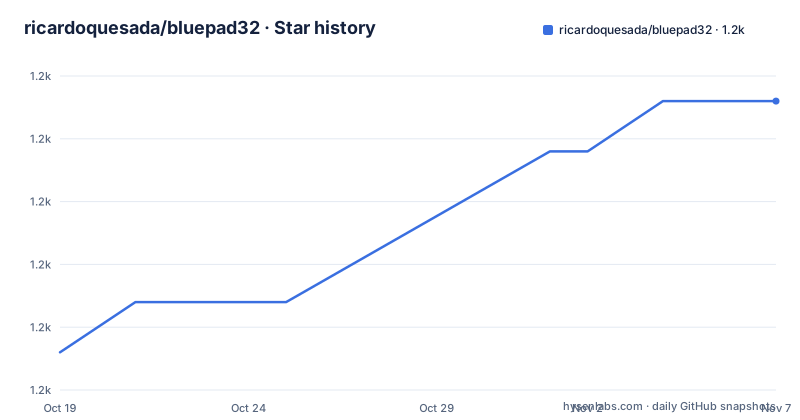
- ricardoquesada/bluepad321,174 ★ · +10
| Repository | 2026-10-19 | 2026-11-07 |
|---|---|---|
| ricardoquesada/bluepad32 | 1.2k | 1.2k |
10 Stars in the last 19 days, measured from the daily GitHub snapshot. Compare with other projects
Editorial analysis
A Bluetooth host, which is the part that is hard to write
Bluepad32 is a Bluetooth controller host for a long list of boards: the ESP32, ESP32-S3, ESP32-C3, ESP32-C5, ESP32-C6, ESP32-H2, the Raspberry Pi Pico W, Pico 2 W, and Posix targets on Linux and macOS.
The description makes the purpose concrete. It adds Bluetooth gamepad, mouse and keyboard support to your projects easily, and in other words, it allows you to control a robot using a DualSense controller. The project calls itself a host, and that word is the technical point. Making an embedded board act as the central device in a Bluetooth HID connection is the part that requires a real Bluetooth stack, and the reason the project depends on BTstack.
The features list gives the engineering constraints that shaped the design. It supports most, if not all, modern Bluetooth gamepads, mice and keyboards. The supported APIs are ESP-IDF, Pico-SDK and Arduino. It is fast, with very low latency, and has a small footprint. It uses only one core, with CPU0 doing the work and the remaining one free to use. It is C11 based. It is open source, and easy to integrate into third party projects.
Using only one core is the detail that matters for embedded work. A Bluetooth stack with a dedicated core is a common pattern, but it also means the design had to keep the protocol handling compact enough to fit alongside whatever else the project needs on the other core. On the Pico W, which has an RP2040 with two cores, that frees half the machine for the application.
The C11 base is a similar constraint. It keeps the library usable from projects that are not C11, and it avoids a C++ runtime dependency in firmware where code size and startup cost are real concerns.
Which boards support which controllers is not uniform
The supported controller list is long and specific, which is the right way to document a Bluetooth host.
Gamepads include the Sony DualSense for PS5, the DualShock 4 for PS4, the DualShock 3 for PS3, the Nintendo Switch Pro controller, the Switch JoyCon, the Nintendo Wii U controller, the Wii Remote with accessories, Xbox Wireless controllers in models 1708, 1914 and the adaptive variant, Android controllers, the Steam controller, the Stadia controller, PC and Windows controllers, 8BitDo controllers, an Atari joystick and the iCade. Plus mice and keyboards.
The DualSense and the older DualShock 3 are the interesting entries. The DualSense is a modern controller with touchpad, haptics and motion, and the DualShock 3 predates the HID over GATT standard entirely and uses a proprietary Bluetooth stack, so supporting it alongside a PS5 controller means handling two very different transports.
Then there is the note about the boards, and it is the caveat to read before you pick hardware. Original ESP32, Pico W and Pico 2 W support all listed controllers, while ESP32-S3, ESP32-C3, ESP32-C5, ESP32-C6 and ESP32-H2 only support a subset.
That difference follows from the radio. The original ESP32 and the Pico W have Bluetooth Classic support, which is what the older proprietary controllers and some of the others need, while the S3, C3, C5, C6 and H2 are Bluetooth Low Energy only. A controller that only works over Classic will not work on those boards, no matter what the library supports elsewhere.
The README links to separate documentation pages for supported gamepads, supported mice and supported keyboards, so the per-board, per-controller answer lives there rather than in the README itself.
Five supported toolchains, each with its own example project
The where to start table is the most useful part of the README, because it maps a platform to a starting point, a documentation page and a set of community projects.
For the Arduino IDE the starting point is a video and the further information is the Arduino documentation page, with a community project for a controller for the Tello drone. For Arduino using the ESP-IDF toolchain, the starting point is a template project. For Pico W it is a Pico W example, with community projects for Pico Switch and PicoNtrol. For ESP-IDF it is the ESP32 example, with a community project for the OGX Wireless Lite. For Posix on Linux and macOS there are a Posix example and a Posix ImGui example. And for Unijoysticle the starting point is the Unijoysticle 2 project.
That last entry is a good sign. Unijoysticle is a commercial handheld console, and the fact that it is a supported platform with pre-compiled binaries means the library is being used by a product, not only by hobby projects.
The community projects show the range of uses. There is a Lego Robot, a gbaHD Shield which is a GameBoy consolizer, the Tello drone controller, the Pico Switch and PicoNtrol, and the OGX Wireless Lite. The GameBoy consolizer is a good example of what a Bluetooth host library enables, since it turns an old console into a modern input device.
The creating your project section lists the examples in the repository: an ESP32 example covering the ESP32, S3, C3, C5, C6 and H2, a Pico W example for Pico W and Pico 2 W, a Posix example and a Posix ImGui diagnostic suite, with the Arduino examples living in a separate template project and a video.
The diagnostic suite is worth noting as a debugging aid. A Bluetooth host has a lot of state that is invisible from the outside, and a graphical diagnostic tool that shows what the host sees is exactly what you need when a controller connects but reports nothing.
The BTstack dependency shapes the licensing
The license section is where the project states something a reader needs to know before shipping anything.
Bluepad32 is open source, licensed under Apache 2. However, the README says Bluepad32 depends on the great BTstack library, which is free to use for open source projects, but commercial for closed source, and the sentence is cut off in the version available here.
That is a genuinely important caveat, and it is the kind of thing that gets missed. Apache 2 on the library itself does not mean the whole stack you ship is Apache 2, because the Bluetooth implementation underneath is separately licensed with a commercial requirement for closed source products.
The dependency is visible in the repository layout too. There is an external/ directory, and a .gitmodules file, which is how the BTstack source is pulled in. The .clang-format and .pre-commit-config.yaml files show a C project with a consistent style and pre-commit hooks.
The rest of the project files are the standard ones for a library with a documentation site: mkdocs.yml and docs/ for the documentation built by Read the Docs, a .readthedocs.yaml for the build configuration, AUTHORS.md, CHANGELOG.md, CONTRIBUTING.md, and a .gitlab-ci.yml alongside a .gitlab/ directory, so CI runs on both GitLab and GitHub.
The licence metadata lists the repository licence as one GitHub cannot classify, and the LICENSE file at the top of the tree is the authoritative text. The README's statement is the practical summary.
Where Bluepad32 is the wrong choice
The first limit is the hardware subset, and it is not a small one. If your controller is one of the older proprietary devices, the original ESP32 and the Pico W are the boards that work. The S3, C3, C5, C6 and H2 support only a subset, which in practice means the radio capability, not a configuration switch. Choosing a board for a hobby project and then discovering your controller needs Bluetooth Classic is a rework of the hardware, not of the code.
The second is that this is a Bluetooth host and nothing more. There is no wired input path, no USB HID, and no way to use the library to make a board look like a keyboard to a host computer. If what you want is for the board to send keypresses to a laptop, this is the wrong direction entirely.
The third is the licensing for commercial work, and it deserves emphasis rather than a footnote. The library is Apache 2, but the BTstack dependency is free for open source projects and commercial for closed source. A hobbyist or an open source project has nothing to worry about. A company shipping a closed source product that includes Bluepad32 has a different conversation, and the README's text on the subject is truncated in the version available here, so the actual terms need to be read from the BTstack side as well.
The fourth is the version state. The releases listed are 4.1.0 from June 2024, 4.2.0 from January 2025 and 5.0.0-beta0 from October 2026. A beta of the next major means the API is in flux, and the last push was on 2026-10-15, ten days before the beta tag, so the tip of the repository is in active development.
The fifth is scope. The library covers input, and only input. If your project also needs to stream data back to the controller, for example for rumble or light bar feedback, that is a different piece of work the library does not describe.
Editorial conclusion
Bluepad32 suits a maker building a robot or controller that has to be driven by a commercial gamepad, because it removes the work of writing a Bluetooth HID host from scratch and supports both the ESP32 and Pico W families with one codebase. It is the wrong tool if you only need a serial input from a controller over USB, and the wrong tool if your specific controller is only supported on the original ESP32 and Pico W, since the README says the other ESP32 variants support only a subset. Before choosing a board, check the supported gamepads, mice and keyboards lists, and note the licensing caveat that the BTstack dependency is free for open source projects but commercial for closed source ones.
Frequently asked questions
What is Bluepad32?
It is a Bluetooth controller host written in C11 that lets the ESP32, ESP32-S3, ESP32-C3, ESP32-C5, ESP32-C6, ESP32-H2, Raspberry Pi Pico W, Pico 2 W and Posix platforms act as the central device for gamepads, mice and keyboards, so a robot can be controlled with something like a DualSense.
Which controllers does Bluepad32 support?
The list includes the Sony DualSense, DualShock 4 and DualShock 3, the Nintendo Switch Pro controller and JoyCon, the Wii U controller, Wii Remote with accessories, Xbox Wireless controllers in models 1708, 1914 and adaptive, Android, Steam, Stadia and PC controllers, 8BitDo controllers, an Atari joystick, the iCade, plus mice and keyboards.
Do all ESP32 variants support the same controllers?
No. The README states that the original ESP32, Pico W and Pico 2 W support all listed controllers, while ESP32-S3, ESP32-C3, ESP32-C5, ESP32-C6 and ESP32-H2 only support a subset. The per-board, per-controller detail is in the supported gamepads, mice and keyboards pages of the documentation.
Which toolchains does Bluepad32 work with?
The supported APIs are ESP-IDF, Pico-SDK and Arduino. The examples folder has projects for ESP32, Pico W, Posix on Linux and macOS including an ImGui diagnostic suite, and there are separate Arduino examples and an ESP-IDF based Arduino template project.
What licence does Bluepad32 use?
The library is open source and licensed under Apache 2, with the LICENSE file in the repository. The README also notes that Bluepad32 depends on the BTstack library, which is free to use for open source projects but commercial for closed source ones, so a commercial product needs that checked separately.
Official sources
Add this badge to your README
If you maintain this project, the badge below links readers to this analysis and shows its maintenance status from the daily GitHub snapshot. Paste the markdown into your README; add ?metric=license or ?metric=stars to the image URL for a different field.

[](https://hysenlabs.com/projects/ricardoquesada-bluepad32)Star history chart for your README
[](https://hysenlabs.com/projects/ricardoquesada-bluepad32)Was this useful?