CalendarKit is Apple Calendar's look as a class you subclass, and its examples need a fix
📅 Calendar for Apple platforms in Swift
At a glance
- What is it?
- A Swift calendar UI library for iOS and Mac Catalyst that mimics the system Calendar app by default. The architecture is two protocols and one view controller, which is easy to grasp, but the selection example prints a variable that does not exist and the first data source sample stops mid-string. The newest tag is nearly two years older than the last push.
- Who is it for?
- Adopt CalendarKit if you are shipping an iOS app that needs a calendar with events and want the Apple Calendar look without designing one, and if you are willing to subclass a view controller rather than compose a declarative view. Do not adopt it expecting a fast-moving dependency: the newest tagged release is 1.1.11 from 2024-11-03 while the last push to the branch was on 2026-09-12, and the page keeps no changelog.
- Can I use it commercially?
- Yes. MIT is a permissive licence: you can use, modify and sell software built on it, as long as you keep its copyright and licence notices.
- Is it still maintained?
- Yes. The repository last received commits 64 days ago.
- What is it written in?
- Mainly Swift, according to GitHub's language statistics.
Answers come from the project's GitHub data, last synced on November 15, 2026, and from our analysis. They are not legal advice.
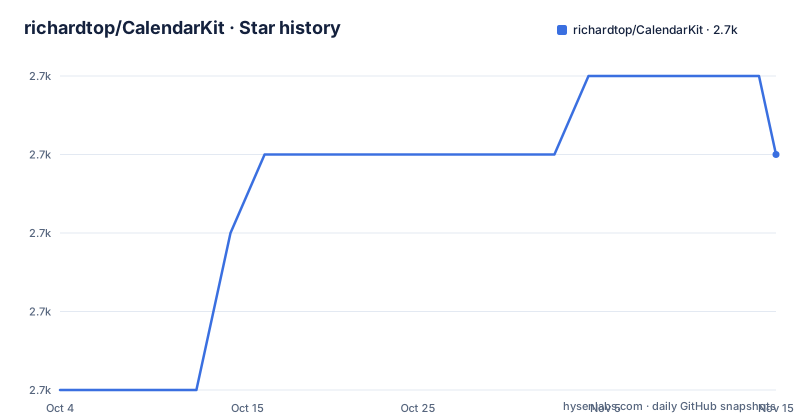
Star history
- richardtop/CalendarKit2,703 ★ · +3
| Repository | 2026-10-04 | 2026-11-15 |
|---|---|---|
| richardtop/CalendarKit | 2.7k | 2.7k |
3 Stars in the last 42 days, measured from the daily GitHub snapshot. Compare with other projects
Editorial analysis
The repository homepage field is a YouTube video
The homepage recorded for this repository is a link to a YouTube watch page, and it is the same video the README calls the official tutorial. So the address a package index, a search result or a dependency scanner shows as the project's home is a tutorial rather than a site.
The rest of the support surface is unusually complete for a library README. Two tutorial videos, a Stack Overflow tag for programming questions, a separate Sample App repository, and issue templates reached through a choose page. There is a second sample inside this repository as CalendarKitDemo/, so two runnable apps exist for one library, which is a redundancy a new user has to resolve.
The badge row has its own oddity: the Swift Package Index link appears four times and the CocoaPods link twice, all pointing at the same two addresses. Nothing is broken, but the row was assembled by copy and paste and gives the impression of four and two sources of information.
Install is documented for SPM only, while a podspec sits at the root
Installation is four clicks in Xcode. Open the project, go to File, then Swift Packages, then Add Package Dependency, paste `https://github.com/richardtop/CalendarKit.git`, set Rules to Version (Up to Next Major), and finish.
Up to Next Major is the only version policy on the page, and for a library whose release titles record an API change in 1.1.0 that is the setting that will cost you. It admits any 1.x, so a patch or minor that changes what your subclass must implement arrives without a manifest edit.
The stated requirements are iOS 11.0+, macOS through Catalyst at 10.15+, and Swift 5.7+. What the page does not say is that CocoaPods is also an option, even though CalendarKit.podspec is in the repository root and a CocoaPods badge is displayed. The sentence is explicit that it can be installed with Swift Package Manager, and no podspec instruction follows it.
The Swift Package Index metadata is committed too, in .spi.yml and .swiftpm/ at the root.
Two protocols, one subclass, and an array as the contract
The usage section is two steps. Subclass `DayViewController`, then implement the `EventDataSource` protocol so the calendar has something to draw.
The contract is deliberately narrow: `EventDataSource` returns an array of objects conforming to `EventDescriptor` for a particular date, and `EventDescriptor` is where all the display information comes from. You may use the `Event` class the library ships or write your own conforming type. Once the array arrives, the library handles view layout and display, which is the division of labour the whole design rests on.
The first Swift example shows the shape of that return value:
override func eventsForDate(_ date: Date) -> [EventDescriptor] {
  var models = myAppEventStore.getEventsForDate(date) // Get events (models) from the storage / API

  var events = [Event]()

  for model in models {
      // Create new EventView
      let event = Event()
      // Specify DateInterval
      event.dateInterval = DateInterval(start: model.startDate, end: model.endDate)
      // Add info: event title, subtitle, location to the array of Strings
      var info = [model.title, model.location]
That example ends mid-sentence, on an unterminated `info.append` call whose string interpolation stops after `\(dat`. How the info array reaches the event is the one thing the sample never shows.
The selection example prints eventview.data for a parameter named eventView
The second usage block handles user input through `DayViewDelegate`, and it contains a mistake you will hit on the first copy:
override func dayViewDidSelectEventView(_ eventView: EventView) {
  print("Event has been selected: \(eventview.data)")
}

override func dayViewDidLongPressEventView(_ eventView: EventView) {
  print("Event has been longPressed: \(eventView.data)")
}
The long-press override uses `eventView.data`, spelled correctly. The selection override uses `eventview.data`, one letter lower, for a parameter declared as `eventView`. Swift is case sensitive, so that line does not compile as printed.
The same block has smaller tells. The sentence introducing it spells methods as mehtods. And the heading structure repeats itself: the page has a `## Usage` section, then a second `### Usage` underneath it for the delegate, so the two halves of the integration are filed under the same name at different levels. None of this is deep, but all of it is in the first two code blocks a new user reads.
CalendarStyle is copied, edited, then pushed with updateStyle
Restyling is three steps. Create a `CalendarStyle` object or copy an existing one, change its properties, then invoke `updateStyle` with the new style:
let style = CalendarStyle()
style.backgroundColor = UIColor.black
dayView.updateStyle(style)
The mutability is the interesting part. Because you copy an existing style and change properties on the copy, the library keeps a canonical style to copy from, and the only thing you must get right is applying the copy to the right view. That is also the gap in the snippet: `dayView` is never introduced, so which object owns the style, and whether a fresh style must be pushed again after a reload, is left to the reader.
Out of the box the library is described as looking similar to the Apple Calendar app and as fully supporting Dark Mode. So the default is a finished design, and customisation is opt-in rather than a requirement, which is the opposite of most calendar libraries and the main reason to look at this one.
Localization follows the device locale with no documented override
Localization is handled by deferring to the system. CalendarKit uses the iOS default locale to display month and day names, and selects the first day of the week according to that locale too.
That covers the common case with no configuration, and it means the calendar agrees with the rest of the device rather than with a setting inside the library. It also means there is one behaviour and one source of truth. Nothing on the page documents an override for the week start, an explicit locale parameter, or per-user formatting, so a product that needs a fixed Monday-first week regardless of device settings has no documented route to it.
For a component that is supposed to look like the system app, deferring is the defensible default. It is worth knowing that it is a default and not a setting before you design around it.
The release titles are the upgrade guide
Three releases are visible and their titles read like a migration log. Version 1.1.0 from 2021-11-26 is titled DateInterval API, which is when event timing moved to Foundation's `DateInterval`. Version 1.1.8 from 2023-03-20 is titled Swift 5.7+, which is the compiler floor the README still states. Version 1.1.11 from 2024-11-03 is titled iOS 18 style, which is a visual refresh rather than an API change.
So the one breaking change in the visible history is four and a half years old, and the most recent release is a styling update. The last push to the branch was on 2026-09-12, almost two years after that tag.
There is no CHANGELOG in the repository. Contributing points at the issues page for the list of features currently in development, which means the state of the work lives in issue titles rather than in a file you can diff.
The reference implementation is an app you cannot embed
CalendarKit describes itself as a library that looks similar to the Apple Calendar app out of the box, and that sentence is the whole positioning. The alternative it is measured against is not another library but the platform's own application, which a third-party app cannot embed and reuse.
That is the difference in approach worth naming. Writing a calendar against the system app means you get nothing to embed and have to build the whole component. Writing it against CalendarKit means subclassing a view controller, feeding it descriptors, and inheriting a design that already matches the platform, with the option to replace the styling wholesale through `CalendarStyle`. The cost is that you are inside someone else's view controller rather than composing views yourself, and that a style change means copying and pushing a style object rather than setting properties where you declare things.
The library also says it is composed of multiple modules usable together or independently, and never names them. Licensing is MIT, the README points to a LICENSE file, and the tree holds LICENSE.md. The author is Richard Topchii.
Editorial conclusion
Adopt CalendarKit if you are shipping an iOS app that needs a calendar with events and want the Apple Calendar look without designing one, and if you are willing to subclass a view controller rather than compose a declarative view. Do not adopt it expecting a fast-moving dependency: the newest tagged release is 1.1.11 from 2024-11-03 while the last push to the branch was on 2026-09-12, and the page keeps no changelog. Verify the two code paths you intend to copy before you commit to either, because the selection example prints `eventview.data` for a parameter named `eventView` and the first data source example ends mid-string, then check your Swift version against the stated 5.7 floor.
Frequently asked questions
Which platforms and Swift versions does CalendarKit support?
CalendarKit is a Swift calendar UI library for iOS and Mac Catalyst, requiring iOS 11.0+, macOS 10.15+ through Catalyst, and Swift 5.7+. The newest tagged release, 1.1.11, is titled iOS 18 style.
How do you install CalendarKit?
Through Swift Package Manager in Xcode: open the project, go to File, Swift Packages, Add Package Dependency, paste `https://github.com/richardtop/CalendarKit.git`, set Rules to Version (Up to Next Major) and finish. The page documents no CocoaPods steps, although a podspec is in the repository root.
How do I show my own events in CalendarKit?
Subclass DayViewController and implement the EventDataSource protocol, returning an array of objects conforming to EventDescriptor for a particular date. You can use the bundled Event class or your own conforming type, and CalendarKit handles view layout and display once the array is returned.
How do I customise the appearance of CalendarKit?
Create a new CalendarStyle object or copy an existing one, change its properties, and invoke updateStyle with the new style. By default the library resembles the Apple Calendar app and fully supports Dark Mode.
Official sources
Add this badge to your README
If you maintain this project, the badge below links readers to this analysis and shows its maintenance status from the daily GitHub snapshot. Paste the markdown into your README; add ?metric=license or ?metric=stars to the image URL for a different field.

[](https://hysenlabs.com/projects/richardtop-calendarkit)Star history chart for your README
[](https://hysenlabs.com/projects/richardtop-calendarkit)Was this useful?