ocrs downloads its models on first run, and its annotate example closes with an extra backtick
Rust library and CLI tool for OCR (extracting text from images)
At a glance
- What is it?
- robertknight/ocrs is a Rust optical character recognition engine built on models trained in PyTorch and run through a runtime the same author maintains. It is an early preview that recognises one alphabet, ships no weights, and has two licence files.
- Who is it for?
- This suits someone who needs text out of screenshots, photos and scans and would rather compile a small Rust dependency than configure an older engine's preprocessing. Three things to know first.
- Can I use it commercially?
- Yes. Apache-2.0 is a permissive licence: you can use, modify and sell software built on it, as long as you keep its copyright and licence notices.
- Is it still maintained?
- Yes. The repository last received commits 16 days ago.
- What is it written in?
- Mainly Rust, according to GitHub's language statistics.
Answers come from the project's GitHub data, last synced on November 24, 2026, and from our analysis. They are not legal advice.
Star history
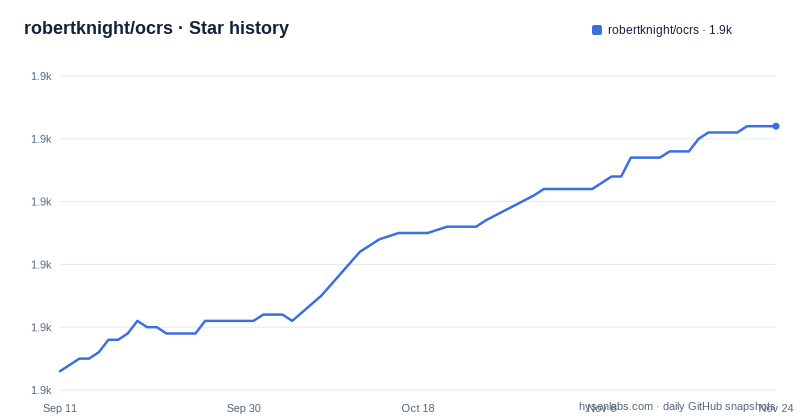
- robertknight/ocrs1,922 ★ · +39
| Repository | 2026-09-11 | 2026-11-24 |
|---|---|---|
| robertknight/ocrs | 1.9k | 1.9k |
39 Stars in the last 74 days, measured from the daily GitHub snapshot. Compare with other projects
Editorial analysis
An early preview that expects more errors than commercial engines
The status section is two sentences and it is the most important thing on the page. The project is in an early preview, and readers should expect more errors than commercial engines produce. That is not a hedge, it is a design position stated up front, and it follows from the first of the project's four stated goals: working on a wide variety of images, from scans to photographs to screenshots, with far less preprocessing than an older engine requires, achieved by pushing machine learning further through the pipeline rather than only the recognition step. Less preprocessing means fewer knobs to tune and more reliance on the model, and a model that is wrong is wrong in a way a threshold never is. So the trade is explicit: fewer moving parts, more errors, and the caller has to handle them.
One alphabet, one issue, and a claim about the training data
The language section is short and unambiguous. Only the Latin alphabet is recognised, with English given as the example, and support for more languages is described as planned with a link to a single open issue. That means every non-Latin use case is blocked on one tracked item rather than on a roadmap, which is honest but also means there is no partial support to fall back on. Alongside that, the goals include a claim worth checking against the models rather than the readme: the models are trained on open and liberally licensed datasets. The details are not in this repository, since the models and their training tooling live in a separate one.
No weights ship here, and the engine is the author's own
The repository contains no model files, which is unusual and worth knowing before you plan a reproducible install. The first time the tool runs it downloads what it needs and stores the models in a cache directory in your home folder. The models themselves are trained in a Python framework, exported to a standard interchange format, and executed by a separate inference engine that the same author maintains and links from the page. The training code, the datasets and the tools for training custom models are all in a second repository. So this repository is the pipeline and the bindings, and the thing that does the actual work is assembled from three separate places at run time.
Two licence files at the root and one value in the metadata
The root of the repository carries an Apache licence text and an MIT licence text side by side, which is the conventional way to offer a choice of terms. The project's own licence field, however, records only one of them. Nothing on the page explains the arrangement, so a reader has to infer that the dual files are intentional rather than a leftover. It matters more here than in most cases because this is a library: the choice of licence travels with whatever you link it into, and a downstream packager reading only the metadata field will see a single licence where the tree offers two. Two small files are also present for the parts of the ecosystem that ask about them, one on the subject of automated contributions.
The annotate example is the only place that feature is documented
The command line section walks through five things you can do: read an image and print the text, write that text to a named file, emit the text and the layout together as structured output, read from the system clipboard, and annotate the image so you can see where words and lines were detected. The annotation command is the interesting one for anyone debugging a result, because it turns the model's spatial output into something you can look at. It is also the one example whose code fence on the page closes with one more backtick than it opened with, which is why the block runs into the heading below it when read as Markdown. The command itself is unambiguous:
ocrs image.png --png -o annotated.pngTests are split around the models, and a C header is generated
The testing section draws a line that most projects do not: unit tests cover the code that runs before and after the model, and separate end-to-end tests exercise the whole pipeline including the models. The recipe file encodes that split, because the end-to-end tests need the model files and are therefore excluded from the default check and run in release mode. The end-to-end tests are driven by a Python script pointed at a test data directory, with a companion invocation that rewrites the expected output. There is also a test that guards a committed C header: a recipe sets an environment variable and reruns it, which tells the test to regenerate the header from the Rust source instead of comparing against it.
The browser build is a recipe, not a workspace member
The README claims the library is easy to build across platforms including WebAssembly, and the recipe file backs that up with a dedicated target rather than a promise. One recipe compiles the main crate for the browser target with a processor feature flag passed through the compiler environment, then runs a binding generator over the output and writes it into the browser package directory. That directory is not in the workspace: the workspace has three members, all Rust, and the browser output is cleaned by the clean recipe along with the build target. So the web build is a real, scripted thing that sits outside the main dependency graph, which means a change that breaks it will not necessarily break the default check.
Three workspace members, a runtime with its features switched off
The workspace manifest is short and worth reading twice. It sets the dependency resolver to an older generation and lists exactly three members: the core library, the command line tool, and a C interface crate. The shared dependency block pins three crates from the same inference engine at the same version, and the main one is declared with its default features switched off. That last detail is the kind that bites: an inference runtime with no features enabled is the portable baseline, so anyone wanting vector instructions or other acceleration has to know to turn them on rather than getting them. The rest of the tooling is a task runner rather than a makefile, with recipes for building, cleaning, checking, documenting, linting, testing and running an example, and a flag to list them. One recipe is worth noting on its own: running the example downloads the models first and then compiles in release mode to run a sample image, so the first invocation of even the example path needs the network. The root also carries a changelog, a documentation directory, a bindings directory, a browser package directory and a tools directory, which together make this a repository with more surfaces than a two-crate library would need, and the default check covers none of the model-dependent ones.
Editorial conclusion
This suits someone who needs text out of screenshots, photos and scans and would rather compile a small Rust dependency than configure an older engine's preprocessing. Three things to know first. It is labelled an early preview that will produce more errors than commercial engines, so the output needs checking. It recognises the Latin alphabet only, with other scripts tracked in a single open issue. And no model weights are in the repository, so the first run reaches the network and the models live in a cache directory you will need to think about if you are reproducing results across machines.
Frequently asked questions
What is robertknight/ocrs?
It is a Rust library and command line tool for extracting text from images, described as an early preview that expects more errors than commercial engines. Its goal is to need far less preprocessing than an older engine because machine learning is used more extensively in the pipeline, and it is built to compile and run across platforms including WebAssembly.
How do I install the ocrs command line tool?
Install Rust and Cargo first, then run cargo install ocrs-cli --locked. To read images from the system clipboard, add the clipboard feature with cargo install ocrs-cli --locked --features clipboard. The command line tool takes an image path, writes output to a file with the output flag, emits JSON with the JSON flag, and annotates the image with the PNG flag.
Which languages does ocrs recognize?
The Latin alphabet only, with English given as the example. Support for other scripts is described as planned and is tracked in a single open issue in the repository, so there is no partial support for non-Latin scripts to fall back on.
Where do the ocrs models come from?
They are not in the repository. The first run downloads the required models automatically and stores them in a cache directory under your home folder. The models were trained in PyTorch and exported to the ONNX interchange format for execution by a separate inference engine maintained by the same author, and the models, datasets and training tools live in a separate repository.
Can ocrs run in a browser?
Yes, via a build recipe. It compiles the main crate for the browser target with a processor feature flag and runs a binding generator to write the output into the browser package directory, which sits outside the Rust workspace and is removed by the clean recipe.
Official sources
Add this badge to your README
If you maintain this project, the badge below links readers to this analysis and shows its maintenance status from the daily GitHub snapshot. Paste the markdown into your README; add ?metric=license or ?metric=stars to the image URL for a different field.

[](https://hysenlabs.com/projects/robertknight-ocrs)Star history chart for your README
[](https://hysenlabs.com/projects/robertknight-ocrs)Was this useful?