Tag in your own language, copy out the English a model expects
Click tags in your language, get the English prompt Midjourney, FLUX, GPT-Image and Veo actually expect - supports Korean, Arabic, Russian, Hindi, Thai, and more.
At a glance
- What is it?
- IMGPrompt is a prompt editor for image and video models aimed at people who do not think in English: 5,040 tags across 16 subjects and 212 categories, labelled in 18 locales, assembling the English wording GPT-Image-2, Midjourney, FLUX and Veo expect as you click. The tag data is plain JSON per language, and the only thing that leaves your browser is the free-text translation box.
- Who is it for?
- Adopt img-prompt if you can name the look you want in any language but not in the vocabulary Midjourney and FLUX were trained on, and read the licence note before you redistribute anything. Do not adopt it as an image-to-prompt reverse tool, because it only builds prompts from tags and never looks at a picture, and do not expect the translation box to handle a long paragraph, since one of its four free providers refuses input over 500 bytes.
- Can I use it commercially?
- Yes. MIT is a permissive licence: you can use, modify and sell software built on it, as long as you keep its copyright and licence notices.
- Is it still maintained?
- Yes. The repository last received commits 11 days ago.
- What is it written in?
- Mainly TypeScript, according to GitHub's language statistics.
Answers come from the project's GitHub data, last synced on November 14, 2026, and from our analysis. They are not legal advice.
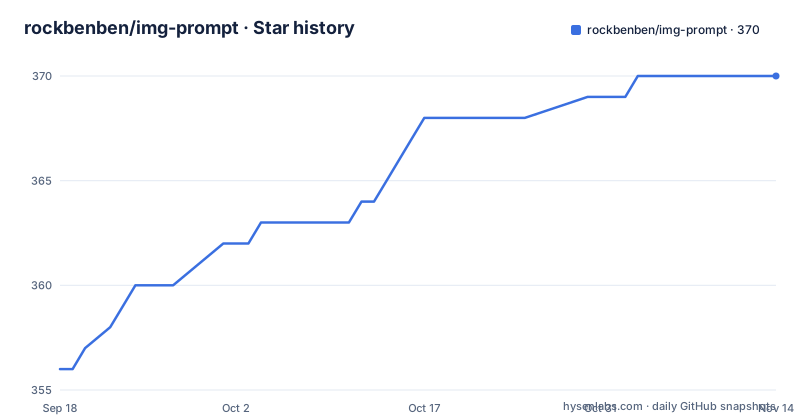
Star history
- rockbenben/img-prompt370 ★ · +14
| Repository | 2026-09-18 | 2026-11-14 |
|---|---|---|
| rockbenben/img-prompt | 356 | 370 |
14 Stars in the last 57 days, measured from the daily GitHub snapshot. Compare with other projects
Editorial analysis
Three clicks, and the English assembles on the right
The problem this solves is narrow and real. You know the look you want, but you do not know that models call it Tyndall effect, film grain or Fisheye Lens. The tool answers that by making those terms clickable rather than searchable, which is the difference between a thesaurus and a prompt editor.
The loop is three steps: pick a subject, pick a category, then click tags. The English prompt for your chosen model assembles in the right-hand panel as you click, and a Copy button hands it over. The library holds 5,040 bilingual tags across 16 subjects and 212 categories, covering lighting, composition, lenses, camera moves, art styles, materials and wardrobe, and the README stresses that the list was organised by hand rather than scraped into one flat list.
Model coverage is GPT-Image-2, Nano Banana, Midjourney, FLUX, Seedance, Veo and Kling, with compatibility for Stable Diffusion and DALL·E syntax as well. Nearly every tag carries a preview image, and clicking one opens a lightbox with zoom, rotate and download.
The housekeeping features are small and practical rather than clever: duplicate cleanup, a one-tap negative-prompt template, inline lighting and quality snippets, and a random colour swap.
The filter you are viewing is the URL you are looking at
Your selection is written into the address, with a query string that names the subject and attribute you filtered on. That single decision does two useful things: a bookmark reopens the same view, and a shared link drops the next person exactly where you were rather than at the top of a list.
Two display choices exist for long lists, and both persist and sync across tabs. Monochrome tags give you a plain grid. Multicolor paints the grid in blocks of eight drawn from a six-colour cycle, so your eye keeps its place when scrolling several hundred terms. A light, dark or system theme sits alongside them.
The same no-account approach covers state in general: there is no backend, and your selection lives in the URL and in your own browser and never reaches a server run by the project. That claim has one exception, and the README puts it in a section of its own rather than a footnote.
The translate box is the one thing that leaves your browser
Everything stays local except the free-text translation box. What you type there is sent to free public endpoints, using no API key of yours, and the built-in providers are tried in order: Google, Microsoft Edge, Youdao, then MyMemory, until one answers.
Those services rate-limit, and MyMemory refuses anything over 500 bytes. The app falls through the provider list, so a short phrase usually lands somewhere, but a long paragraph can still come back untranslated with nothing to tell you why.
The box is debounced at 1.5 seconds and does something more useful than translating: it suggests curated tags matching what you typed, which means it is a search entry point as much as a translation tool. That is the feature to try first, since a suggested tag is a local lookup while a translation is a round trip to somebody else's server.
Previews come from a CDN, even in the desktop build
The tag data ships inside the app, one JSON file per locale. The preview images do not. They are served from a CDN, so hover previews need a network connection in the browser and in the desktop build alike.
That split defines what the offline experience actually is. On an air-gapped machine you can still install, browse all 5,040 tags by subject and category, read their translations and assemble a prompt; what you lose is seeing what a style looks like before you commit to it.
The desktop builds exist for people who want that without a browser tab, and the formats match what each platform expects: an exe or msi on Windows, Intel and Apple Silicon builds for macOS, and deb, AppImage or rpm on Linux. Running it in a browser needs nothing installed at all, which is the shortest path to trying it.
Self-hosting is one container, because the build is a static export
The published image already contains the finished 18-language site, so there is nothing to build:
docker run -d -p 5666:5666 --name imgprompt ghcr.io/rockbenben/img-prompt:latestOpen http://localhost:5666 and it works on a NAS, a home server or a machine with no internet route out. A docker-compose.yml ships in the repo and is three settings: the same image, container name imgprompt, port 5666 on both sides, and restart unless-stopped.
The Dockerfile explains why the image is so thin. A first stage builds on node:24-alpine and runs yarn install with a frozen lockfile and a raised network timeout, then yarn build. A second stage is nginx:stable-alpine, which copies the nginx.conf and the static output from /app/out and serves it on port 5666. Nothing from the build stage ships except files.
There is a deliberate pin in that first line, with the reasoning in a Chinese comment in the file: the static output is architecture-independent, so the build is fixed to the native build platform to avoid running the same yarn build twice under QEMU, which doubles memory usage and invites out-of-memory failures. Because the result is a plain static export, any static host works as well as Docker, and the deployment guide covers Vercel.
Adding a tag means editing one JSON file per language
The tag library is open data with a shape you can read: src/app/data/prompt/prompt-<locale>.json, one file per language, each holding the localised terms and, for the entries sourced from GPT-Image-2 examples, per-entry author credits.
That is why tag contributions need no toolchain. Correcting a term in your own language, or adding a missing one, is a single file edit. For code changes the stack is Next.js 16 with React 19, TypeScript, Ant Design 6 and Tailwind CSS 4, with Node 20.9.0 as the declared floor, and the project asks for an issue first when a change is large.
The build scripts show how the locale data is handled rather than hand-written into pages. sliceData.js runs before both dev and build, flattenRscSegments.js runs after the build, and buildWithLang.js is a separate per-language build path. next-intl handles the interface, and next-themes the theme switching that syncs across tabs.
MIT covers the code, not the tag library
The licensing is split in a way worth reading before you do anything with the data. The project's own code is MIT. The prompt library is aggregated and curated from other open sources, and the README credits each one with its own terms.
The largest contributor is EvoLinkAI's awesome-gpt-image-2-prompts, holding GPT-Image-2 prompt examples under CC BY 4.0; entries from it were localized into 18 languages with the author credits preserved in the data file, which means attribution obligations travel with the data. The baseline tag taxonomy comes from Physton's sd-webui-prompt-all-in-one under AGPL-3.0, and promptoMANIA supplied structured keyword inspiration.
So the MIT licence on the repository does not make the JSON files freely reusable in isolation. If you fork the tag library and ship it, the CC BY 4.0 attribution and the AGPL-3.0 baseline both apply to the data, and that is a question for whoever owns your compliance process rather than for a licence file.
On maintenance, releases are tagged app-v3.1.0 on 2026-09-27, app-v3.0.0 on 2026-07-09 and app-v2.7.0 on 2026-04-25, with the last push on 2026-09-27.
Editorial conclusion
Adopt img-prompt if you can name the look you want in any language but not in the vocabulary Midjourney and FLUX were trained on, and read the licence note before you redistribute anything. Do not adopt it as an image-to-prompt reverse tool, because it only builds prompts from tags and never looks at a picture, and do not expect the translation box to handle a long paragraph, since one of its four free providers refuses input over 500 bytes. Verify first that the tag list in your language is complete enough to be useful, since each locale is a separate JSON file maintained by hand.
Frequently asked questions
How do I build an image prompt in img-prompt?
Pick a subject, pick a category, then click the tags you want, and the English prompt assembles in the right-hand panel as you click. Hit Copy and paste it into your AI tool. The filter you are viewing is written into the URL, so a bookmark or shared link reopens the same view.
Which AI models does img-prompt target?
GPT-Image-2, Nano Banana, Midjourney, FLUX, Seedance, Veo and Kling, with syntax compatibility for Stable Diffusion and DALL-E as well. The interface and the tag library are both translated into 18 languages, and Arabic renders right to left.
Does img-prompt send my data to a server?
Your tag selection does not: there is no backend, and the selection lives in the URL and in your own browser. The exception is the free-text translation box, which sends what you type to free public endpoints, Google, Microsoft Edge, Youdao and MyMemory in that order, without an API key of yours. One of them refuses input over 500 bytes.
Can I self-host img-prompt?
Yes, with one container and nothing to build, since the published image carries the finished site: docker run -d -p 5666:5666 --name imgprompt ghcr.io/rockbenben/img-prompt:latest. A docker-compose.yml ships in the repo, and because the app is a plain static export any static host works too.
Can I add my own tags to img-prompt?
Yes, without any toolchain. Each language is one JSON file under src/app/data/prompt/, so adding or correcting a term for your language is a single edit. Code changes use Next.js 16, React 19, TypeScript, Ant Design 6 and Tailwind CSS 4, and the project asks for an issue first when a change is large.
Official sources
Add this badge to your README
If you maintain this project, the badge below links readers to this analysis and shows its maintenance status from the daily GitHub snapshot. Paste the markdown into your README; add ?metric=license or ?metric=stars to the image URL for a different field.

[](https://hysenlabs.com/projects/rockbenben-img-prompt)Star history chart for your README
[](https://hysenlabs.com/projects/rockbenben-img-prompt)Was this useful?